Entry properties, Description tab: description box no longer fills the window height (regression of 39870)
Entry properties, Description tab: description box no longer fills the window height (regression of 39870)

Hi,
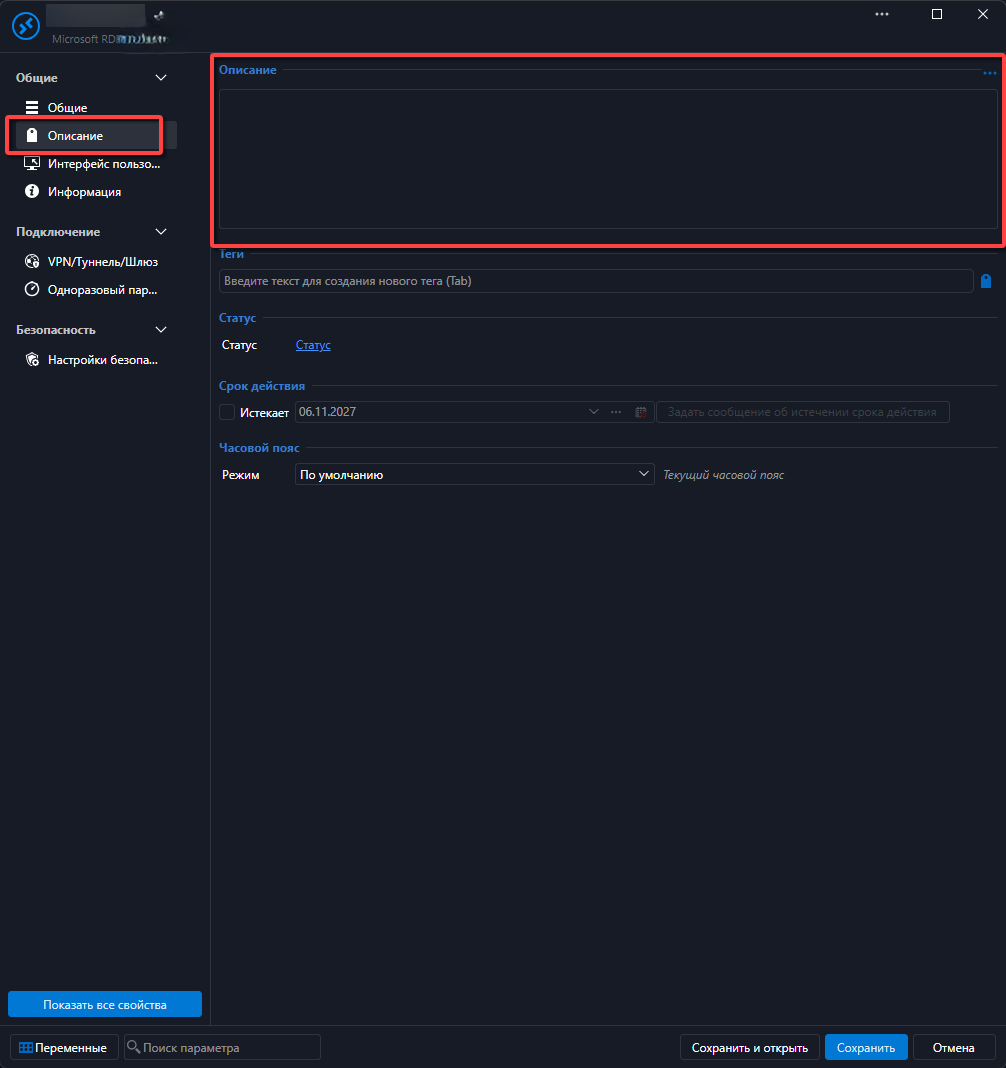
The free-text description box on the Description tab of an entry's properties is back to a fixed height of about four lines, whatever the size of the properties window. It cannot be resized at all — there is no drag handle — and the rest of the tab stays empty, so longer notes are read and edited through a small scroll area.
This is a regression of topic 39870 ("Extend the HEIGHT of the Description text box in the Description Section of any object"). That request was completed for 2023.3.3, where the box became resizable by dragging, and in later builds it also grew with the properties window. In 2026.3.17.0 both are gone: fixed height, no handle.
Environment
Remote Desktop Manager 2026.3.17.0 (64-bit)
Windows 11, build 26300
Data source: local workspace
Steps to reproduce
Open Properties of any entry.
Open the Description tab (the one with Time zone, Expiration, Status, Tags and the description box).
Try to resize the box or maximize the properties window.
Actual: the description box stays about four lines high, cannot be resized, and the tab keeps a large empty area below it.
Expected: as in 2023.3.3 and later builds — the box can be resized and fills the remaining height of the tab.
Proposal (either variant would work)
Restore the drag handle and the auto-expanding height of the description box.
Or move the description box below the Time zone / Expiration / Status / Tags fields so it can use the full remaining height of the window.
Possible cause, in case it helps locate the regression: the properties windows were remade in the new Avalonia UI (release notes 2025.3.15.0 "Remade multiple views in Avalonia", 2026.2.5.0 non-modal connection properties), and 2026.3.8.0 mentions "Fixed fields stretching across the full width in the RDP entry properties".
Screenshot attached.
Thanks!
All Comments (3)
Hello,
Thank you for contacting us on that matter,
We were able to reproduce the issue in Remote Desktop Manager 2026.3.17.0: the description box on the Description tab of the entry properties is fixed at about four lines, cannot be resized, and does not expand with the window. As you noted, this is a regression of the improvement delivered in 2023.3.3 (forum topic 39870).
I have reported it to our development team, along with both of your proposed approaches: restoring the resize handle and auto-expanding height, or moving the box below the Time zone / Expiration / Status / Tags fields.
I will keep this case open and contact you again as soon as the fix is available in a release.
Best regards,
Tommy Sanders
Hello,
Thank you for your patience while our team looked into the issue you reported.
I'm happy to let you know that the latest version of Remote Desktop Manager (2026.3.19.0) includes a fix for this problem. You can download it from our website here:
https://devolutions.net/remote-desktop-manager/download/
Once you have installed the update, could you please test it in your environment and confirm that everything now works as expected? If the issue persists or if you notice anything unusual related to the same original problem, just reply to this message with a few details, and we will be glad to look into it further.
Thank you for your collaboration.
Best regards,
Maxim Robert
Hello,
Thank you for testing the update and for confirming that the description box can be resized again.
One thing that should make the manual step lighter. The height you set by dragging is not saved per entry. It is a single setting that every entry's description box opens with, so once you drag it to a height that suits you, the other entries open at that same height too.
About your layout suggestion, the fix brought back the resizing but did not change the order of the tab. Putting the Tags, Status, Expiration and Time zone fields first and letting the description box fill the rest of the tab is a change to how that tab is designed, so yes, a separate feature request is the right place for it. I will post it in the Remote Desktop Manager Feature Request forum here.
https://forum.devolutions.net/forums/17/remote-desktop-manager--feature-request
Your explanation of why long notes need the space would work well there as you wrote it.
Since the regression is fixed on your side, I will close this case. If the resizing stops working again, just reply here and we will look into it.
Best regards,
Tommy Sanders