
simon
Git for Dev and Prod Instance
Hi Simon,
Thank you for the clear description of your setup. Yes, there is guidance for it: the Git page has a Branching Strategies section for this layout. A separate dev instance, with its own database and scheduler, runs against a dev branch, while production pulls main one-way. Changes reach production when you merge dev into main. Each instance needs its own license.
https://docs.devolutions.net/powershell-universal/config/git/#branching-strategies
The order matters for your two concerns.
Schedules: first, before you create the dev branch and connect the dev instance, add -AvailableInBranch 'main' to each New-PSUSchedule line that must only run in production, in .universal\schedules.ps1 on main, and commit (the One-Way console is read-only). PSU then runs such a schedule only on an instance synced to main; a schedule with no branch set runs everywhere. These schedules also no longer appear in the dev console, so edit them in schedules.ps1.
https://docs.devolutions.net/powershell-universal/automation/schedules
Variables: on the dev instance, tick Store In Database on the variables that differ between dev and prod (or -Database with New-PSUVariable), and set the dev value. The repository then holds only the definition, and each instance keeps its own value in its own database.
When that change reaches production, the variable is empty there until you set it with the Set Variable Value button, which stays available in One-Way mode, so set it right after the sync. Secret values sit in the vault, not the repository, so they also differ per instance when each instance has its own vault, such as the Database vault.
https://docs.devolutions.net/powershell-universal/powershell-commands/new-psuvariable
https://docs.devolutions.net/powershell-universal/platform/variables/
Other users describe the same dev/prod layout on our forum (on an older version):
https://forum.devolutions.net/topics/54183/development-flow
Best regards,
Michel
Hi @Michel Audi,
thanks for the detailed reply.
I did not realize that the git Settings added the new option "Available in branch". Now it's clear how to proceed with my setup.
Git for Dev and Prod Instance
Hi,
i want to start using a Git Repo for our PSU Instance.
I've set-up everything based on the Docs (Git | Devolutions PowerShell Universal | Product guides & reference) but im unsure now how to use it in a good way.
We have our Prod instance, this is configured to OneWay-Sync, so it will only pull new changes from the main branch.
Our Prod instance has Variables, Schedules, etc. configured too.
Im a bit confused now how to handle Development work. We would need to clone the main branch as a new dev branch, but then all of the Variables are pointing to our Prod Systems (Azure for example). The schedules will run too, which should not as those are pointing to Prod System too.
Is there any more detailed tutorial how to handle this or are there any other people which use this already?
Thanks!
Problem with Modules on PSU Host
Hi @rubentapia
1. From the PowerShell 7 session on the host where the module works, please run:
Name                           Version ModuleBase
----                           ------- ----------
Microsoft.Graph.Authentication 2.40.0  C:\Users\*****\Documents\PowerShell\Modules\Microsoft.Graph.Authentication\2.40.0
Microsoft.Graph.Authentication 2.28.0  C:\Users\*****\Documents\PowerShell\Modules\Microsoft.Graph.Authentication\2.28.0
We don't have any custom configuration for the PS7 Environment:
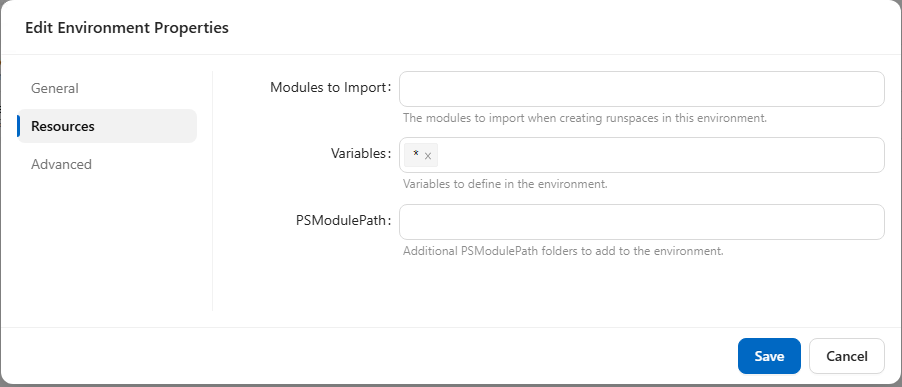
I've also sent you the logs of the failed job directly.
Thanks!
Problem with Modules on PSU Host
Hi @rubentapia
Thank you for your response. Find following all information you requested.
Which PSU version were you running before upgrading to 2026.3.0?
V2026.2.5.0
How is PSU hosted, for example Windows Service, IIS, ZIP, or Docker?
Windows Service
Does this affect only Microsoft.Graph, or are other installed modules also failing?
Also for other modules. (e.g. ExchangeOnlineManagement)
Additional, i can see that not all installed modules are listed in PSU, even they are listed if use "Get-Modules -ListAvailable" on the Host.
Is the PSU service running under the same Windows account used when the cmdlets work directly from PowerShell?
Yes, we use a Service User which runs the Service and also the scripts in PSU.
Output of the Commands:
[2026-09-22T05:53:33.2897810Z] [Information] C:\Users\*****\Documents\PowerShell\Modules
[2026-09-22T05:53:33.2921030Z] [Information] C:\Program Files\PowerShell\Modules
[2026-09-22T05:53:33.2936180Z] [Information] c:\program files (x86)\universal\hosts\7.5\Modules
[2026-09-22T05:53:33.2948490Z] [Information] C:\Program Files\WindowsPowerShell\Modules
[2026-09-22T05:53:33.2960020Z] [Information] C:\WINDOWS\system32\WindowsPowerShell\v1.0\Modules
[2026-09-22T05:53:33.2968520Z] [Information] C:\Program Files (x86)\Universal\Modules
[2026-09-22T05:53:33.9828590Z] [Error] The running command stopped because the preference variable "ErrorActionPreference" or common parameter is set to Stop: The specified module 'Microsoft.Graph.Authentication' was not loaded because no valid module file was found in any module directory.
Running the commands in a PowerShell 7 on the host directly works without any errors, if that output is relevant
Problem with Modules on PSU Host
Hello,
I've upgraded to the latest PSU Version 2026.3.0 and now the Scripts using installed modules on the PSU Host cannot be found anymore. I'm getting the following error:
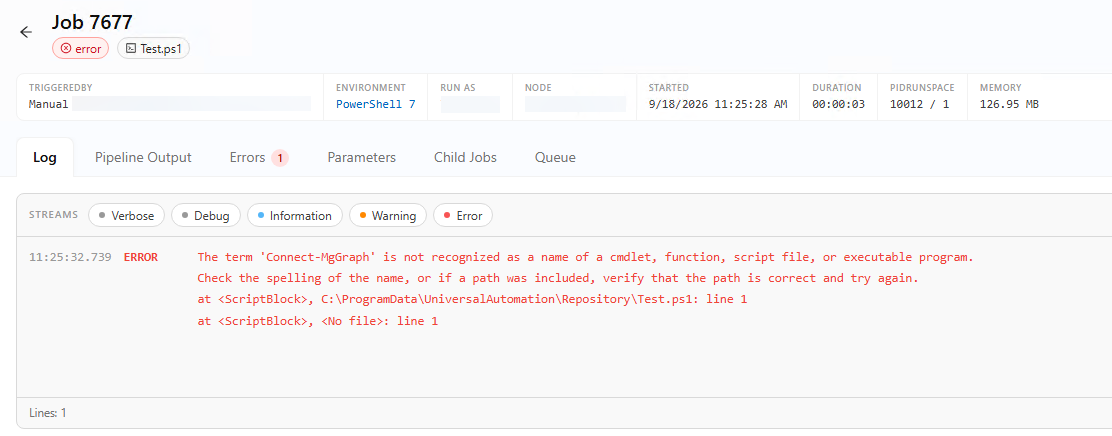
Inside the script im just using the Connect-MgGraph cmdlet.
Running the script on the Host directly in Power Shell works without problems, also running the cmdlets works.
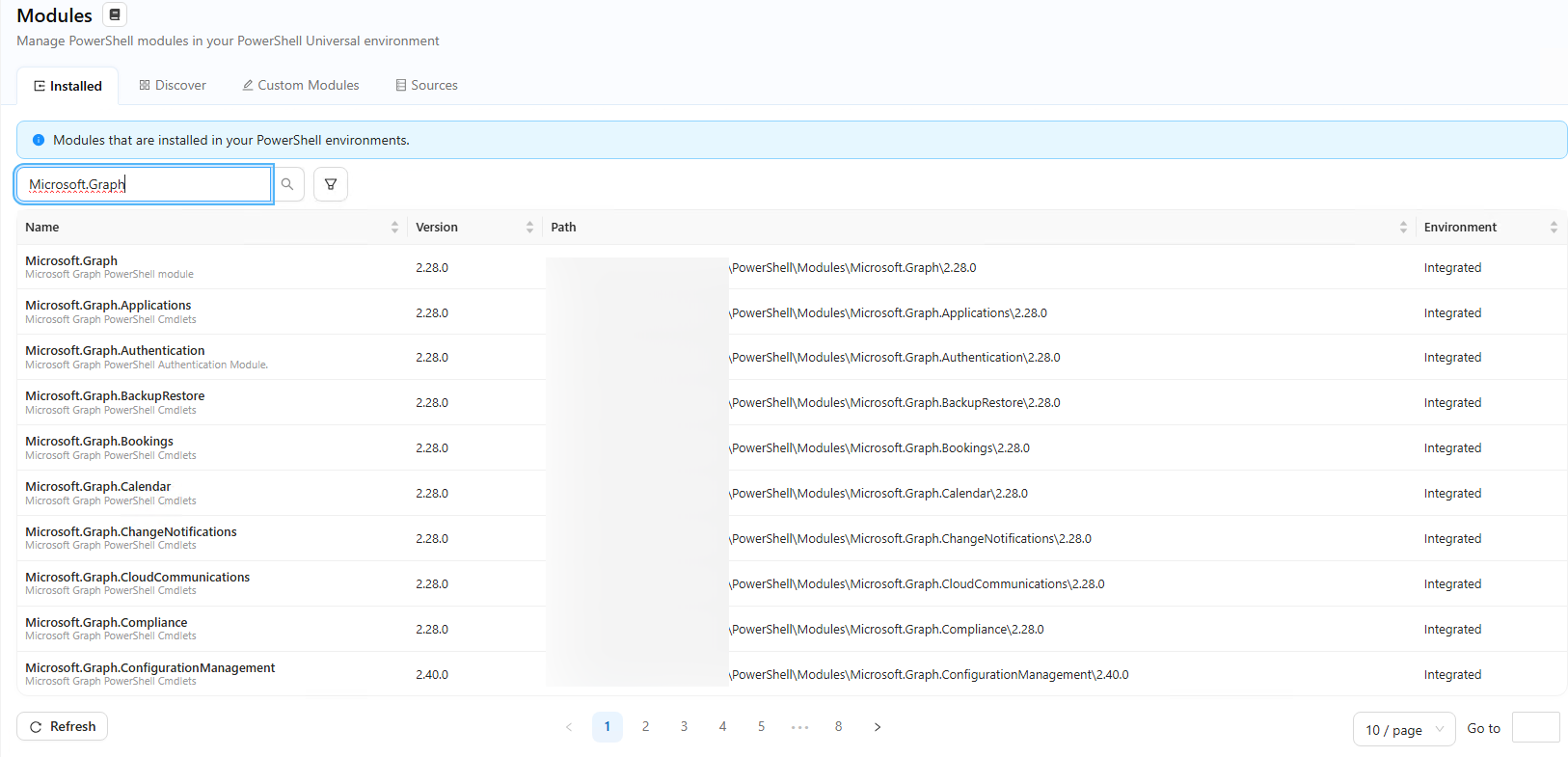
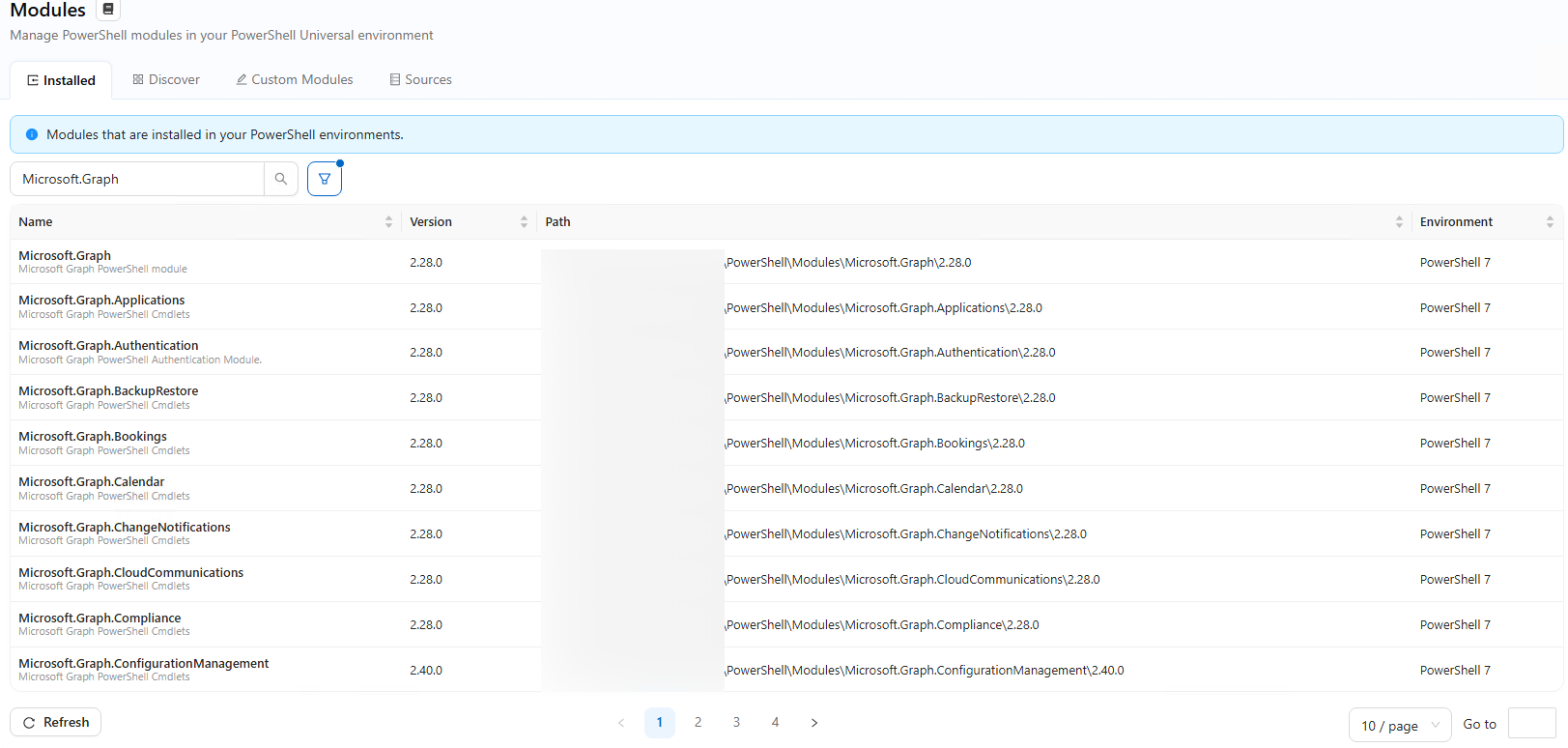
In Manage > Modules in PSU the Modules are available for both integrated and Power Shell 7 Environments:
New-UDPaper and New-UDTable different width
The width of New-UDPaper and New-UDTable are different.
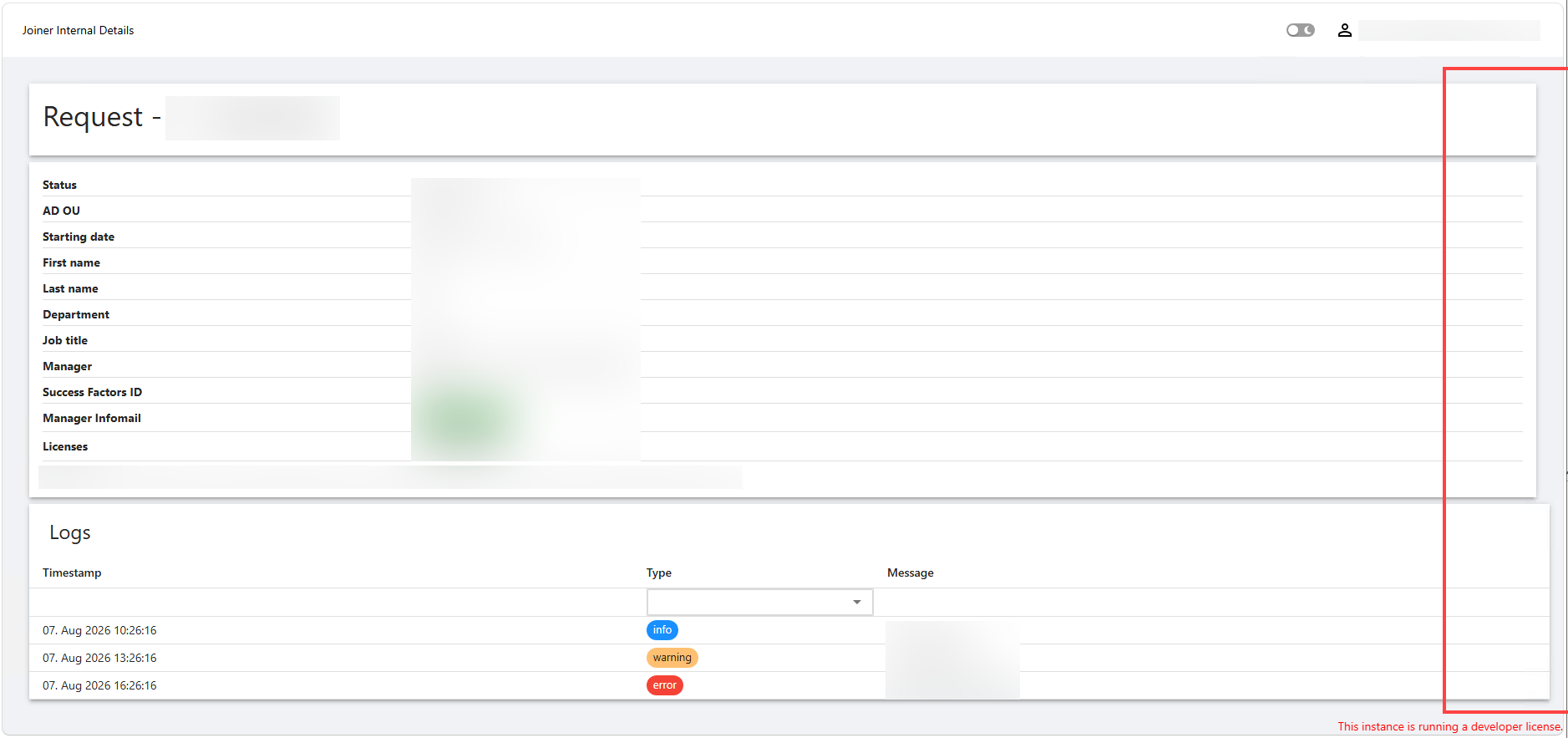
Inspecting the CSS, the Table has the width set to 100%, the paper not.
@simon
Hello simon,
Thank you for reporting this and for including the screenshot and CSS observation.
I would like to reproduce the behavior under the same conditions before determining whether this is a component styling issue or a defect.
Could you please provide the following?
* Your exact PowerShell Universal version.
* A minimal example containing the `New-UDPaper` and `New-UDTable`, including their immediate parent container.
* Whether the App uses a custom theme, `New-UDStyle`, global CSS, or `-Style` on either component.
* The browser and version where you are seeing the behavior.
* Whether the same width difference occurs in another browser.
As a quick diagnostic test, if possible, please also check whether explicitly setting the paper width to `100%` makes it align with the table. This will help determine whether we are dealing with the default styling of the component or something inherited from the surrounding layout.
Once I have the version and minimal example, I can compare the behavior in a clean environment.
Because this is a public forum, please sanitize all evidence before posting. Remove credentials, tokens, license keys, cookies, private keys, full connection strings, email addresses, usernames, customer data, tenant or account identifiers, internal domains, hostnames, IP addresses, and private URLs. Please do not upload unredacted HAR files, memory dumps, database backups, or complete configuration files to this public thread.
Best regards,
Ruben Tapia
Hi @rubentapia,
Your exact PowerShell Universal version.
2026.2.3
A minimal example containing the `New-UDPaper` and `New-UDTable`, including their immediate parent container.
New-UDPage -Url "/joiner/internal/details/:id" -Name "Joiner Internal Details" -HideNavigation -Content {

    # Variables removed

    New-UDPaper -Elevation 1 -Content {
        New-UDTypography -Variant h4 -Text "Request - $($request.id) - $($request.first_name) $($request.last_name)" -GutterBottom
    }
    New-UDPaper -Elevation 1 -Content {
        New-UDGrid -Direction row -Container -Content {
            New-UDGrid -Container -Content {
                foreach ($dataItem in $Data) {
                    New-UDRow -Style @{"margin-bottom"="6px";"padding-bottom"="3px";"border-bottom"="0.3px solid #dfdfdf"} -Columns {
                        New-UDColumn -MediumSize 3 -LargeSize 3 -Content {
                            New-UDTypography -Style @{"font-weight"="bold"} -Text $dataItem.Title
                        }
                        New-UDColumn -MediumSize 9 -LargeSize 9 -Content {
                            $dataItem.Value
                        }
                    }
                }
            }
            New-UDGrid -Container -Style @{"color"="#9d9d9d"} -Content {
                New-UDTypography -Text "Created: $($request.created_at) by $($request.created_by)"
                New-UDTypography -Text "|" -Style @{"margin"="0 5px"}
                New-UDTypography -Text "Updated: $($request.updated_at) by $($request.updated_by)"
            }
        }
    }
    New-UDTable -Data $requestLogs -Dense -Title "Logs" -Columns @(
        New-UDTableColumn -Property timestamp -Title "Timestamp" -OnRender { (Get-Date -Date $EventData.timestamp).ToString('dd. MMM yyyy HH:mm:ss') } -ShowSort
        New-UDTableColumn -Property type -Title "Type" -OnRender {
            $color = switch ($EventData.type) {
                'info' {'primary'}
                'warning' {'warning'}
                'error' {'error'}
                default {'secondary'}
            }
            New-UDChip -Size small -Color $color -Label $EventData.type
        } -FilterType multiselect -ShowFilter
        New-UDTableColumn -Property message -Title 'Message'
    )
} -AutoInclude
Whether the App uses a custom theme, `New-UDStyle`, global CSS, or `-Style` on either component.
No custom styles in the App besides the ones found in the code above.
The browser and version where you are seeing the behavior.
Microsoft Edge 151.0.4129.72
Whether the same width difference occurs in another browser.
Tested with Firefox 153.0.3, same result.
As a quick diagnostic test, if possible, please also check whether explicitly setting the paper width to `100%` makes it align with the table. This will help determine whether we are dealing with the default styling of the component or something inherited from the surrounding layout.
Adding the parameter -Style @{width="100%"} to the New-UDPaper fixes the issue.
Thanks for looking into it!
New-UDPaper and New-UDTable different width
The width of New-UDPaper and New-UDTable are different.
Inspecting the CSS, the Table has the width set to 100%, the paper not.
PSU Setup for IT and Employee Facing Apps
Hi,
We are currently using PSU for our "internal" IT Automation, which runs great.
By now we are thinking to extend this also for our Employees, to handle specific tasks like guided updating the Members of a Distribution Group in Active Directory.
I have some concerns regarding security, if we let our employees access the PSU, which runs on our Automation Windows Server.
What is the recommended setup here?
Thanks for any answer!
Multiselect Autocomplete shows Values instead of Name if more are selected
Hi @DataTraveler,
thank you for your answer again.
The workaround does work for us, as our AD does not have too many users. But as it grows, we could get performance problems, i guess.
Thanks also for taking the report back to your team!
Multiselect Autocomplete shows Values instead of Name if more are selected
Hi,
not sure if this a bug or i do something wrong.
Im using the Autocomplete Component to select one or more users from a list.
For the Name i build something out of Username and the Title / Position and the Value is the ObjectGuid for the script to use afterwards.
If i now select one entry it works without a problem, but as soon as i add another different entry, the one before transforms into the Value instead of showing the Name.
The code for the Autocomplete Component ist the following:
The $ADUsers is a cached list of our AD Users.
New-UDAutocomplete -Id "txtMailboxAccess" -Label "User" -Multiple -FullWidth -Icon (New-UDIcon -Icon "user" -Solid) -OnLoadOptions {
    $ADUsers | Where-Object {$_.userprincipalname -like "*$Body*" -or $_.samaccountname -like "*$Body*"} | ForEach-Object {
        New-UDAutoCompleteOption -Name "$($_.displayName) ($($_.title) | $($_.department))" -Value $_.ObjectGuid
    } | ConvertTo-Json
}
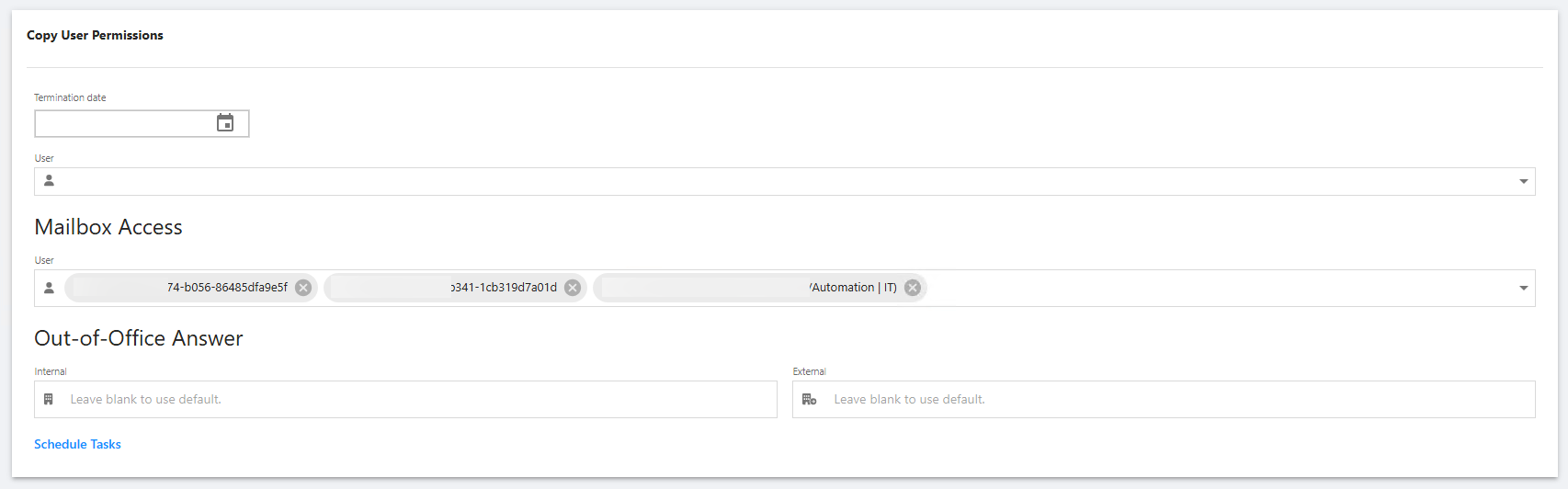
Does anybody know how to solve this?
Thank you!
@simon
Yes. To solve this, make sure already selected users are still included in the results returned by -OnLoadOptions. New-UDAutocomplete -Multiple stores the selected Value, then maps it back to Name from the current options list. If the previous user is no longer in that list, the control can only display the GUID.
Also cast the GUID to string:
New-UDAutoCompleteOption -Name "$($_.displayName) ($($_.title) | $($_.department))" -Value ([string]$_.ObjectGuid)
Hi @DataTraveler,
thanks for the reply.
Im not really sure how to achieve this. The List i give into the -OnLoadOptions is the $ADUsers, which gets filtered by the input you make to search for the specific users. But as far as i understand, the return value is always only "one entry" as i can only select one from the list?
Multiselect Autocomplete shows Values instead of Name if more are selected
Hi,
not sure if this a bug or i do something wrong.
Im using the Autocomplete Component to select one or more users from a list.
For the Name i build something out of Username and the Title / Position and the Value is the ObjectGuid for the script to use afterwards.
If i now select one entry it works without a problem, but as soon as i add another different entry, the one before transforms into the Value instead of showing the Name.
The code for the Autocomplete Component ist the following:
The $ADUsers is a cached list of our AD Users.
New-UDAutocomplete -Id "txtMailboxAccess" -Label "User" -Multiple -FullWidth -Icon (New-UDIcon -Icon "user" -Solid) -OnLoadOptions {
$ADUsers | Where-Object {$_.userprincipalname -like "*$Body*" -or $_.samaccountname -like "*$Body*"} | ForEach-Object {
New-UDAutoCompleteOption -Name "$($_.displayName) ($($_.title) | $($_.department))" -Value $_.ObjectGuid
} | ConvertTo-Json
}Does anybody know how to solve this?
Thank you!