New-UDPaper and New-UDTable different width

The width of New-UDPaper and New-UDTable are different.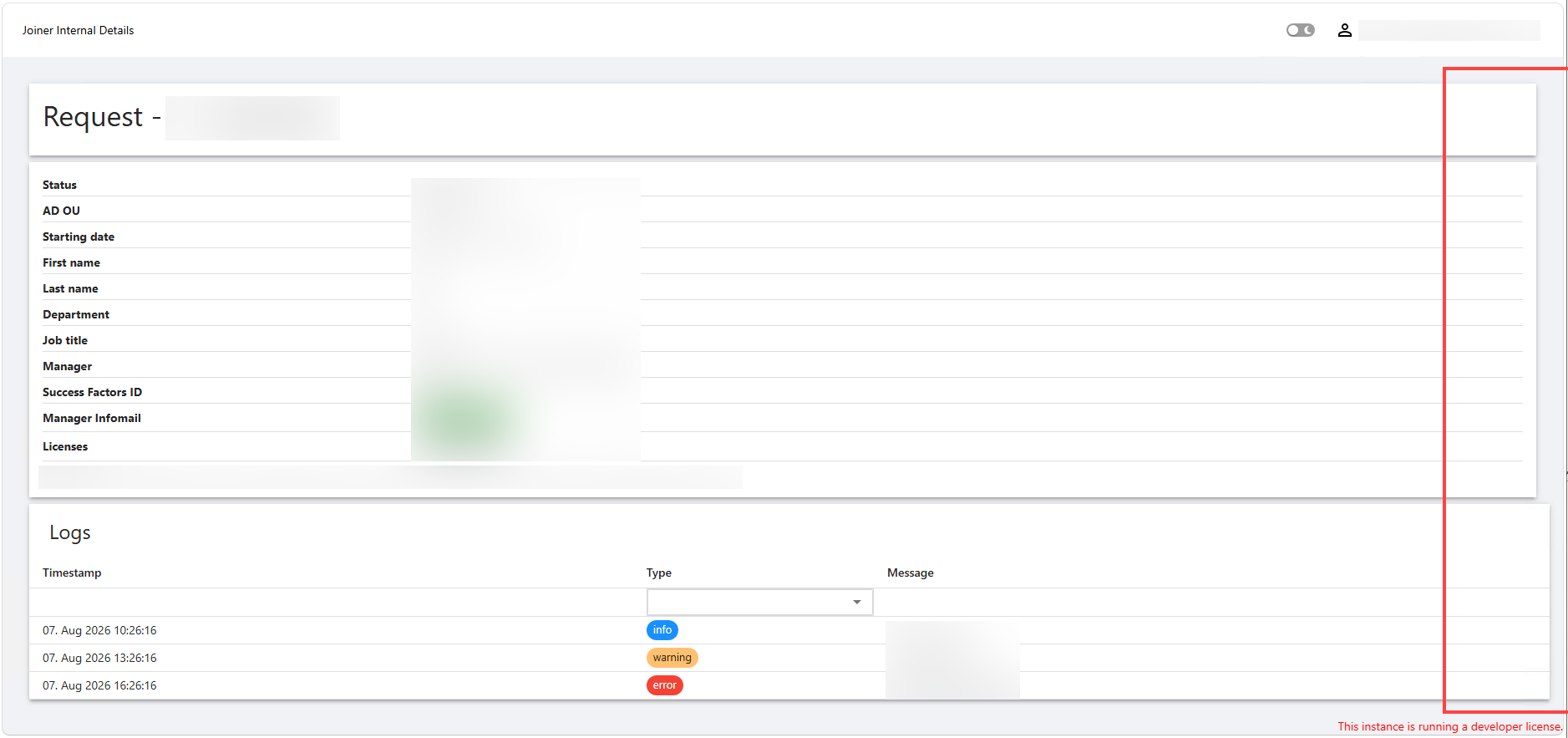
Inspecting the CSS, the Table has the width set to 100%, the paper not.
a5f49955-1edc-4125-bf84-dc13273f6445.png
All Comments (4)
The width of New-UDPaper and New-UDTable are different.
Inspecting the CSS, the Table has the width set to 100%, the paper not.
@simon
Hello simon,
Thank you for reporting this and for including the screenshot and CSS observation.
I would like to reproduce the behavior under the same conditions before determining whether this is a component styling issue or a defect.
Could you please provide the following?
* Your exact PowerShell Universal version.
* A minimal example containing the `New-UDPaper` and `New-UDTable`, including their immediate parent container.
* Whether the App uses a custom theme, `New-UDStyle`, global CSS, or `-Style` on either component.
* The browser and version where you are seeing the behavior.
* Whether the same width difference occurs in another browser.
As a quick diagnostic test, if possible, please also check whether explicitly setting the paper width to `100%` makes it align with the table. This will help determine whether we are dealing with the default styling of the component or something inherited from the surrounding layout.
Once I have the version and minimal example, I can compare the behavior in a clean environment.
Because this is a public forum, please sanitize all evidence before posting. Remove credentials, tokens, license keys, cookies, private keys, full connection strings, email addresses, usernames, customer data, tenant or account identifiers, internal domains, hostnames, IP addresses, and private URLs. Please do not upload unredacted HAR files, memory dumps, database backups, or complete configuration files to this public thread.
Best regards,
Ruben Tapia
The width of New-UDPaper and New-UDTable are different.
Inspecting the CSS, the Table has the width set to 100%, the paper not.
@simon
Hello simon,
Thank you for reporting this and for including the screenshot and CSS observation.
I would like to reproduce the behavior under the same conditions before determining whether this is a component styling issue or a defect.
Could you please provide the following?
* Your exact PowerShell Universal version.
* A minimal example containing the `New-UDPaper` and `New-UDTable`, including their immediate parent container.
* Whether the App uses a custom theme, `New-UDStyle`, global CSS, or `-Style` on either component.
* The browser and version where you are seeing the behavior.
* Whether the same width difference occurs in another browser.
As a quick diagnostic test, if possible, please also check whether explicitly setting the paper width to `100%` makes it align with the table. This will help determine whether we are dealing with the default styling of the component or something inherited from the surrounding layout.
Once I have the version and minimal example, I can compare the behavior in a clean environment.
Because this is a public forum, please sanitize all evidence before posting. Remove credentials, tokens, license keys, cookies, private keys, full connection strings, email addresses, usernames, customer data, tenant or account identifiers, internal domains, hostnames, IP addresses, and private URLs. Please do not upload unredacted HAR files, memory dumps, database backups, or complete configuration files to this public thread.
Best regards,
Ruben Tapia
Hi @rubentapia,
Your exact PowerShell Universal version.
2026.2.3
A minimal example containing the `New-UDPaper` and `New-UDTable`, including their immediate parent container.
New-UDPage -Url "/joiner/internal/details/:id" -Name "Joiner Internal Details" -HideNavigation -Content {

    # Variables removed

    New-UDPaper -Elevation 1 -Content {
        New-UDTypography -Variant h4 -Text "Request - $($request.id) - $($request.first_name) $($request.last_name)" -GutterBottom
    }
    New-UDPaper -Elevation 1 -Content {
        New-UDGrid -Direction row -Container -Content {
            New-UDGrid -Container -Content {
                foreach ($dataItem in $Data) {
                    New-UDRow -Style @{"margin-bottom"="6px";"padding-bottom"="3px";"border-bottom"="0.3px solid #dfdfdf"} -Columns {
                        New-UDColumn -MediumSize 3 -LargeSize 3 -Content {
                            New-UDTypography -Style @{"font-weight"="bold"} -Text $dataItem.Title
                        }
                        New-UDColumn -MediumSize 9 -LargeSize 9 -Content {
                            $dataItem.Value
                        }
                    }
                }
            }
            New-UDGrid -Container -Style @{"color"="#9d9d9d"} -Content {
                New-UDTypography -Text "Created: $($request.created_at) by $($request.created_by)"
                New-UDTypography -Text "|" -Style @{"margin"="0 5px"}
                New-UDTypography -Text "Updated: $($request.updated_at) by $($request.updated_by)"
            }
        }
    }
    New-UDTable -Data $requestLogs -Dense -Title "Logs" -Columns @(
        New-UDTableColumn -Property timestamp -Title "Timestamp" -OnRender { (Get-Date -Date $EventData.timestamp).ToString('dd. MMM yyyy HH:mm:ss') } -ShowSort
        New-UDTableColumn -Property type -Title "Type" -OnRender {
            $color = switch ($EventData.type) {
                'info' {'primary'}
                'warning' {'warning'}
                'error' {'error'}
                default {'secondary'}
            }
            New-UDChip -Size small -Color $color -Label $EventData.type
        } -FilterType multiselect -ShowFilter
        New-UDTableColumn -Property message -Title 'Message'
    )
} -AutoInclude
Whether the App uses a custom theme, `New-UDStyle`, global CSS, or `-Style` on either component.
No custom styles in the App besides the ones found in the code above.
The browser and version where you are seeing the behavior.
Microsoft Edge 151.0.4129.72
Whether the same width difference occurs in another browser.
Tested with Firefox 153.0.3, same result.
As a quick diagnostic test, if possible, please also check whether explicitly setting the paper width to `100%` makes it align with the table. This will help determine whether we are dealing with the default styling of the component or something inherited from the surrounding layout.
Adding the parameter -Style @{width="100%"} to the New-UDPaper fixes the issue.
Thanks for looking into it!
Hello simon,
Thank you for providing the additional details and for confirming that explicitly setting `-Style @{ width = "100%" }` resolves the width difference.
The behavior you are reporting appears similar to another recent case involving inconsistent rendering behavior in Universal Dashboard components. Because of that, I am going to consult this internally to determine whether there may be a related component-level issue.
I will also run your provided scenario in our lab today using PowerShell Universal 2026.2.3. I will test the default `New-UDPaper` behavior against `New-UDTable` and compare it with the explicit `width = "100%"` workaround you validated.
Once I have the lab results and internal feedback, I will update this thread with the findings.
Best regards,
Ruben Tapia
Hello simon,
Thank you again for providing the detailed reproduction information.
We completed our internal lab testing and were able to reproduce the width difference between `New-UDPaper` and `New-UDTable` on PowerShell Universal 2026.2.3.
We also validated that applying `-Style @{width="100%"}` to `New-UDPaper` removes the width difference in our test environment. The same behavior was observed during comparison testing with PSU 2026.2.2, so at this time we do not have evidence that this is a regression introduced in 2026.2.3.
The case has now been escalated to Development for review so they can confirm whether the default sizing behavior of `New-UDPaper` is intentional or should be corrected.
I will update this thread once we receive additional information from Development.
Best regards,
Ruben Tapia