
ctcomp
Terminal Color
I am starting to use the embedded SSH client and would like to know if I can change the foreground text to bold? This may seem like a ridiculous request but I spend hours a day looking at the terminal window and my eye like; Yellow, Courier New, Bold, 12pt.
I tried the following but I never see the bold yellow
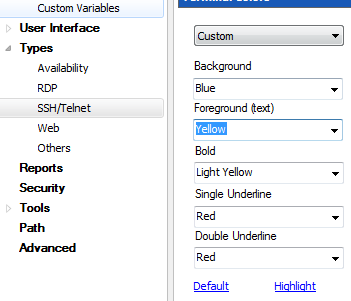
Thanks
Installation - "Extracting files from archive"
Turns out the .msi installer worked. Another co-worker had the same problem I was having (but a different error).
Installation - "Extracting files from archive"
Windows 7
When I run the installer for the new version it does "uninstall" my current version then starts the install for the new version and sits on the extracting files... I tried rebooting before the install. also I need to kill the install process in task manager, the close or "X" does not work.
Installation - "Extracting files from archive"
I am unable to install the last three versions of RDM. When I run the installer it sits on the "Extracting files from archive". I have delete all the files in C:\Program Files (x86)\Devolutions\Remote Desktop Manager and C:\Users\xxx.xxx\AppData\Local\Devolutions
Any suggestions would be helpful. Thanks!
IP Address Management
We are a service provider and use RDM to support our clients. It would be great to have a place to store IP addresses in a table format into the database. We have engineers on site and it would be useful to reference and edit the IP list. I tried attaching spreadsheets into RDM as a document but it is opened as a read only and must be saved locally then added back to RDM.
VMware Synchronizer - VM Tags
OK we found the problem... I think. We never set a security group to our "Customer" top level folder and everything under it was set to <none>. We have another top level folder for network admins that did have a security group applied. Funny enough the three people that I said aren't having a problem are all members of that group. The other standard users were not a part of any security group. So I created a security group and applied it to Customer root folder, assigned it to the users and they are now able to see the sessions. Thanks for your help and timely responses.
FYI, this was not a problem in the older versions.
VMware Synchronizer - VM Tags
Can we do a WebEx so you can see what we are looking at?
VMware Synchronizer - VM Tags
We disabled cache and the offline and he doesn't see anything at all. We also created a new user for testing and that use doesn't see anything as well. He able to create a connection and I can see it after I refresh. When we test server and test database both are successful. Seems like a permissions thing...
VMware Synchronizer - VM Tags
Neither one resolved the issue. He un-installed (8.9.1.0) and installed (8.4.0) and he is able to see the sessions. Is there some kind of logging we can turn on?
VMware Synchronizer - VM Tags
This is what he has.
General = He is not an admin and he is not allowed to drag and drop
Sessions = Add, Edit, View Details, View Information, and import.
Side note Offline Mode is Read-Only for him and I and we did change it to read/write.
VMware Synchronizer - VM Tags
So far it works great for me a two other co-workers. Today I had three others install the new version (8.9.1.0) and they cannot see any sessions. The get the entire tree structure but no connections exist. I tried making one of them an administrator, that didn't work. I had them uninstall and use the same executable I downloaded, that didn't work either. They can test the database successfully. I know this is a beta so just thought I would pass the information along.
Offline - Ability to edit and add connections
I have downloaded, installed and tested this feature. Works GREAT!!!! And the speed of editing connections is 10x faster. Great job developers.
Offline - Ability to edit and add connections
I am on the edge of my seat.
Offline - Ability to edit and add connections
I would LOVE to have the ability to edit the database offline and when I come back the changes are automatically uploaded to the database server. I have several users that wont use this product because "they are a bunch of whinny men" they can't edit connection offline. Please tell me you are working on this and I should expect it any day...
SQL Datasource Still prompting for password
Well... Turns out there is some type of local security policy set, the person who made the image swears the files are directly from our MSDN disk. I found the policy and set it to "disable" and rebooted, the setting stayed.
Windows 7 Enterprise
Computer Configuration > Administrative Templates > Windows Components > Remote Desktop Services > Do not allow password to be saved = Disabled
Thanks
SQL Datasource Still prompting for password
21 seconds.... That has to be the fastest reply in history. There is no GPO set for this. My co-worker and I just rebuilt our laptops with the same image and we are both having the problem. We have 12+ other users that are not having the problem, all in the same domain. Cold there be a local security policy set?
SQL Datasource Still prompting for password
I am still having this issue. When I change the registry it works fine, after rebooting the computer it goes back. Is there a more permanent fix for this?