
Arjan
Devolutions PowerShell Universal Version 2026.3.4.0 (October 27, 2026)
Any idea if and/or when there will be an Azure image for PSU 2026.3.4 ?
No admin portal after update to 2026.2.0-azure
@Arjan There is an issue with the docker image and the admin console. We've got a fix being verified and this will be included in 2026.2.1.
@Adam Driscoll
Hi Adam,
any idea when the new image will be released?
No admin portal after update to 2026.2.0-azure
We've updated our container from 2026.1.7-azure to 2026.2.0-azure
The webapp restarted successfully, but we are not able to open de /admin pages. The page shows an empty page, no errors are shown.
Direct links to pages in the admin portal, e.g. /admin/platform/logging, will also show no information and the page stays empty.
We reverted the image back to 2026.1.7-azure, then the admin portal works again.
The dashboard (apps) are working properly.
Terminal not starting
Product: PowerShell Universal - Container
Version: 2026.1.6-azure
We are running the Azure container at version 2026.1.6 and are not able to start the Terminal.
We’ve setup the terminal like below:
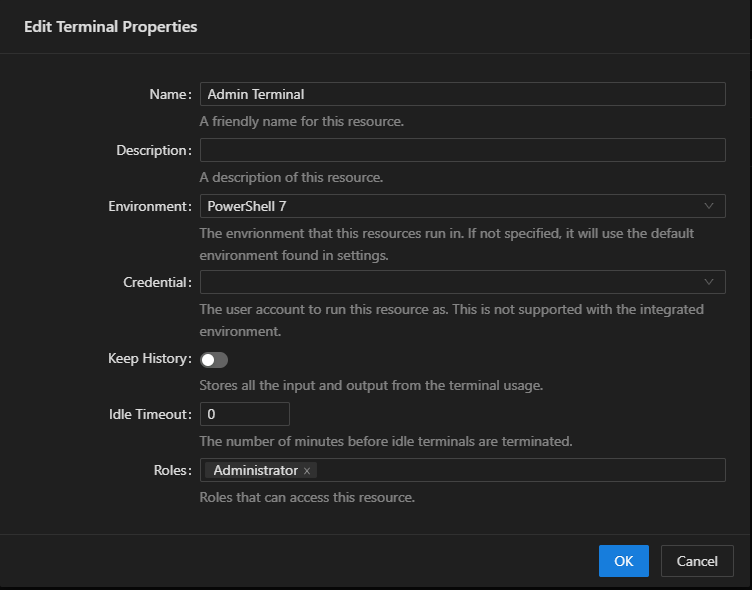
But when we click on the ‘Open Terminal’ button or start from the vscode extension, nothing will happen. We only see the ‘wait circle’ or the message ‘Starting terminal…’ (vscode).
There’s nothing written to the logs about starting the terminal or any errors.
Anyone any idea what’s going wrong? Any help is appreciated
Add new page with FTP needs full webapp restart to discover the page
HI insomniacc,
I’ve seen your post before an tried that, but now I’ve retried it and it works properly indeed. Probably typo in my code.
Will have to refactor all of our existing pages.
But thanks for the reply!
Add new page with FTP needs full webapp restart to discover the page
I’ve tried the reload, but that doesn’t reload the uploaded page file(s).
The ‘problem’ is that we use vscode to build the apps and create pages in vscode and upload them with ftp to the webapp.
I also tried the following:
switched back to ‘web’ instead of ‘vscode’
Went to the App in the portal
Used
Create App Pageto create a new page on thePagestabThis added the file to the webapp and the ‘memory’
Downloaded the new file to our local repository (vscode) and work from there.
Would be nice if the process of adding a page (discovery) to the App can be triggered by either restarting the App or a button in the portal.
Add new page with FTP needs full webapp restart to discover the page
Product: PowerShell Universal
Version: 2026.1.3
We are using PSU in an Azure WebApp. When we add a new page to one of the Apps with FTP, the page will not be available in the App, also not after restarting the corresponding app.
The new pages are added into the /pages folder of the App
The new page will not be showed at the Pages tab of the app in the admin portal.
We now have to restart the full Azure WebApp to have the pages discovered and added to the Pages tab.
Are we doing something wrong or is there a bug that will not discover newly created pages on the restart of an App?
Show Displayname instead of UserPrincipalName
Product: PowerShell Universal
Version: 2026.1.3
I’ve configured PSU to use OpenId authentication with Azure EntraId. This works fine, but I see the UserPrincipalName in the top right of the pages as the logged on user.

I’m trying to figure out how I can display the ‘DisplayName’ instead of the UPN.
I’ve been looking around in the documentation and the forum, but can’t find the solution.
Anybody an idea on how to get the DisplayName shown instead of the UserPrincipalName.
The DisplayName is a part of the $ClaimsPrincipal
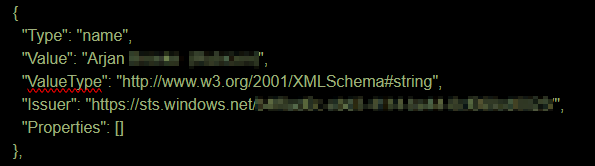
Any help is appreciated
PowerShell Universal - 2026.1.1
Hi Adam,
thanks for the reply, completely missed the 2026.1.1 image, the 2026.1.0 image is still in the selection list on the docker hub.
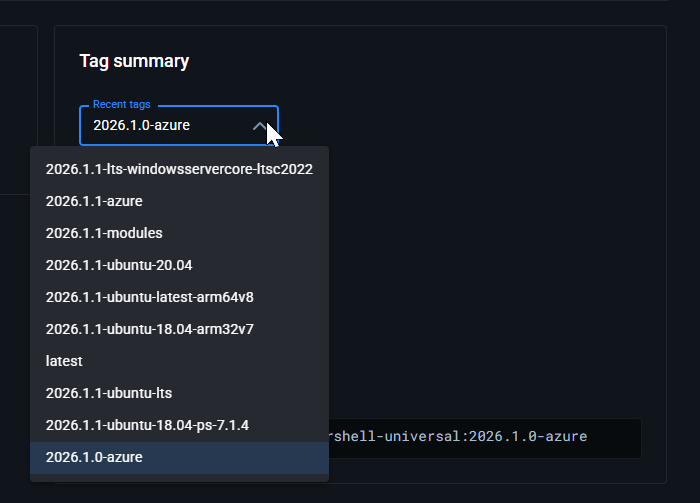
But I now set the AppService to pull the 2026.1.1 image and it works again.
I only notice that there is an update warning about an image I can’t pull:
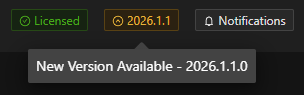
PowerShell Universal - 2026.1.1
I’ve upgraded our Azure container from 5.6.13 to 2026.1.1 but the container won’t start. It will give me an exit code 139.
Tried restarting the Azure App Service, even replaced the instance that was running the container.
We are running the container on a P1V3 instance (2 cores, 8gb mem).
Below is the log from the App Service that tries to start the container.
Container start method called.
2026-02-10T20:11:19.9317763Z Establishing network.
2026-02-10T20:11:19.9319675Z Pulling image: docker.io/devolutions/powershell-universal:2026.1.0-azure.
2026-02-10T20:11:20.4399704Z Container is starting.
2026-02-10T20:11:20.4402759Z Establishing user namespace if not established already.
2026-02-10T20:11:20.4404337Z Establishing network if not established already.
2026-02-10T20:11:20.4406190Z Mounting volumes.
2026-02-10T20:11:20.4409075Z Nested mountpoint
2026-02-10T20:11:20.4553157Z Nested mountpoint volatile/logs
2026-02-10T20:11:20.4817606Z Nested mountpoint
2026-02-10T20:11:20.4907393Z Creating container.
2026-02-10T20:11:20.4948891Z Creating pipes for streaming container io.
2026-02-10T20:11:20.4950787Z Creating stdout named pipe at /podr/container/pipe/9ec3318a4cea_##appname##/stdout_835d71c91edc4d9abb6b0e432c5ccdfb.
2026-02-10T20:11:20.4953685Z Successfully created stdout named pipe at: /podr/container/pipe/9ec3318a4cea_##appname##/stdout_835d71c91edc4d9abb6b0e432c5ccdfb.
2026-02-10T20:11:20.4955041Z Opening named pipe /podr/container/pipe/9ec3318a4cea_##appname##/stdout_835d71c91edc4d9abb6b0e432c5ccdfb for reading in non-blocking mode.
2026-02-10T20:11:20.4956415Z Successfully opened named pipe: /podr/container/pipe/9ec3318a4cea_##appname##/stdout_835d71c91edc4d9abb6b0e432c5ccdfb.
2026-02-10T20:11:20.4957451Z Successfully removed non-blocking flag from /podr/container/pipe/9ec3318a4cea_##appname##/stdout_835d71c91edc4d9abb6b0e432c5ccdfb.
2026-02-10T20:11:20.4958711Z Creating stderr named pipe at /podr/container/pipe/9ec3318a4cea_##appname##/stderr_8a2796c3a6cb4a20b85ac817b1b5cb09.
2026-02-10T20:11:20.4960329Z Successfully created stderr named pipe at: /podr/container/pipe/9ec3318a4cea_##appname##/stderr_8a2796c3a6cb4a20b85ac817b1b5cb09.
2026-02-10T20:11:20.4961358Z Opening named pipe /podr/container/pipe/9ec3318a4cea_##appname##/stderr_8a2796c3a6cb4a20b85ac817b1b5cb09 for reading in non-blocking mode.
2026-02-10T20:11:20.4962637Z Successfully opened named pipe: /podr/container/pipe/9ec3318a4cea_##appname##/stderr_8a2796c3a6cb4a20b85ac817b1b5cb09.
2026-02-10T20:11:20.4963933Z Successfully removed non-blocking flag from /podr/container/pipe/9ec3318a4cea_##appname##/stderr_8a2796c3a6cb4a20b85ac817b1b5cb09.
2026-02-10T20:11:20.4965360Z Overriding PORT environment variable with port exposed by container image.
2026-02-10T20:11:20.5197446Z Container image exposes ports: ContainerExposedPort { Port = 5000, Protocol = TCP }. Sanitized list of ports is: 5000. Resolved main port to 5000.
2026-02-10T20:11:20.5204081Z Setting value of PORT variable to 5000
2026-02-10T20:11:20.5208760Z Creating container with image: docker.io/devolutions/powershell-universal:2026.1.0-azure from registry: docker.io and fully qualified image name: docker.io/devolutions/powershell-universal:2026.1.0-azure
2026-02-10T20:11:20.7054041Z Starting container: 9ec3318a4cea_##appname##.
2026-02-10T20:11:20.7253092Z Starting watchers and probes.
2026-02-10T20:11:20.7275865Z Starting metrics collection.
2026-02-10T20:11:20.7297603Z Container is running.
2026-02-10T20:11:20.7459759Z Container start method finished after 814 ms.
**2026-02-10T20:11:30.5880501Z Container has finished running with exit code: 139.**
2026-02-10T20:11:30.5882346Z Container is terminating. Grace period: 5 seconds.
2026-02-10T20:11:30.5886223Z Stop and delete container. Retry count = 0
2026-02-10T20:11:30.5888392Z Stopping container: 9ec3318a4cea_##appname##.
2026-02-10T20:11:30.6062815Z Deleting container: 9ec3318a4cea_##appname##. Retry count = 0
2026-02-10T20:11:30.8141232Z Container spec TerminationMessagePolicy path
2026-02-10T20:11:30.8143498Z Container is terminated. Total time elapsed: 225 ms.
2026-02-10T20:11:30.8145095Z Site container: ##appname## terminated during site startup.
2026-02-10T20:11:30.8189819Z Site startup probe failed after 10.0700505 seconds.
2026-02-10T20:11:30.8955125Z Failed to start site. Revert by stopping site.
2026-02-10T20:11:30.8963521Z Site: ##appname## stopped.
Anybody had the same issue? If so, how did you solve it?
New-UDDataGrid not AutoSizingColumns on load
Hi Ruben,
sorry for the delay, holiday season , but here are the requested answers:
The behavior is the same with PSU 5.6.12.
The grid is rendered inside a Tab. Below the code snippet (removed the content of the other tabs)
New-UDTabs -Tabs {
  #region: Solution Tab
  New-UDTab -Text 'Solution' -Content {
  }
  #endregion: Solution Tab

  #region: AzureDevOps Tab
  New-UDTab -Text 'Azure DevOps' -Content {
  }
  #endregion: AzureDevOps Tab

  #region: App Registrations Tab
  New-UDTab -Text 'App Registrations' -Content {
    New-UDGrid -Container -Content {
      New-UDGrid -Item -LargeSize 12 -MediumSize 12 -SmallSize 12 -ClassName 'button-header' -Content {
        New-UDButton -Text 'New App Registration ...' -OnClick {
          Show-UDModal -Header {
            New-UDTypography -Text 'New App Registration' -Variant h6
          } -Content {
            New-UDTextbox -Label 'Display Name' -Id 'display_name' -Type Text -FullWidth -ClassName 'text-control'
            New-UDSelect -Label 'Sign In Audience' -Id 'sign_in_audience' -ClassName 'select-control' -Option {
              $Cache:SignInAudiences.ForEach{
                New-UDSelectOption -Name $_.DisplayName -Value $_.Value
              }
            } -FullWidth -DefaultValue $Cache:SignInAudiences.Where{ $_.Value -eq 'AzureADMyOrg' }.Value
            New-UDCard -Title 'Options' -Content {
              New-UDRow -Columns {
                New-UDColumn -LargeSize 12 -MediumSize 12 -SmallSize 12 -Content {
                  New-UDSwitch -Label 'Service Principal' -Id 'service_principal' -LabelPlacement right -ClassName 'switch-control' -Checked $false
                }
                New-UDColumn -LargeSize 12 -MediumSize 12 -SmallSize 12 -Content {
                  New-UDSwitch -Label 'Retain Owner' -Id 'retain_owner' -LabelPlacement right -ClassName 'switch-control' -Checked $false
                }
                New-UDColumn -LargeSize 12 -MediumSize 12 -SmallSize 12 -Content {
                  New-UDSwitch -Label 'Managed Certificate' -Id 'certificate_rollover' -LabelPlacement right -ClassName 'switch-control' -Checked $false -OnChange {
                    if ($EventData) {
                      Set-UDElement -Id 'certificate_vault_name' -Properties @{
                        Disabled = $false
                        Style    = @{}
                      }
                    } else {
                      Set-UDElement -Id 'certificate_vault_name' -Properties @{
                        Disabled = $true
                        Style    = @{ 'display' = 'none' }
                      }
                    }
                  }
                }
                New-UDTextbox -Label 'Certificate Vault Name' -Id 'certificate_vault_name' -Type Text -FullWidth -Disabled -ClassName 'text-control' -Style @{ 'display' = 'none' }
              }
            }
            New-UDButton -Id 'saveButtonAppReg' -Text 'Save' -OnClick {
              $newAppRegArgs = @{
                SolutionId          = $Cache:SolutionId
                DisplayName         = (Get-UDElement -Id 'display_name').Value
                SignInAudience      = (Get-UDElement -Id 'sign_in_audience').Value
                ServicePrincipal    = (Get-UDElement -Id 'service_principal').Checked
                RetainOwner         = (Get-UDElement -Id 'retain_owner').Checked
                CertificateRollover = (Get-UDElement -Id 'certificate_rollover').Checked
              }

              if ($newAppRegArgs.CertificateRollover) {
                $newAppRegArgs.Add('CertificateVaultName', (Get-UDElement -Id 'certificate_vault_name').Value)
              }

              $Id = (New-PsuMwAppRegistration @newAppRegArgs -Verbose).Id

              Show-UDToast -Message "App Registration [$Id] created successfully." -Duration 5000

              Start-Sleep -Seconds 1

              Sync-UDElement -Id 'gridAppRegistrations'
              Hide-UDModal
            }
            New-UDButton -Id 'cancelButtonAppReg' -Text 'Cancel' -OnClick {
              Hide-UDModal
            }
          }
        }
        New-UDButton -Id 'removeButtonAppReg' -Disabled -Text 'Remove selected' -OnClick {
          Show-UDModal -Header {
            New-UDTypography -Text 'Delete row(s)' -Variant h6
          } -Content {
            $selection = (Get-UDElement -Id 'gridAppRegistrations').Selection
            $data = $Cache:appData.Where{ $_.id -in $selection }
            New-UDTable -Id 'tableRemove' -Data $data -Columns @(
              New-UDTableColumn -Property Id -Title 'ID' -Hidden
              New-UDTableColumn -Property DisplayName -Title 'Display Name'
              New-UDTableColumn -Property SignInAudience -Title 'Sign In Audience'
              New-UDTableColumn -Property ServicePrincipal -Title 'Service Principal'
              New-UDTableColumn -Property RetainOwner -Title 'Retain Owner'
              New-UDTableColumn -Property CertificateRollover -Title 'Managed Certificate'
              New-UDTableColumn -Property CertificateVaultName -Title 'Certificate Vault Name'
              New-UDTableColumn -Property StateDescription -Title 'State'
            )
            New-UDButton -Id 'deleteAppReg' -Text 'Delete' -OnClick {
              $data.ForEach{
                $updateArgs = @{
                  Id    = $_.Id
                  State = 6
                }
                Update-PsuMwAppRegistration @updateArgs > $null
              }

              Show-UDToast -Message "Deleted [$($data.Count)] app registrations successfully." -Duration 5000

              Start-Sleep -Seconds 1

              Sync-UDElement -Id 'gridAppRegistrations'

              Hide-UDModal
            }
            New-UDButton -Id 'cancelAppRegDelete' -Text 'Cancel' -OnClick {
              Hide-UDModal
            }
          }
        }
        New-UDButton -Id 'refreshButtonAppReg' -Text 'Refresh' -OnClick {
          Sync-UDElement -Id 'gridAppRegistrations'
        }
      }

      New-UDGrid -Item -LargeSize 12 -MediumSize 12 -SmallSize 12 -Content {
        New-UDDataGrid @Cache:defaultGridArgs -Id 'gridAppRegistrations' -LoadRows {
          $Cache:appData = (Get-PsuMwAppRegistration -SolutionId $Cache:SolutionId).Where{ @(5, 6) -notcontains $_.State }
          $Cache:appData.ForEach{
            $appReg = $_
            $appReg | Add-Member -MemberType NoteProperty -Name 'StateDescription' -Value ($Cache:States.Where{ $_.Value -ieq $appReg.State }).DisplayName
            $appReg | Add-Member -MemberType NoteProperty -Name 'SignInAudienceDescription' -Value ($Cache:SignInAudiences.Where{ $_.Value -ieq $appReg.SignInAudience }).DisplayName
          }
          $Cache:appData | Out-UDDataGridData -Context $EventData -TotalRows $Cache:appData.Count
        } -Columns @(
          New-UDDataGridColumn -Field Id -Title 'ID' -Hide -Type string
          New-UDDataGridColumn -Field DisplayName -Title 'Display Name' -Type string
          New-UDDataGridColumn -Field SignInAudienceDescription -Title 'Sign In Audience' -Type string
          New-UDDataGridColumn -Field ServicePrincipal -Title 'Service Principal' -Type Boolean
          New-UDDataGridColumn -Field RetainOwner -Title 'Retain Owner' -Type Boolean
          New-UDDataGridColumn -Field CertificateRollover -Title 'Managed Certificate' -Type Boolean
          New-UDDataGridColumn -Field CertificateVaultName -Title 'Certificate Vault Name' -Type string
          New-UDDataGridColumn -Field StateDescription -Title 'State' -Type string
          New-UDDataGridColumn -Field ObjectId -Title 'Object ID' -Type string
          New-UDDataGridColumn -DisableColumnMenu -Title 'Edit' -Align center -HideSortIcons -Width 75 -Resizable $false -Render {
            New-UDButton -Icon (New-UDIcon -Icon 'Pen') -Size Small -Variant contained -ClassName 'edit-button' -OnClick {
              $appReg = $Cache:appData.Where{ $_.Id -eq $EventData.Id }

              Show-UDModal -Header {
                New-UDTypography -Text "Edit App Registration [$($appReg.DisplayName)]" -Variant h6
              } -Content {
                New-UDTextbox -Label 'Display Name' -Id 'edit_display_name' -Type Text -FullWidth -ClassName 'text-control' -Value $appReg.DisplayName
                New-UDSelect -Label 'Sign In Audience' -Id 'edit_sign_in_audience' -ClassName 'select-control' -Option {
                  $Cache:SignInAudiences.ForEach{
                    New-UDSelectOption -Name $_.DisplayName -Value $_.Value
                  }
                } -FullWidth -DefaultValue ($Cache:SignInAudiences.Where{ $_.Value -ieq $appReg.SignInAudience }).Value
                New-UDCard -Title 'Options' -Content {
                  New-UDRow -Columns {
                    New-UDColumn -LargeSize 12 -MediumSize 12 -SmallSize 12 -Content {
                      New-UDSwitch -Label 'Service Principal' -Id 'edit_service_principal' -LabelPlacement right -ClassName 'switch-control' -Checked $appReg.ServicePrincipal
                    }
                    New-UDColumn -LargeSize 12 -MediumSize 12 -SmallSize 12 -Content {
                      New-UDSwitch -Label 'Retain Owner' -Id 'edit_retain_owner' -LabelPlacement right -ClassName 'switch-control' -Checked $appReg.RetainOwner
                    }
                    New-UDColumn -LargeSize 12 -MediumSize 12 -SmallSize 12 -Content {
                      New-UDSwitch -Label 'Managed Certificate' -Id 'edit_certificate_rollover' -LabelPlacement right -ClassName 'switch-control' -Checked $appReg.CertificateRollover -OnChange {
                        if ($EventData) {
                          Set-UDElement -Id 'edit_certificate_vault_name' -Properties @{
                            Disabled = $false
                            Style    = @{}
                          }
                        } else {
                          Set-UDElement -Id 'edit_certificate_vault_name' -Properties @{
                            Disabled = $true
                            Style    = @{ 'display' = 'none' }
                          }
                        }
                      }
                    }
                    New-UDTextbox -Label 'Certificate Vault Name' -Id 'edit_certificate_vault_name' -Type Text -FullWidth -ClassName 'text-control' -Value $appReg.CertificateVaultName
                  }
                }
                New-UDButton -Id 'saveEditButtonAppReg' -Text 'Save' -OnClick {
                  $updateAppRegArgs = @{
                    CertificateRollover = (Get-UDElement -Id 'edit_certificate_rollover').Checked
                    DisplayName         = (Get-UDElement -Id 'edit_display_name').Value
                    Id                  = $appReg.Id
                    RetainOwner         = (Get-UDElement -Id 'edit_retain_owner').Checked
                    ServicePrincipal    = (Get-UDElement -Id 'edit_service_principal').Checked
                    SignInAudience      = (Get-UDElement -Id 'edit_sign_in_audience').Value
                    SolutionId          = $Cache:SolutionId
                  }

                  if ($newAppRegArgs.CertificateRollover) {
                    $newAppRegArgs.Add('CertificateVaultName', (Get-UDElement -Id 'edit_certificate_vault_name').Value)
                  }

                  $Id = (Update-PsuMwAppRegistration @updateAppRegArgs).Id

                  Show-UDToast -Message "App Registration [$Id] updated successfully." -Duration 5000

                  Start-Sleep -Seconds 1

                  Sync-UDElement -Id 'gridAppRegistrations'
                  Hide-UDModal
                }
                New-UDButton -Id 'cancelEditButtonAppReg' -Text 'Cancel' -OnClick {
                  Hide-UDModal
                }
              }
            }
          }
        ) -OnSelectionChange {
          Set-UDElement -Id 'removeButtonAppReg' -Properties @{
            Disabled = (Get-UDElement -Id 'gridAppRegistrations').selection.Count -eq 0
          }
        }
      }
    }
  }
  #endregion: App Registrations Tab

  #region: Security Groups Tab
  New-UDTab -Text 'Security Groups' -Content {
  }
  #endregion: Security Groups Tab

  #region: Approvals Tab
  New-UDTab -Text 'Approvals' -Content {
  }
  #endregion: Approvals Tab
}
When navigating to the ‘AppRegistrations’ tab, the auto sizing fails. Then press ‘F5’ will return to the first tab, then navigating to the ‘AppRegistrations’ tab will show the proper sizing for the columns:
before:

after:

Created a simple page with the content of the tab. On this page the auto sizing works properly.
New-UDDataGrid not AutoSizingColumns on load
Product: PowerShell Universal
Version: 5.6.8
Hi,
I’m trying to get a datagrid (New-UDDataGrid) to use -AutoSizeColumns but it won’t resize the columns on load.
I use -LoadRows to create the dataset and prepare the dataset with Out-DataGirdData.
But when the grid is shown on the page all the colums are displayed without the proper sizes.

I’ve added a button ‘Refresh’ to the page that will use Sync-UDElement -Id 'id-of-the-grid' which will now trigger the grid to reload and auto size the columns.
Is there a way to trigger the autosize of the columns so that it will show properly at the first load,without having to use Sync-UDElement or do I miss something ?
Here are the corresponding code snippets:
  $defaultGridArgs = @{
    AutoHeight                 = $true
    AutoSizeColumns            = $true
    CheckboxSelection          = $true
    DisableRowSelectionOnClick = $true
    HideExport                 = $true
    PageSize                   = 25
    RowsPerPageOptions         = @(10, 25, 50, 100)
    ShowPagination             = $true
    ShowQuickFilter            = $true
    StripedRows                = $true
  }
New-UDDataGrid @defaultGridArgs -Id 'gridAppRegistrations' -LoadRows {
$Cache:appData = (Get-PsuMwAppRegistration -SolutionId $solutionId).Where{ @(5, 6) -notcontains $_.State }
$Cache:appData.ForEach{
$appReg = $_
$appReg | Add-Member -MemberType NoteProperty -Name 'StateDescription' -Value ($Cache:states.Where{ $_.Value -ieq $appReg.State }).DisplayName
}
$Cache:appData | Out-UDDataGridData -Context $EventData -TotalRows $Cache:appData.Count
} -Columns @(
New-UDDataGridColumn -Field Id -Title 'ID' -Hide
New-UDDataGridColumn -Field DisplayName -Title 'Display Name' -Editable
New-UDDataGridColumn -Field SignInAudience -Title 'Sign In Audience' -Editable -Type singleSelect -ValueOptions $audiences.Value
New-UDDataGridColumn -Field ServicePrincipal -Title 'Service Principal' -Editable -Type Boolean
New-UDDataGridColumn -Field RetainOwner -Title 'Retain Owner' -Editable -Type Boolean
New-UDDataGridColumn -Field CertificateRollover -Title 'Managed Certificate' -Editable -Type Boolean
New-UDDataGridColumn -Field CertificateVaultName -Title 'Certificate Vault Name' -Editable
New-UDDataGridColumn -Field StateDescription -Title 'State'
New-UDDataGridColumn -Field ObjectId -Title 'Object ID'
)