New-UDDataGrid not AutoSizingColumns on load
Product: PowerShell Universal
Version: 5.6.8
Hi,
I’m trying to get a datagrid (New-UDDataGrid) to use -AutoSizeColumns but it won’t resize the columns on load.
I use -LoadRows to create the dataset and prepare the dataset with Out-DataGirdData.
But when the grid is shown on the page all the colums are displayed without the proper sizes.
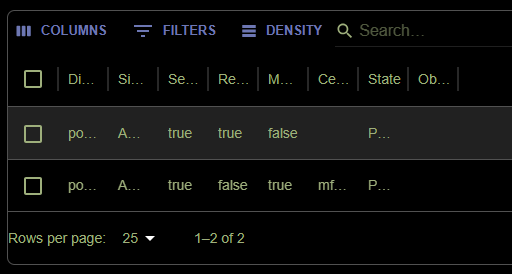
I’ve added a button ‘Refresh’ to the page that will use Sync-UDElement -Id 'id-of-the-grid' which will now trigger the grid to reload and auto size the columns.
Is there a way to trigger the autosize of the columns so that it will show properly at the first load,without having to use Sync-UDElement or do I miss something ?
Here are the corresponding code snippets:
  $defaultGridArgs = @{
    AutoHeight                 = $true
    AutoSizeColumns            = $true
    CheckboxSelection          = $true
    DisableRowSelectionOnClick = $true
    HideExport                 = $true
    PageSize                   = 25
    RowsPerPageOptions         = @(10, 25, 50, 100)
    ShowPagination             = $true
    ShowQuickFilter            = $true
    StripedRows                = $true
  }
New-UDDataGrid @defaultGridArgs -Id 'gridAppRegistrations' -LoadRows {
$Cache:appData = (Get-PsuMwAppRegistration -SolutionId $solutionId).Where{ @(5, 6) -notcontains $_.State }
$Cache:appData.ForEach{
$appReg = $_
$appReg | Add-Member -MemberType NoteProperty -Name 'StateDescription' -Value ($Cache:states.Where{ $_.Value -ieq $appReg.State }).DisplayName
}
$Cache:appData | Out-UDDataGridData -Context $EventData -TotalRows $Cache:appData.Count
} -Columns @(
New-UDDataGridColumn -Field Id -Title 'ID' -Hide
New-UDDataGridColumn -Field DisplayName -Title 'Display Name' -Editable
New-UDDataGridColumn -Field SignInAudience -Title 'Sign In Audience' -Editable -Type singleSelect -ValueOptions $audiences.Value
New-UDDataGridColumn -Field ServicePrincipal -Title 'Service Principal' -Editable -Type Boolean
New-UDDataGridColumn -Field RetainOwner -Title 'Retain Owner' -Editable -Type Boolean
New-UDDataGridColumn -Field CertificateRollover -Title 'Managed Certificate' -Editable -Type Boolean
New-UDDataGridColumn -Field CertificateVaultName -Title 'Certificate Vault Name' -Editable
New-UDDataGridColumn -Field StateDescription -Title 'State'
New-UDDataGridColumn -Field ObjectId -Title 'Object ID'
)All Comments (2)

Hi Arjan,
Thank you for sharing the reproduction details. Based on your post, it looks like -AutoSizeColumns is not recalculating on the initial render when the rows are provided via -LoadRows and Out-UDDataGridData, but it does recalculate after a manual refresh with Sync-UDElement.
To narrow this down, could you confirm the following?
Is the grid rendered inside any container that may start hidden or size later (tabs, accordion, modal, or a collapsible region)? This can affect the initial width measurement.
Does it happen on a cold load (F5) as well as when navigating to the page from another page in the app?
Can you reproduce with a minimal grid (2 to 3 simple text columns and a small dataset) to rule out interactions with column types like boolean, singleSelect, or editable columns?
As a first step, please try the same script on PSU 5.6.12 to confirm whether the behavior is still present. If it still reproduces there with a minimal example, I can help package the repro for a bug report.
As a short-term workaround, if you need a stable layout on first render, you may want to define explicit sizing for the columns that tend to be long (for example using flexible columns and minWidth) rather than relying on autosize.
Best regards,