
KST
Developer licenses no longer exists in latest versions? (coming from 5.5.2)
Hello KST,
Upgrading to the latest version of PowerShell Universal (2026.1 or better) the dev licence requires a Devolutions account on our portal.
Here's the procedure to create your account : https://docs.devolutions.net/portal
If you are still not able to retrieve the licence, you can contact us directly at sales@devolutions.net and we will help you with this!
Thanks,
@Sebastien Charron
Thank you, i have contacted your sales department.
Developer licenses no longer exists in latest versions? (coming from 5.5.2)
Hello,
I am a paying customer with 2 licenses. One for each environment (labo/prod).
I have some developer zip instances that i run on a separate machine. They are only used for development.
I used to generate a dev license for this from within the PSU interface.
The last 8 months I haven't been available to develop more in PSU but now I have. I updated one of those zip instances to the latest version just to explore.
I can no longer find the option to create a dev license.
I found a page https://devolutions.net/powershell-universal/?fromPsu that seems to offer a dev license but i don't see where?
If i press download it just offers the same page i used to download the original zip i used to update the dev instance.
What am i missing?
Authentication to a PSU-App with a AD-group?
It is well documented here : OpenID Connect | PowerShell Universal
Authentication to a PSU-App with a AD-group?
You would need WS-Federation | PowerShell Universal
I use claims with AAD instead. So I have no experience with WS-federation setup. But this is a starting point.
How to auto-discover new PSU Apps without manual intervention? (multi environment setup)
Platform: PowerShell Universal (PSU) v5.6.8
Branches: Labo (Development/Testing) and Prod (Production).
CI/CD: GitLab pipelines using sync-back.ps1 (to capture UI changes) and deploy.ps1 (to push Git changes to servers).
Secrets: Local Vault stored within the LiteDB database.
General workflow
Feature Development: I start by creating a feature branch (e.g., labo-feature-xyz) based on the LABO branch. All new scripts, dashboards, or configuration changes are written here.
Labo Integration: Once the feature is ready, I create a Merge Request to the LABO branch. Merging this triggers the Labo CI/CD pipeline, which deploys the changes to the Labo server.
Production Promotion: After successful testing in Labo, I merge the LABO branch into the PROD branch. This merge acts as the “release” trigger, initiating the Production CI/CD pipeline for deployment to the Prod server.
Configurations per environment:
A key part is the .universalfolder. SInce both environments live in the same repo,I tackle this with :
A config/ directory with 2 sub directories, one per environment.
config/labo/contains the .universal files for the Labo environment.config/prod/contains the .universal files for the Production environment.
During the CI/CD process, the pipeline is responsible for selecting the correct folder. When deploying to Labo, it takes the contents of config/labo/ and places them into the .universal folder on the server. It does the same for Prod using config/prod/.
The CI/CD Mechanism
GitLab CI/CD pipeline serves as the sngle source of truth.
Because PSU allows administrators to make changes directly in the Web UI (which modifies the files on the server), I run a sync-back pipeline. (to be honest, the sync back rarely captures changes).
This captures those “live” changes, commits them to Git, and ensures the repository stays in sync with the actual state of the server.
This all looks like this:
Labo branch & Prod branch
.
├── .universal/             # Resolved registry during deployment
├── config/
│   ├── labo/               # Labo-specific .universal files
│   └── prod/               # Prod-specific .universal files
├── dashboards/             # Dashboard .ps1 files
├── scripts/                # Automation .ps1 files
└── ci-scripts/             # Pipeline automation
    ├── sync-back.ps1       # Captures UI changes back to Git
    └── deploy.ps1          # Pushes Git changes to the server
Problem
In 1 line: Getting the new application/endpoint/… to exist in PROD without manual intervention.
When I merge a new app or dashboard from Labo to Prod, the production instance doesn’t automatically “discover” the new files. (read: it sees a new dashboar, it doesn’t automatically add that to the .universal/dashboards.ps1 file.)
I have tried with Sync-PSUConfiguration but that doesnt work.
I read that deleting the database and just relauncing the server should auto-discover everything.
But since i use a local vault with PSU, i can’t do that because then I throw my vault away.
My Current (Manual) Solution
To get around this, I am currently forced to perform a manual workaround:
Merge code from Labo to Prod.
Log into the Production Web UI.
Manually create the App/Dashboard, ensuring the Name and URL exactly match the settings I defined in the Labo environment.
Run the CI/CD pipeline to deploy the actual .ps1 logic.
What I’m Looking For
The manual method works perfectly but is not ideal.
I am looking for a way that is fully automatic.
Anyone has any ideas?
'Triggering a build remotely via a script' functions like Jenkins
Hi Justine and welcome to the PSU community.
I assume you mean a CI/CD pipeline. Yes you can deploy a PSU artifact with a pipeline.
I use Gitlab Runners to do this, but it should work with any really.
The biggest things to look out for are:
multiple environments lab/prod have different configuration files , so you need a system that takes care of that
a sort of ‘sync-back’ system. Say an admin changes something in the UI, those changes need to make it back to the repository before the next build
But all of this is very much possible.
[SOLVED] Using a Apptoken from within an API Endpoint to use Invoke-PSUScript fails
Hi thanks for reaching out.
It might be off a bit. like i said `best way i understand’. The documentation is not clear to me.
What you are saying is what I initially had in mind too. But the script that I was trying to invoke, had no permissions set. Later on, I did set permissions on it with a role that was identical to the API Endpoint. Still I was getting the error.
So in my mind , this was similar to the double hop problem when writing ‘normal’ PowerShell code. The call to the API Endpoint, is the first stop of my train ride. My ID Card gets scanned, sees it is valid and allows me to drive the train. Now at the next stop, I want to continue riding the train (invoke-psuscript).
In strict mode, the train staff says ‘sorry your ID was already scanned, this ticket is no longer valid’. But in permissive, they say, ‘ the next stop is part of the entire route, please continue your travels as we already scanned and validated your ticket, we know you are good to go’.
I am curious if you can get it to work with Strict mode on.
Security is always important but i don’t feel as this is a huge risk to set it to permissive. You still have to authenticate and get authorized at the first stop.
[SOLVED] Using a Apptoken from within an API Endpoint to use Invoke-PSUScript fails
I hope this helps someone in the future. It took me way too long to find this.
If you drop the Connect-PSu and use Invoke-PSUscript -integrated it works on the condition that you change theappsettings.json.
In the API settings I set it to Permissive:
{
    "Api": {
       "SecurityModel": "Permissive"
    }
}
explained here : Module | PowerShell Universal
Best way I understand : Strict asks for your ID card at every door you try to use. Permissive says, I see you are already in the building, your ID card is OK, go ahead … .
[SOLVED] Using a Apptoken from within an API Endpoint to use Invoke-PSUScript fails
Anyone has any idea?
I tried using the bearer token but that doesn’t seem to work either.
[SOLVED] Using a Apptoken from within an API Endpoint to use Invoke-PSUScript fails
Product: PowerShell Universal
Version: 5.6.8
Licensed user: Yes
I successfully configured PowerShell Universal to accept **Azure AD Bearer Tokens** for external API authentication using the `Jwt` section in `appsettings.json`. However, this seems to break**internal script invocations** using `Invoke-PSUScript` because i keep receiving internal gRPC errors since i did that. Before i had no issues using it with a APP Token.
appsettings.json
{

“Authentication”: {

"OIDC": {

  "Enabled": "true",
  "Authority": "https://login.microsoftonline.com/<Tenant-ID>",
  "ClientID": "<Client-ID>",
  "ClientSecret": "<Secret>",
  "Resource": "",
  "Scope": "openid profile groups"
}

},

“Jwt”: {

"SigningKey": "PleaseUseYourOwnSigningKeyHere", #kept this since i don’t need it with the use of the DiscoveryDocument
"Issuer": "https://sts.windows.net/<Tenant-ID>/",
"Audience": "<Client-ID>",
"DiscoveryDocument": "https://login.microsoftonline.com/<Tenant-ID>/.well-known/openid-configuration",
"RoleClaimType": "roles"

}

}
External API Authentication works
- External applications can call PSU endpoints using Azure AD Bearer tokens
token validation works correctly (signature, issuer, audience, roles)
Role-based authorization works e.g (`-Role @(‘PSU.Access’)`) coming from the claim
The problem is with Internal Script Invocations
When an API endpoint tries to invoke another PSU script using `Invoke-PSUScript`, it fails:
# In API endpoint

$token = 'abcdefg  # PSU-native AppToken
Connect-PSUServer -ComputerName ‘http://localhost:5000’ -AppToken $token
Invoke-PSUScript -Name ‘ChildScript.ps1’ -Parameters @{ Data = $data }
It is the following error:
Bad gRPC response. Invalid content-type value: text/html; charset=utf-8
The goal of my setup:
External API endpoint receives Azure AD Bearer token
Endpoint performs initial work (e.g., creates AD groups)
Endpoint needs to invoke a child PSU script asynchronously by using the inboke-psuscript
Child script execution must appear in PSU Jobs with full logging
I am almost there! The only remaining blocker is internal script invocations from API endpoints.
Anyone can help me out with this @Adam Driscoll ?
Call API endpoint that then uses invoke-psuscript
For those reading in the future.
Yes it is possible. But in order to invoke a script via the API, you first need to connect to the PSU server using an apptoken, which you an create in the UI.
Call API endpoint that then uses invoke-psuscript
Product: PowerShell Universal
Version: 5.4
The idea is to have an API Endpoint that creates some groups in AD. These groups need to get assigned to a *group on an Entra application using `New-AzureADGroupAppRoleAssignment` *
I have an API Endpoint setup that first creates the groups, then it should invoke the child script.
This script should have a 30 min sleep to wait for the sync (hybrid environment), then assign the groups the role.
param(
  [Parameter(Mandatory)][string]$Account,
  [parameter(Mandatory)][string]$Environment,
  [Parameter(Mandatory)][string]$AWSAccount
)

function New-AWSAccountGroups
{
  Param (
    [Parameter(Mandatory)][string]$Account,
    [parameter(Mandatory)][string]$Environment,
    [Parameter(Mandatory)][string]$AWSAccount
  )
  $Roles = 'Admin', 'Ops', 'R', 'Billing'

  $GroupNames = foreach ($Role in $Roles)
  {
    if ($Environment)
    {
      $grpName = "RCWR_AWS_$($Account)_$($Environment)_$($Role)"
    }
    else
    {
      $grpName = "RCWR_AWS_$($Account)_$($Role)"
    }

    New-ADGroup -Name $grpName -SamAccountName $grpName  `
      -Path 'OU=Admins_Hybrid,DC=domain,DC=com' `
      -GroupScope DomainLocal -GroupCategory Security `
      -Description "AWS - $AWSAccount $Role" -whatif

    $grpName
  }
  Write-output $GroupNames
} #end function

try
{
  $outputdata = $null
  $outputdata = New-AWSAccountGroups -AWSAccount $AWSAccount -Account $Account -Environment $Environment
  $jsonResponse = $outputdata | ConvertTo-Json
  $jsonResponse
  #New-PSUApiResponse -StatusCode 200 -body $jsonResponse
}
catch
{
  $errorResponse = @{
    error      = $_.Exception.Message
    identity   = $Identity
    stackTrace = $_.ScriptStackTrace
  }
  New-PSUApiResponse -StatusCode 500 -body ($errorResponse | ConvertTo-Json -Depth 5)
}

# Trigger second script to do sync with roles after 30 minutes
try
{
  # Ensure we have data to pass
  if ($null -eq $outputdata)
  {
    $outputdata = @{
      group = 'this is test to see if it works.'
    }
  }
  $childScriptParams = @{
    InputData = $outputdata
  }

  Invoke-PSUScript -Name 'scripts/APIChild.ps1' -Parameters $childScriptParams
  Write-Host "Child script invoked successfully."
  Write-Host "Child script result: $($result | ConvertTo-Json -Depth 2)"
}
catch
{
  Write-Host "Child script invocation failed:"
  Write-Host "Message: $($_.Exception.Message)"

  # Get detailed error information
  if ($_.ErrorDetails.Message)
  {
    Write-Host "Error details: $($_.ErrorDetails.Message)"
  }

}
The child script, has just a simple in this test case.
# Script contents
param(
    [object]$InputData
)
#start-sleep -seconds 10
write-host $InputData
remove-item c:\temp\me.txt -force
$inputdata | out-file c:\temp\me.txt -force
This however, never gets executed, nor do i get a error message. Anyone an idea? is this even possible?
Dynamic containers on page load instead of onchange?
So after a lot of reading and struggle, i came up with the following solution.
This seems to work 98% of the time. The 2% is when you do a reload of the page too soon after the previous one. Somehow , the submit button doesn’t work, no clue why.
<#
.SYNOPSIS
    The goal of the UI should be:

    If AllBookinPolicy is checked --> Don't show anything else.
    If AllBookinPolicy if NOT checked --> Show AllRequestInPolicy checkbox.
    If AllRequestInPolicy is checked --> Show Textbox txtAllBookinPolicyList.
    If AllRequestInPolicy is NOT checked --> Don't show textbox txtAllBookinPolicyList.

.DESCRIPTION
    The problem is that by using Get-UDElement & Set-UDElement, we encouter the issue that

        - When the page is loading,
        - I address DOM-objects, that are not ready loading yet.

    This means that if I use Get-UDElement 'checkboxAllBookInPolicy' and the object in the browser isn't ready yet at the time that I call it
    it breaks the entire code.

    In my use case, we can retrieve our desired INITIAL state of the UI object, by using Get-mailbox .... , and store those in $Cache:variables.
    When we then change the state of the object, we use the -onChange event and $Eventdata (which holds true/false), to adjust the $Cache:variable.
    This way, the variables are always up to date and the UI should have the correct state.
#>

New-UDPage -Url "/DynamicChecks" -Name "Test" -Content {
    New-UDTypography -Text 'Test dynamic checkboxes in UI' -Variant 'h4' -Id 'pageTitle'
    New-UDForm -Id 'roomConfigForm' -Content {
        New-UDRow -Columns {
            New-UDColumn -Size 2 -Content {
                # create a single textbox with verifcations to AD, update UI 'on the fly'
                New-UDTextbox -Id 'txtMailboxEmailAddress' -Label 'mailbox address' -Placeholder 'yaya@domain.com ' -Value 'toure@domain.com' -FullWidth
            }
        }
        # Empty container (div) to display errors concerning mailaddress validation.
        New-UDDynamic -Id 'dynamicContent' -Content {
            New-UDElement -Tag 'div' -Id 'errorMailboxEmailAddress' -Attributes @{
                style = @{
                    color = 'red'
                }
            }
        }
    } -OnSubmit {
        Start-sleep 5
        # Mock the initiale session state for checkbox values.
        # These should normally come from Exchange by using Get-Mailbox ....
        $Cache:AllBookInPolicy = $false
        $Cache:AllRequestInPolicy = $true

        # Create custom object to build our new UI elements with.
        $Properties = [PSCustomObject]@{
            AllBookInPolicy     = $Cache:AllBookInPolicy
            AllRequestInPolicy  = $Cache:AllRequestInPolicy
            AutomateProcessing  = $true
            BookingWindowInDays = '428'
            Tags                = 'wifi'
        }

        # Debug code to console
        $Properties | Write-Host

        # Dynamic section to 're'-create UI form.
        # New-UDDynamic -Id 'dynamicSettings' -Content {
        New-UDRow -Columns {
            New-UDColumn -Size 6 -Content {
                New-UDCheckBox -Label 'AllBookInPolicy' -Id 'checkboxAllBookInPolicy' -Checked $Cache:AllBookInPolicy -OnChange {
                    # Update cache state when checkbox changes --> basically replaces Get-UDElement, which was not reliable.
                    $Cache:AllBookInPolicy = $EventData
                    Sync-UDElement -Id 'dynamicAllBookInPolicyCheckboxContainer'
                    Sync-UDElement -Id 'dynamicAllRequestInPolicyInputContainer'
                }
            }
        }
        # }

        New-UDColumn -Size 6 -Content {
            New-UDDynamic -Id 'dynamicAllBookInPolicyCheckboxContainer' -Content {

                # Use cache state instead of reading the DOM with Get-UDElement.
                $AllBookInPolicy = $Cache:AllBookInPolicy

                # Only show "Disable AllRequestInPolicy" checkbox when AllBookInPolicy is FALSE
                if ($AllBookInPolicy -eq $false)
                {
                    New-UDCheckBox -Id 'checkboxAllRequestInPolicy' -Checked $Cache:AllRequestInPolicy -Style @{
                        marginRight = '-16px' #For some reason, the checkbox gets a margin of 16px, this is to reverse that undesired margin.
                    } -OnChange {
                        # Update cache state when checkbox changes --> basically replaces Get-UDElement, which was not reliable.
                        $Cache:AllRequestInPolicy = $EventData
                        Sync-UDElement -Id 'dynamicAllRequestInPolicyInputContainer'
                    }
                    New-UDTooltip -TooltipContent {
                        New-UDTypography -Text 'When you want AllBookinPolicy to be limited this needs to be set to $false. Otherwise the booking will go to a ''tentative'' state. Waiting for approval by a delegate.'
                    } -Content {
                        New-UDTypography -Text 'Disable AllRequestInPolicy'
                    }
                }
                # If AllBookInPolicy is true, don't show the AllRequestInPolicy checkbox at all
            } # end dynamic

            New-UDDynamic -Id 'dynamicAllRequestInPolicyInputContainer' -Content {

                # Use cache state instead of reading the DOM with Get-UDElement.
                $AllBookInPolicy = $Cache:AllBookInPolicy
                $AllRequestInPolicy = $Cache:AllRequestInPolicy

                # Only show textbox when AllBookInPolicy is FALSE
                if ($AllBookInPolicy -eq $false)
                {
                    # Show textbox when AllRequestInPolicy is TRUE AND AllBookInPolicy is FALSE
                    if ($AllRequestInPolicy -eq $true)
                    {
                        New-UDColumn -Size 2 -Content {
                            # later we need to fill this with the people that are allowed to book
                            New-UDTextbox -Id 'txtAllBookinPolicyList' -Label 'List of people allowed to book.' -Placeholder 'Provide a list of user mail addressess separated by ;' -FullWidth
                        }
                    }
                }
                # If AllBookInPolicy is true, don't show anything in this container!
            }
        }


        # Stuck here :
        # Stuck here :
        # Stuck here :
        # Add a separate form for final submission that will hide after submit


    }-OnProcessing {
        New-UDCard -Title 'Processing' -Content {
            New-UDProgress
        }

    }
} -Title 'Learning PSU'```Dynamic containers on page load instead of onchange?
Product: PowerShell Universal
Version: 5.5.2
New-UDPage -Url '/EditRoomDefaults' -Name 'Edit Room Mailbox Config' -Content {
New-UDTypography -Text 'Edit Room Mailbox Config' -Variant 'h4' -Id 'pageTitle'
Import-Module ActiveDirectory
# Setup basic form
New-UDForm -Id 'roomConfigForm' -Content {
New-UDRow -Columns {
New-UDColumn -Size 2 -Content {
# create a single textbox with verifcations to AD, update UI 'on the fly'
New-UDTextbox -Id 'txtMailboxEmailAddress' -Label 'mailbox address' -Placeholder 'yaya@domain.com ' -Value 'toure@domain.com' -FullWidth -OnValidate {
$FoundMailbox = $null
$Mail = (Get-UDElement -Id 'txtMailboxEmailAddress').value
if (-not [string]::IsNullOrEmpty($Mail))
{
try
{
# $FoundMailbox = Get-ADUser -LDAPFilter "(mail=$($Mail.ToLower()))" -ErrorAction Stop
$FoundMailbox = $true
}
catch
{
Set-UDElement -Id 'errorEmail' -Properties @{ Content = "Error checking email: $($_.Exception.Message)" }
}
if ($FoundMailbox)
{
Set-UDElement -Id 'txtMailboxEmailAddress' -Properties @{ Value = "$Mail" } # Or $FoundMailbox.mail if you want the AD value
Set-UDElement -Id 'errorEmail' -Properties @{ Content = '' }
Set-UDElement -Id 'txtMailboxEmailAddress' -Properties @{ Icon = (New-UDIcon -Icon Check -Style @{ color = 'green' }) }
New-UDFormValidationResult -Valid # Email is valid
}
else
{
Set-UDElement -Id 'txtMailboxEmailAddress' -Properties @{ Value = "$Mail" }
Set-UDElement -Id 'errorEmail' -Properties @{ Content = "Email address '$mail' doesn't exist." }
Set-UDElement -Id 'txtMailboxEmailAddress' -Properties @{ Icon = (New-UDIcon -Icon Xmark -Style @{ color = 'red' }) }
}
}
elseif ([string]::IsNullOrEmpty($Mail))
{
Set-UDElement -Id 'errorEmail' -Properties @{ Content = 'Mail is required.' }
Set-UDElement -Id 'txtMailboxEmailAddress' -Properties @{ Icon = (New-UDIcon -Icon Xmark -Style @{ color = 'red' }) }
}
}
New-UDElement -Tag 'div' -Id 'errorEmail' -Attributes @{
style = @{
color = 'red'
}
}
}
}
# Empty container (div) to display errors concerning mailaddress validation.
New-UDDynamic -Id 'dynamicContent' -Content {
New-UDElement -Tag 'div' -Id 'errorMailboxEmailAddress' -Attributes @{
style = @{
color = 'red'
}
}
}
} -OnSubmit {
# Create custom object to create our new UI elements with.
$Properties = [PSCustomObject]@{
Capacity = '1'
Floor = '1'
IsWheelChairAccessible = $True
AudioDevice = $True
VideoDevice = $True
DisplayDevice = $true
AllBookInPolicy = $false
AllRequestInPolicy = $true
AutomateProcessing = $true
DeleteSubject = $true
BookingWindowInDays = '428'
Tags = 'wifi'
}
# Debug code to console
$Properties | Write-Host
# Dynamic section to 're'-create UI form.
New-UDDynamic -Id 'dynamicSettings' -Content {
New-UDRow -Columns {
New-UDColumn -Size 6 -Content {
New-UDTextbox -Id 'txtCapacity' -Label 'Capacity' -Value $properties.Capacity
}
New-UDColumn -Size 6 -Content {
New-UDTextbox -Id 'txtFloor' -Label 'Floor' -Value $Properties.Floor
}
New-UDColumn -Size 6 -Content {
New-UDCheckBox -Id 'checkboxIsWheelChairAccessible' -Label 'Is WheelChair Accessible' -Checked $Properties.IsWheelChairAccessible
}
New-UDColumn -Size 6 -Content {
New-UDCheckBox -Id 'checkboxAudioDevice' -Label 'Audio Device' -Checked $Properties.AudioDevice
}
New-UDColumn -Size 6 -Content {
New-UDCheckBox -Id 'checkboxVideoDevice' -Label 'Video Device' -Checked $Properties.VideoDevice
}
New-UDColumn -Size 6 -Content {
New-UDCheckBox -Id 'checkboxDisplayDevice' -Label 'Display Device' -Checked $Properties.DisplayDevice
}
New-UDColumn -Size 6 -Content {
New-UDTextbox -Id 'txtTags' -Label 'Tags' -Value $Properties.Tags
}
New-UDColumn -Size 6 -Content {
New-UDCheckBox -Id 'checkboxDeleteSubject' -Label 'Delete Subject' -Checked $Properties.DeleteSubject
}
New-UDColumn -Size 6 -Content {
New-UDTextbox -Id 'txtBookingWindowInDay' -Label 'Booking Window In Days' -Value $Properties.BookingWindowInDays
}
New-UDColumn -Size 6 -Content {
New-UDCheckBox -Label 'AllBookInPolicy' -Id 'checkboxAllBookInPolicy' -Checked $Properties.AllBookInPolicy -OnChange {
Sync-UDElement -Id 'dynamicAllBookInPolicyCheckboxContainer'
Sync-UDElement -Id 'dynamicAllRequestInPolicyInputContainer'
}
}
}
}
New-UDColumn -Size 6 -Content {
New-UDDynamic -Id 'dynamicAllBookInPolicyCheckboxContainer' -Content {
$AllBookInPolicy = (Get-UDElement -Id 'checkboxAllBookInPolicy').checked
if ($AllBookInPolicy -eq $false)
{
New-UDCheckBox -Id 'checkboxAllRequestInPolicy' -Checked $Properties.AllRequestInPolicy -Style @{
marginRight = '-16px' #For some reason, the checkbox gets a margin of 16px, this is to reverse that undesired margin.
} -OnChange {
Sync-UDElement -Id 'dynamicAllRequestInPolicyInputContainer'
}
New-UDTooltip -TooltipContent {
New-UDTypography -Text 'When you want AllBookinPolicy to be limited this needs to be set to $false. Otherwise the booking will go to a ''tentative'' state. Waiting for approval by a delegate.'
} -Content {
New-UDTypography -Text 'Disable AllRequestInPolicy'
}
}
else
{
#If AllBookingPolicy is true, we don't want AllRequestInPolicy to be available or selected.
Set-UDElement -Id 'AllRequestInPolicy' -Properties @{ Checked = $false } #Clear upon deselect, just to be sure.
}
}# end dynamic
New-UDDynamic -Id 'dynamicAllRequestInPolicyInputContainer' -Content {
$AllBookInPolicy = (Get-UDElement -Id 'checkboxAllBookInPolicy').checked #Remember to re-add, with dynamic, the scope gets lost!
$AllRequestInPolicy = (Get-UDElement -Id 'checkboxAllRequestInPolicy').checked
if ($AllRequestInPolicy -eq $true -and $AllBookInPolicy -eq $false)
{
New-UDColumn -Size 2 -Content {
# later we need to fill this with the people that are allowed to book
New-UDTextbox -Id 'txtAllBookinPolicyList' -Label 'List of people allowed to book.' -Placeholder 'Provide a list of user mail addressess separated by ;' -FullWidth
}
}
else
{
Set-UDElement -Id 'txtAllBookinPolicyList' -Properties @{ Value = '' } #Clear upon deselect, just to be sure.
}
}
}
} # end of submit.
} -Title 'Room Mailbox Config'
This used mocked data to simplify the code.
The problem I have is with the checkboxes.
When i retrieve the data and `AllBookInPolicy` is `$false` then
if `AllRequestInPolicy` is `true` it should be selected and show the textbox `txtAllBookinPolicyList`.
The problem is that these dynamic containers, only update when I have an onChange event. These happen after the page is loaded.
Is there any way around this?This used mocked data to simplify the code.
The problem I have is with the checkboxes on pageload.
When i retrieve the data and AllBookInPolicy is $false then
if AllRequestInPolicy is true it should be selected and show the textbox txtAllBookinPolicyList.
The problem is that these dynamic containers, only update when I have an onChange event. These happen after the page is loaded. The dynamic containers work when the page is loaded.
Perhaps I am doing it all wrong. Is there any way to get around this?
Nested script cmdlet execution now requires specifying an app token explicitly
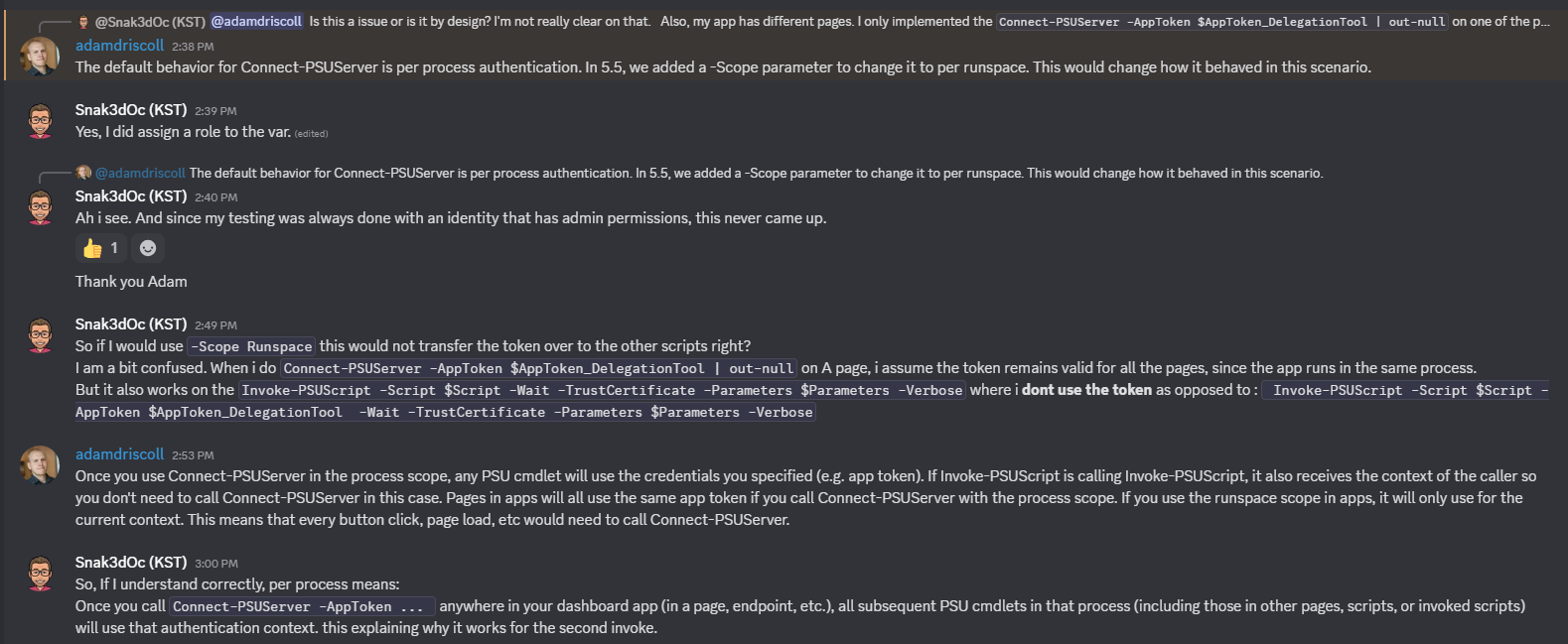
I was mostly referring to :
Blockquote
So, If I understand correctly, per process means: Once you call
Connect-PSUServer -AppToken ...anywhere in your dashboard app (in a page, endpoint, etc.), all subsequent PSU cmdlets in that process (including those in other pages, scripts, or invoked scripts) will use that authentication context. this explaining why it works for the second invoke.
I was just wondering if my understanding was correct.
Nested script cmdlet execution now requires specifying an app token explicitly
Perhaps useful for those reading in the future, a bit more detail by Adam.
Only the last part hasn’t been answered but it provides a lot more context
Nested script cmdlet execution now requires specifying an app token explicitly
Could you please tell me how you did this exactly?
I have been getting errors when using invoke-psuscript.
But only for non-admin members.
Error: Status(StatusCode=“Cancelled”, Detail=“Bad gRPC response. Invalid content-type value: text/html; charset=utf-8”)
Edit: Never mind i figured it out. Thank you for this suggestion.
PSU 5.x Login Page Theming
Thank you for this. This is an awesome resource to learn from!
Problems starting om PSU 5.5.0
So a lot of questions in one post.
Just focusing on your main question: The Run as error is normal: it is in the documentation: Environments | PowerShell Universal
So try to use your credential inside your code.
$sendMailMessageSplat = @{
    From = 'User01 <user01@fabrikam.com>'
    To = 'ITGroup <itdept@fabrikam.com>'
     Subject = "Don't forget today's meeting!"
    Credential =  $secret:mysecret  --> this is the name of your secret.
    UseSsl = $true
}
Send-MailMessage @sendMailMessageSplat
How you handle secrets is explained here: Variables | PowerShell Universal
I recently started with PSU myself. My advise is to go over the YouTube playlist of @Adam Driscoll first. Next, read the documentation and check out PowerShell Universal to see all that is possible and available.
If you have access to the internet on the machine you run it on, look at the small applications that are available too. You can download them and look at their code.
**edit: you can actually download the zip version (free version) and have a look at those applications too.
PSU is a great product but has quite a steep learning curve.
Practical question: 2 environments, how do you manage your GIT repositories?
Right, reading back your and my own post, you don’t need to cherry pick.
In my previous example of the 3 dashboards. Say only 1 was ready for PROD.
Because of the way you work with the variables: Unless a role is assigned to them in PROD , users would never see them.
So going over it in my head:
The benefits are that everything exists in 1 repository and they are a 1:1 copy.
The experience is only different due to the system with variables.
The main drawdown I see is that :
Configuration is hidden and in .Universal-files
It requires team members to really know PSU and how it works.
We have to hope that, with an update to say PSU v6, this all keeps working.
Practical question: 2 environments, how do you manage your GIT repositories?
No worries, I have a newborn, I am on a constant coffee spree myself .
So your single repository serves both PSU servers. It either functions for the dev-server where you are experimenting (DEV branch) OR it serves the prod-server by having it hooked up to the master branch.
You make sure that it gets the correct configuration based on a variable system. $PSUisProduction is used to help with that. If $PSUisProduction -is $true, these variables, these secrets.
You define roles based on claims, these can be both. Meaning they can be claims to groups in prod or in dev (or even possibly both for the same group).
When you are in PSU that is synced up to the DEV branch and PSU goes to get its claims, it only finds the dev claims, effectively granting you access to those scripts and dashboards.
If you are on the PSU instance that is hooked up to the master branch, you get those roles and the apps and scripts that go along with it.
When you have a dashboard in DEV, that is completed and ready for master, you then do a cherry-picked? merge for that dashboard?
Another interesting read i’ve found was this: SUBMODULES: A git repo inside a git repo. - DEV Community
Not sure if it would help in my case. Need to read more to fully understand.
Error executing Script from App
For what it’s worth, I was running into the same issue, turns out that the nested role of script reader seems to be sufficient.
PSU is a great product but there are so many hidden gotcha’s , feels like being on a quest at times
Openid authentication issues in 5.4.0 version
"openid profile roles"
“openid profile roles”
what happens if you use “openid profile groups”?
Practical question: 2 environments, how do you manage your GIT repositories?
Thanks for chipping it.
Let’s see if I understood this correctly. So basically you’re using variables.ps1 to detect if PSU is in Prod or Dev. It checks the $Repository variable to set a $PSUisProduction variable. This variable then dictates which configuration to choose in you authentication.ps1 which has different settings for each environment (SAML or not). This keeps Prod and Dev separate and but allows to keep .univeral within git? Is my understanding correct?
In the assumption that i understood it correctly: a follow up question:
Let’s say you would create 3 more dashboards in DEV. But, you only want (at a certain moment) promote 1 to production.
Your dashboards.ps1 would have 3 additional references to it, but you would only promote 1.
How do you tackle that? Do you create a branch for each dashboard? I can see how that would work because you can then ‘cherry pick’ to only merge that branch. Each branch would have just one additional line in reference to the master, right?
But for things like roles.ps1 , tags.ps1 , scripts, terminals, even variables. They would all need to have the PSUisProdcution check ?
Practical question: 2 environments, how do you manage your GIT repositories?
According to the comments on that page, it seems that more than 1 person mentions the fact that you need a conflict in order for it to work. I will test it but if that’s the case, this isn’t a good solution.
The other option .git/info/exclude seems more promising. I will set up a demo for this as well.
git cherry-pick as I understand it requires a very very strict commit hygiene, which frankly is not present (and I speak for myself).
The consideration to fully exclude the .universal, is only possible due to the fact that have daily Veeam snapshots running. So I can always retrieve the .universal from those daily backups or do a full VM restore.
But as I said in my original post, excluding the .universal folder, comes with it’s issues as well. I would be managing certain files manually. If that’s the case, I might as well keep 2 entirely separate repositories, 1 per domain.
This is how I have things set up right now. The problem is that even after a few weeks, it shows how hard it is to keep this maintained properly. The flip side is that the Dev environment is truly a playground.
I appreciate you taking the time to discuss this and offering solutions.
I can’t imagine that I’m the only one struggling with this.