
schubfre
Integrated mode intermittently fails with "You must be running this command in PowerShell Universal to use the integrated mode" after upgrading to 2026.3.0
@schubfre It looks like we still have a problem with Get-PSUJob. Can you please try this?
Get-PSUJob -RunId $jobId -HideChildren $true
@Adam Driscoll
Yes, that works.
Integrated mode intermittently fails with "You must be running this command in PowerShell Universal to use the integrated mode" after upgrading to 2026.3.0
@Adam Driscoll should this be working in 2026.3.3 ? Based on this fix from the changelog:
Fixed an issue with Integrated API Security Model and -Integrated enforcing permissions incorrectly
Because of some other bug early this year my PSU still runs on permissive mode as opposed to Strict mode:
$Env:Api__SecurityModel = 'Permissive'
But this should not affect how the code runs post 2026.3.x. The same code works in 2026.1.x
Not using -Integrated should use the user rights per my understanding as opposed to system rights.
But I still get the same error.
It still doesn't work from a dashboard.
This time an example from an API:
This:
$Job = Get-PSUJob -RunId $jobId
results in this:
[10/6/2026 10:47:14 AM] [Information] [Api-/job/:jobId:GET] Permission denied. The role specified does not have access to this resource.
I called the API as an Admin, so I definitely have access.
Curiously, this seems to work without problems though:
$JobOutput = Get-PSUJobPipelineOutput -RunId $jobId
The cache seems to work now, I think.
The solution can't be adding -Integrated to every function, this would defeat the purpose of Security Models.
Specific Branding Settings Not Applying
@Adam Driscoll in 2026.3.2 the favicon settings don't work. I think that's because there are now two settings for it. One in branding.ps1 and one in settings.ps1. My branding is filled, my settings is not. And the problem is I can't put settings in a header (for different favicons for dev/test/prod for example), because I want to be able to configure them manually. In a header, a dublicate block would be generated with default settings if I manually edit a setting. So I really like the branding.ps1.
Integrated mode intermittently fails with "You must be running this command in PowerShell Universal to use the integrated mode" after upgrading to 2026.3.0
-Integrated cache reads now "Permission denied" for non-admin roles after 2026.3.1.0 - intended or bug?
Upgraded 2026.3.0 → 2026.3.1.0. The known Get-PSUCache -Integrated gRPC error ("You must be running this command in PowerShell Universal...") is gone, but now non-admin users get:
Permission denied. The role specified does not have access to this resource.
- Works fine as Administrator.
- Fails for a custom role that already has app access via New-PSUApp -Role.
Cache was written without -Role:
Set-PSUCache -Key "SomeCacheKey" -Value $Data -Integrated
App reads it with:
Get-PSUCache -Key "SomeCacheKey" -Integrated
Theory: -Integrated used to bypass per-user authorization entirely; now (post CVE-2026-4064 fix) it authorizes as the real calling user, so a cache entry with no -Role is effectively Administrator-only.
Is explicitly setting -Role on Set-PSUCache now required for non-admin roles to read via -Integrated, or is this a new bug in 2026.3.1.0?
I have the same problem with 3.2
@Adam Driscoll This doesn't work either:
$Job = Get-PSUJob -RunId $ServerInfo.DeletionJobRunId
or this
$Job = Get-PSUJob -RunId $ServerInfo.DeletionJobRunId -Integrated
or this
$Job = Get-PSUJob -RunId $ServerInfo.DeletionJobRunId -UseDefaultCredentials
will result in this
Permission denied. The role specified does not have access to this resource.
This happens even with the Administrator role. And the Get functions (Cache, Job, etc.) don't even have Role parameters.
This also happens in the Admin Terminal.
This whole problem needs to be fixed with priority. This breaks all of our dashboards
AI Tools auto-formatter bug
Hi @rubentapia ,
the local AiTools.ps1 did not exist beforehand, it was created by adding a new AI Tool through the GUI.
Best Regards
AI Tools auto-formatter bug
PSU: 2026.2.5
If you have AiTools in a module and then you add a new tool via the GUI, PSU adds ALL the tools into the new, local AiTools.ps1. So the new file has all the tools from the module AiTools.ps1 + the just generated tool.
This reminds a bit of the buggy behaviour from read-only sections in earlier versions (4.x/5.x).
MCP Tools: High CPU load
Hi schubfre,
Your diagnosis is on the mark: the dominant cost here is not the work the tool does, it is the per-job spawn of a Universal.
Host.exe child process to run a PowerShell session for that single MCP call.
Each spawn pays a full .NET + PowerShell runtime startup, and at >10 in parallel that easily saturates a 4-core box for a few seconds. AV/EDR amplifies the spike (script-block logging, AMSI, image-load callbacks all fire on each new process) but it is not the root cause, just an accelerant.
Before we tune anything, could you run one quick test on 2026.2 (current branch is 2026.2.1) so we have a clean baseline?
You do not need to migrate your prod cluster, a side-by-side instance on your dev VM running the same parallel MCP fan-out is enough.
Reasoning: 2026.1.x is now the maintenance branch and several MCP fixes landed in 2026.2.x.
None of those tickets target the spawn-cost angle directly, so I do not expect the CPU profile to change, but I want to confirm the architecture is the same on the current branch before we agree the FR scope is "both branches". If 2026.2 behaves materially differently, that is a useful data point either way.
In parallel, two settings already in 2026.1.x can give you real relief without waiting on a feature.
First, move the MCP tool scripts to the Integrated environment.
The Integrated environment runs scripts directly inside the PowerShell Universal server process rather than starting an external PowerShell host, so each MCP tool call no longer launches a Universal.Host.exe. The docs are explicit about the performance angle: "you will also see a performance improvement because there is no need to serialize and communicate via interprocess communication" (https://docs.devolutions.net/powershell-universal/config/environments).
You can set this per script via the script's Environment property in the admin UI, or in scripts.ps1 with New-PSUScript -Environment 'Integrated'.
The trade-offs to be aware of: Integrated cannot run a script as alternate credentials, it cannot use Start-Job, and concurrent calls share the worker process and its module state, so heavy modules pre-imported via environments.ps1 for the Integrated environment will load once and stay warm across MCP calls, which is often what you want here.
Second, cap the per-script Concurrent Jobs value.
Each script has a Concurrent Jobs setting that defaults to 100.
Lowering it to, say, 4 to 8 on your MCP tool scripts gives you exactly the rate limit you described, once the cap is hit, additional MCP invocations queue rather than spawning more hosts simultaneously. This is per script today, not a global "MCP throttle", so it acts as a budget per tool rather than across all tools.
Combining the two, an integrated environment plus a low Concurrent Jobs cap, should flatten the CPU spike substantially, even before you finish your AV/EDR work. While you are tuning AV/EDR, the binaries to whitelist for the spawn-driven scenario are Universal.Host.exe (under C:\Program Files (x86)\Universal), pwsh.exe, and powershell.exe.
On your follow-up question, yes, please file the feature requests, and you can file them as two separate items.
We have no internal ticket today that covers either a first-class concurrency / rate-limiting control specifically for the MCP server (the Concurrent Jobs setting is per-script, so it is a workaround, not the dedicated knob you are asking for), or the ability to scope MCP tool invocations to a Computer Group / Environment so an MCP tool can only spawn jobs on a designated node or in a designated environment.
Best regards,
@Patrick Ouimet
I tested this on 2026.2.5 and the behaviour is the same.
I also changed the relevant scripts to Integrated some time ago, with that change the CPU load has lessened, and opened two FRs:
https://forum.devolutions.net/topics/55435/mcp-tools-rate-limiting
https://forum.devolutions.net/topics/55436/mcp-tools-set-dedicated-computer-groups-and-environments
External modules still vanish after git sync file changes
@Adam Driscoll is there an update for this topic?
External modules still vanish after git sync file changes
@Adam Driscoll if you remember our call a few months ago, it's still like I showed you.
I just call them submodules, they have nothing to do with the innate git functionality. They are located in the PSU \modules folder, but are procured externally by a script that listens to the git sync trigger.
The rest is just like you inferred. Except it's not module resources I have to update for the module to vanish but main resources, it doesn't seem to matter what main resource was touched. Last time I edited a PSU main repo internal module and it caused the external module to vanish after I merged the PR and the git sync ran.
MCP Tools: Set dedicated computer groups and environments
Spawned from https://forum.devolutions.net/topics/55354/mcp-tools-high-cpu-load
To combat high loads caused by jobs spawned MCP tools, it would also be a good idea to be able to configure Computer Groups and Enviroments where the MCP tools are allowed to start jobs.
MCP Tools: Rate limiting
Spawned from https://forum.devolutions.net/topics/55354/mcp-tools-high-cpu-load
To prevent abuse, denial-of-service or simple overloading it would be prudent to be able to configure rate limiting and/or concurrency settings for MCP tools. The settings should be central and not on a per-script basis.
User filter in job view doesn't update after selecting 'Origin'
PSU 2026.1.6
In Automation -> Jobs when selecting columns, if you select 'Origin', the table updates one last time and after that it gets stuck. You can select and deselect what you want, it doesn't update the columns and it doesn't refresh the table anymore. Also after selecting it, Origin appears two times in the list of selectable columns.
Right now, as I see it, the only way to reset the view would be to delete the user or execute SQL:
UPDATE "main"."Identity" SET "JobColumns" = NULL WHERE "name" = "USERIDENTITY"
External modules still vanish after git sync file changes
PSU 2026.1.6
Priority: High
The behaviour has been more stable in recent releases, but modules that are not in the main PSU repo are still vanishing after a git sync when the sync changes files in the main repo. This can be fixed by the known method of reloading modules.
If the git sync is stale and has no changes to sync, things are stable and don't require manual intervention.
So:
automated git sync -> git detects changes and PSU reloads config(?) -> git sync delayed trigger -> PSU script getting submodules -> modules with PSU resources vanish in the script view
This is the general sequence, but I can't tell when exactly in the process the external modules vanish. It might be as early as the second step and everything after it doesn't matter.
The consequence of this is not only cosmetic, the vanishing resources also can't be triggered via Invoke-PSUScript anymore.
MCP Tools: High CPU load
For now I set the environment to Integrated in each script used by the MCP tools and the CPU load is a fraction of what it was before.
But is this really the solution? It goes against best practice and some random MCP job could crash the whole PSU process. Would it be an alternative to create a new persisting environment for MCP tools where the only overhead is serializing the jobs for the new persistent env?
New script params for MCP Tools example:
$Parameters = @{
    Module            = 'psu_mcp_tools'
    Command           = 'Get-MCPDNSRecord'
    Description       = 'Get DNS record information'
    Environment       = 'Integrated'
    TimeOut           = 2
    ConcurrentJobs    = 10
    MaxHistory        = 20
    InformationAction = 'SilentlyContinue'
    ErrorAction       = 'Stop'
}
New-PSUScript @ParametersUI: Wrong parameter description in script properties
PSU 2026.1.6
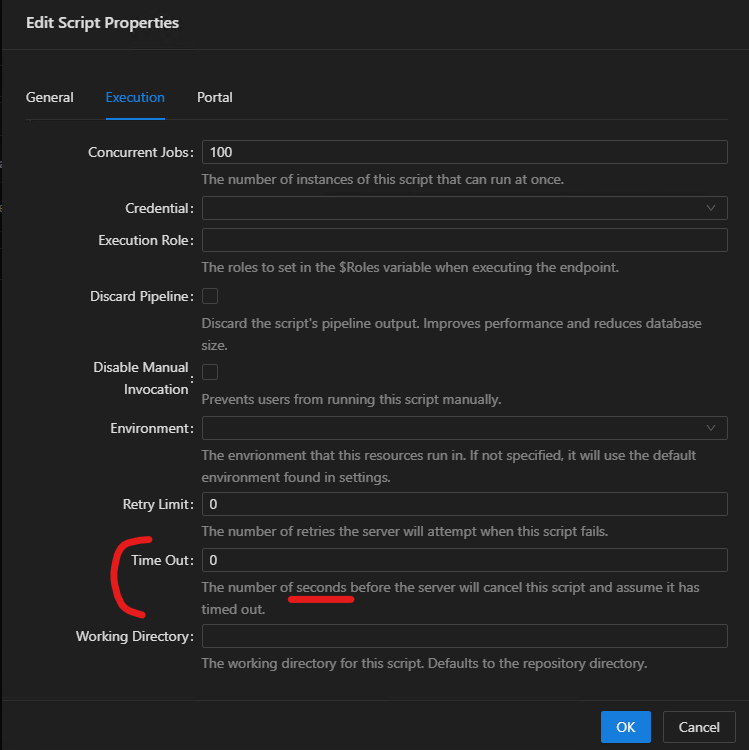
The UI says seconds, but based on the documentation and real world testing, this is actually minutes
https://docs.devolutions.net/powershell-universal/powershell-commands/new-psuscript#timeout
MCP Tools: High CPU load
For now, I extended both prod to 8 cores 12GB RAM. I will have to observe if that makes things smoother.
I still think rate limiting MCP tools would be a good idea. As it stands we have very little leeway to configure MCP tools in any way (at least in 2026.1.x)
To combat high loads caused by jobs spanwed MCP tools, it would also be a good idea to be able to configure Computer Groups and Enviroments where the MCP tools are allowed to start jobs.
Should I create a feature request for this?
MCP Tools: High CPU load
PSU 2026.1.6
Priority: High
When using multiple MCP tools in parallel (e.g. >10) the server CPU load caps at 100% for several seconds and PSU gets unresponsive. Each MCP job spawns a Universal.Host process that consumes approximately 7~10% CPU. These jobs do very light work, most just start an asynchronous REST API call and check for completion with most calls completing in seconds. I'd wager the time it takes for PSU to prepare these jobs is greater than the time it takes for the content of the jobs to finish.
Our AV and EDR tools are surely involved in creating this load and we are testing what happens if they are off or the PSU processes are excluded. But I don't think this will fully fix the problem.
I would like to have the load problem permanently fixed, but for a workaround i would be satisified with a rate limiting for MCP tools.
Can you please - either fix the problem or create a workaround - in the 2026.1.x version family?
This happens on both of these types of machines:
RDP -> VM (dev machine)
Windows Server 2019
local access HTTP
Portable zip
6 cores @ 2.80GHz
24GB RAM
LB -> VM (test machine)
Windows Server 2022
remote access HTTPS with official cert
MSI install
4 cores @ 2Ghz (restricted by hypervisor policy)
8GB RAM
I haven't tested it yet on our prod cluster, but i would expect the same:
LB -> 2 VMs
Windows Server 2022
remote access HTTPS with official cert
MSI install
4 cores @ 2Ghz (restricted by hypervisor policy)
8GB RAM
MCP Error: "Error: MPC -32603: An error occurred."
PSU 2026.1.6
Somehow the codeword "Port" results in the PSU MCP tools to do inexplicable things. I can define Port as String or Int, it always gets treated as Int. Same with the Codeword: I can use Port or PortString or anything with Port in the name, it gets cut internally into "Port", even if Port exists nowhere and the real parameter is PortString.
This problem reminds me of the other bugs I opened where the codeword IP results in inexplicable behaviours.
The call doesn't even get converted into a job run.
Get-MCPPortConnectionCheck.ps1:
<#
.SYNOPSIS
    Test remote IP connectivity by port
.DESCRIPTION
    Test remote IP connectivity by port from a specific server, return the connection result
.PARAMETER Servername
    Name of source server
.PARAMETER TargetIP
    Target IP address to check connection
.PARAMETER Port
    Target port to check connection
#>
function Get-MCPPortConnectionCheck {
    param (
        [Parameter(Mandatory = $true, HelpMessage = 'Name of source server')]
        [String]
        $Servername,
        [Parameter(Mandatory = $true, HelpMessage = 'Target IP address to check connection')]
        [String]
        $TargetIP,
        [Parameter(Mandatory = $true, HelpMessage = 'Target port to check connection')]
        [String]
        $Port
    )
MCP log:
2026-06-09 08:55:07.040 [info] [editor -> server] {"jsonrpc":"2.0","id":4,"method":"tools/call","params":{"name":"Test_remote_IP_connectivity_by_port","arguments":{"Servername":"REDACTED","TargetIP":"REDACTED","Port":53},"_meta":{"progressToken":"REDACTED","vscode.conversationId":"REDACTED","vscode.requestId":"REDACTED","traceparent":"REDACTED"}}}
2026-06-09 08:55:07.064 [info] [server -> editor] {"error":{"code":-32603,"message":"An error occurred."},"id":4,"jsonrpc":"2.0"}
Output in chat:
Error: MPC -32603: An error occurred.
Now, this magically works:
$Parameters = @{
    Module            = 'psu_mcp_tools'
    Command           = 'Get-MCPPortConnectionCheck'
    Description       = 'Test remote IP connectivity by textstring'
    InformationAction = 'SilentlyContinue'
    ErrorAction       = 'Stop'
}
New-PSUScript @Parameters
$Parameters = @{
Name = 'Test remote IP connectivity by textstring'
Description = 'Test remote IP connectivity by textstring from a specific server, return the connection result'
ScriptFullPath = 'psu_mcp_tools\Get-MCPPortConnectionCheck'
Authenticated = $true
Role = @('Reader')
}
New-PSUMcpTool @Parameters<#
.SYNOPSIS
Test remote IP connectivity by port
.DESCRIPTION
Test remote IP connectivity by port from a specific server, return the connection result
.PARAMETER Servername
Name of source server
.PARAMETER TargetIP
Target IP address to check connection
.PARAMETER TextString
Target port to check connection send as PORT:portnumber, example PORT:3389
#>
function Get-MCPPortConnectionCheck {
param (
[Parameter(Mandatory = $true, HelpMessage = 'Name of source server')]
[String]
$Servername,
[Parameter(Mandatory = $true, HelpMessage = 'Target IP address to check connection')]
[String]
$TargetIP,
[Parameter(Mandatory = $true, HelpMessage = 'Target port to check connection send as PORT:portnumber, example PORT:3389')]
[String]
$TextString
)
$Port = $TextString.Split(':')[-1]MCP API: sometimes returns "no output" even when output exists
PSU 2026.1.6
MCP output:
2026-06-08 13:46:35.507 [info] [editor -> server] {"jsonrpc":"2.0","id":4,"method":"tools/call","params":{"name":"Get_OS_installation_compliance","arguments":{"Servername":"REDACTED"},"_meta":{"progressToken":"REDACTED","vscode.conversationId":"REDACTED","vscode.requestId":"REDACTED","traceparent":"REDACTED"}}}
2026-06-08 13:47:05.682 [info] [server -> editor] {"result":{"content":[{"type":"text","text":"Job completed successfully with no output."}]},"id":4,"jsonrpc":"2.0"}
PSU job log output:
Get-PSUJobPipelineOutput -RunId 'e8add5e9-5152-4e99-9c9e-391a7682b464' -UseDefaultCredentials -ComputerName 'http://localhost:5075'
{"Message":{"REDACTED"},"Result":1}
Screenshot:

This works in several scripts that are structured the same and in some it doesn't. I can't really see a difference why most scripts/tools would answer fine and some have this problem.
Both functions do something like this to return data
return $ComplianceResult
And in both cases I do something like this to serialize it
Function-Call -Parameters Inputs | ConvertTo-Json -Depth 100 -Compress
Curiously, I get the following error in the Pipeline Output tab. But I don't think it's relevant to this problem, because I get this error in the tools that don't work, but also in the tools that do work:

MCP API: sometimes empty parameter descriptions
PSU 2026.1.6
In most cases it is enough to fill the parameter description in the comment based help. But in some cases even if the comment based help is correctly filled the MCP API doesn't recognize it and if you look at the tool output, the parameter description is suddenly empty. To remediate this, you can supply a parameter HelpMessage and then it works as expected. I don't know why this is happening, but curiously both scripts where it doesn't work have IP related inputs.
Works (Get-MCPDNSRecord):
<#
.SYNOPSIS
    Get DNS record information
.DESCRIPTION
    Get DNS record information from the DNS API with automatic detection of forward or reverse lookups based on input type
.PARAMETER Name
    Name to lookup as IPv4 address or FQDN or hostname
#>
function Get-MCPDNSRecord {
    param (
        [parameter(Mandatory = $true, HelpMessage = "Name to lookup as IPv4 address or FQDN or hostname")]
        [string]
        $Name
    )
Doesn't work (Get-MCPDNSRecord):
<#
.SYNOPSIS
    Get DNS record information
.DESCRIPTION
    Get DNS record information from the DNS API with automatic detection of forward or reverse lookups based on input type
.PARAMETER Name
    Name to lookup as IPv4 address or FQDN or hostname
#>
function Get-MCPDNSRecord {
    param (
        [parameter(Mandatory = $true)]
        [string]
        $Name
    )
Doesn't work (Get-MCPPortConnectionCheck):
<#
.SYNOPSIS
    Test remote IP connectivity by port
.DESCRIPTION
    Test remote IP connectivity by port from a specific server, return the connection result
.PARAMETER Servername
    Name of source server
.PARAMETER TargetIP
    Target IP address to check connection
.PARAMETER Port
    Target port to check connection
#>
function Get-MCPPortConnectionCheck {
    param (
        [parameter(Mandatory = $true)]
        [string]
        $Servername,
        [parameter(Mandatory = $true)]
        [string]
        $TargetIP,
        [parameter(Mandatory = $true)]
        [int]
        $Port
    )
Works (Get-MCPCloudServerVariables):
<#
.SYNOPSIS
    Get cloud server variables from git
.DESCRIPTION
    Get cloud server variables from git like domain, platform, IP, etc.
.PARAMETER Servername
    Name of cloud server
#>
function Get-MCPCloudServerVariables {
    param (
        [parameter(Mandatory = $true)]
        [string]
        $Servername
)Non-success streams get forwarded to the MCP API
@Adam Driscoll can you also remove the stream "source" information in the response? I think the LLM would be more comfortable, to parse a JSON for example, without the stream info.

Q:
can you handle the superflous stream info - in this case Information - {JSON} - or are you struggling with that?
Claude:
I handled it fine! I was able to parse the JSON and extract all the relevant information despite the "Information - " prefix.
However, from a best practice perspective, if you're developing the tool, it would be cleaner to return just the JSON object without the stream prefix. That would make it:
Easier to parse programmatically
More consistent with standard JSON responses
Less prone to parsing issues if different stream types are used (Information, Warning, Error, etc.)
Database variables from modules can't be set
PSU 2026.1.6
Is this intended behaviour or a bug?
$module\1.0.0\.universal\variables.ps1
$Parameters = @{
    Name     = "Test"
    Type     = "System.String"
    Database = $true
}
New-PSUVariable @Parameters

Non-success streams get forwarded to the MCP API
PSU 2026.1.6
If you provide an MCP tool and the script it's based on has Debug output for example, that output gets forwaded to the agent and from the agent to the user. So now both Anthropic and the user have the debug output that is only supposed to be read by me and my team. This is highly problematic if there were to be confidential info in that output.
Example output from VSC Claude Sonnet 4.5
Debug - Request URL: REDACTED
Debug - Request Method: GET
Debug - Request Body: REDACTED
Debug - Response StatusCode: 200
Debug - Response Content:

Information - REDACTED
What is marked as the "Information" stream is the actual ouput from the success stream (the success stream is marked wrong, but that "bug" is not new)

Manually collapse a Table Row OnRowExpand section
Alright. I have also removed certain functionalities now and made it simpler because of this
Possible to autocollapse rows from New-UDTable -OnRowExpand when going to new page?
then collapse all expanded rows.
This is the problem, there doesn’t seem to be a command for that. Or do you have an example for that?