UI: Wrong parameter description in script properties

PSU 2026.1.6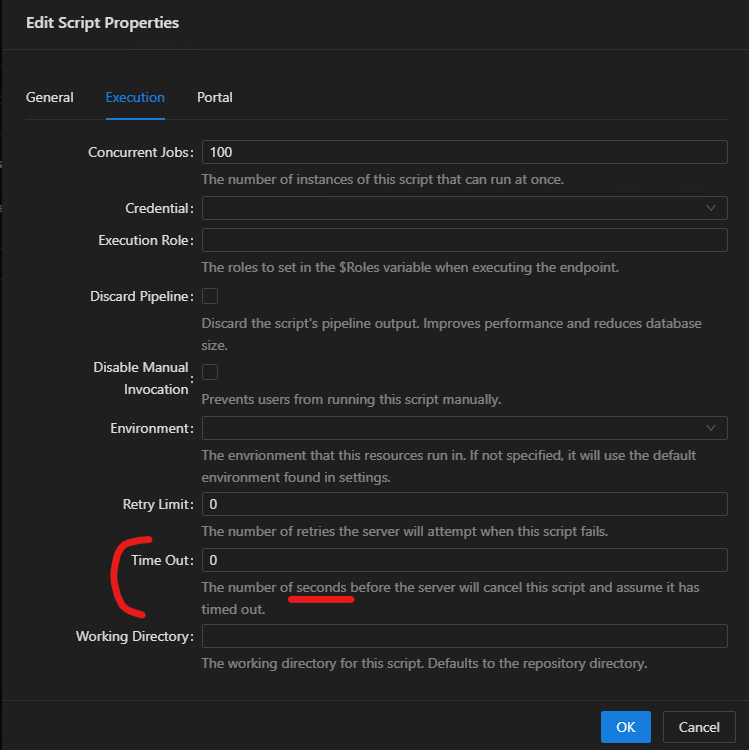
The UI says seconds, but based on the documentation and real world testing, this is actually minutes
https://docs.devolutions.net/powershell-universal/powershell-commands/new-psuscript#timeout
a6c939b4-8d5d-411d-8c2f-9194b81673c7.png
All Comments (2)
Dear schubfre,
Thank you for reporting this, and apologies for the delayed response.
You are correct. Based on the current documentation and the behavior you confirmed through testing, the script timeout value is measured in minutes.
From what you shared, this appears to be a UI text issue in the Script Properties dialog, where the description says seconds instead of minutes.
I will reproduce this behavior in my lab using PSU 2026.1.6 so we can confirm the mismatch between the UI description, the documented behavior, and the actual runtime behavior.
After validating this in the lab, I will flag it internally as a UI text issue for review.
Reference:
https://docs.powershelluniversal.com/automation/scripts
Best regards,
Ruben Tapia
Hello,
Thank you for being so patient.
The fix has been implemented in the latest PowerShell Universal 2026.2.3.0 version.
Let us know if that works as expected.
Thank you for your collaboration.
Best regards,
Érica Poirier