
mshepard70
Document the branding features with examples
There are dozens of branding settings, but no examples. Lots of different parameters but not much for how to use them.
2026.3.3.0 - Error with Set-PSUCache
It's failing in a dev environment on 2026.3.3. Production is still on 2026.2.1 and it's succeeding there.
the sanitized code is this:
Set-PSUCache -Key CacheKey -value (Import-csv "<PATH TO CSV>") -Integrated
2026.3.3.0 - Error with Set-PSUCache
I have a script which loads various items into the PSU Cache. One is a csv that's 7,158kb, and has always succeeded.
Now with 2026.3.3.0, I get this error. I don't know if there's a setting that could be adjusted (couldn't find one in app.config).:
08:33:02.176
ERROR
Status(StatusCode="Unknown", Detail="Exception was thrown by handler. BadHttpRequestException: Request body too large. The max request body size is 30000000 bytes.", DebugException="Grpc.Core.Internal.CoreErrorDetailException: {"created":"@1791293582.012000000","description":"Error received from peer ipv6:[::1]:64789","file":"..\..\..\src\core\lib\surface\call.cc","file_line":953,"grpc_message":"Exception was thrown by handler. BadHttpRequestException: Request body too large. The max request body size is 30000000 bytes.","grpc_status":2}")
Add a "Restore missing Menus" to admin UI
First of all, I like the new organization of the admin UI.
I don't love that dragging a menu item to the favorites area removes it from it's natural habitat.
Because, when I delete it from the favorites area, it's not anywhere in the menu anymore. I was shown a non-obvious way to get it back (click and hold on some existing menu item until the search box shows up, then type the name of the missing item in).
I'd love a couple of changes:
Make the drag to favorites a copy, rather than a move.
Add a "reset menus", "restore deleted menu items" or make menu editing a bit more discoverable.
Nested IIS problems in 2026.3.3.0
I've been using 2026.3.3.0 for a few minutes and have already found a few places where nested IIS sites don't work.
<complaint>
Nested IIS PSU sites break in different features in nearly every PSU release. Please add nested IIS to your testing suite.
</complaint>
Broken things I've noticed so far:
Return to site from job diagnostics

View App on "more actions" menu
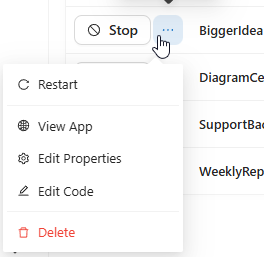
2026.2.5 - auto reload not working
This was on 2026.2.1, but here's my experience:
I added authentication and a required role to an app
committed the change (to dashboards.ps1)
Created a PR and merged it
Waited a minute and made sure the change was registered in my Prd PSU environment
Auth was still not required in the app in Prd.
Restarted the app (from the apps page in the admin console)
Still no required auth
Went to Config/Files and restarted the apps fixture.
Now auth was required.
I would expect that when the app restarts after the git merge, changes to auth would immediately be active.
All apps/scripts not working on 2026.3.0
2026.3.1 is working in our installation....Apps and scripts are running.
Operator role required for Get-PSUCache in 2026.2.1?
Adding -Integrated everywhere seems to have allowed the app to run with User only.
Operator role required for Get-PSUCache in 2026.2.1?
My mistake...the Api security model was set to Permissive.
Operator role required for Get-PSUCache in 2026.2.1?
Before assigning Operator, the affected users had the User role. We also tried adding the Execute role with no luck.
The Api Security Model is set to "Integrated"
I think this surfaced when we tightened the Operator role. It has been working in earlier versions (and this version), but the Operator role was set to $true for all users.
I haven't tried using -Integrated, but will try that this morning.
Operator role required for Get-PSUCache in 2026.2.1?
It seems like we need the operator role in order for users to execute Get-PSUCache in an app in 2026.2.1. Line 15 in the function is a Get-PSUCache call ( $CPM = Get-PSUCache -Key CPM )
[9/21/2026 10:08:11 AM] [Error] [App-CRM Banking Dashboard]
at Get-CPMTable, E:\psuSites\JHBDashboard_data\UniversalAutomation\Repository\dashboards\CRMBankingDashboard\modules\CPMBackEnd\1.0.0\Public\Get-CPMTable.ps1: line 15
at dynamicCPMTable: line 4
at dynamicCPMTable: line 3
at dynamicCPMTable: line 1
at CPM.ps1
[9/21/2026 10:08:11 AM] [Error] [App-CRM Banking Dashboard] Permission denied. The role specified does not have access to this resource.
[File]: CPM.ps1
[Endpoint]: dynamicCPMTable
[Page]: b1c7879d-5fea-4f55-8d58-66bc9a85dc0d
The description for Operator says it can add or remove psu resources like scripts or endpoints. That seems like way too much power for someone who needs to access cache programmatically.
All apps/scripts not working on 2026.3.0
[9/17/2026 8:38:04 AM] [Error] [App-CRMBot3001] Inner Exception: Grpc.Core.Internal.CoreErrorDetailException
[9/17/2026 8:38:04 AM] [Error] [App-CRMBot3001] at ProtoBuf.Grpc.Internal.Reshape.UnaryTaskAsyncImpl[TRequest,TResponse](AsyncUnaryCall`1 call, MetadataContext metadata, CancellationToken cancellationToken) in /_/src/protobuf-net.Grpc/Internal/Reshape.cs:line 554
at PowerShellUniversal.ClientServiceRedirect.IsDebuggerAttachedAsync() in D:\a\powershell-universal\powershell-universal\src\Host\GrpcUniversalClient.cs:line 42
at Nito.AsyncEx.Synchronous.TaskExtensions.WaitAndUnwrapException[TResult](Task`1 task)
at Nito.AsyncEx.AsyncContext.<>c__DisplayClass16_0`1.<Run>b__0(Task`1 t)
at System.Threading.Tasks.ContinuationResultTaskFromResultTask`2.InnerInvoke()
at System.Threading.ExecutionContext.RunInternal(ExecutionContext executionContext, ContextCallback callback, Object state)
--- End of stack trace from previous location ---
at System.Threading.ExecutionContext.RunInternal(ExecutionContext executionContext, ContextCallback callback, Object state)
at System.Threading.Tasks.Task.ExecuteWithThreadLocal(Task& currentTaskSlot, Thread threadPoolThread)
--- End of stack trace from previous location ---
at Nito.AsyncEx.Synchronous.TaskExtensions.WaitAndUnwrapException[TResult](Task`1 task)
at Nito.AsyncEx.AsyncContext.Run[TResult](Func`1 action)
at PowerShellUniversal.ValueTaskExtensions.ToResult[T](ValueTask`1 valueTask) in D:\a\powershell-universal\powershell-universal\src\PowerShellUniversal\ValueTaskExtensions.cs:line 49
--- End of stack trace from previous location ---
at PowerShellUniversal.ValueTaskExtensions.HandleException[TResult](RpcException e) in D:\a\powershell-universal\powershell-universal\src\PowerShellUniversal\ValueTaskExtensions.cs:line 130
at PowerShellUniversal.ValueTaskExtensions.ToResult[T](ValueTask`1 valueTask) in D:\a\powershell-universal\powershell-universal\src\PowerShellUniversal\ValueTaskExtensions.cs:line 53
at UniversalDashboard.Services.UDRunspaceFactory.CreateRunspace() in D:\a\powershell-universal\powershell-universal\src\UniversalDashboard\Services\UDRunspaceFactory.cs:line 480
at UniversalDashboard.Services.UDRunspaceFactory.Create() in D:\a\powershell-universal\powershell-universal\src\UniversalDashboard\Services\UDRunspaceFactory.cs:line 658
at Microsoft.Extensions.ObjectPool.DefaultObjectPool`1.Get()
at UniversalDashboard.Services.UDRunspaceFactory.GetRunspaceReference(Boolean sendSaturationWarning) in D:\a\powershell-universal\powershell-universal\src\UniversalDashboard\Services\UDRunspaceFactory.cs:line 112
at UniversalDashboard.Services.UDRunspaceFactory.GetRunspaceAsync() in D:\a\powershell-universal\powershell-universal\src\UniversalDashboard\Services\UDRunspaceFactory.cs:line 78
at UniversalAutomation.Host.UniversalDashboardService.StartDashboard() in D:\a\powershell-universal\powershell-universal\src\Host\DashboardService.cs:line 156
[9/17/2026 8:38:04 AM] [Error] [App-CRMBot3001] Failed to get dashboard. Status(StatusCode="Internal", Detail="Received http2 header with status: 400", DebugException="Grpc.Core.Internal.CoreErrorDetailException: {"created":"@1789652284.427000000","description":"Error received from peer ipv6:[::1]:50908","file":"..\..\..\src\core\lib\surface\call.cc","file_line":953,"grpc_message":"Received http2 header with status: 400","grpc_status":13}") Grpc.Core.RpcException
[9/17/2026 8:38:03 AM] [Information] [App-CRMBot3001] Dashboard information received. Starting dashboard.
[9/17/2026 8:38:02 AM] [Information] [App-CRMBot3001] Waiting for dashboard information...
All apps/scripts not working on 2026.3.0
yes...a troubleshooting script with write-host "hello world" failed the same way.
All apps/scripts not working on 2026.3.0
I see this error in every job and in the log for all apps.
Status(StatusCode="Internal", Detail="Received http2 header with status: 400", DebugException="Grpc.Core.Internal.CoreErrorDetailException: {"created":"@1789641307.947000000","description":"Error received from peer ipv6:[::1]:50908","file":"..\..\..\src\core\lib\surface\call.cc","file_line":953,"grpc_message":"Received http2 header with status: 400","grpc_status":13}")
Workflow documentation
I've played with workflows some and have a decent grasp of $PSUItem and $Workflow. I haven't managed to get the "Deconstruct hashtable output" to anything that I can discern.
Any chance you can add some documentation to show what that setting does?
PowerShell Universal - 2026.1.2
Anyone using Mermaid diagrams in PSU?
We’re generating logical architecture diagrams showing what components/packages communicate with others (according to the product list for a customer).
Anyone using Mermaid diagrams in PSU?
Got some help from Adam…
Step 1: In the New-UDApp call, add -Scripts @(“https://cdn.jsdelivr.net/npm/mermaid@10/dist/mermaid.min.js”)
then, in the page, I have a UDDynamic called Mermaid with a New-UDHTML in it. Syncing the Mermaid element causes the graph to render.
New-UDDynamic -id Mermaid -Content {
….
          New-UDHTML -Markup @"
                <pre class="mermaid">
$page:MermaidSyntax
                </pre>
"@Restricting access to parts of an App
There’s also Protect-UDSection.
Anyone using Mermaid diagrams in PSU?
Product: PowerShell Universal
Version: 5.6.5
Trying to generate a mermaid diagram in a psu page.
No luck with this:
New-UDPage -autoinclude -name Mermaid -Title Mermaid -Content {

    New-UDHelmet -tag 'script' -attributes @{src = 'https://unpkg.com/mermaid@8.1.0/dist/mermaid.min.js' }
     New-UDHTML -Markup @'
<pre class="mermaid">
graph TD;
    A[Start] --> B{Is it working?};
    B -- Yes --> C[Great!];
    B -- No --> D[Fix it];
    D --> B;
</pre>
'@
    New-UDHTML -Markup @'
<div class="mermaid">
graph TD;
    A[Start] --> B{Is it working?};
    B -- Yes --> C[Great!];
    B -- No --> D[Fix it];
    D --> B;
</div>

'@
}
Changing the helmet to this doesn’t help either:
    New-UDHelmet -tag 'script' -attributes @{type="module"} -content @'
      import mermaid from 'https://unpkg.com/mermaid@8.1.0/dist/mermaid.min.js';
      mermaid.initialize({ startOnLoad: true });
'@Get-PSUScript: Status(StatusCode="Unimplemented", Detail="Bad gRPC response. HTTP status code: 404")
Having the same issue…Http1andHttp2 didn’t help.
PSU 4.0.9 login button after logout is return to admin console URL
@Adam Driscoll … still present in 4.0.11