PowerShell Universal - 2026.1.2
PowerShell Universal - 2026.1.2
Release Notes
Improvements
- Update Docker images to Ubuntu 24.04 LTS base
- Update Secret Variable Roles warning to mention Execution Roles
- Updated to latest version of git in Docker container image
Fixes
- Fix exception thrown by Universal cmdlets
- Fixed an issue where Git Sync Loses Remote Branch Association
- Fixed an issue where the version notification is displayed all the time
- Fixed an issue where Write-PSULog -Console doesn’t work outside PSU
- Fixed an issue with PSModulePath in Windows PowerShell 5.1 environments
Downloads
Adam Driscoll
PowerShell Expert and Software Architect at Devolutions
All Comments (8)
Lots of errors in the system logs and I cannot log in; getting not authorized.
2026-02-12 20:47:26.081 -06:00 [ERR][] Startup: The term 'New-UDDashboard' is not recognized as a name of a cmdlet, function, script file, or executable program.
Check the spelling of the name, or if a path was included, verify that the path is correct and try again.
2026-02-12 20:47:26.138 -06:00 [ERR][] Startup: The term 'New-UDDashboard' is not recognized as a name of a cmdlet, function, script file, or executable program.
Check the spelling of the name, or if a path was included, verify that the path is correct and try again.
2026-02-12 20:47:26.154 -06:00 [ERR][] Startup: at <ScriptBlock>, C:\Program Files (x86)\Universal\Docs\index.ps1: line 387
at <ScriptBlock>, <No file>: line 1
2026-02-12 20:47:26.167 -06:00 [ERR][] Startup:    at System.Management.Automation.CommandDiscovery.LookupCommandInfo(String commandName, CommandTypes commandTypes, SearchResolutionOptions searchResolutionOptions, CommandOrigin commandOrigin, ExecutionContext context)
   at System.Management.Automation.CommandDiscovery.TryModuleAutoDiscovery(String commandName, ExecutionContext context, String originalCommandName, CommandOrigin commandOrigin, SearchResolutionOptions searchResolutionOptions, CommandTypes commandTypes, Exception& lastError)
   at System.Management.Automation.CommandDiscovery.LookupCommandInfo(String commandName, CommandTypes commandTypes, SearchResolutionOptions searchResolutionOptions, CommandOrigin commandOrigin, ExecutionContext context)
   at System.Management.Automation.PipelineOps.AddCommand(PipelineProcessor pipe, CommandParameterInternal[] commandElements, CommandBaseAst commandBaseAst, CommandRedirection[] redirections, ExecutionContext context)
   at System.Management.Automation.PipelineOps.InvokePipeline(Object input, Boolean ignoreInput, CommandParameterInternal[][] pipeElements, CommandBaseAst[] pipeElementAsts, CommandRedirection[][] commandRedirections, FunctionContext funcContext)
   at System.Management.Automation.Interpreter.ActionCallInstruction`6.Run(InterpretedFrame frame)
   at System.Management.Automation.Interpreter.EnterTryCatchFinallyInstruction.Run(InterpretedFrame frame)
2026-02-12 20:47:26.184 -06:00 [ERR][] Failed to get app. App was null. Make sure to return an app from your script.
2026-02-12 20:47:26.147 -06:00 [ERR][] Startup: at <ScriptBlock>, C:\Program Files (x86)\Universal\Docs\index.ps1: line 387
at <ScriptBlock>, <No file>: line 1
2026-02-12 20:47:26.345 -06:00 [ERR][] Startup:    at System.Management.Automation.CommandDiscovery.LookupCommandInfo(String commandName, CommandTypes commandTypes, SearchResolutionOptions searchResolutionOptions, CommandOrigin commandOrigin, ExecutionContext context)
   at System.Management.Automation.CommandDiscovery.TryModuleAutoDiscovery(String commandName, ExecutionContext context, String originalCommandName, CommandOrigin commandOrigin, SearchResolutionOptions searchResolutionOptions, CommandTypes commandTypes, Exception& lastError)
   at System.Management.Automation.CommandDiscovery.LookupCommandInfo(String commandName, CommandTypes commandTypes, SearchResolutionOptions searchResolutionOptions, CommandOrigin commandOrigin, ExecutionContext context)
   at System.Management.Automation.PipelineOps.AddCommand(PipelineProcessor pipe, CommandParameterInternal[] commandElements, CommandBaseAst commandBaseAst, CommandRedirection[] redirections, ExecutionContext context)
   at System.Management.Automation.PipelineOps.InvokePipeline(Object input, Boolean ignoreInput, CommandParameterInternal[][] pipeElements, CommandBaseAst[] pipeElementAsts, CommandRedirection[][] commandRedirections, FunctionContext funcContext)
   at System.Management.Automation.Interpreter.ActionCallInstruction`6.Run(InterpretedFrame frame)
   at System.Management.Automation.Interpreter.EnterTryCatchFinallyInstruction.Run(InterpretedFrame frame)
2026-02-12 20:47:26.363 -06:00 [ERR][] Failed to get app. App was null. Make sure to return an app from your script.
2026-02-12 20:47:27.199 -06:00 [ERR][] Startup: The 'Get-Variable' command was found in the module 'Microsoft.PowerShell.Utility', but the module could not be loaded. For more information, run 'Import-Module Microsoft.PowerShell.Utility'.
2026-02-12 20:47:38.513 -06:00 [ERR][] Startup: at New-UDApp, C:\Program Files (x86)\Universal\Modules\Universal\UniversalDashboard.MaterialUI.psm1: line 3048
at <ScriptBlock>, C:\ProgramData\UniversalAutomation\Repository\dashboards\Troubleshooting\Troubleshooting.ps1: line 1
at <ScriptBlock>, <No file>: line 1
2026-02-12 20:47:38.666 -06:00 [ERR][] Startup:    at System.Management.Automation.CommandDiscovery.TryModuleAutoDiscovery(String commandName, ExecutionContext context, String originalCommandName, CommandOrigin commandOrigin, SearchResolutionOptions searchResolutionOptions, CommandTypes commandTypes, Exception& lastError)
   at System.Management.Automation.CommandDiscovery.LookupCommandInfo(String commandName, CommandTypes commandTypes, SearchResolutionOptions searchResolutionOptions, CommandOrigin commandOrigin, ExecutionContext context)
   at System.Management.Automation.PipelineOps.AddCommand(PipelineProcessor pipe, CommandParameterInternal[] commandElements, CommandBaseAst commandBaseAst, CommandRedirection[] redirections, ExecutionContext context)
   at System.Management.Automation.PipelineOps.InvokePipeline(Object input, Boolean ignoreInput, CommandParameterInternal[][] pipeElements, CommandBaseAst[] pipeElementAsts, CommandRedirection[][] commandRedirections, FunctionContext funcContext)
   at System.Management.Automation.Interpreter.ActionCallInstruction`6.Run(InterpretedFrame frame)
   at System.Management.Automation.Interpreter.EnterTryCatchFinallyInstruction.Run(InterpretedFrame frame)
   at System.Management.Automation.Interpreter.EnterTryCatchFinallyInstruction.Run(InterpretedFrame frame)
2026-02-12 20:47:38.960 -06:00 [ERR][] Startup: Cannot bind argument to parameter 'Path' because it is null.
2026-02-12 20:47:38.982 -06:00 [ERR][] Startup: at New-UDApp, C:\Program Files (x86)\Universal\Modules\Universal\UniversalDashboard.MaterialUI.psm1: line 3049
at <ScriptBlock>, C:\ProgramData\UniversalAutomation\Repository\dashboards\Troubleshooting\Troubleshooting.ps1: line 1
at <ScriptBlock>, <No file>: line 1
2026-02-12 20:47:39.502 -06:00 [ERR][] Startup:    at System.Management.Automation.ParameterBinderController.BindPositionalParametersInSet(UInt32 validParameterSets, Dictionary`2 nextPositionalParameters, CommandParameterInternal argument, ParameterBindingFlags flags, ParameterBindingException& bindingException)
   at System.Management.Automation.ParameterBinderController.BindPositionalParameters(Collection`1 unboundArguments, UInt32 validParameterSets, UInt32 defaultParameterSet, ParameterBindingException& outgoingBindingException)
   at System.Management.Automation.CmdletParameterBinderController.BindCommandLineParametersNoValidation(Collection`1 arguments)
   at System.Management.Automation.CmdletParameterBinderController.BindCommandLineParameters(Collection`1 arguments)
   at System.Management.Automation.CommandProcessor.BindCommandLineParameters()
   at System.Management.Automation.CommandProcessor.Prepare(IDictionary psDefaultParameterValues)
   at System.Management.Automation.CommandProcessorBase.DoPrepare(IDictionary psDefaultParameterValues)
   at System.Management.Automation.Internal.PipelineProcessor.Start(Boolean incomingStream)
   at System.Management.Automation.Internal.PipelineProcessor.SynchronousExecuteEnumerate(Object input)
--- End of stack trace from previous location ---
   at System.Management.Automation.Internal.PipelineProcessor.SynchronousExecuteEnumerate(Object input)
   at System.Management.Automation.PipelineOps.InvokePipeline(Object input, Boolean ignoreInput, CommandParameterInternal[][] pipeElements, CommandBaseAst[] pipeElementAsts, CommandRedirection[][] commandRedirections, FunctionContext funcContext)
   at System.Management.Automation.Interpreter.ActionCallInstruction`6.Run(InterpretedFrame frame)
   at System.Management.Automation.Interpreter.EnterTryCatchFinallyInstruction.Run(InterpretedFrame frame)
   at System.Management.Automation.Interpreter.EnterTryCatchFinallyInstruction.Run(InterpretedFrame frame)
2026-02-12 20:47:39.634 -06:00 [ERR][] Startup: Value cannot be null. (Parameter 'The provided Path argument was null or an empty collection.')
2026-02-12 20:47:39.899 -06:00 [ERR][] Startup: at New-UDApp, C:\Program Files (x86)\Universal\Modules\Universal\UniversalDashboard.MaterialUI.psm1: line 3051
at <ScriptBlock>, C:\ProgramData\UniversalAutomation\Repository\dashboards\Troubleshooting\Troubleshooting.ps1: line 1
at <ScriptBlock>, <No file>: line 1
2026-02-12 20:47:40.268 -06:00 [ERR][] Startup:
2026-02-12 20:47:40.454 -06:00 [ERR][] Startup: The 'ConvertTo-Json' command was found in the module 'Microsoft.PowerShell.Utility', but the module could not be loaded. For more information, run 'Import-Module Microsoft.PowerShell.Utility'.
2026-02-12 20:47:40.471 -06:00 [ERR][] Startup: at New-UDApp, C:\Program Files (x86)\Universal\Modules\Universal\UniversalDashboard.MaterialUI.psm1: line 3060
at <ScriptBlock>, C:\ProgramData\UniversalAutomation\Repository\dashboards\Troubleshooting\Troubleshooting.ps1: line 1
at <ScriptBlock>, <No file>: line 1
2026-02-12 20:47:40.486 -06:00 [ERR][] Startup:    at System.Management.Automation.CommandDiscovery.TryModuleAutoDiscovery(String commandName, ExecutionContext context, String originalCommandName, CommandOrigin commandOrigin, SearchResolutionOptions searchResolutionOptions, CommandTypes commandTypes, Exception& lastError)
   at System.Management.Automation.CommandDiscovery.LookupCommandInfo(String commandName, CommandTypes commandTypes, SearchResolutionOptions searchResolutionOptions, CommandOrigin commandOrigin, ExecutionContext context)
   at System.Management.Automation.PipelineOps.AddCommand(PipelineProcessor pipe, CommandParameterInternal[] commandElements, CommandBaseAst commandBaseAst, CommandRedirection[] redirections, ExecutionContext context)
   at System.Management.Automation.PipelineOps.InvokePipeline(Object input, Boolean ignoreInput, CommandParameterInternal[][] pipeElements, CommandBaseAst[] pipeElementAsts, CommandRedirection[][] commandRedirections, FunctionContext funcContext)
   at System.Management.Automation.Interpreter.ActionCallInstruction`6.Run(InterpretedFrame frame)
   at System.Management.Automation.Interpreter.EnterTryCatchFinallyInstruction.Run(InterpretedFrame frame)
   at System.Management.Automation.Interpreter.EnterTryCatchFinallyInstruction.Run(InterpretedFrame frame)
2026-02-12 20:47:40.979 -06:00 [ERR][] Failed to get app. App was null. Make sure to return an app from your script.
2026-02-12 20:47:39.387 -06:00 [ERR][] Startup: The term 'New-UDDashboard' is not recognized as a name of a cmdlet, function, script file, or executable program.
Check the spelling of the name, or if a path was included, verify that the path is correct and try again.
2026-02-12 20:47:41.152 -06:00 [ERR][] Startup: at <ScriptBlock>, C:\Program Files (x86)\Universal\Docs\index.ps1: line 387
at <ScriptBlock>, <No file>: line 1
2026-02-12 20:47:41.214 -06:00 [ERR][] Startup:    at System.Management.Automation.CommandDiscovery.LookupCommandInfo(String commandName, CommandTypes commandTypes, SearchResolutionOptions searchResolutionOptions, CommandOrigin commandOrigin, ExecutionContext context)
   at System.Management.Automation.CommandDiscovery.TryModuleAutoDiscovery(String commandName, ExecutionContext context, String originalCommandName, CommandOrigin commandOrigin, SearchResolutionOptions searchResolutionOptions, CommandTypes commandTypes, Exception& lastError)
   at System.Management.Automation.CommandDiscovery.LookupCommandInfo(String commandName, CommandTypes commandTypes, SearchResolutionOptions searchResolutionOptions, CommandOrigin commandOrigin, ExecutionContext context)
   at System.Management.Automation.PipelineOps.AddCommand(PipelineProcessor pipe, CommandParameterInternal[] commandElements, CommandBaseAst commandBaseAst, CommandRedirection[] redirections, ExecutionContext context)
   at System.Management.Automation.PipelineOps.InvokePipeline(Object input, Boolean ignoreInput, CommandParameterInternal[][] pipeElements, CommandBaseAst[] pipeElementAsts, CommandRedirection[][] commandRedirections, FunctionContext funcContext)
   at System.Management.Automation.Interpreter.ActionCallInstruction`6.Run(InterpretedFrame frame)
   at System.Management.Automation.Interpreter.EnterTryCatchFinallyInstruction.Run(InterpretedFrame frame)
2026-02-12 20:47:41.229 -06:00 [ERR][] Failed to get app. App was null. Make sure to return an app from your script.

In my dev environment, everything runs smoothly again, but in production, I see this when get-psueventhub is called.
d3969f53753774af40e18552cf6f6012da8d76d5.png
After downgrading and upgrading to 26.1.2 Get-PSEventHub works fine again
getting the following error:[ERROR] The ‘Set-Variable’ command was found in the module ‘Microsoft.PowerShell.Utility’, but the module could not be loaded. For more information, run ‘Import-Module Microsoft.PowerShell.Utility’
Breaking API and script execution
I’ve updated to 2026.1.2 yesterday, now i see a box at the top of the code editor, is this a bug?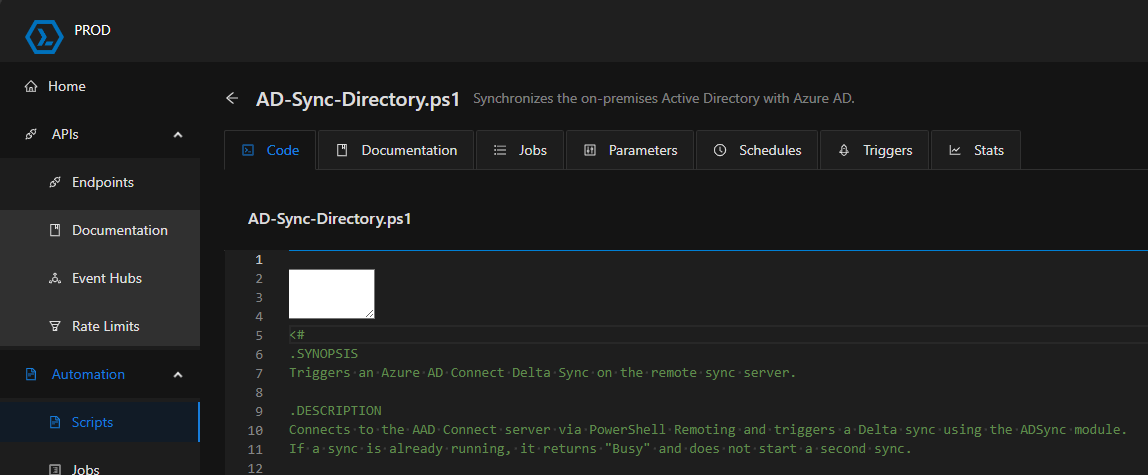
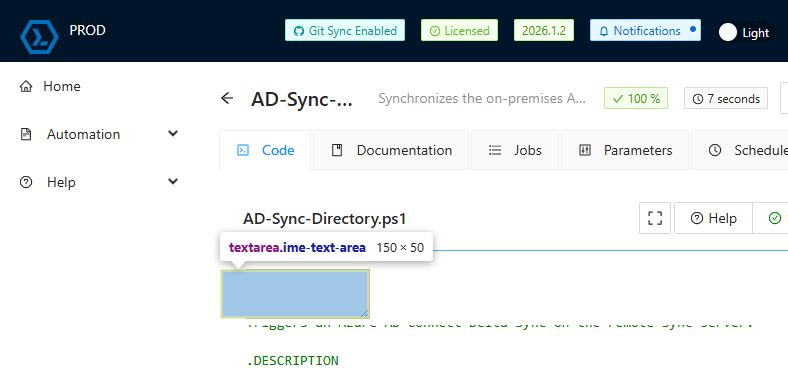

7081084c8c77fffb125b5f636611b6cc6085881f.png
1f13c5436f483a699c0e8eb84b8aa72f6274646d.png
c4a8dad0b4fafbcc7b640d02c5ad11b481d49ab7.png
try in a fresh browser profile,
or
clear the browser cache. (not the cookies)
This seems to be a rendering issue.
thanks, worked!