
dj
Error starting gRPC call on certain roles
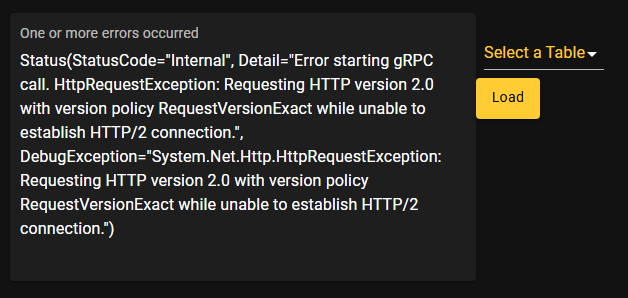
We have roles setup for different user bases that are just setup to look if they are members of groups in Entra since we use SSO. For one of our groups/roles (BadRole), when they go to a page that they are allowed to go to, they get the following error:
One or more errors occurred
Status(StatusCode="Internal", Detail="Error starting gRPC call. HttpRequestException: Requesting HTTP version 2.0 with version policy RequestVersionExact while unable to establish HTTP/2 connection.", DebugException="System.Net.Http.HttpRequestException: Requesting HTTP version 2.0 with version policy RequestVersionExact while unable to establish HTTP/2 connection.")
When I go to the page as my administrator role, it works fine:
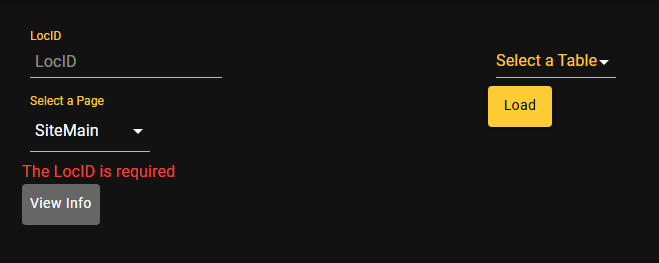
It's a simple form that doesn't checking of roles or do any permission specific lookups:
New-UDGrid -Item -ExtraSmallSize 3 -Content {
$Session:RNOutput = 'None'
New-UDForm -SubmitText "View Info" -ButtonVariant contained -Content {
New-UDTextbox -Id "RNLocID" -Placeholder "LocID" -Label "LocID"
New-UDSelect -Label "Select a Page" -Id "TableSelect" -Option {
New-UDSelectOption -Name "SiteMain" -Value "SiteMain"
New-UDSelectOption -Name "Location" -Value "Location"
New-UDSelectOption -Name "Equipment" -Value "Equipment"
New-UDSelectOption -Name "Circuits" -Value "Circuits"
New-UDSelectOption -Name "Phone Lines" -Value "Phones"
New-UDSelectOption -Name "Work Orders" -Value "WorkOrders"
New-UDSelectOption -Name "Employees" -Value "Employees"
New-UDSelectOption -Name "AV" -Value "AV"
} -DefaultValue "SiteMain"
} -OnValidate {
$FormContent = $EventData
if ($FormContent.RNLocID -eq $null -or $FormContent.RNLocID -eq '')
{
New-UDFormValidationResult -ValidationError "The LocID is required"
}
Else
{
New-UDFormValidationResult -Valid
}
} -OnSubmit {
Invoke-UDRedirect -Url "/OurSite/$($EventData.RNLocID)/$($EventData.TableSelect)"
}
}
The UDPage has this at the top:
New-UDPage -Url "/OurSite" -Name "OurSite" -Role @('Administrator', 'BadRole') -Content { ...
There is nothing the PSU logs at the time of loading the page, we do not use a proxy internally and we do have our site behind a load balancer. We did however, test going directly to the PSU servers (we have 2) and not thru the load balancer and the issue still remained. We are currently on version 2026.1.6 and tested it on 2026.2 in our QA environment with the same issue. Any ideas?
Apps to query exchange message tracking
We ended up moving all Exchange functions into automation scripts then have the UI call the scripts. Since you can set environments and credentials to use for each script. It resolved all the hassle of remote powershell sessions
Apps to query exchange message tracking
I wrote this back in the PSU 3.0 days and I sanitized it so you might wanna test it all out (maybe update some stuff too), but it should get you going.
New-UDPage -Name MessageTracking -Content {
    $Session:MessageTrackingShowTable = $null
    $Session:MessageTrackingData = $null

    New-UDForm -SubmitText "Search" -ButtonVariant 'contained' -Content {
        New-UDRow -Columns {
            New-UDColumn -SmallSize 3 -LargeSize 3 -Content {
                New-UDTextbox -Id "Sender" -Placeholder "Sender"
            }
            New-UDColumn -SmallSize 3 -LargeSize 3 -Content {
                New-UDTextbox -Id "Subject" -Placeholder "Subject"
            }
            New-UDColumn -SmallSize 3 -LargeSize 3 -Content {
                New-UDTextbox -Id "Recipient" -Placeholder "Recipient"
            }
            New-UDColumn -SmallSize 3 -LargeSize 3 -Content {
                New-UDTextbox -Id "MessageID" -Placeholder "Message ID"
            }
        }
        New-UDRow -Columns {
            New-UDColumn -SmallSize 3 -LargeSize 3 -Content {
                New-UDDatePicker -Id "StartDate" -Label "Start Date"
            }
            New-UDColumn -SmallSize 3 -LargeSize 3 -Content {
                New-UDTimePicker -Id "StartTime" -Label "Start Time" -Value ((Get-Date).ToString())
            }
            New-UDColumn -SmallSize 3 -LargeSize 3 -Content {
                New-UDDatePicker -Id "EndDate" -Label "End Date"
            }
            New-UDColumn -SmallSize 3 -LargeSize 3 -Content {
                New-UDTimePicker -Id "EndTime" -Label "End Time" -Value ((Get-Date).ToString())
            }
        }
        New-UDRow -Columns {
            New-UDColumn -SmallSize 4 -LargeSize 4 -Content {
                New-UDSelect -id "EventID" -Label "EventID" -Option {
                    New-UDSelectOption -Name "ALL" -Value "ALL"
                    New-UDSelectOption -Name "BADMAIL" -Value "BADMAIL"
                    New-UDSelectOption -Name "AGENTINFO" -Value "AGENTINFO"
                    New-UDSelectOption -Name "DEFER" -Value "DEFER"
                    New-UDSelectOption -Name "DELIVER" -Value "DELIVER"
                    New-UDSelectOption -Name "DSN" -Value "DSN"
                    New-UDSelectOption -Name "EXPAND" -Value "EXPAND"
                    New-UDSelectOption -Name "FAIL" -Value "FAIL"
                    New-UDSelectOption -Name "RECEIVE" -Value "RECEIVE"
                    New-UDSelectOption -Name "RESOLVE" -Value "RESOLVE"
                    New-UDSelectOption -Name "SEND" -Value "SEND"
                    New-UDSelectOption -Name "SUBMIT" -Value "SUBMIT"
                    New-UDSelectOption -Name "TRANSFER" -Value "TRANSFER"
                }
            }
            New-UDColumn -SmallSize 4 -LargeSize 4 -Content {
                New-UDButton -Text "Event ID Info" -OnClick {
                    Show-UDModal -Content {
                        New-UDList -Content {
                            New-UDListItem -Label 'BADMAIL' -SubTitle "A message submitted by the Pickup directory or the Replay directory that can't be delivered or returned."
                            New-UDListItem -Label 'AGENTINFO' -SubTitle "This event is used by transport agents to log custom data."
                            New-UDListItem -Label 'DEFER' -SubTitle "Message delivery was delayed."
                            New-UDListItem -Label 'DELIVER' -SubTitle "A message was delivered to a local mailbox."
                            New-UDListItem -Label 'DSN' -SubTitle "A delivery status notification (DSN) was generated."
                            New-UDListItem -Label 'EXPAND' -SubTitle "A distribution group was expanded."
                            New-UDListItem -Label 'FAIL' -SubTitle "Message delivery failed. Sources include SMTP, DNS, QUEUE, and ROUTING."
                            New-UDListItem -Label 'RECEIVE' -SubTitle "A message was received by the SMTP receive component of the transport service or from the Pickup or Replay directories (source: SMTP), or a message was submitted from a mailbox to the Mailbox Transport Submission service (source: STOREDRIVER)."
                            New-UDListItem -Label 'RESOLVE' -SubTitle "A message's recipients were resolved to a different email address after an Active Directory lookup."
                            New-UDListItem -Label 'SEND' -SubTitle "A message was sent by SMTP between transport services."
                            New-UDListItem -Label 'SUBMIT' -SubTitle "The Mailbox Transport Submission service successfully transmitted the message to the Transport service. "
                            New-UDListItem -Label 'TRANSFER' -SubTitle "Recipients were moved to a forked message because of content conversion, message recipient limits, or agents. Sources include ROUTING or QUEUE."
                        }
                    } -Footer {
                        New-UDButton -Text "Close" -OnClick { Hide-UDModal }
                    }
                }
            }
            New-UDColumn -SmallSize 4 -LargeSize 4 -Content {
                New-UDButton -Text "Source Value Info" -OnClick {
                    Show-UDModal -Content {
                        New-UDList -Content {
                            New-UDListItem -Label 'ADMIN' -SubTitle "The event source was human intervention. For example, an administrator used Queue Viewer to delete a message, or submitted message files using the Replay directory."
                            New-UDListItem -Label 'AGENT' -SubTitle "The event source was a transport agent."
                            New-UDListItem -Label 'DNS' -SubTitle "The event source was DNS."
                            New-UDListItem -Label 'DSN' -SubTitle "The event source was a delivery status notification (also known as a DSN, bounce message, non-delivery report, or NDR)."
                            New-UDListItem -Label 'QUEUE' -SubTitle "The event source was a queue."
                            New-UDListItem -Label 'ROUTING' -SubTitle "The event source was the routing resolution component of the categorizer in the Transport service."
                            New-UDListItem -Label 'SMTP' -SubTitle "The message was submitted by the SMTP send or SMTP receive component of the transport service."
                            New-UDListItem -Label 'STOREDRIVER' -SubTitle "The event source was a MAPI submission from a mailbox on the local server."
                        }
                    } -Footer {
                        New-UDButton -Text "Close" -OnClick { Hide-UDModal }
                    }
                }
            }
        }
    } -OnSubmit {
        $PSTargetServer = "ServerName"
        [string]$PSConnectionURI = "http://$PSTargetServer/powershell?serializationLevel=Full;clientApplication=ManagementShell;TargetServer=$PSTargetServer;PSVersion=3.0"
        $EXPSSession = New-PSSession -ConfigurationName Microsoft.Exchange -ConnectionUri $PSConnectionURI -Authentication Kerberos
        Import-PSSession $EXPSSession -AllowClobber -WarningAction:SilentlyContinue -DisableNameChecking -CommandName Get-MessageTrackingLog | Out-Null

        [DateTime]$StartDate = $EventData.StartDate
        [DateTime]$StartTime = $EventData.StartTime
        [DateTime]$EndDate = $EventData.EndDate
        [DateTime]$EndTime = $EventData.EndTime

        [DateTime]$StartDateTime = $StartDate.ToShortDateString() + " " + $StartTime.ToShortTimeString()
        [DateTime]$EndDateTime = $EndDate.ToShortDateString() + " " + $EndTime.ToShortTimeString()

        if ($StartDateTime -gt $EndDateTime)
        {
            Show-UDToast -Message "Start DateTime must be before End DateTime" -Persistent
        }
        elseif (($EventData.Sender -eq $null -or $EventData.Sender -eq '') -and ($EventData.Recipient -eq $null -or $EventData.Recipient -eq ''))
        {
            Show-UDToast -Message "Must include Sender or Recipient in search" -Persistent
        }
        else
        {
            $MessageParams = @{
                Start               = $StartDateTime
                End                 = $EndDateTime
                ErrorAction        = 'Stop'
            }

            if ($EventData.Subject -ne $null -or $EventData.Subject -ne '')
            {
                $MessageParams.MessageSubject = $EventData.Subject
            }
            if ($EventData.Sender -ne $null -or $EventData.Sender -ne '')
            {
                $MessageParams.Sender = $EventData.Sender
            }
            if ($EventData.MessageId -ne $null -or $EventData.MessageId -ne '')
            {
                $MessageParams.MessageId = $EventData.MessageId
            }
            if ($EventData.Recipient -ne $null -or $EventData.Recipient -ne '')
            {
                $MessageParams.Recipients = $EventData.Recipient
            }
            if ($EventData.EventId -ne "ALL")
            {
                $MessageParams.EventId = $EventData.EventId
            }

            Try {
                $MessageSearchResults = Get-MessageTrackingLog @MessageParams

                $Session:MessageTrackingData = [System.Collections.ArrayList]::new()
                foreach ($Message in $MessageSearchResults)
                {
                    [void]$Session:MessageTrackingData.Add([pscustomobject][ordered]@{
                            Sender         = $Message.Sender
                            Recipients     = $Message.Recipients -join ";"
                            Directionality = $Message.Directionality
                            Timestamp      = $Message.Timestamp.ToString()
                            EventId        = $Message.EventId
                            Subject        = $Message.Subject
                            Source         = $Message.Source
                            ServerHostName = $Message.ServerHostName
                            TotalBytes     = $Message.TotalBytes
                            MessageId      = $Message.MessageId
                            ReturnPath     = $Message.ReturnPath
                            SourceContext  = $Message.SourceContext
                            ConnectorId    = $Message.ConnectorId
                        })
                }
                $Session:MessageTrackingShowTable = $true
                Sync-UDElement -Id 'MessageTrackingResults'
            }
            Catch {
                Show-UDToast -Message "Error during message tracking search: $($_.Exception.Message)" -BackgroundColor Red
                break
            }
        }
    }
    New-UDDynamic -Id 'MessageTrackingResults' -Content {
        if ($Session:MessageTrackingShowTable -and $Session:MessageTrackingData)
        {
            $MessageTrackingColumns = @(
                New-UDTableColumn -Property Directionality -Title Directionality -Filter -FilterType select -IncludeInExport
                New-UDTableColumn -Property Sender -Title Sender -Filter -FilterType text -IncludeInExport
                New-UDTableColumn -Property Recipients -Title Recipients -Filter -FilterType text -IncludeInExport
                New-UDTableColumn -Property Subject -Title Subject -Filter -FilterType text -IncludeInExport
                New-UDTableColumn -Property Timestamp -Title Timestamp -Filter -FilterType date -DefaultSortColumn -IncludeInExport
                New-UDTableColumn -Property EventId -Title EventId -Filter -FilterType select -IncludeInExport
                New-UDTableColumn -Property Source -Title Source -Filter -FilterType select -IncludeInExport
                New-UDTableColumn -Property ServerHostName -Title ServerHostName -Filter -FilterType select -IncludeInExport
                New-UDTableColumn -Property TotalBytes -Title TotalBytes -Filter -FilterType range -IncludeInExport
                New-UDTableColumn -Property MessageId -Title MessageId -Filter -FilterType text -Hidden -IncludeInExport
                New-UDTableColumn -Property ReturnPath -Title ReturnPath -Filter -FilterType text -Hidden -IncludeInExport
                New-UDTableColumn -Property SourceContext -Title SourceContext -Filter -FilterType text -Hidden -IncludeInExport
                New-UDTableColumn -Property ConnectorId -Title ConnectorId -Filter -FilterType text -Hidden -IncludeInExport
            )
            New-UDTable -Data $Session:MessageTrackingData -Columns $MessageTrackingColumns -ShowExport -ShowSort -Paging -PageSize 50 -ShowFilter
        }
    }
}
UI looks like this and will load the messages into a table at the bottom if it finds results

Error creating contact: No provisioning handler is installed. - Hybrid Exchange
Without knowing how your PSU is setup, it’s probably a permission issue. What is the account you are using to run your PSU instance or the PSU environment? Does that account have proper permissions in Exchange? It will use ‘Local System’ by default which obviously won’t have any permissions in Exchange.
As a side note, while it does work for most cmdlets, it’s not recommended to manually load the Exchange Snap-ins for anything other than Exchange 2010 and if you are still running Exchange 2010 then you have a bunch of other problems. You should always do a remote connection to an actual Exchange server instead of a server with mgmt tools installed on it.
Line break after New-UDTextBox
I used to do the New-UDElement but New-UDStack is more readable when looking at the code and more cleaner
New-UDApp -title "This Is A Title" -Content {
    New-UDStack -Content {
        New-UDTextbox -Label "First Name"
        New-UDTextbox -Label "Last Name"
        New-UDButton -Text "Submit"
    } -Spacing 2 -Direction 'column'
}Errors around if else and pages and $Roles
Unable to Render in Tables and Datagrids
First off, your running a 2+ year old version of PSU (6/25/23) and officially 101 versions behind the most current version. #1 I would recommend, at a minimum, upgrading to the most recent version of 4.X which would be 4.5.5 (7/25/25). There were a number of table/grid render fixes since your 4.0.2. Such as:
4.1.7 - 10/23/2023
Fixed an issue with variable scoping in rendered table rows (#2776)
4.3.4 - 7/29/2024
Fixed an issue with data grid columns not rendering properly (#3443)
4.4.1 - 10/1/2024
Fixed an issue rendering a nested table.
Fixed a rendering issue with dropdown buttons in a data grid cell (#3327)
That being said, if this works on another server running the same version then I would try to re-install PSU. Also try creating a new page with just that render example to see if maybe their is something else in your page code that is messing things up.
New-UDPage -Url “/Test” -Name “Test” -Content {$Data = @(@{Dessert = ‘Frozen yoghurt’; Calories = 1; Fat = 6.0; Carbs = 24; Protein = 4.0 }@{Dessert = ‘Ice cream sandwich’; Calories = 159; Fat = 6.0; Carbs = 24; Protein = 4.0 }@{Dessert = ‘Eclair’; Calories = 159; Fat = 6.0; Carbs = 24; Protein = 4.0 }@{Dessert = ‘Cupcake’; Calories = 159; Fat = 6.0; Carbs = 24; Protein = 4.0 }@{Dessert = ‘Gingerbread’; Calories = 200; Fat = 6.0; Carbs = 24; Protein = 4.0 })
$Columns = @(
    New-UDTableColumn -Property Dessert -Title Dessert -Render {
        New-UDButton -Id "btn$($EventData.Dessert)" -Text "Click for Dessert!" -OnClick { Show-UDToast -Message $EventData.Dessert }
    }
    New-UDTableColumn -Property Calories -Title Calories
    New-UDTableColumn -Property Fat -Title Fat
    New-UDTableColumn -Property Carbs -Title Carbs
    New-UDTableColumn -Property Protein -Title Protein
)

New-UDTable -Data $Data -Columns $Columns -Sort -Export
}Issue with Render in a Column
Just to follow up, I was having the same issue although I already had my columns explicitly in the New-UDTable but as soon as I removed the -id from the button it fixed my issue. So maybe its remove the -id and explicitly list the columns. I also didn’t have to store $EventData to another variable. Weird all the way around though
JWT Validation built in
Any insight @Adam Driscoll ?
JWT Validation built in
Does PSU have any JWT validation built in when using Oauth to Entra ID? I don’t see anything in the docs about it.