
Mordecai
Is PSU being abandoned ?
Are you serious?
Looking at 2026.3.x I see the opposite.
Way too many changes and fixes. I can't keep up with testing ;)
To me it seems the use of AI assisted coding added and changed a lot and introduced a lot of bugs.
To me it seems as well that forum posts get handled partially by AI.
It looks like Devolutions has a bigger workforce set on PSU.
And Adam is still keeping after many support calls in the forum.
While the old and nice chit-chat has vanished, there are still many questions and answers (I am subscribed to anything new, and it is a lot)
So while I personally liked the old style much more and I must admit that I am not a big fan of devolutions,
I don't see the project dying at all.
From a business perspective things seem to go the right direction.
I am with @deroppi, we have a ton of new features, small enhancements and bug fixes in the last few months (perhaps too much ;)). But the fact that the public issue tracker is gone is something that i do not like too.
Docs app: "You cannot call a method on a null-valued expression" at index.ps1 line 555 ($PSUBasePath is null)
Hi Support,
i found a small bug in the integration documentation app:
Version: PowerShell Universal 2026.2.5, Linux (container, Rocky Linux base), no base path configured.
What happens: On every server start the built-in Docs app logs two errors: You cannot call a method on a null-valued expression. / at ScriptBlock, /opt/universal/Docs/index.ps1: line 555
Cause: line 555 renders the "Powered by Devolutions" navigation item with $($PSUBasePath.TrimEnd('/')) for the light and the dark logo. $PSUBasePath is $null when no base path is configured, so TrimEnd is called on $null - one error per logo.
Suggested fix: guard the call, e.g. $("$PSUBasePath".TrimEnd('/')) or $(if ($PSUBasePath) { $PSUBasePath.TrimEnd('/') }).
Expected: no errors when no base path is set; the logo URLs fall back to the root.
Thanks
René
An early API login as the configured default admin permanently prevents the local admin account from being created (the web UI is protected, the API is not)
Hi,
i found a "strange" bug that i was finally able to reproduce on different containers about the local admin creation (troubleshooting was done in relation `Set-PSUIdentity -Password` does not update `PasswordLastSet` (the reset page does) - Devolutions Forum)
ENVIRONMENT
PowerShell Universal: 2026.2.5
Host: Linux container (Rocky-based image), PowerShell 7.6.3
Database: SQLite, empty (first run)
Configuration: PSUDefaultAdminName / PSUDefaultAdminPassword set via environment
SUMMARY
On a first run against an empty database, PowerShell Universal creates the local
administrator account from PSUDefaultAdminName / PSUDefaultAdminPassword roughly 110
seconds after the service starts (slow developer notebook with a lot of containers too).
If an authentication request using that same user name reaches the API before then (READ or Get-PSUIdentity), the
ClaimsEvaluator inserts a claims identity under that name, and the first-run creation
afterwards fails:
ClaimsEvaluator psu_admin is not in the database. Adding identity.
System.Exception: Identity 'psu_admin' already exists.
at PowerShellUniversal.Authentication.IdentityService.CreateIdentity(Identity identity)
in .../PowerShellUniversal.Authentication/IdentityService.cs:line 120
The instance is left with an identity of that name that is not a local account and has no
password. Nobody can log in with it, and a restart does not repair it, because
PSUDefaultAdmin* are only consulted while no administrator account exists - and now one
does. The database has to be recreated.
THREE RUNS, SAME IMAGE, ONLY THE EARLY REQUEST DIFFERS
Run During startup Identity table afterwards
----------- --------------------------------- --------------------------------------
control nothing psu_admin LocalAccount=1, password set
API basic auth as psu_admin at ~t+79s psu_admin LocalAccount=0, no password
browser repeated visits to the login page psu_admin LocalAccount=1, password set
The browser run could not reproduce it, and that appears to be by design: for the whole
startup window GET /login answers 302 to /first-run, which shows "PowerShell Universal is
starting..." and offers no login form. The user is simply held there until the account
exists.
Basic authentication against the API has no such gate. Polled every 3 seconds from the
first second, GET /api/v1/accessible with the admin name and password returned:
t+ 0s 401 (server not up)
t+ 79s 200 <-- account does not exist yet; this is the request that breaks it
t+148s 401
STEPS TO REPRODUCE
1. Start an instance with an empty database and PSUDefaultAdminName/Password set.
2. From the first second, send basic-auth requests with that user name to any API
endpoint - we used GET /api/v1/accessible.
3. Let startup finish, then inspect the Identity table or try to log in.
EXPECTED
An authentication attempt should not be able to prevent the account from being created.
Either the first-run creation wins, or it completes the existing identity into a local
account. A 200 for an account that does not exist yet also looks wrong on its own.
IMPACT
Easy to hit unintentionally on a new deployment: a health check, a monitoring probe or a
deployment script that authenticates as the admin during the first two minutes is enough,
and the damage is permanent for that database. We hit it with an automated readiness
check; interactive users never did, because the /first-run gate protects them.
QUESTION
Is there a supported way to recover an instance already in this state, short of
recreating the database - for example removing the identity and restarting?
Thanks,
René
`Set-PSUIdentity -Password` does not update `PasswordLastSet` (the reset page does)
Hi Support,
we have found a problem with the Password Reset for the builtin/local admin account and documentation issues.
Title: Set-PSUIdentity -Password does not update PasswordLastSet (the reset page does)
ENVIRONMENT
PowerShell Universal: 2026.2.5
Host: Linux container (Rocky-based image), PowerShell 7.6.3
Database: SQLite (default)
Client: PowerShell 7.5 on Windows, management API via -ComputerName / -Credential
Settings: PasswordExpirationDays = 1095, PasswordLength = 12
Account: local account, Administrator role, created at first run from
PSUDefaultAdminName / PSUDefaultAdminPassword
SUMMARY
Two ways of changing a local account's password behave differently, and only one of them
keeps the expiration clock consistent:
Path Password changes PasswordLastSet updated
--------------------------- ---------------- -----------------------
/reset-password page yes YES
Set-PSUIdentity -Password yes NO
Because expiration is evaluated against PasswordLastSet, an account whose password is
rotated programmatically will still be forced through the reset page once the configured
period elapses - even though its password was changed the day before.
STEPS TO REPRODUCE
1. Configure PasswordExpirationDays.
2. Note PasswordLastSet: Get-PSUIdentity | Where-Object Name -eq '<name>'
3. Set-PSUIdentity -Id <id> -Password (ConvertTo-SecureString '<new>' -AsPlainText -Force)
4. Confirm the change took effect - the new password authenticates, the old one returns 401.
5. PasswordLastSet is unchanged. Verified both through Get-PSUIdentity and by reading the
Identity table in the SQLite database directly, across two changes on the same day.
6. For contrast, set PasswordLastSet to a date beyond the expiration period, log in through
the web UI, and complete the reset the product offers. PasswordLastSet is updated correctly.
EXPECTED
Set-PSUIdentity -Password updates PasswordLastSet, exactly as the reset page does.
Your release notes suggest the same gap existed elsewhere and was fixed. From 2025.11.0:
"Fixed an issue where the ResetAdminAccount environment variable process would not set
PasswordLastSet".
SECOND OBSERVATION, POSSIBLY BY DESIGN
With PasswordLastSet beyond the expiration period, the two entry points disagree:
- The login page redirects to /reset-password with "Your password has expired."
- Basic authentication against GET /api/v1/accessible still returns 200 with that same
expired password, before and after a service restart.
Is the API deliberately exempt from expiration, or is the check not applied on that path?
DOCUMENTATION NOTE
The Local Accounts page
(https://docs.devolutions.net/powershell-universal/security/local-accounts)
states that for an account created from PSUDefaultAdminName / PSUDefaultAdminPassword
"password restrictions are not enforced", and describes expiration on that same page as one
of those restrictions. Such an account does expire, as the redirect above shows.
PasswordExpirationDays and PasswordLength also exist as Set-PSUSetting parameters but appear
nowhere in the documentation.
Thanks for your support,
René
Set-PSUSetting -DisableAutoReload:$false (-Integrated) has no effect - Auto-reload can't be enabled code-first
Hello Mordecai,
Thank you for the detailed reproduction steps.
I completed an isolated validation using PowerShell Universal 2026.2.2.0 on Windows with the ZIP installation.
The laboratory confirmed a behavioral difference between the administrative console and Set-PSUSetting:
.universal\settings.ps1 executed on every expected startup.
Set-PSUSetting completed without relevant binding errors.
$false, $true, with and without -Integrated, and the DisableCodeFirst alias produced the same result.
The code-first variants did not persist or apply the Auto-reload state.
Enabling Auto-reload through the administrative console persisted after restarting PSU.
The console stored the enabled state per node and subsequent file modifications were detected and processed automatically.
This confirms that the administrative-console toggle and Set-PSUSetting -DisableAutoReload are not applying the same effective state in PSU 2026.2.2.0.
I will escalate the laboratory findings and sanitized reproduction evidence internally to our Development team. They will need to confirm whether the cmdlet behavior is a product defect, an implementation limitation, or whether the parameter is intended to have different semantics from the current Auto-reload toggle.
I will update this thread after we receive a confirmed technical assessment.
Best regards,
Ruben Tapia
@rubentapia
Hi, any news on this?
Variables & Secrets in Tests
@rubentapia We are having a smiliar (or the same?) problem with variables, especially secret variables - the value is always $null. The issue is also explained here in the last few comments: Retrieving Secrets by name when the name is a variable
We need secret variables to be available on "first start" of PSU. So, with empty secretstore or database. We tried many different ways until we found the issue and explanation in the thread above.
When we are doing this on a fresh startup, the variable is being created but not available in the SecretStore (doesn't matter if the PSUSecretStore or the Database is used as vault).
The ENV variables are available - you can also do it manually (as described in the other thread, starting here: https://forum.devolutions.net/topics/54889/retrieving-secrets-by-name-when-the-name-is-a-variable?message=233317#233317)
The creation of the secret variable is working in the admin menu and when executing the below command afterwards (using token with connect-psuserver or -Integrated switch while executing inside psu: `New-PSUVariable -Name 'svc_universal-test' -Type 'PSCredential' -InputObject $RunAsCredential -Vault 'Database'` -Integrated)
PSU version and build: Tested on 2026.2.2 & 2026.2.3
Selected test environment: PowerShell 7 (Linux / Docker Container)


if ($env:RUNAS_UPN -and $env:RUNAS_PASSWORD) {
    $RunAsPassword = ConvertTo-SecureString -String $env:RUNAS_PASSWORD -AsPlainText -Force
    $RunAsCredential = [System.Management.Automation.PSCredential]::new($env:RUNAS_UPN, $RunAsPassword)

    New-PSUVariable -Name 'svc_universal-test' -Type 'PSCredential' -InputObject $RunAsCredential -Vault 'Database'
}
Also not working (with or without SecureString):
New-PSUVariable -Name 'svc_universal-test' -Type 'PSCredential' -Vault 'Database'
Set-PSUVariable -UserName $env:ARC_RUNAS_UPN -Password $env:ARC_RUNAS_PASSWORD -Name 'svc_universal-test'
New-PSUVariable -Name 'svc_universal-test' -Type 'PSCredential' -Vault 'PSSecretStore'
Set-PSUVariable -InputObject $RunAsCredential -Name 'svc_universal-test'Also when using -Force on New-PSUVariable (because you got the error message 'New-PSUVariable: A Variable with the name: "svc_universal-test" already exists. Provide a unique name.'(, the variable will be created again, so you end up with 2 variables and the admin menu will not load the variables page anymore:
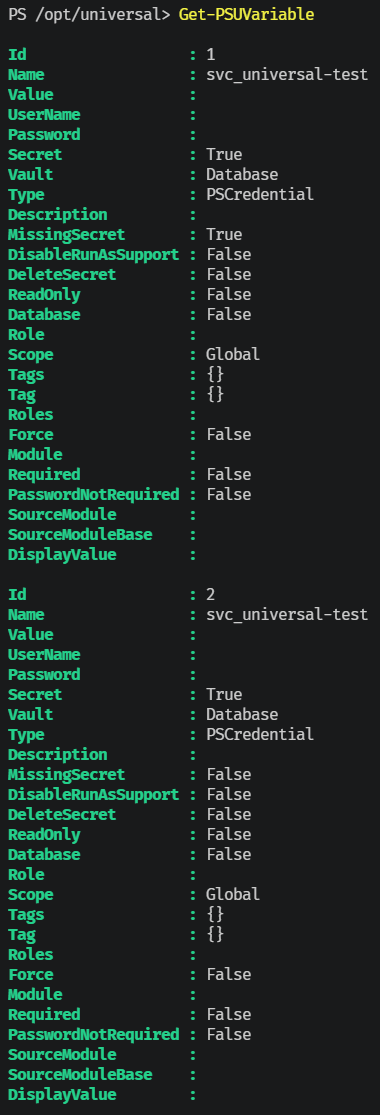
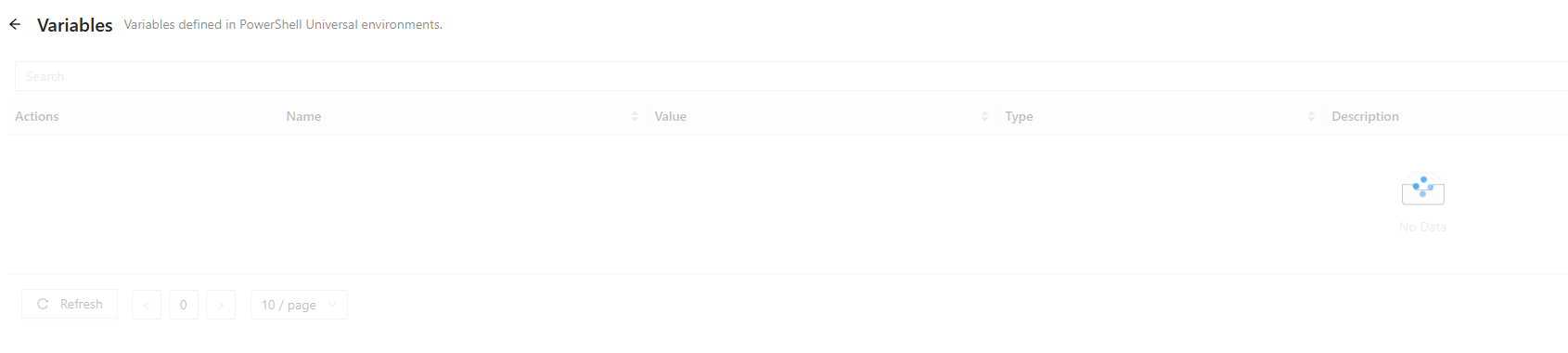
Regards
René
Set-PSUSetting -DisableAutoReload:$false (-Integrated) has no effect - Auto-reload can't be enabled code-first
Hi,
PSU version: 2026.2.2 (Windows, licensed, ZIP Installation)
What we're trying to do:
Enable the "Auto-reload" toggle (Settings -> Files -> Configuration Changes) programmatically from a code-first script (.universal/settings.ps1), so a freshly provisioned local dev instance or automatically newly deployed instances doesn't need a manual click every time.
Steps to reproduce:
1. Fresh instance, new/empty database (GitSyncBehavior is not OneWay, so the
toggle is available, not greyed out).
2. In .universal/settings.ps1 (a script PSU re-evaluates on every server
start), call:
Set-PSUSetting -DisableAutoReload:$false -Integrated
(also tested without -Integrated)
3. Restart the server (reusing the same database, no DB reset) several times.
Expected: Settings -> Files -> Configuration Changes -> "Auto-reload" toggle shows enabled.
Actual: Toggle stays off across every restart, no matter how many times the script runs with -DisableAutoReload:$false.
Isolating the cause:
- Manually flipping the same toggle ON once via the admin console persists
correctly across subsequent restarts (as long as the DB isn't recreated) -
so DB persistence of the setting itself works fine.
- This suggests Set-PSUSetting -Integrated either doesn't write
DisableAutoReload to the database at all, or writes it but the running
process doesn't pick it up, while the admin console's toggle goes through a
different code path that applies it live.
- Also tried the DisableCodeFirst alias - same result.
Questions:
1. Is this a known bug, or is DisableAutoReload intentionally not settable via -Integrated or code directly?
2. Is there any supported code-first / startup-time way (appsettings.json key, cmdlet, CLI flag) to enable Auto-reload on a fresh instance without a manual admin console click?
3. If not, could this be added as a feature - i.e. Set-PSUSetting actually applying DisableAutoReload live, matching the admin console's behavior?
Happy to provide logs or run further tests if useful.

Thanks,
René
When using New-UDApp with -PageNotFound the default page "reset-password" is not working anymore
Hi René,
Thank you for reporting this.
I have not confirmed this behavior yet on my side, but based on your description it sounds like the custom `PageNotFound` handler may be intercepting the built-in `reset-password` route when the app is hosted at `BaseUrl '/'`.
To help us validate and reproduce this accurately, could you please share the following details?
* PowerShell Universal version
* Whether this only happens with `BaseUrl '/'` or also with another base URL, such as `/test`
* Whether the issue happens with only `PageNotFound`, only `NotAuthorized`, or only when both are defined
* A minimal tested script that reproduces the behavior
* Any PSU logs generated when trying to access the reset password page with an expired local account
As an initial workaround, could you also test whether temporarily removing the custom `PageNotFound` block allows the built-in reset password page to load correctly?
Once we have those details, we can try to reproduce the issue and determine whether this needs to be escalated as a routing issue with built-in PSU pages and apps hosted at the root path.
Thanks,
Ruben Tapia
@rubentapia
Hi, thanks for the answer. I will do it. We are currently in the release of a new web app (based on psu). i will come back as soon as possible to answer your questions
When using New-UDApp with -PageNotFound the default page "reset-password" is not working anymore
Hi,
when i am using `PageNotFound` and `NotAuthorized` parameter for `New-UDApp` i cannot view the "reset-password" page when i run an app on "/" as `BaseUrl`.
When the password of PSU Admin acccount or other local accounts expires, the scriptblock in PageNotFound will be triggered and in my use case i will be redirected to a custom page.
I do not know if this is also the same for other integrated urls that are located at "/".
Anyone else have this? Can this please be reproduced/fixed?
Demo code (AI generated, not tested, but parameters and usage are the same as for my use case):
New-PSUApp -Name 'BugReport-ResetPassword' -BaseUrl '/' -Authenticated -Content {

    New-UDApp `
        -Title 'Bug Report Demo' `
        -PageNotFound {
            New-UDTypography -Text 'Custom PageNotFound'
        } `
        -NotAuthorized {
            New-UDTypography -Text 'Custom NotAuthorized'
        } `
        -Content {

            New-UDTypography -Text 'Home Page'

        }

}
Thanks
René
Performance Environments
HI @marcobux what could also be a “problem” is the background jobs powershell or .net is doing at startup. I have written a script some time ago to disable some of them in our environments (sometimes air gapped systems where only the powershell update check hangs for 5-10 seconds). Perhaps it is useful for you.
In general you only need the machine scope on servers, since we are also using this on our workstations, we are doing both. it fails with a warning if running as user (not administrator) and only applies user scope variables.
At the end, if you set $VerbosePreference = ‘Continue’before running the code, it will also output the found environment variables:
<#
    .SYNOPSIS
        Configure PowerShell and .NET environment variables for air-gapped environments.
    .DESCRIPTION
        This script configures environment variables to:
        - Disable PowerShell telemetry
        - Disable PowerShell update notifications
        - Disable PowerShell diagnostics telemetry
        - Disable .NET CLI telemetry
        - Disable .NET welcome banners
        - Reduce unnecessary module analysis cache cleanup activity

        The script first tries to configure Machine scope.
        If Machine scope fails, it falls back to User scope.

        Official documentation:
        PowerShell Environment Variables:
        https://learn.microsoft.com/powershell/module/microsoft.powershell.core/about/about_environment_variables

        PowerShell Telemetry:
        https://learn.microsoft.com/powershell/module/microsoft.powershell.core/about/about_telemetry

        PowerShell Update Notifications:
        https://learn.microsoft.com/powershell/module/microsoft.powershell.core/about/about_update_notifications

        PowerShell Startup Performance:
        https://learn.microsoft.com/powershell/scripting/dev-cross-plat/performance/startup-performance

        .NET CLI Telemetry:
        https://learn.microsoft.com/dotnet/core/tools/telemetry
    .NOTES
        Recommended for:
        - Air-gapped environments
        - Offline systems
        - Restricted enterprise environments
        - CI/CD runners
        - Non-interactive automation hosts

        A restart of PowerShell sessions is required after applying changes.
#>

# Configure environment variables
$EnvironmentVariables = @{
    POWERSHELL_TELEMETRY_OPTOUT         = '1'
    POWERSHELL_UPDATECHECK              = 'Off'
    POWERSHELL_DIAGNOSTICS_OPTOUT       = '1'
    DOTNET_CLI_TELEMETRY_OPTOUT         = '1'
    DOTNET_NOLOGO                       = 'true'
    PSDisableModuleAnalysisCacheCleanup = '1'
}

# Configure preferred scope order
$Scopes = @(
    'Machine'
    'User'
)

# Apply environment variables
$AppliedScope = $null

foreach ($Scope in $Scopes) {
    try {
        Write-Verbose -Message ("Trying environment scope: {0}" -f $Scope)

        foreach ($Variable in $EnvironmentVariables.GetEnumerator()) {
            [System.Environment]::SetEnvironmentVariable(
                $Variable.Key,
                $Variable.Value,
                $Scope
            )
        }

        $AppliedScope = $Scope

        Write-Verbose -Message (
            "Successfully configured environment variables in scope: {0}" -f
            $Scope
        )

        break
    }
    catch {
        Write-Warning -Message (
            "Failed to configure environment variables in scope '{0}'. {1}" -f
            $Scope,
            $_.Exception.Message
        )
    }
}

# Display configured variables by scope
foreach ($Variable in $EnvironmentVariables.Keys | Sort-Object) {
    foreach ($Scope in $Scopes) {
        $Value = [System.Environment]::GetEnvironmentVariable(
            $Variable,
            $Scope
        )

        Write-Verbose -Message (
            "{0} = {1} [{2}]" -f
            $Variable,
            $Value,
            $Scope
        )
    }
}Developer License: what needs to be done if hosting on docker behind proxy server
in with Devolutions Account
@mjs461 So, the “old way” of generating a developer license from a paid license is not working anymore? We are using this way for our development systems. These are all “infrastructure as code”, so we do not have a browser or something else to login with devolution account. We are only using this for developing anything inside psu, test it and then it goes to the systems with paid licenses.Also our systems never have internet access.
Our license will expire soon - What can we do?
UD-Pivot on new version of dashboard
Thanks First, I checked to see if you were still actively developing it; if so, I would have reached out to you directly instead of forking it. We still had quite a few requirements (e.g., adding pivot charts with value filters, layout, sorting, etc., when the page loads, and displaying them in a preset dropdown so they can be reused).
I also liked the word cloud chart (psDevUK/Cloud-Tag: Animated Tag Cloud for UniversalDashboard), thanks for that
UD-Pivot on new version of dashboard
Thank you, if something is not working, feel free to contact me or open an issue on Github .
Also, since i could only test it in my environment, i would be interested in feedback.
New Pivot Table Charting Component
For anyone finding this old thread:
Hi, i know this is an old post, but i really liked the UD-Pivot component from @AnonymousUser and since there is nothing similar built it (see Add Pivot Table support as new component · Issue #4942 · ironmansoftware/powershell-universal), i rebuild the component by myself with newest react components, working in the latest PSU version.
The module should be backward compatible, at least in my dashboards/apps it is.
you can see it here: PowerShell Gallery | UniversalDashboard.Pivot 1.0.0
Function is named New-UDPivot
I also added a lot of parameters - you can now customize the pivot table and also give presets for the properties including value filters.
More information on the github repository: GitHub - eizedev/UD-Pivot: PowerShell Universal custom component for interactive pivot tables based on react-pivottable (React 19 compatible) · GitHub
UD-Pivot on new version of dashboard
Hi @AnonymousUser i know this is an old post, but i really liked the UD-Pivot component from @AnonymousUser and since there is nothing similar built it (see Add Pivot Table support as new component · Issue #4942 · ironmansoftware/powershell-universal), i rebuild the component by myself with newest react components, working in the latest PSU version.
The module should be backward compatible, at least in my dashboards/apps it is.
you can see it here: PowerShell Gallery | UniversalDashboard.Pivot 1.0.0
Function is named New-UDPivot
I also added a lot of parameters - you can now customize the pivot table and also give presets for the properties including value filters.
More information on the github repository: GitHub - eizedev/UD-Pivot: PowerShell Universal custom component for interactive pivot tables based on react-pivottable (React 19 compatible) · GitHub
Custom LoginPage
Thanks @marcobux for mentioning my post. I also support the issue about Alternative Login Page Layouts.
I also like the way microsoft allows customizations to their ADFS themes for the login page.
You can take a closer look here: microsoft/adfsWebCustomization: A repository of useful Web Customizations for Active Directory Federation Services
And here is the code with a screenshot:
adfsWebCustomization/centeredUi at master · microsoft/adfsWebCustomization
We are using this approach internally a lot.
Very slow table rendering
@AnonymousUser
In general, you are using the right approach: you need to use the -LoadData parameter and add a scriptblock to add where you specify how your data is loaded with filtering, pageination …
You can find a similar example also on the demo page: PowerShell Universal
Note:
What I had to understand at the beginning is the fact that with LoadData you have to do the filtering, pagination, sorting etc. yourself in the LoadData script block. So everything that a user specifies/does in the table in the browser (entering filters, sorting a column, etc.) must be done in LoadData itself. If you enter a filter in a column, you have to calculate how many values match this filter and adjust the Pages and TotalSize etc. accordingly. If a user clicks on a column to sort it, you have to recognize this and sort your PowerShell object yourself.
The most important thing is that you pass a PowerShell object with, for example, 50000 data records. With the pagination that you calculate yourself, however, only e.g. 15 entries (PageSize) are obtained from the object and displayed. Therefore the initial loading is much faster, but it could take a little longer when changing pages.
Here is an example from one of our custom functions:
The code creates a hashtable with all parameters later used with splatting for New-UDTable.
$InputData or $Data contains your data for the table to show (in this example).
# Example $Data
$Data = [System.Collections.ArrayList]::new()
$Data = $InputData | ForEach-Object {
    [PSCustomObject]@{
        'Column1'   = [float]$_.column1
        'Column2'   = [string]$_.column2
        'Column3'   = [Int]$_.column3
        'Column4'   = [Int]$_.column4
        'Column5'   = [string]$_.column5
        'Column6'   = [Int]$_.column6
        'Column7'   = [Int]$_.column7
    }
}

#region New-UDTable parameter
$params_table = @{
    Id                   = "table_$($UniqueId)_table_data"
    Columns              = $objColumns
    PaginationLocation   = $PaginationLocation
    PageSize             = $PageSize
    ShowPagination       = $ShowPagination
    ShowFilter           = $ShowFilter
    ShowSearch           = $ShowSearch
    ShowExport           = $ShowExport
    ShowSort             = $true
    DefaultSortDirection = $DefaultSortDirection
    TextOption           = $Options
}

if ($Dense) {
    $params_table['Dense'] = $true
}


$params_table['LoadData'] = {
       # if something was added to the filter on top of the columns, filter the data
        foreach ($Filter in $EventData.Filters) {
            $Data = $Data | Where-Object -Property $Filter.Id -Match -Value $Filter.Value
        }

        # Get TotalCount of the input data to calculate pagination
        $TotalCount = $Data.Count

        # if one table column will be sorted (someone clicked on the sorting in the table, sort also the content
        if (-not [string]::IsNullOrEmpty($EventData.OrderBy.Field)) {
            $Descending = $EventData.OrderDirection -ne 'asc'
            $Data = $Data | Sort-Object -Property ($EventData.orderBy.Field) -Descending:$Descending
        }
        # calculate page amount, each page size (default 5) based on the total objects
        $Data = $Data | Select-Object -First $EventData.PageSize -Skip ($EventData.Page * $EventData.PageSize)
        # output the data to the table
        $Data | Out-UDTableData -Page $EventData.Page -TotalCount $TotalCount -Properties $EventData.Properties
    }
#endregion

New-UDTable @params_table