Variables & Secrets in Tests

Are variable and secrets supposed to be available to tests as we have built tests that require these but are all failing?
All Comments (6)
Hello seanhickey,
Variables and secrets should be available to tests when they are included in the environment selected for the test run. Please confirm that the test is running with the same PowerShell Universal environment used by the scripts that work as expected.
For custom environments, please check the environment’s variable configuration. Default environments import all variables, but custom environments must explicitly include the appropriate variables. Secrets can also be accessed with the `$Secret:` scope.
As a minimal test, please try validating only that a non-sensitive variable and secret are available, without writing their values to output. For example, verify whether the variable is non-null and whether `$Secret:<secret-name>` resolves.
Please share the following, sanitized:
- PSU version and build
- Selected test environment
- Whether that environment is default or custom
- Whether the secret has roles assigned
- Exact sanitized test failure or error output
References:
https://docs.devolutions.net/powershell-universal/automation/tests
https://docs.devolutions.net/powershell-universal/platform/variables
Best regards,
Ruben Tapia
Thank you. We are using the same environment across scripts, apps, apis and tests which is the "PowerShell 7" one, not a custom one.
We built some debugging in the test to write out a log in the file system and verified that all variables and secrets are showing with no value, they are all null
- PSU version and build: Tested on 2026.2.0, 2026.2.1 & 2026.2.2
- Selected test environment: PowerShell 7
- Whether that environment is default or custom: Default
- Whether the secret has roles assigned: No roles used on them
- Exact sanitized test failure or error output: All tests which require variables or secrets simply show failed in the console. Testing a SQL connection simply returns that it's parameters are null.
SQL: ERROR ParameterBindingValidationException: Cannot validate argument on parameter 'Database'. The argument is null or empty. Provide an argument that is not null or empty, and then try the command again.
Thank you. We are using the same environment across scripts, apps, apis and tests which is the "PowerShell 7" one, not a custom one.
We built some debugging in the test to write out a log in the file system and verified that all variables and secrets are showing with no value, they are all null
- PSU version and build: Tested on 2026.2.0, 2026.2.1 & 2026.2.2
- Selected test environment: PowerShell 7
- Whether that environment is default or custom: Default
- Whether the secret has roles assigned: No roles used on them
- Exact sanitized test failure or error output: All tests which require variables or secrets simply show failed in the console. Testing a SQL connection simply returns that it's parameters are null.
SQL: ERROR ParameterBindingValidationException: Cannot validate argument on parameter 'Database'. The argument is null or empty. Provide an argument that is not null or empty, and then try the command again.
@seanhickey
Hello seanhickey,
Thank you for confirming that the behavior occurs with the default PowerShell 7 environment and across PSU 2026.2.0, 2026.2.1, and 2026.2.2. The additional details about the variables and secrets resolving to null are helpful.
We will perform lab testing today to validate this behavior in a controlled environment. Once we have completed the reproduction and collected the necessary technical evidence, we will escalate the case to our Development team for further review.
We will update this topic with our findings and any additional information required.
Best regards,
Ruben Tapia
Hello seanhickey,
Thank you for your patience. Our Development team has confirmed this behavior as a bug: variables and secrets are currently not being loaded during test execution.
The team has recorded the issue and will work on a correction. We do not yet have a confirmed target version or release date, but we will update this topic when verified information becomes available.
Best regards,
Ruben Tapia
@rubentapia We are having a smiliar (or the same?) problem with variables, especially secret variables - the value is always $null. The issue is also explained here in the last few comments: Retrieving Secrets by name when the name is a variable
We need secret variables to be available on "first start" of PSU. So, with empty secretstore or database. We tried many different ways until we found the issue and explanation in the thread above.
When we are doing this on a fresh startup, the variable is being created but not available in the SecretStore (doesn't matter if the PSUSecretStore or the Database is used as vault).
The ENV variables are available - you can also do it manually (as described in the other thread, starting here: https://forum.devolutions.net/topics/54889/retrieving-secrets-by-name-when-the-name-is-a-variable?message=233317#233317)
The creation of the secret variable is working in the admin menu and when executing the below command afterwards (using token with connect-psuserver or -Integrated switch while executing inside psu: `New-PSUVariable -Name 'svc_universal-test' -Type 'PSCredential' -InputObject $RunAsCredential -Vault 'Database'` -Integrated)
- PSU version and build: Tested on 2026.2.2 & 2026.2.3
- Selected test environment: PowerShell 7 (Linux / Docker Container)


if ($env:RUNAS_UPN -and $env:RUNAS_PASSWORD) {
    $RunAsPassword = ConvertTo-SecureString -String $env:RUNAS_PASSWORD -AsPlainText -Force
    $RunAsCredential = [System.Management.Automation.PSCredential]::new($env:RUNAS_UPN, $RunAsPassword)

    New-PSUVariable -Name 'svc_universal-test' -Type 'PSCredential' -InputObject $RunAsCredential -Vault 'Database'
}
Also not working (with or without SecureString):
New-PSUVariable -Name 'svc_universal-test' -Type 'PSCredential' -Vault 'Database'
Set-PSUVariable -UserName $env:ARC_RUNAS_UPN -Password $env:ARC_RUNAS_PASSWORD -Name 'svc_universal-test'
New-PSUVariable -Name 'svc_universal-test' -Type 'PSCredential' -Vault 'PSSecretStore'
Set-PSUVariable -InputObject $RunAsCredential -Name 'svc_universal-test'
Also when using -Force on New-PSUVariable (because you got the error message 'New-PSUVariable: A Variable with the name: "svc_universal-test" already exists. Provide a unique name.'(, the variable will be created again, so you end up with 2 variables and the admin menu will not load the variables page anymore: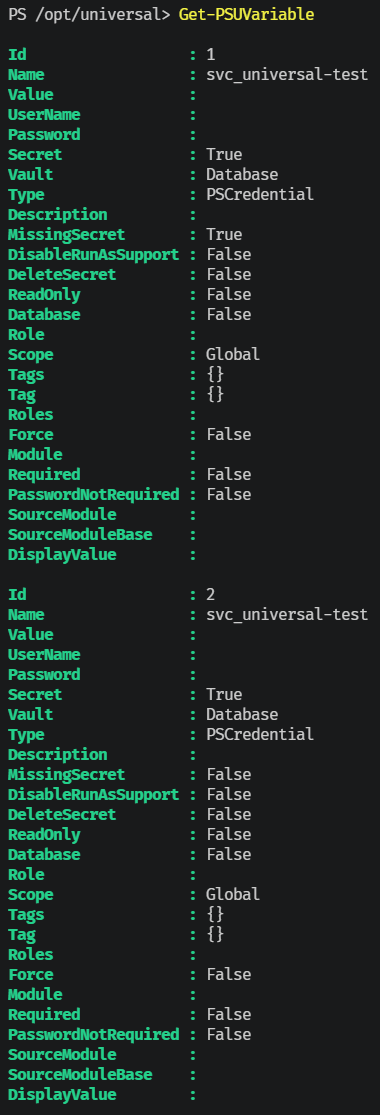
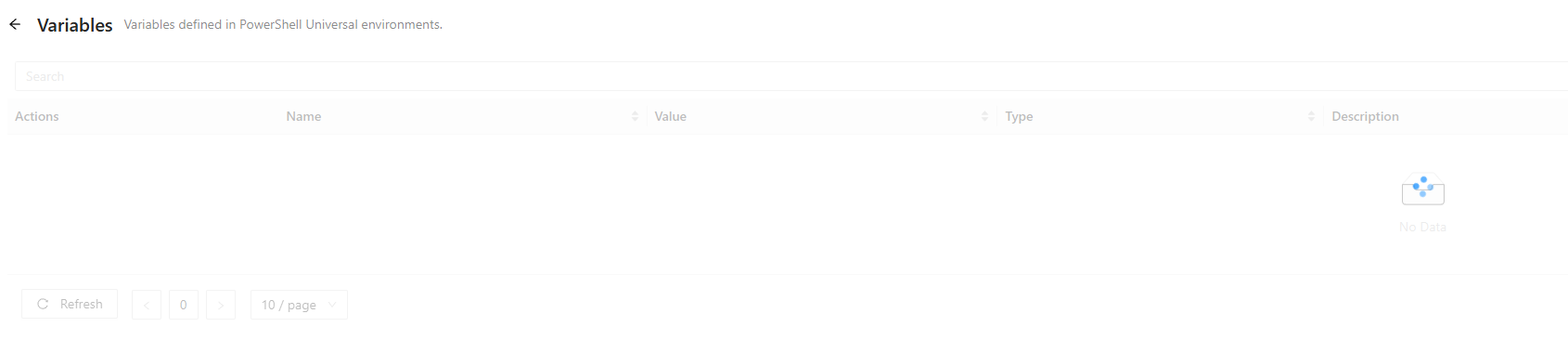
Regards
René
7e275eea-55af-4cd2-a630-21382123f165.png
8c11b415-7292-47e9-9d1f-ac367a832d42.png
1832f2cd-1afe-417a-bb50-5c7f444d4bdb.png
c944e2b5-29e6-42d5-af8a-7b949f0dc9ae.png
3744fd59-470d-4bce-b99a-862b87f86423.png
ddecc1d7-fb25-466c-acb6-e3cb3907c55f.png
730d70fb-d44c-47b7-aa96-531e85d1d843.png
e6478b08-9b0f-4795-ba0f-529905cccdda.png
d494db3f-1745-4ba4-856e-424436446c22.png
fc2340cd-f54d-46e3-9923-d35ba5856a57.png
62f4b380-587b-4337-b58b-1d91ac51f786.png
Hello seanhickey,
Thank you for your patience, and please accept our apologies for the delay.
We have consolidated the details of the behavior you reported and are coordinating the next review with our Development team. We expect to revisit the case next week and will update this topic as soon as we have confirmed information to share.
Thank you for your understanding.
Best regards,
Ruben Tapia