
ronbouwmeester
Create a Custom variable in a Devolutions Cloud Vault using PowerShell
Hello Christian,
Thank you for your reply. I will have a look at the cmdlets.
Kind regards,
Ron Bouwmeester
Incorrect name in Navigation Pane after removing Custom Variable
Dear Mr/mrs,
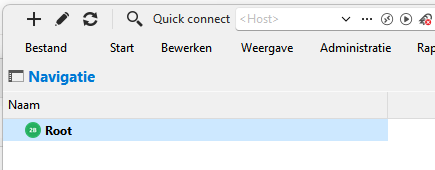
When I remove a Custom variable in a Vault the name of the Vault in the Navigation Pane of RDM changes from "<DataSource Name> (<Vaultname>)" to "Root".
In the selection list and the selection Window the Vaultname is still correct.
I am using RDM version 2025.3.28.0 in combinatie with a Hub Business Datasource.
Is there a way to correct the name in the Navigation Pane?
In advance thank you for your reply.
Kind regards,
Ron Bouwmeester
Import Custom variable into Devolutions Cloud
Hello Maxime,
Thank you for your advice. It works perfect now.
Thank you for the support.
Kind regards,
Ron Bouwmeester
Import .rdm file into Devolutions Cloud
Hello Maxime,
This works perfectly.
Thank you very much for your support.
Kind regards,
Ron Bouwmeester
Import Custom variable into Devolutions Cloud
Hello Maxime,
Thank you very much for your reply.
Test-Json: Cannot parse the JSON.
Th content of the json file is:
{
"Name": "CV1",
"Value": "Some value",
"Description": "my custom variable 1"
},
{
"Name": "SomePort",
"Value": "5432",
"Description": "Some port"
}
Kind regards,
Ron Bouwmeester
Import Custom variable into Devolutions Cloud
Hello Maxime,
Thank you for your reply.
I have created the following script:
$ds = Get-RDMDataSource -Name "Devolutions Hub Business"
Set-RDMCurrentDataSource $ds
$repository = Get-RDMRepository -Name "<VaultName>" ;Set-RDMCurrentRepository $repository
Import-RDMCustomVariable -FilePath "<FilePath>\config.json" -ImportAction AddAndUpdate -VariableScope Vault
But when I execute the import startement I get the following error:
Import-RDMCustomVariable: The file format (.json) is not supported.
Can you give some advice?
In advance thank you for your reply.
Kind regards,
Ron Bouwmeester
Import .rdm file into Devolutions Cloud
Hello Maxime,
I have created the following script:
$ds = Get-RDMDataSource -Name "Devolutions Hub Business"
$repository = Get-RDMRepository -Name ",Vault name>" ;Set-RDMCurrentRepository $repository
Import-RDMEntry -Path "<Path>\<FileName>.rdm"
Is this the correct way?
Kind regards,
Ron Bouwmeester
Import .rdm file into Devolutions Cloud
Hello Maxime,
Thank you very much for your reply.
Do you perhaps have an example script?
Thank you in advance for your reply.
Kind regards,
Ron Bouwmeester
Import Custom variable into Devolutions Cloud
Good afternoon,
Is it possible to import Custom variables into a Hub Business environment using PowerShell?
Kind regards,
Ron Bouwmeester
Import .rdm file into Devolutions Cloud
Good afternoon,
Is it possible to import the content of an .rdm file into a Hub Business environment using PowerShell?
Kind regards,
Ron Bouwmeester