Incorrect name in Navigation Pane after removing Custom Variable
Incorrect name in Navigation Pane after removing Custom Variable

 Dear Mr/mrs,
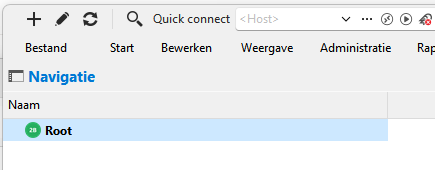
When I remove a Custom variable in a Vault the name of the Vault in the Navigation Pane of RDM changes from "<DataSource Name> (<Vaultname>)" to "Root".
In the selection list and the selection Window the Vaultname is still correct.
I am using RDM version 2025.3.28.0 in combinatie with a Hub Business Datasource.
Is there a way to correct the name in the Navigation Pane?
In advance thank you for your reply.
Kind regards,
Ron Bouwmeester
Schermafbeelding 2026-03-20 120506.png
All Comments (2)
Hello,
we've managed to reproduce the issue and a ticket has been sent to the Engineering Team.
Best regards,
Antoine Mauger
Hello,
Thank you for being so patient!
I'm pleased to inform you that a new version of RDM (2026.1.18.0) has been released, featuring the fix for your issue.
Latest Version: Download RDM
Please let us know if this works or if you encounter any issues.
Best regards,
Maxim Robert