
jjaritsch
High RAM ussage
Hi Maxim,
I can confirm: memory issue is resolved.
High RAM ussage
Hi all,
since ~1 week RDM is eating up to 30GB of memory, if kept running over night. Even after closing all connections, there is no memory decrease (waited for about 1 hr).
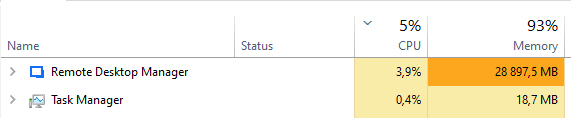
RDM is installed on a Windows Server 2022 Standard VM with 32GB memory. All Microsoft updates installed. RDM Version 2026.3.15.0 64-bit, installed.
Diag from RDM:
Remote Desktop Manager 2026.3.15.0 64-bit (JIT)
Runtime: .NET 10.0.6
Platform: Microsoft Windows 10.0.20348
Workspace: xx
Allocated memory: 35043 MB
Running since: 23 hours 52 minutes
Klicking around while high memory usage happens, results in unresponsive application. Can be closed only via Task Manager.
Virtualization with VMWare vSphere 8.0.3
Hardware Specs: PowerEdge R640, 2x Xeon(R) Gold 6154, 3x SAS-SSD Samsung PM1643 3,84TB RAID5 with BBU
VM Specs: 6 Cores, 32GB RAM
Workspace Diagnostics:
SQLite · Connections.db · v1.155
Workspace
Name: xx
Workspace type: SQLite
Workspace ID: A966D145-C267-43B0-xxxxxxxxxxxx
Caching mode: Disabled
Database
Filename: Connections.db
Path: C:\_admin\Connections.db
Schema: v1.155
File size: 16.3 MB
System information
Version: 2026.3.15.0 64-bit
.NET version: .NET 10.0.6
Current user: 55IT\jjaritsch
I access this Windows Server only via RDP. Application performance is a complete nightmare (like seconds of delay on clicks; up to 10 sec wait for establishing new SSH connections, etc) and it got worse since the last 2 or 3 updates of RDM. After disabling all the options in "File > Settings > Performance > Avalonia Rendering", performance got improved like 2 or 3 times(!), but application crashes came up like every few hours.
I already tried to close RDM, rename C:\Users\$user\AppData\Local\Devolutions\RemoteDesktopManager to RemoteDesktopManager.old. The application starts with all the original settings and no new folder RemoteDesktopManager gets created?
Only renaming the folder C:\Users\$user\AppData\Roaming\Devolutions\RemoteDesktopManager to RemoteDesktopManager.old causes RDM to generate a new config and a new folder RemoteDesktopManager in C:\Users\$user\AppData\Roaming\Devolutions.
With the new config "profile" it runs at ~550MB memory usage, but is quite useless, cause all my personal keys are not imported. Only Connections.db is linked.
Steps I've done to get a clean config:
I've renamed RemoteDesktopManager to RemoteDesktopManager.new
I've renamed RemoteDesktopManager.old to RemoteDesktopManager
In RemoteDesktopManager I've renamed RemoteDesktopManager.cfg to RemoteDesktopManager.cfg-backup-before-test
I've copied RemoteDesktopManager.cfg from RemoteDesktopManager.new to my RemoteDesktopManager folder
Now I have a working version with config reset (something I can deal with, for a few days of testing). Performance slightly increased - let's see how this works in the next 24 hours. Should I share my config file?
Openning SSH Sessions - Index was out of range
Hi Maxim,
after installing the update I can confirm that for me it's working. You want to get any logs?
Openning SSH Sessions - Index was out of range
+1 important for us too!
Openning SSH Sessions - Index was out of range
Thanks Carl, I received it and scheduled a session.
Also thanks to jjaritsch for more insight. I can confirm the post login issue, specially when passing the password to elevate to sudo seems to cause the issue. Post login command like clear screen or echo seem to work fine.
@info43
This is something I can confirm: as soon as "Expected prompt" is set to anything, it fails..
Openning SSH Sessions - Index was out of range
Hi,
we do have the exact same problem! Problem started sometime in the past 6-8 weeks. Problem only occours if post-login commands are defined (we use it to send enable to Cisco and Arista devices).
It doesn't matter if it's a newly created connection, a cloned existing one or the original one (which has been created earlier this year).
It doesn't matter which SSH port is used.
It doesn't matter which timeout is set for the post-login commands.
One thing we recognized: in earlier versions we saw the first lines from the SSH server (like "Last login from...") and then we saw the expected outputed (which matched with what we defined in the post-login commands) and AFTER the post-login wait time, we saw the command from the post-login submitted to the device. Now we see a black window, no output from the SSH server and after the wait time we get the error message.
Error Message:
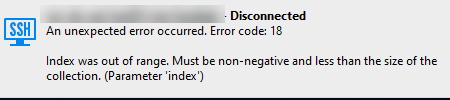
We created logs for the same session with and without post-login commands set (both attached).
Installation details:
Version: 2025.3.25.0 64-bit
.net 9.0.4
best regards
Jürgen