Openning SSH Sessions - Index was out of range

Hi,
I've been using RDM for a while and have several ssh connections saved. All of a sudden, when I try to open one I receive this error: "Index was out of range. Must be non-negative and less than the size of the collection. Parameter name: index"
Latest version, no updates available.
This is on all ssh connections.
Appreciate any help.
Thanks!
All Comments (27)
Hello,
Thank you for reaching out to us regarding this,
Could you please specify the version of RDM you are currently using?
I'm also wondering if this issue is occurring with multiple entries or only a specific SSH session?
Best regards,
Samuel Dery
Sure, build is: 2025.3.22.0 64-bit (PreJIT)
This is happening with pretty much all SSH entries. RDP sessions are working.
Thanks
Hello,
Thank you!
Could you please try creating a brand-new SSH entry and let us know if the issue persists? This will help us determine whether the problem originates from the global SSH settings or from existing entries.
If the issue reoccurs, please try resetting RDM to its default settings and see if the problem continues:
https://docs.devolutions.net/rdm/kb/how-to-articles/reset-rdm-to-default-settings/
Let me know the results.
Best regards,
Carl Marien
Hi,
I'm having exactly the same problem with this error. It started appearing after updating to version 2025.3.22.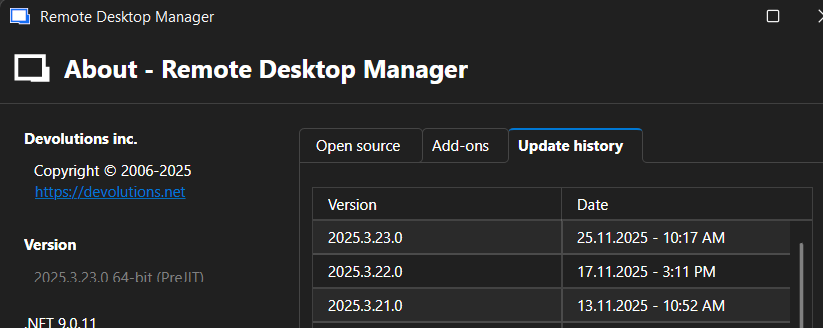
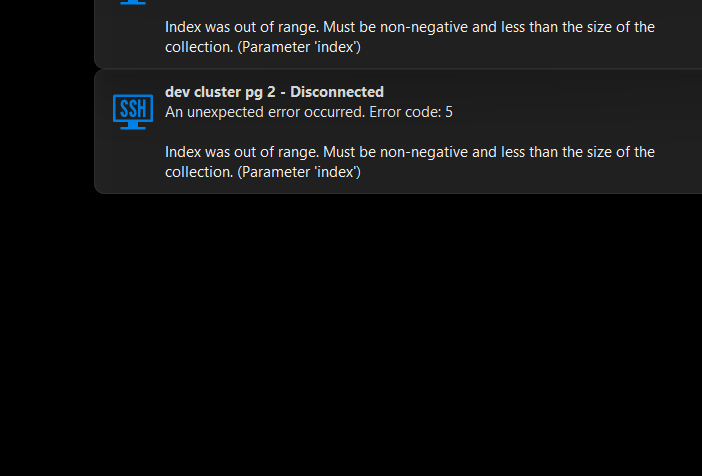
afe8d901-991a-45f8-ad6d-349bd2e78067.png
1383bea0-42e6-4a34-b0cc-b48da023ec29.png
Hello,
I would like to review the issue personally and schedule a session with you.
I’ll be sending you an email with a link where you can request a session at your convenience.
Best regards,
Carl Marien
Happy to jump on a call.
I did some more testing; New connection seems to work. Copying an existing connection has the same error.
An existing connection might randomly work, but no more than one. If opening another connection, it will always fail.
Also I updated to the latest version (2025.3.23.0). The error is slightly different Wasn't able to get it all
effbc88b-ad19-4cf3-b72f-c2a29eb33ada.png
Hello,
I’ve sent you a link for a remote session via email. Could you please confirm if you’ve received it?
Best regards,
Carl Marien
Hi Carl,
I did not receive a link.
Hello,
We’ve sent you another email containing the link.
Best regards,
Carl Marien
Ok, I'm not getting those emails. I checked spam folders and they are not there either. Can you direct message me here in the forum?
Hi,
we do have the exact same problem! Problem started sometime in the past 6-8 weeks. Problem only occours if post-login commands are defined (we use it to send enable to Cisco and Arista devices).
- It doesn't matter if it's a newly created connection, a cloned existing one or the original one (which has been created earlier this year).
- It doesn't matter which SSH port is used.
- It doesn't matter which timeout is set for the post-login commands.
One thing we recognized: in earlier versions we saw the first lines from the SSH server (like "Last login from...") and then we saw the expected outputed (which matched with what we defined in the post-login commands) and AFTER the post-login wait time, we saw the command from the post-login submitted to the device. Now we see a black window, no output from the SSH server and after the wait time we get the error message.
Error Message: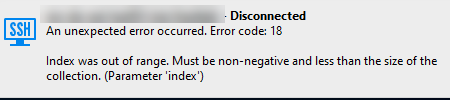
We created logs for the same session with and without post-login commands set (both attached).
Installation details:
Version: 2025.3.25.0 64-bit
.net 9.0.4
best regards
Jürgen
ssh-error.png
ssh-log-without-post-login.txt
ssh-log-with-post-login.txt
Hello info43,
I’ve sent you a session link via direct message. Please let me know if you’ve received it.
As for you, jjaritsch thank you for the logs. I’ll review them before the session and let you know what we find.
Best regards,
Carl Marien
Thanks Carl, I received it and scheduled a session.
Also thanks to jjaritsch for more insight. I can confirm the post login issue, specially when passing the password to elevate to sudo seems to cause the issue. Post login command like clear screen or echo seem to work fine.
Thanks Carl, I received it and scheduled a session.
Also thanks to jjaritsch for more insight. I can confirm the post login issue, specially when passing the password to elevate to sudo seems to cause the issue. Post login command like clear screen or echo seem to work fine.
@info43
This is something I can confirm: as soon as "Expected prompt" is set to anything, it fails..
Hi,
I'm also encountering the same issue and my installation details:
Version: 2025.3.25.0 64-bit (JIT)
.net 9.0.11
I've several SSH sessions, with post login commands (passing the password to elevate to sudo).
Not all of them fail but many do with "index was out of range" error message.
Hello everyone,
We’d like to provide an update on the issue.
We have successfully reproduced the issue in the session, and a bug report has been submitted to the development team.
Workaround
Until a fix is released, you can avoid this error by using an After Opening event to send the entire command sequence in one action. To apply this workaround, navigate to:
`Entry Property → Event → After Opening`
This approach prevents the "index out of range" error and has been tested for reliability.
We will share further updates as soon as we receive more information from the development team.
Thank you for your patience.
Best regards,
Carl Marien
Hello Carl,
Could you guide on how to translate this 'post login' sequence to the workaround you mention, please?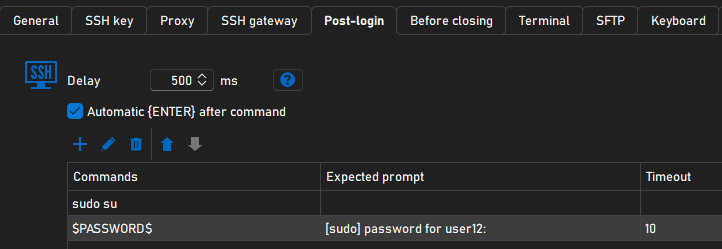
84aeeecb-4ed5-423f-b568-fd3194a5ba1b.png
Hello,
To apply the workaround, you’ll need to first remove the previously configured `sudo su` command from the post-login section.
Next, open the properties of the entry, go to the Events tab, and under After Opening, add the following as a typing macro:
sudo su
$PASSWORD$
This will type the command and automatically send the password.
Please ensure that the Allow passwords in macros option is enabled in the security settings for this to work correctly.
Best regards,
Carl Marien
Thanks Carl, for the details.
While the workaround does work, it is "insecure", in that the credentials are displayed in the terminal.
Any idea, when the bug will be fixed & released?
Hello,
Indeed, the workaround is less secure than the original method you used to push the command.
While I can’t provide an exact timeline for the fix, I will inform the developer assigned to this case that the issue is important to you.
I’ll keep you informed of any updates.
Best regards,
Carl Marien
+1 important for us too!
Hello,
Noted. I will contact the developer and request a change in priority.
Best regards,
Carl Marien
Hello,
Thank you for being so patient!
I'm pleased to inform you that a new version of RDM (2025.3.29.0) has been released, featuring the fix for your issue.
Latest Version: Download RDM
Please let us know if this works or if you encounter any issues.
Best regards,
Maxim Robert
Hi Maxim,
after installing the update I can confirm that for me it's working. You want to get any logs?
Wonderful !
RDM (2025.3.29.0) works as expected !!
I can also confirm it is working again. Thanks!