marcus2
SSH session font scaling on high dpi laptop
Thank you. Scaling is now working correct for me.
SCP session does not allow to change from home dir to anything else
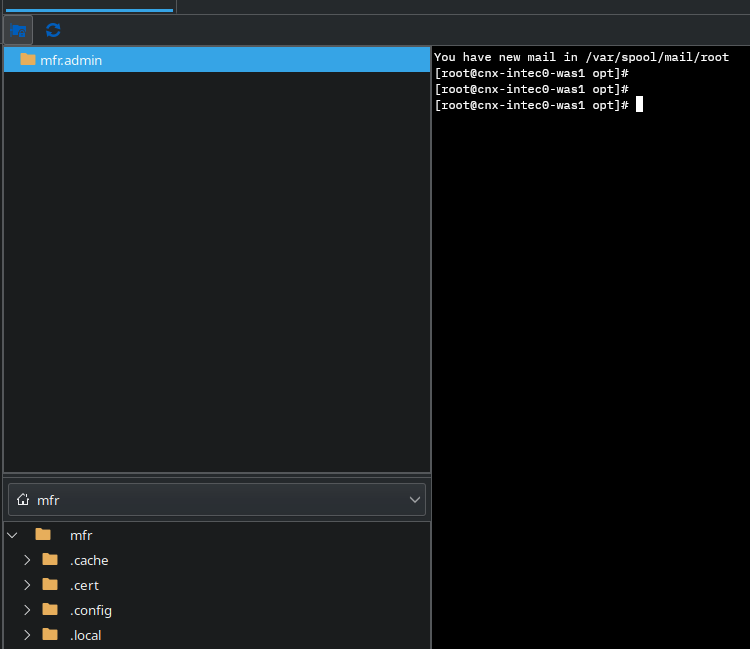
this is the scp window

on the right side the remote path. I cannot change this path. Left side (local) is working, I can change path.
SCP session does not allow to change from home dir to anything else
I'm using the latest version for Mac and I work mainly with SSH sessions.
I can open also a scp session to the server to copy files. But in the right pane the scp session is switching to my home dir on that server and I cannot change the directory to anything else (e.g. /tmp).
Is there a special way to change scp directory other than home directory?
SSH session font scaling on high dpi laptop
Hello,
I'm mainly use RDP on my Linux system (Fedora 43 KDE) for SSH sessions. The laptop is a high dpi 2880x1920 scaled with 165%. I have to set the font size to 22 so I can read something ... but when I connect to a external monitor with lower dpi and scaling 100% it will be too big.
Is there a way to automatically scale correctly depending on system settings?
X11 with MacOS and RDM
Hi,
This issue should be fixed in the latest version (2026.1.11.3).
Please update and let us know if you’re still experiencing any problems or have questions.
Best regards,
@Jesse Galarneau
Thanks. I just tested it successfully. Thank you very much.
X11 with MacOS and RDM
Yes exactly the same issue ...
X11 with MacOS and RDM
Hello,
sure, XQuartz is running in background and a XTerm is opened.
X11 with MacOS and RDM
Hello,
I'm new to RDM and tired to call a x11 program like xclock on a ssh'd remote machine. I have enabled X11 forwarding for my ssh session, x11 forwarding in enabled in sshd.
I installed XQuartz in my Mac.
Once I call the xclock app on remote it is telling me:
"Successfully established session to Xserver" ..
but nothing happens on my Desktop. no xclock windows is appearing.
Do I miss something?
I'm running latest RDM version for MacOS.
Switch remote dir in file transfer session
The version of RDM is 2025.2.1.5
DataSource Type is SQLite.
Switch remote dir in file transfer session
Ok, I found a solution ... if I set the base remote path to the root "/" then the tree is appearing and I can navigate.
Switch remote dir in file transfer session
I'm opening a ssh session to a remote location. Then I press the button above "open file transfer window". It is showing me the remote path upper and the local path lower.
How can I switch the remote path? On local path I have a tree view, but on remote path I have nothing ...