Mwyann
TigerVNC display is messed up
Quick update: I can still see those color bugs in the Android version 2025.2.2.2. Not in the iOS nor the Windows version, which is weird.
(Also, quick little bug for the iOS version, if you set your default view to "Favorite" it doesn't work, it still shows you the server list at launch).
Yann
TigerVNC display is messed up
Hi Richard,
I've updated RDM to 2025.2.28 and as you predicted, the bug has vanished, as far as I can tell! I'll get back to you if there's any new occurence but for now everything's fine on my side. Just waiting for a similar update to the mobile version.
Have a nice day!
Yann
TigerVNC display is messed up
Hi Richard, thanks for the heads up.
If possible, you can send me a dll to replace in my current install to try out the new fix.
Yann
Keyboard shortcuts on VNC and layout on RDP
Hi,
Is there any update on this bug? Did you have the time to test this? Or do you need more information on my part?
Yann
TigerVNC display is messed up
Hi Richard,
In fact we're pretty close to a full fix, indeed it's mostly fixed but I think there's still an edge case where it's still not completely over, especially with large areas. Take a look at the included screenshot. The background is supposed to be solid blue all the way, but the orange artifact remains. I couldn't find any other place where I can trigger this bug though, so I don't know why it still happens on some occasion. Even after redrawing the screen the bug does still remain, for example opening the Application menu. The orange rectangle in the top right corner is when I showed and closed the clock popup. And of course that's not the only color who does that, I tried other background colors and it was still showing the bug.
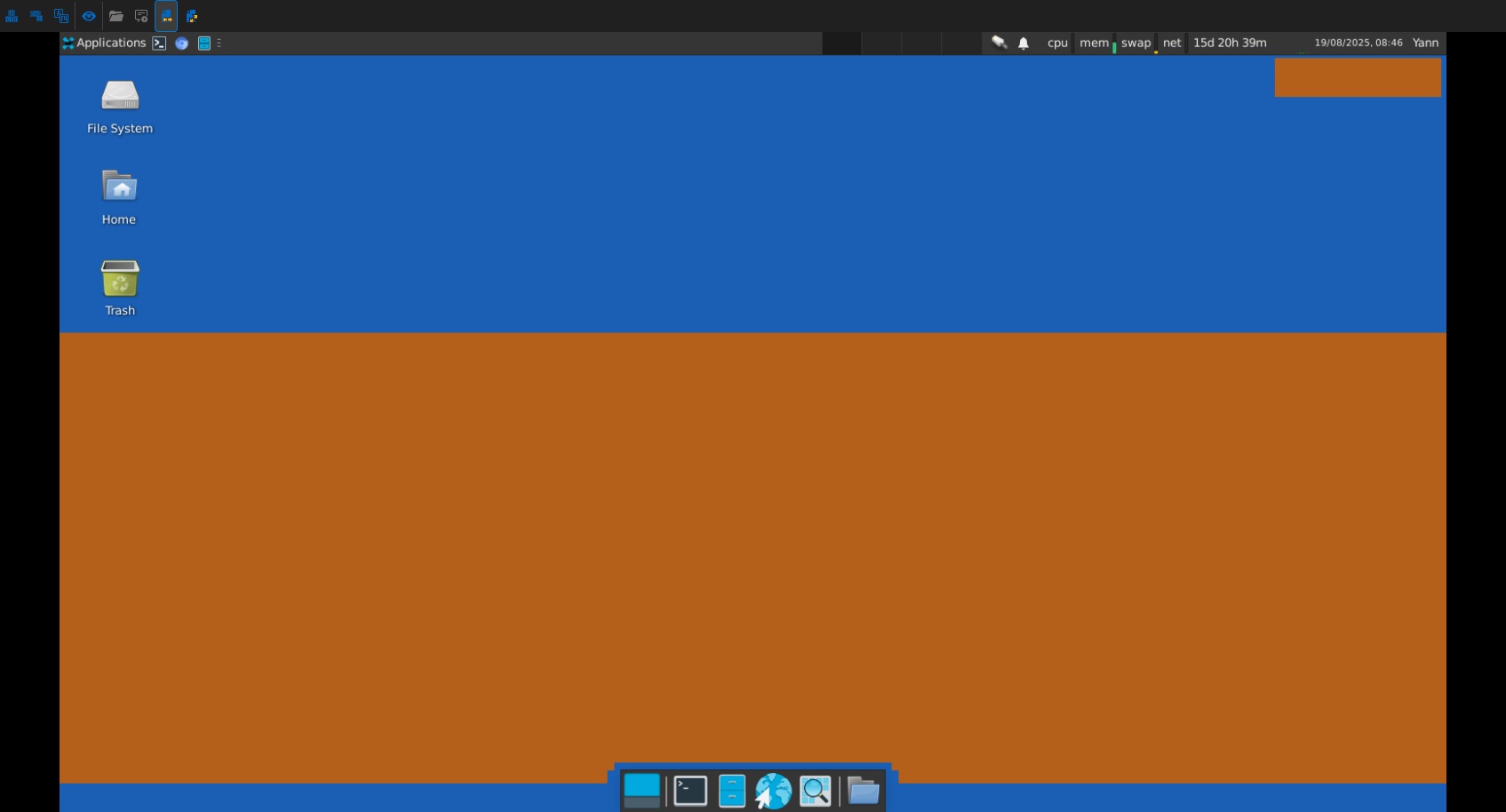
So basically I think we're very very close to have fixed this weird bug once and for all.
And for the record, the hash for the DLL is 5EE723A694C8936FE21782EA0845E974ECB1784D79FF5AE2EF8DC2A08631079F
Thanks
Yann
TigerVNC display is messed up
Hi Richard,
Hope you had good vacation :)
I'm following up this thread as the 2025.2.26 version of the desktop app doesn't seem to have integrated the fix yet, nor the mobile apps. Do you know when it will make it to the public release?
Have a nice day!
Yann
TigerVNC display is messed up
Nicely done sir, you have earned your vacations now ;) Thanks a lot for the fast answers, keep going!
TigerVNC display is messed up
Oooh I think I can guess what's happening there: in the RLE processing routine, the 16-bit color field is copied straight into the 24-bit buffer without proper conversion, which only fills the Red-Green part of the color with the 16-bit version of the original color. That's why big white patches are turned into yellow (full Red-Green), and why a dark grey background turned into just red. So it's just a matter of some bitwise operations to convert into 24-bit colors. Am I right?
TigerVNC display is messed up
Hi Richard,
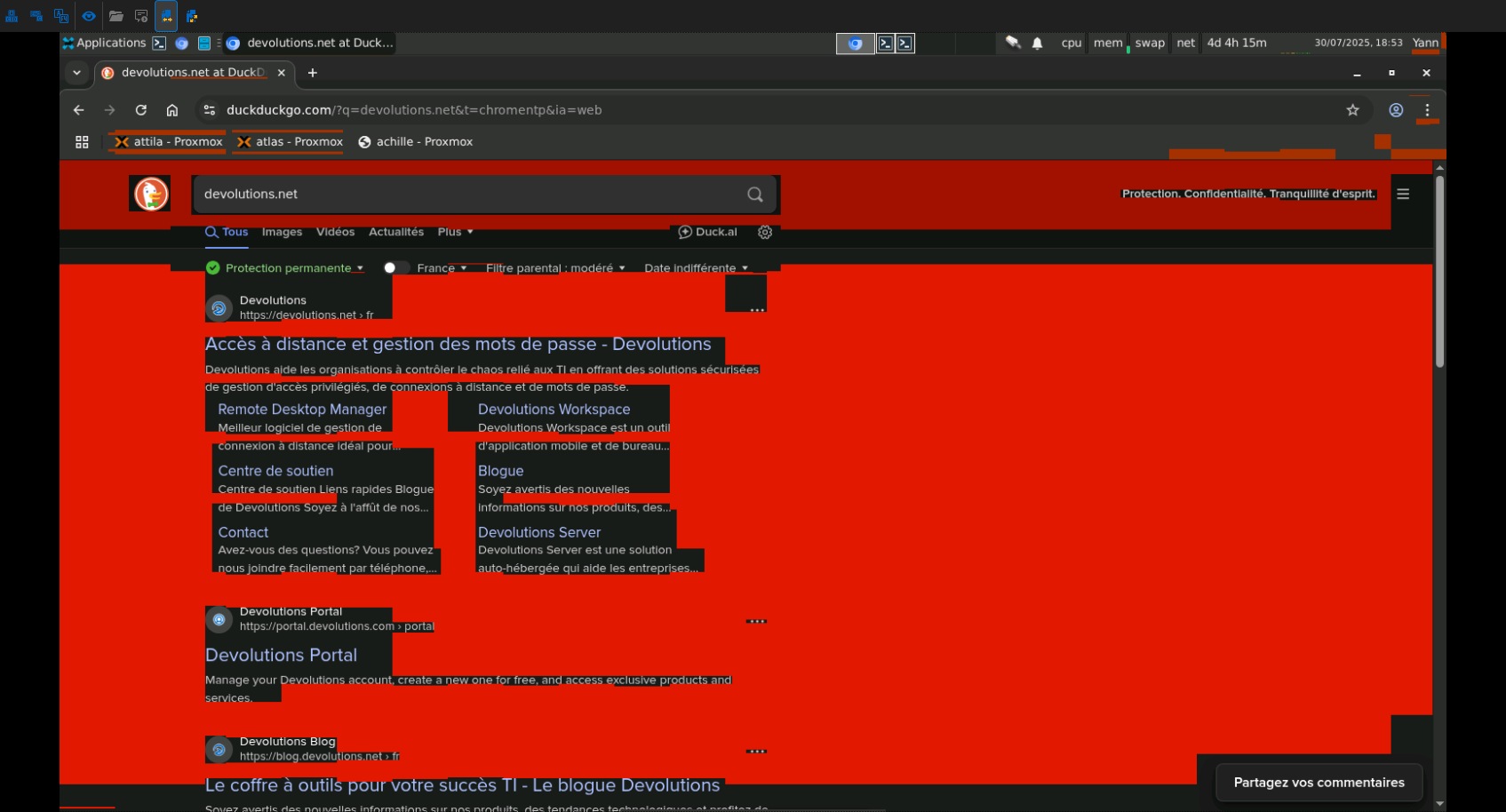
You're absolutely right: the bug isn't visible on the first screen loading upon connection, but it will eventually show up where the screen updates, in particular when there's a running length of the same color. So it looks like an RLE related issue or something. I think you don't need the video, you describe the same behaviour as I have. And 24-bit depth doesn't show the problem. In my screenshot, the big red area you're seeing is after the Google results updated the screen with a flat background, which resulted in a big red mess all around the text.
And it's okay for the delay, enjoy your vacation, I hope you have good weather and get some good rest :)
Have a nice one,
Yann
Keyboard shortcuts on VNC and layout on RDP
No, I'm using the Samsung keyboard on the S25U and Gboard on the Pixel.
Which issue can't you reproduce, the VNC one or the RDP? Or both?
Keyboard shortcuts on VNC and layout on RDP
Hi,
I'm using Remote Desktop Manager on both my Samsung S25U and my Google Pixel phone, and I'm having issues using the keyboard.
When connecting to a Linux VNC server (TigerVNC), when I try to type keys with modifiers like Ctrl-C, Ctrl-X, Ctrl-D it doesn't work, it sends other kind of keys in its place (for example, in a terminal, if I type Ctrl-X, instead it presses Ctrl-Minus which is the shortcut to zoom out). But typing normal keys (without modifier) is fine. I can fix that problem by enabling the "legacy keyboard processing", and now Ctrl shortcuts are working again. But if I enable that option, then connecting to RDP is a problem: the keyboard layout is wrong (QWERTY instead of my usual AZERTY), even after changing the keyboard layout in RDM options. If I switch "legacy keyboard processing" back off, RDP works fine again. So I have to set that option in advance depending on the type of server I'm connecting to ;)
I already tried the "keyboard layout compatibility mode" without success. Tell me what I should try next.
TigerVNC display is messed up
Hi, I just tried setting 24 bit depth and it works fine, so yeah it looks like it's a conversion problem. I use 16 bits as I often control my computer from my phone in the field so I'd rather not waste bandwidth and latency with higher colors, 16 bits is enough for my usage, but as a quick fix it can be good enough until you figure out the problem :-)
I've provided a quick way of setting up such a config in my second post if needed.
Thanks a lot for the investigation and the temp fix, and have a nice day!
TigerVNC display is messed up
Thank you for your reply. I've sent the logs in your inbox.
TigerVNC display is messed up
Yes of course, it's Xvnc TigerVNC 1.12.0 - built 2023-01-06 16:01 running on the latest Debian 12.
Xvnc TigerVNC 1.12.0 - built 2023-01-06 16:01
Copyright (C) 1999-2021 TigerVNC Team and many others (see README.rst)
See https://www.tigervnc.org for information on TigerVNC.
Underlying X server release 12101006, X.Org
You can install it by using the command:
apt install tigervnc-standalone-server
And run it with:
vncserver -depth 16 -geometry 1600x900 -localhost no -SecurityTypes VncAuth :1
Then connect to the host, port 5901
TigerVNC display is messed up
Hi,
I'm connecting to several of my computers using TigerVNC on the server side and RemoteDesktop always screws up the colors of the screen, which can make it difficult to read sometimes. See the attached screenshot (tested on Windows, Android and iOS).