
serjoscha
Vertical (and Horizontal) Split View for Sessions via Right-Click (Context menu)
Hello Hubert,
thank you for the tip! With the additional 1x2 layout setting, it works as expected.
Thanks for your support!
Best regards,
Serjoscha
Vertical (and Horizontal) Split View for Sessions via Right-Click (Context menu)
Hello Hubert,
thank you for the reply. I tried the "Tile vertically" option. It's basically what I was looking for, but I personally find one small detail a bit annoying when working. Maybe I'm still doing something wrong or just need to adjust my workflow :-) I'll try to explain it in more detail with an example:
1) Tile vertically is enabled. Each session opens in a new vertical view.

2) In my current case I only want to have two vertical views, so i grouped my sessions manually per drag and drop.

3) As soon as I open a new session, my grouping is discarded and all already opened sessions plus the new session are displayed in their own vertical view.

I would expect, or rather, like, that the two views remain and the new session simply opens in the last active or first view (tab-group), so that my two vertical views are retained with one or more tabs. However, I don't want the view to be discarded and everything should be displayed separately in a vertical view.
Edit: From my perspective, this would be an additional view option. This option would statically set the number of vertical or horizontal views. This would ensure that the new session always opens as a tab in one of the specified views—preferably in the last active view/tab group.
Best regards,
Serjoscha
Vertical (and Horizontal) Split View for Sessions via Right-Click (Context menu)
Hello,
i would love to have the ability to right-click on a session and open it in a vertical split view, docked to the right side of the main Remote Desktop Manager window. This would allow two sessions to be displayed side by side within the application.
This feature exists in Royal TS, and I found it extremely useful in daily work, especially when I need to monitor or work on two systems in parallel. Their implementation of split view was very comfortable and intuitive. It also allowed placing three sessions next to each other or even splitting sessions horizontally.
While it's currently possible to undock sessions and use the operating system's window snapping to arrange them, this is far less convenient than having a built-in split view.
From my perspective, this is the only feature I truly miss in Remote Desktop Manager. Adding this would significantly improve the workflow for users who regularly work with multiple remote systems at the same time.
Best regards,
Serjoscha
RDM Flatpak v2025.2.0.8; Websession Auto Fill Not Working Reliably
Hello Simon,
thank you very much for the quick fix. I can confirm that the AutoLogin now works with Portainer and Nextcloud. It doesn't work with Grafana, Synology DSM, Proxmox Backup Server and DokuWiki (Examples of software that many people are familiar with). Is it already known from which RDM version the new uniform platform Avalonia will be used? Maybe then the AutoLogin will work more reliably there (as with the current Windows RDM version).
Thanks.
Best regards,
Serjoscha
RDM Flatpak 2025.2.0.8 – SFTP Session: Local Files are displayed multiple times
Hello Simon,
thank you very much for the quick fix. I can confirm that the files are no longer displayed multiple times after a double-click since RDM 2025.2.0.9.
Best regards,
Serjoscha
RDM Flatpak 2025.2.0.8 – SFTP Session: Local Files are displayed multiple times
Hello Gabriel,
thank you for your response! I'm glad to hear that the file browser is being reworked. I believe that, aside from web sessions, SFTP is one of the most frequently used features.
I'm looking forward to the new version.
Best regards,
Serjoscha
RDM Flatpak v2025.2.0.8; Websession Auto Fill Not Working Reliably
Hello Simon,
thank you very much for the quick response! I truly appreciate that the reported issues are actually being analyzed and fixed. That’s not something to be taken for granted and speaks very well for Devolutions. In the enterprise environment, I often see a very different picture – automated responses, vague reassurances, being passed from one first-level support to another, and only after a relatively long time either receiving a solution or finally reaching someone from second-level support.
I’m really glad to hear that the software is being further unified (cross-plattform UI Framework). In my opinion, Flatpak will be the future in the Linux environment, especially due to the fragmented of distributions and derivatives.
As soon as the update is released, I’ll test it and report back in this thread.
Edit: Btw: Synology DSM, Grafana, DokuWiki or Nextcloud might also be a widely used web session that could possibly be simulated. The Auto-Fill button doesn't work with it either – no username or password is being filled in.
Best regards,
Serjoscha
RDM Flatpak v2025.2.0.8; Websession Auto Fill Not Working Reliably
Hello Simon,
thank you very much for the quick reply. I have set the Button ID to [Submit]. When I use the auto-fill button, the Website told that the login data is invalid (unable to login). But if I copy and paste exactly the same credentials (password + username) individually via the context menu, it works. The login data is correct in any case, but it is not accepted via auto-fill. very strange :-/ Portainer was just one example of many web sessions that very few work, unfortunately :-( In Windows over RDM, with the same DB, everything works.
I hope this can be fixed, because RDM is a wonderful tool for admin's. Personally, I just think it's a bit of a shame that it's not on par with the Windows version. Especially in these times when many, including me and my colleagues, are migrating or planing switch from Windows to Linux.
Thank you.
Best regards,
Serjoscha
RDM Flatpak 2025.2.0.8 – SFTP Session: Local Files are displayed multiple times
Hello,
I'm using RDM as a Flatpak on Fedora Workstation. Unfortunately, working with the SFTP session on Linux is not as smooth as on Windows.
I don't know why, but every time I double-click a file to open it, the contents of the folder—or specifically the file—are displayed multiple times. Before the first double-click, everything looks fine, but then more and more duplicate entries appear. When checking with the Fedora file manager, I can confirm that the files are only present once, as expected.

Unfortunately, it's also not possible to directly open files on the host using VSCodium or another text editor (download), edit them, and then save them again (upload). This works without any issues in the Windows version. I’m aware there is a post stating that this doesn't work on Windows either, but I can't confirm that—in my case (with the current version 2025.2.17.0), it works fine. As far as I can remember, it had worked before as well.
I hope that a future version will make editing .yml or .conf files easier.
Best regards,
Serjoscha
RDM Flatpak v2025.2.0.8; Websession Auto Fill Not Working Reliably
Hello,
some time ago, I migrated from another product to RDM on Windows with around 331 entries and was very satisfied with it. Recently, I switched to the "Fedora 42 Workstation" operating system and unfortunately found that RDM as a Flatpak (I also tested the RPM version) doesn't run as smoothly as the Windows version.
I understand that the Flatpak version might not be as fully featured (e.g., Rustdesk is missing) as the Windows variant, but I had assumed that features that are implemented would work at least as reliably as they do on Windows.
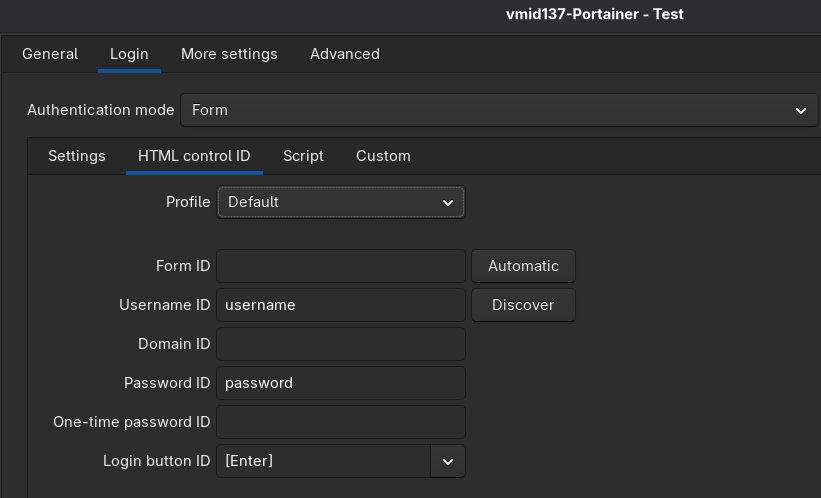
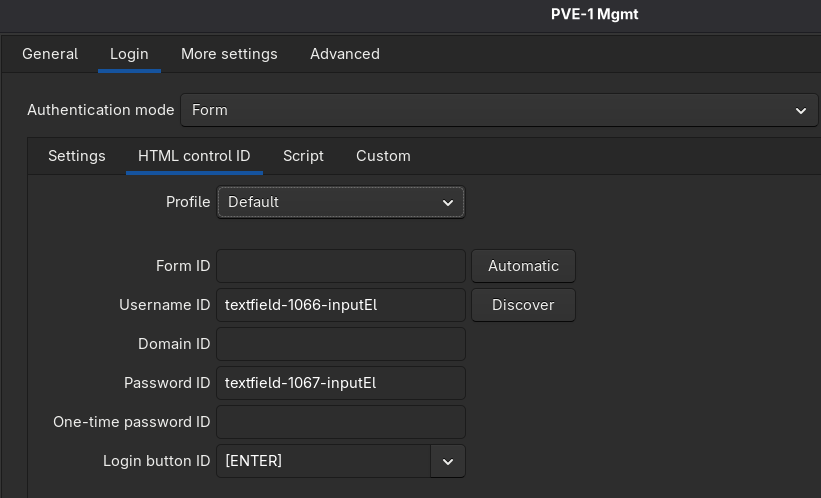
In my case, the SQLite database was fully created and maintained using the Windows RDM version. Unfortunately, in the Flatpak version, AutoFill or AutoLogin doesn't work for many web sessions. The form fields are correctly identified via "Discover", but when opening the session, nothing happens — the values are not entered into the fields. These same web sessions all work perfectly fine on Windows (with Edge as the engine).
I hope there is a solution for this or that the issue will be fixed in a future release. RDM is one of the tools I actively use for many hours every day.
Two example applications that may be familiar:
Example "Portainer" (Autologin does not work)
Example "Proxmox VE" (Autologin works)
Could the issue possibly be resolved through a configuration adjustment? Is there any way to change the web engine being used, maybe to Firefox or Edge Chromium? As far as I know, WebKit is fixed.
Thank you very much.
Best regards,
Serjoscha
Dark Theme does not work in Linux.
Hello,
I recently switched from Windows to Fedora KDE Plasma and had the issue that the Flatpak version of RDM does not apply the Dark Mode. I don’t want to use the RPM package because with that it worked immediately.
sudo flatpak override --env=GTK_THEME=Adwaita:dark net.devolutions.RDM
This post led me to the solution for my problem. Using the following command, I explicitly start the RDM Flatpak with the correct theme: