RDM Flatpak v2025.2.0.8; Websession Auto Fill Not Working Reliably
RDM Flatpak v2025.2.0.8; Websession Auto Fill Not Working Reliably

Hello,
some time ago, I migrated from another product to RDM on Windows with around 331 entries and was very satisfied with it. Recently, I switched to the "Fedora 42 Workstation" operating system and unfortunately found that RDM as a Flatpak (I also tested the RPM version) doesn't run as smoothly as the Windows version.
I understand that the Flatpak version might not be as fully featured (e.g., Rustdesk is missing) as the Windows variant, but I had assumed that features that are implemented would work at least as reliably as they do on Windows.
In my case, the SQLite database was fully created and maintained using the Windows RDM version. Unfortunately, in the Flatpak version, AutoFill or AutoLogin doesn't work for many web sessions. The form fields are correctly identified via "Discover", but when opening the session, nothing happens — the values are not entered into the fields. These same web sessions all work perfectly fine on Windows (with Edge as the engine).
I hope there is a solution for this or that the issue will be fixed in a future release. RDM is one of the tools I actively use for many hours every day.
Two example applications that may be familiar:
Example "Portainer" (Autologin does not work)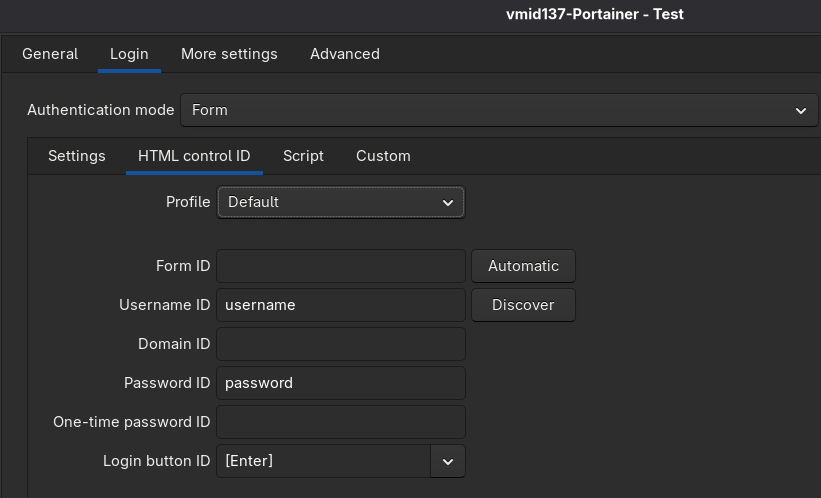
Example "Proxmox VE" (Autologin works)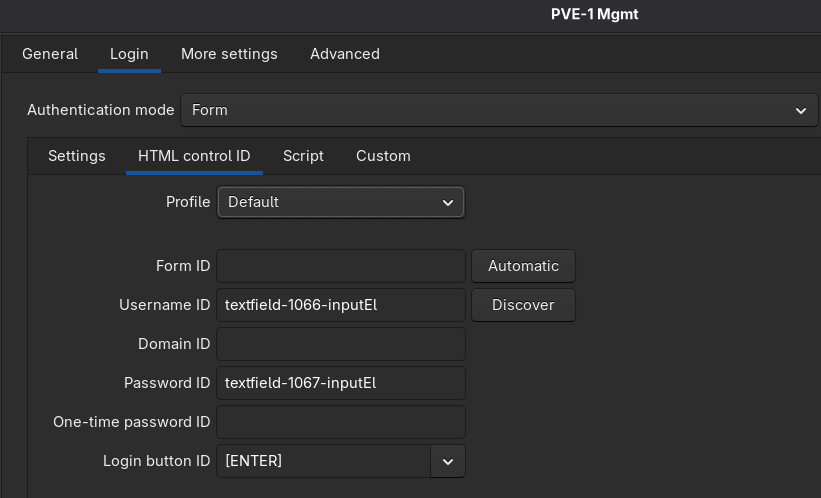
Could the issue possibly be resolved through a configuration adjustment? Is there any way to change the web engine being used, maybe to Firefox or Edge Chromium? As far as I know, WebKit is fixed.
Thank you very much.
Best regards,
Serjoscha
RDM_Autofill_2.png
RDM_Autofill.png
All Comments (6)
Hello Serjoscha !
I was able to reproduce the issue you're experiencing with Portainer, but I’m still unsure about the root cause, I'll open a ticket for that. In the meantime, I noticed that the auto-fill button works as expected.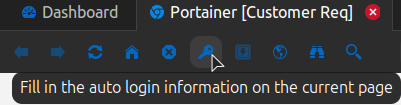
Be sure to set the Login button ID to [SUBMIT] for Portainer.
As for the web engine, it is currently not possible to switch to another engine.
Best regards,
Simon Duguay Létourneau
9680a47f-8620-4b65-a636-3755b8bd27f4.png
Hello Simon,
thank you very much for the quick reply. I have set the Button ID to [Submit]. When I use the auto-fill button, the Website told that the login data is invalid (unable to login). But if I copy and paste exactly the same credentials (password + username) individually via the context menu, it works. The login data is correct in any case, but it is not accepted via auto-fill. very strange :-/ Portainer was just one example of many web sessions that very few work, unfortunately :-( In Windows over RDM, with the same DB, everything works.
I hope this can be fixed, because RDM is a wonderful tool for admin's. Personally, I just think it's a bit of a shame that it's not on par with the Windows version. Especially in these times when many, including me and my colleagues, are migrating or planing switch from Windows to Linux.
Thank you.
Best regards,
Serjoscha
Hello Serjoscha,
thank you very much for the quick reply. I have set the Button ID to [Submit]. When I use the auto-fill button, the Website told that the login data is invalid (unable to login). But if I copy and paste exactly the same credentials (password + username) individually via the context menu, it works. The login data is correct in any case, but it is not accepted via auto-fill. very strange :-/ Portainer was just one example of many web sessions that very few work, unfortunately :-( In Windows over RDM, with the same DB, everything works.
Great news! I’ve identified the root cause of the issue, and a fix will be included in our next update. Once the update is released, please let me know if you encounter any issues with other web sessions. Some website behave differently and we can't do the same as Windows, so we proceed on a case-by-case basis to ensure compatibility with as many websites as possible.
I hope this can be fixed, because RDM is a wonderful tool for admin's. Personally, I just think it's a bit of a shame that it's not on par with the Windows version. Especially in these times when many, including me and my colleagues, are migrating or planing switch from Windows to Linux.
We recently began using Avalonia, which enhances our ability to maintain consistency across platforms. Most of our new features will be developed using this framework, allowing us to maintain a unified codebase instead of creating separate implementations for each platform. Existing features that are currently unavailable on Linux will also be gradually reworked using Avalonia.
Thank you for your feedback, it is greatly appreciated.
Best regards,
Simon Duguay Létourneau
Hello Simon,
thank you very much for the quick response! I truly appreciate that the reported issues are actually being analyzed and fixed. That’s not something to be taken for granted and speaks very well for Devolutions. In the enterprise environment, I often see a very different picture – automated responses, vague reassurances, being passed from one first-level support to another, and only after a relatively long time either receiving a solution or finally reaching someone from second-level support.
I’m really glad to hear that the software is being further unified (cross-plattform UI Framework). In my opinion, Flatpak will be the future in the Linux environment, especially due to the fragmented of distributions and derivatives.
As soon as the update is released, I’ll test it and report back in this thread.
Edit: Btw: Synology DSM, Grafana, DokuWiki or Nextcloud might also be a widely used web session that could possibly be simulated. The Auto-Fill button doesn't work with it either – no username or password is being filled in.
Best regards,
Serjoscha
Hello Serjoscha,
The latest update is now live. Let me know if it resolves any of the issues you were experiencing.
Best regards,
Simon Duguay Létourneau
Hello Simon,
thank you very much for the quick fix. I can confirm that the AutoLogin now works with Portainer and Nextcloud. It doesn't work with Grafana, Synology DSM, Proxmox Backup Server and DokuWiki (Examples of software that many people are familiar with). Is it already known from which RDM version the new uniform platform Avalonia will be used? Maybe then the AutoLogin will work more reliably there (as with the current Windows RDM version).
Thanks.
Best regards,
Serjoscha