Vertical (and Horizontal) Split View for Sessions via Right-Click (Context menu)
Vertical (and Horizontal) Split View for Sessions via Right-Click (Context menu)
1 vote

Hello,
i would love to have the ability to right-click on a session and open it in a vertical split view, docked to the right side of the main Remote Desktop Manager window. This would allow two sessions to be displayed side by side within the application.
This feature exists in Royal TS, and I found it extremely useful in daily work, especially when I need to monitor or work on two systems in parallel. Their implementation of split view was very comfortable and intuitive. It also allowed placing three sessions next to each other or even splitting sessions horizontally.
While it's currently possible to undock sessions and use the operating system's window snapping to arrange them, this is far less convenient than having a built-in split view.
From my perspective, this is the only feature I truly miss in Remote Desktop Manager. Adding this would significantly improve the workflow for users who regularly work with multiple remote systems at the same time.
Best regards,
Serjoscha
All Comments (5)
Hello Serjoscha,
Could you try out the different tiling modes in the Window section of the ribbon and see if they might help you?
By default it's in cascade mode, but you might be interested in vertical (or horizontal) tiling. Additionally we have a custom tiling manager that allows you to set entries in a custom grid, like 2x2 or 2x3 for example.
If this doesn't help in your case, can you show me the feature you mean in RoyalTS? It's indeed possible we don't offer what you need right now, but we'd probably be able to add it, as long as we understand exactly what's missing.
Regards,
Hubert Mireault
b7867f5e-0612-451c-9285-9ec1d3c33946.png
Hello Hubert,
thank you for the reply. I tried the "Tile vertically" option. It's basically what I was looking for, but I personally find one small detail a bit annoying when working. Maybe I'm still doing something wrong or just need to adjust my workflow :-) I'll try to explain it in more detail with an example:
1) Tile vertically is enabled. Each session opens in a new vertical view.
2) In my current case I only want to have two vertical views, so i grouped my sessions manually per drag and drop.
3) As soon as I open a new session, my grouping is discarded and all already opened sessions plus the new session are displayed in their own vertical view.
I would expect, or rather, like, that the two views remain and the new session simply opens in the last active or first view (tab-group), so that my two vertical views are retained with one or more tabs. However, I don't want the view to be discarded and everything should be displayed separately in a vertical view.
Edit: From my perspective, this would be an additional view option. This option would statically set the number of vertical or horizontal views. This would ensure that the new session always opens as a tab in one of the specified views—preferably in the last active view/tab group.
Best regards,
Serjoscha
tile_vertically_opend_new_session_now_my_grouped_rejected_by_rdm.png
tile_vertically_opend_my_tabs_and_grouped.png
tile_vertically_opend_my_tabs.png
Hello,
If you make a custom tiling with 1 row and 2 columns, I think this is nearly what you need: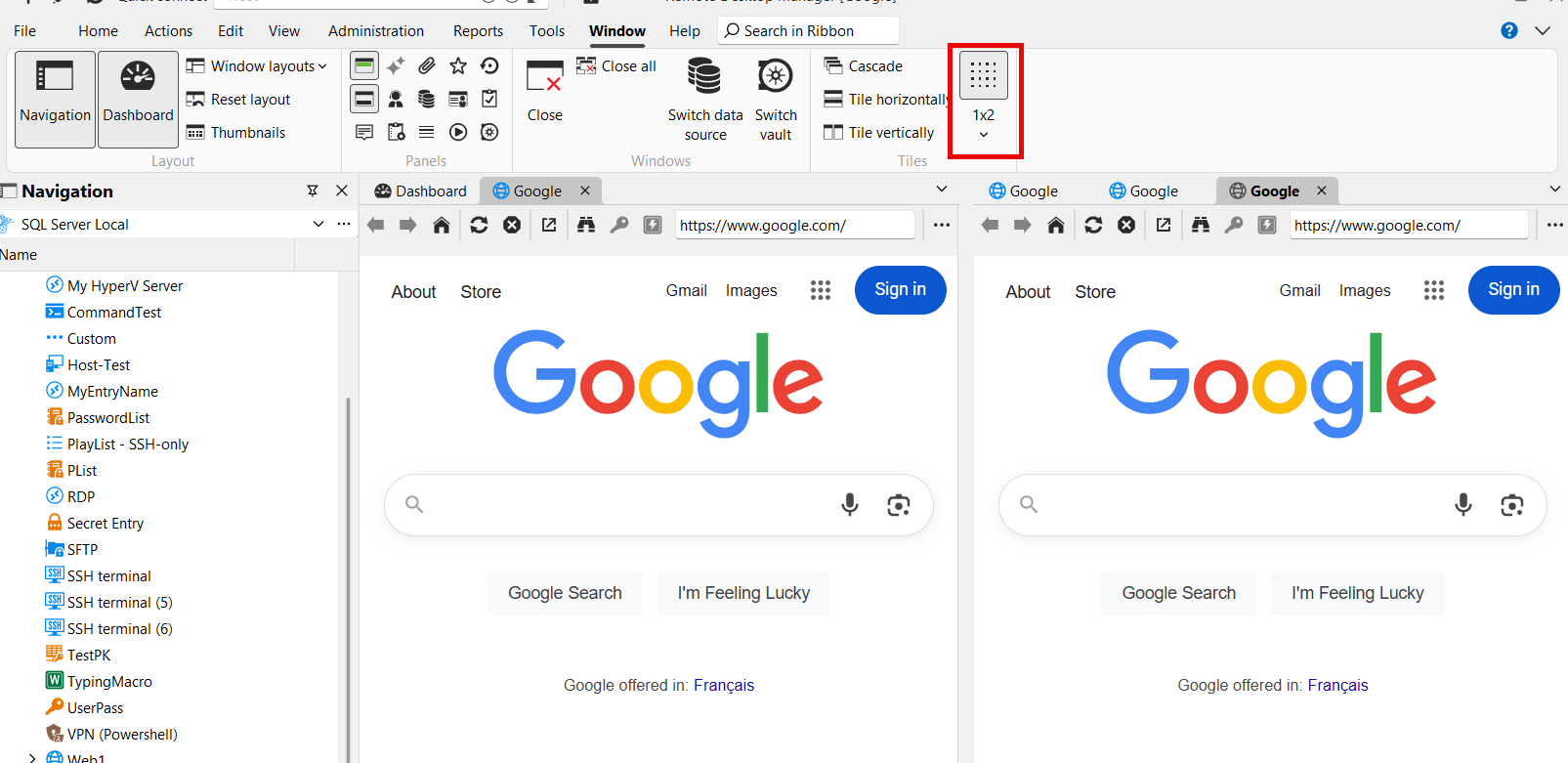
The only issue is that new entries will open in the "last" column. I think it shouldn't be too complicated to instead add the new entries to the last "column" that had focus, maybe with an option to change the behavior.
Can you try out this mode and see if, other than what I mentioned, it acts how you'd expect?
Regards,
Hubert Mireault
1e0f3911-e83a-458c-b921-a2db24ada620.png
Hello Hubert,
thank you for the tip! With the additional 1x2 layout setting, it works as expected.
Thanks for your support!
Best regards,
Serjoscha
That's great, I'm glad it works as you want! I'll mark this thread as implemented. If there's anything else you need, let us know and we'd be happy to help!
Regards,
Hubert Mireault