
noc6
Annoying visual effect
Hello,
I have uncecked "Use Windows accent color" and the problem seems solved !!
Thank you very much and have a good day.
Paolo
Annoying visual effect
Hello,
the datasource is Microsoft SQL Server database.
Today I update the version, it takes a while because I have to update it for all the users in the office.
Annoying visual effect
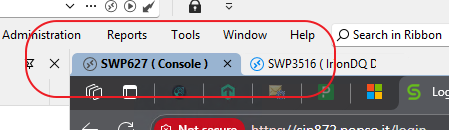
When the PC goes to standby, or lock the screen, when it is reactivated the writings are no longer visible on the tabs, if in the tab option is selected tab color.
Attached are before and after images.
To restore I have to change the transparency settings, on and off or restart RDM.

The version is 2025.2.30.0 64bit
O.S. Windows 11 Enetrprise 24H2
Update to 2025.2.13.1 - vi screen update issues and nonprinting characters appearing on screen
Overriding the terminal type to vt100 resolves issue.
Thanks to sunzout
Update to 2025.2.13.1 - vi screen update issues and nonprinting characters appearing on screen
I have the same problem, version 2025.2.14.0, even if from "vi" I do the command "o" to create an empty line under the cursor, it goes under but does not create the new line.
With version 2025.1.41.0 is ok.