
Laspeed
RDM - Jump Host - Agent not recognized
Hi, I can confirm that version 2026.2.9 (Agent 2026.2.2) is now working across all 3 of our jump servers. Thank you for your support and the quick fix.
RDM - Jump Host - Agent not recognized
Thank you for taking the time to reproduce the issue.
Looking closely at your steps, I think I spot the main differences in our setups. It comes down to Inheritance and Shared Templates.
Here is exactly how my setup differs from yours:
Jump Host Configuration: In your setup, the "Connect using Jump Host" setting is configured directly inside the template. In my setup, the Jump Host is configured on the Parent Folder, and the Host entry is set to Inherit the Jump configuration from it.
Template Type: You used Local Templates. I am using Shared Templates (although my data source is just a local SQLite database).
Template Linkage: I link these Shared Templates directly inside the Host entry's properties under the Templates tab.
So my exact flow is: I double-click the Host entry -> It inherits the Jump configuration from its parent folder -> It prompts me to select one of the linked Shared Templates -> I select the template -> The Devolutions Agent connection fails/stalls.
To eliminate any guesswork and save you time recreating this specific hierarchy, I would be happy to provide an .rdm export of this exact folder/host/template structure (with credentials stripped).
Let me know how you would like me to share the file with you (e.g., via private message or a secure link)!
RDM - Jump Host - Agent not recognized
I believe I am experiencing a similar issue? The setup works fine with a single template, but struggles when a template selection prompt is involved.
Here are my environment details and steps to reproduce:
Environment:
RDM Version: 2026.1.23
Agent Version: 2026.1.2
Agent Settings: Service is running, and only "Session" is checked.
My Configuration: I use one Host entry per server with multiple linked templates:
RDP
Command Line (External application) to open Windows Explorer with an admin share on the server.
Because of these multiple linked templates, I get prompted to choose which template to use whenever I double-click the Host entry.
The Issue: When the Jump Host setting is configured to Devolutions Agent or Automatic, the connection fails to launch after selecting a template from the prompt. Curiously, if I wait a few seconds and double-click the Host again, my previously selected command (RDP or Explorer) gets executed, and I am simultaneously prompted again to choose a template.
Observations & Workarounds:
Single Template: For Hosts that only have a single linked template (e.g., just RDP) where no prompt appears, the Devolutions Agent establishes the connection instantly without any issues.
Legacy Mode: When I change the Jump Host setting to Legacy, everything works normally even with the template prompt. However, this requires RDM to already be running on the jump server, as the Devolutions Agent does not start it automatically in Legacy mode.
Could you look into how the new Agent handles template selection prompts? Let me know if you need any logs or further information.
iDRAC (Web) Language Setting
Sorry for late reply, I had a few days off.
Here's how it looks:
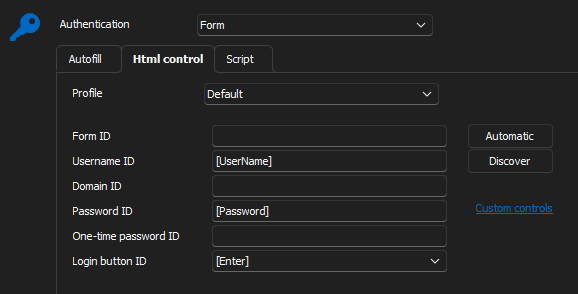
This is just after pressing the "Automatic" button... "Discover" doesn't work for iDRAC, I don't know why. Discovering other internal web pages do work usually (not all).
But the Autofill by an "iDRAC (web)" entry works without problems.
iDRAC (Web) Language Setting
Hello,
Version is 2024.3.31, because of this issue: https://forum.devolutions.net/topics/44271/rdm-2025--requiring-net9-is-a-bad-idea
Local data source.
No, with website entry I found that you can specify the language code here:
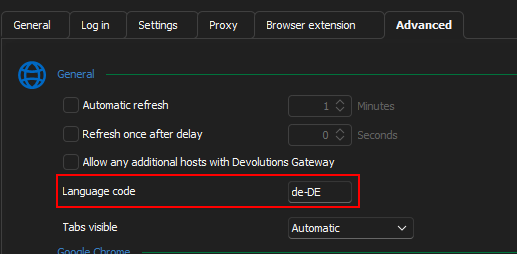
This works as expected. Unfortunately automatic login doesn't work.
Under an iDRAC entry the "advanced" tab is missing.
iDRAC (Web) Language Setting
Hello,
when connecting to iDRAC using the "Dell iDRAC (web)" entry, the language header in the integrated browser is always set to english (en-US presumably).
Unfortunately the keyboard layout in the virtual console (KVM) is tied to the browser's preferred language setting. Because I have a German keyboard I would need to change this to de-DE. In Edge I would change the "preferred language" setting.
Could you please assist me what I can do in RDM to set this to other language?
Best regards
Laspeed
RDM 2025 - requiring .NET9 is a bad idea!
Hi Richard,
yeah, I use Devolutions.PowerShell module 2024.3.11 on my client. Like I said earlier, I discovered RDM not so lang ago and migrated from RDCMan. At work I manage 300+ Windows servers and used PowerShell to import additional data from csv, then change entry names, description, custom fields, iDRAC information and make sub entries. What I still want to do is make scripts for adding new servers and retiring old servers, which would include automating Tag management.
Also I already used "Edit --> Special action --> Custom PowerShell command" in RDM to change templates on entries for example.
This is something that has to work for me, otherwise I can't use RDM 2025.
RDM 2025 - requiring .NET9 is a bad idea!
Hello,
I understand. You decide to stick with .NET 10 (and PowerShell 7.6 pls) for your future releases, then it would make no sense to ship a self-contained version. I am completely fine with that. This is what I wanted in the first place.
Your tailored script sounds VERY interesting and I would use it in a blast, but before that I have a few questions:
Can I deploy the portable package on my servers and still use the jump host functionality? You said something before about not registering with rdm:// links. I guess that wouldn't apply to my case, because I use the agent on the servers?
Can I use the PowerShell module 2024 with RDM 2025 (including up to version 2025.3)? I recently discovered RDM and the extensive functionality it has, including PowerShell scripting support - which is a huge selling point for me.
Thanks
RDM 2025 - requiring .NET9 is a bad idea!
Hello,
I have to agree with Deas, that requiring a .NET STS version for a product targeted at business users is not a good idea.
At our company we can only use the LTS versions of .NET and the same goes for PowerShell. So at the moment I have to use .NET 8 and PowerShell 7.4 on my client and our servers (I use RDM on a couple different jump hosts).
That means I am stuck with RDM 2024 and PowerShell module 2024 for a year until your next release.
Please consider sticking with LTS for .NET and PowerShell for your next release and skipping the STS versions.
Also, thank you, Richard, for your comprehensive post about building a portable environment, at which I will take a look later.
But from what I can already see it is not as user-friendly as I would hope and I don't understand why you couldn't just package a self-contained installer or ZIP and offer it at your downloads page. You could still keep your standard release for users that want the smaller package and add the self-contained package as optional download.
You release RDM often, so that the .NET in your package would be reasonable up-to-date (hinting at security concerns).
Thanks for your considerations