iDRAC (Web) Language Setting

Hello,
when connecting to iDRAC using the "Dell iDRAC (web)" entry, the language header in the integrated browser is always set to english (en-US presumably).
Unfortunately the keyboard layout in the virtual console (KVM) is tied to the browser's preferred language setting. Because I have a German keyboard I would need to change this to de-DE. In Edge I would change the "preferred language" setting.
Could you please assist me what I can do in RDM to set this to other language?
Best regards
Laspeed
All Comments (5)
Hello,
Thank you for reaching out to us regarding this,
Could you please specify the version of RDM you are currently using?
What type of data source are you using?
Additionally, do you encounter the same issue when using a "Website" entry instead?
Let me know,
Best regards,
Samuel Dery
Hello,
Version is 2024.3.31, because of this issue: https://forum.devolutions.net/topics/44271/rdm-2025--requiring-net9-is-a-bad-idea
Local data source.
No, with website entry I found that you can specify the language code here:
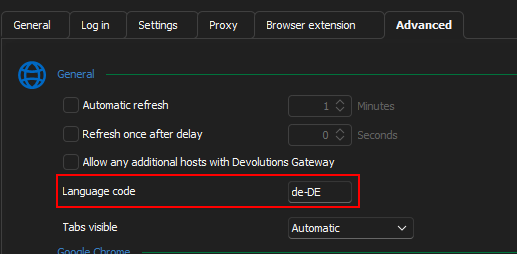
This works as expected. Unfortunately automatic login doesn't work.
Under an iDRAC entry the "advanced" tab is missing.
Hello,
Thank you for your reply,
In the Website entry, can you confirm that the "HTML controls" are configured properly for the autofill as explained in this knowledge base article:
https://docs.devolutions.net/rdm/kb/knowledge-base/website-authentication/
Let me know,
Best regards,
Samuel Dery