
willenae0
RDP Authentication failure when using certificates
Hey guys,
I'd like to add something to this issue as I think I am seeing this exact problem as well.
@ryanadams
Does your certificate have a PIN?
Because mine does. I have a smardcard certificate on a yubikey and I am using a PIN to open RDP connections with it.
I started to see this error that you described. What currently works for is this:
All I had to do was to go into the properties of my smardcard credential in my RDP Managers user vault and remove the PIN from there!
So now, when I double click a connection in RDP Manager the standard Windows login pop up comes up with my yubikey certificate already selected and "all" I have to do is enter my PIN manually.
I am a bit suprised that this maybe comes from these recent Microsoft changes that you posted and that I would have to temper with the registry which apparently is only a temporary fix.
I am surprised because as of right now my certificate on my yubikey still works fine. It works fine when I open an RDP connection manually through mstsc.exe. It is fine when I do it through Remote Desktop Manager. But only if I remove the PIN from being automatically used by the program.
Do you think removing the PIN from your RDP Manager credential would work as well? Without the registry changes?
I am kinda hoping it would as that would point toward what you posted under the "Resolution" section and that maybe all that needs to be done is a change "in the authenticating app" as Microsoft puts it.
BR,
Will
RemoteDesktopManager.exe won't run - 2025.1.25.0 (64-bit)
Dont know if this is a new topic or if this is related to this problem but I just like to add that the installer for "Setup.RemoteDesktopManager.2025.1.25.0.msi" never finishes!
It hangs at this stage:
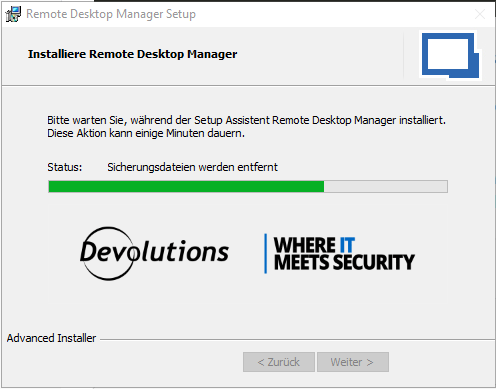
The funny thing is, in that state you can open the application BUT, the msiexec is still running. If you kill the process, something is still present in the system, resulting in any other installation using msiexec to fail stating that "RemoteDesktopManager is in a suspended state, in order to continue changes need to be rolled back"
And when you roll back changes that results in RemoteDesktopManager being completely deinstalled!
I think this was also happening with the 2025.1.24 version. What is going on? Added the install log if it helps.