
mariochancay
IBM i on Power Access Client
Hi Jean-Francois. We made additional test. Now the login process seems to work but the console is not opened automatically. The following message is displayed:

Wanted to remind that the following 2 part command logins and automatically opens the 5250 session:
C:\Users\Public\IBM\ClientSolutions\Start_Programs\Windows_x86-64\acslaunch_win-64.exe /PLUGIN=logon /AUTH /SYSTEM=KYWICDS /USERID=XAVIER /PASSWORD=XXXXXXXX /GUI=0 | C:\Users\Public\IBM\ClientSolutions\Start_Programs\Windows_x86-64\acslaunch_win-64.exe C:\Users\Administrador\Documents\IBM\iAccessClient\Emulator\KYWICDS.hod
Seems that the latest fix in RDM makes the first part of the commando to work but not the second part that should open the 5250 session.
Regards
IBM i on Power Access Client
Hi Jean-Francois, we ran the test again using RDM 2025.1.41.0 64-bit (JIT) but the problem continues.
Can we schedule a remote session with the customer so you can verify what may be causing the issue? Let me know your availability of time during next week.

I think that the following parameter needs to be explicitly specified in the RDM GUI and injected as part of the command line:
/SYSTEM=KYWICDS
where KYWICDS is the hostname of the remote host.
Regards
IBM i on Power Access Client
Hi Jean-Francois, we made some test with the customer and found that the new logon method is not working.
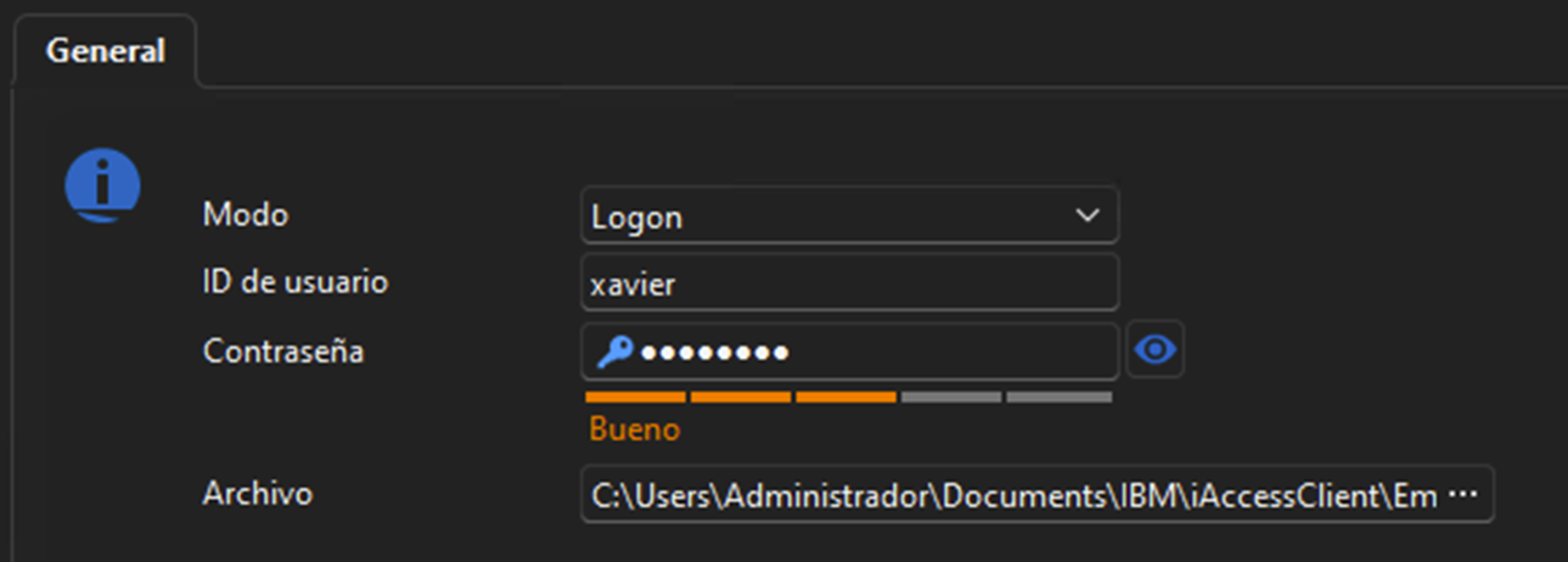
the following error messages in the screen after trying to open the remote session:
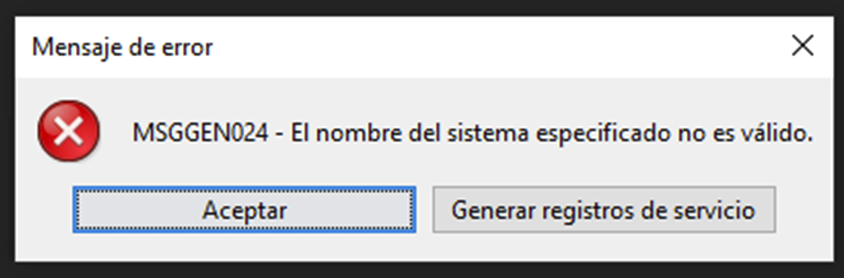
"The name of the specified system is not valid".
I can send to you the .hod file and also a trace file from the i Access client. Please provide a secure upload link. Seems like the hostname parameter of the remote host is not properly passed to the command line. The .hod file also specifies the remote host in the following field:
name=
I suggest to coordinate a remote session with the customer so you can see the steps that we followed and the errors displayed. This can expedite the resolution of this issue.
Thank you for your support
IBM i on Power Access Client
Hi Michael, the customer has time in the following days to schedule a meeting where he can show you the tests that he has performed so far. Let me know your availability of time in the coming days to book this meeting.
Thks!
PAM and Active Directory Tiering
Greetings, we are about to start a project where the customer is going to define a new Active Directory Tiering mode. I found the following article interesting and wanted to ask the feedback of the community about their recommendations and personal experiences with this matter:
Regards
IBM i on Power Access Client
Hi Michael, the customer returns from vacations after the 9th of September. I will coordinate a remote session with you so you can see the parameters and results that we got so far. There is also a ticket open with IBM to understand if we can simplify the command that we are using to automate the login process:
C:\Users\Public\IBM\ClientSolutions\Start_Programs\Windows_x86-64\acslaunch_win-64.exe /PLUGIN=logon /AUTH /SYSTEM=SYSTEM1 /USERID=USERXX /PASSWORD=XXXXXXXX /GUI=0 & C:\Users\Public\IBM\ClientSolutions\Start_Programs\Windows_x86-64\acslaunch_win-64.exe C:\Users\Administrador\Documents\IBM\iAccessClient\Emulator\KYWICDS.hod
Regards
IBM i on Power Access Client
Hi Michael, do you have an update to this request?
Thanks in advance
IBM i on Power Access Client
Hi Michael, wanted to understand when we can have an update about this requirement.
Regards
IBM i on Power Access Client
Hi Michael, that's correct. We want to automate the login process. We are able to fully automate the login process running the following command:
C:\Users\Public\IBM\ClientSolutions\Start_Programs\Windows_x86-64\acslaunch_win-64.exe /PLUGIN=logon /AUTH /SYSTEM=SYSTEM1 /USERID=USERXX /PASSWORD=XXXXXXXX /GUI=0 & C:\Users\Public\IBM\ClientSolutions\Start_Programs\Windows_x86-64\acslaunch_win-64.exe C:\Users\Administrador\Documents\IBM\iAccessClient\Emulator\KYWICDS.hod
This only works from a command prompt. If doesn't works if we include inside a remote session in RDM.
If required, we can schedule a session with the customer to perform additional test.
Regards
Plugin IBM i Access
Bonjour, les dernières versions d'IBM i access prennent en charge la spécification de paramètres tels que le nom d'utilisateur et le mot de passe :
C:\Users\amministrativo4\IBM\ClientSolutions\Start_Programs\Windows_i386-32\acslaunch_win-32.exe /PLUGIN=logon /AUTH /SYSTEM=xxx.xxx.xxx.xxx /USERID=xxxxx /PASSWORD=xxxxxx /GUI=0

Besoin et version mise à jour du plugin IBM i access
https://www.ibm.com/support/pages/ibm-i-access-acs-getting-started
IBM i on Power Access Client
Hi, would like to understand if the lastest version of the IBM i Access plugin supporta automatic login to a 5250 session passing parameters like user, password. Follows and example of the command line:
C:\Users\amministrativo4\IBM\ClientSolutions\Start_Programs\Windows_i386-32\acslaunch_win-32.exe
/PLUGIN=logon /AUTH /SYSTEM=xxx.xxx.xxx.xxx /USERID=xxxxx
/PASSWORD=xxxxxx /GUI=0
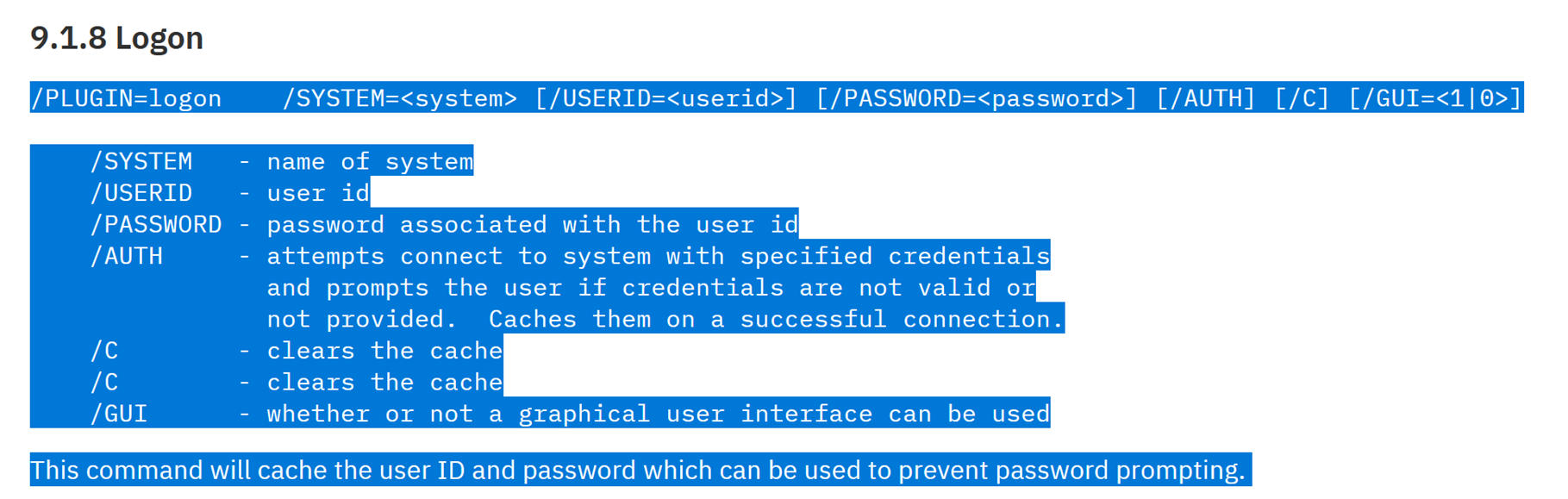
https://www.ibm.com/support/pages/ibm-i-access-acs-getting-started
Thks!