IBM i on Power Access Client
0 vote
Hi, I see the old 5250 client (pcomm 5250) is available in Devolutions, would it be possible to get the new client added? It is java based and has a command line options to open a session. I have it running in a command line but it pops out to it's own window and running it in a tab would be easier. This is the command I use to start it: "\IBM\ClientSolutions\Start_Programs\Windows_x86-64\acslaunch_win-64.exe /plugin=5250 /system=systemname /name=sessionname /wide"
The web site is located here: http://www-03.ibm.com/systems/power/software/i/access/solutions.html
The client can also be started directly like this: "java -jar C:\IBMiAccess\acsbundle.jar"
All Comments (42)
Hi,
I will add this to our todo list.
We will need your help to test.
Regards
David Hervieux
Thanks David, I will be glad to help test!
Hello Mr. Green,
When you mention the pcomm5250 are you talking about our AddOn for IBM Personal communications ?
Regards,
Michaël Beaudin

Hi,
I see this thread is about 10 months old, is there any progress in supporting the new 5250 client from IBM?
This new client java application is now used for IBM Power Systems, IBM i operating system (previous OS/400 & AS/400)
https://www.ibm.com/systems/power/software/i/access/solutions.html
I would like the user/password integration.
I am available for testing purposes.
I could supply a few additional testers as well...
Hello,
We just wanted to make sure. Is what you are asking for an update for an IBM add-on we currently have in RDM or are you asking for a brand new add-on ?
If it was an add-on we currently have, what were you using in the past? Was it IBM personal communications?
Best regards,
Michaël Beaudin
I'm a new RDM user. I do not use the current IBM addon.
The current "IBM Personal Communications" add on is not specific for IBM i (OS/400).
It also needs a license.
All current IBM i customers use the new IBM ACS (Client Solutions).
And it does not need a Client license, only a IBM i server license.
It would be great if it is integrated into RDM with an addon.
Thank you for the input. We'll get working on this as soon as possible and keep you updated on the progress.
Regards,
Michaël Beaudin
Hello,
A first build has been done for the IBM i Access AddOn. I wasn't sure if you wanted this AddOn to "Logon" to IBM i Access or if you wanted it to start a 5250 emulator to a specified system.
At the moment, the AddOn has been setup to work with the "Logon" command line. A .dll file has been linked to this reply so that you can test and see if it works like intended.
If it does then please let me know and I'll release the AddOn after some finishing touches. If it doesn't then please tell me what's wrong and I'll have a new version ready for testing soon after.
PS, the icon the IBMiAccess session isn't the correct one at the moment and will be fixed before it is released. Don't pay it any mind.
Regards,
Michaël Beaudin
IBMiAccessAddOn1.0.0.0.zip
Hi,
Thanks for this add-in. I've been waiting for this feature...
I downloaded the dll and placed it in the RDM installation folder.
When I create a new session, the add-in requests for acslaunch_win-32.exe.
I have however the 64-bit version installed (acslaunch_win-64.exe).
Is it possible to check on both executables?
Thanks !
Hello David,
I've linked a new .dll file to this message and have set the 64-bit client as the default executable for the add-on.
It's now possible to start IBM using acslaunch_win-32.exe, acslaunch_win-64.exe or acsbundle.jar.
Please do let me know if everything works as intended or if any issues need to be fixed.
Best Regards,
Michaël Beaudin
IBMiAccessAddOn1.0.0.0.zip
Hi,
I now get a step further.
I get a message from IBM i access 'the function completed successful' but no session to the IBM i server.
When i uncheck the option 'use GUI' a dos-window flashes by. I managed to capture it using printscreen.
Please have a look at the attachements.
It looks like it launches IBM i access OK, but there is a problem with the parameters passed.
Capture2.PNG
Capture.PNG
Hello David,
Thank you for taking the time to test out. I'll try changing the command line one more time and the parameters will change a little bit. Instead of starting "IBM i Access" I'll go straight for the opening of a 5250 session and see if the results are any better.
Regards,
Michaël Beaudin
Hello,
Linked to this reply is a new version of the add-on using a completely different command line. This command line doesn't accept login parameters so I'm not too sure if you'll have to enter your credentials every time you start a 5250 session or if once will be enough for IBM i access to remember them.
The only informations you'll need to enter are your system's name and your 5250 session's name.
Please keep me posted on the results.
Regards,
Michaël Beaudin
IBMiAccessAddOn1.0.0.0.zip
Hi Michaël,
I apologize for the late reply. I just tested the new dll. It now indeed opens a 5250 session to the correct system.
It would be nice if I could also specify the workstation ID.
Now it presumes the AS400 will automatically generate a workstation ID, but not all AS400 systems are configured to do that.
A logon to such a system would now not be possible.
The workstation ID is not the same as a session name.
Would it be possible to open the 5250 session in a tab instead of external?
Apart from that it would also be nice to be able to open the IBM i access solutions main screen separately in a tab by launching "C:\Users\Public\IBM\ClientSolutions\Start_Programs\Windows_x86-64\acslaunch_win-64.exe" without parameters.
Kind regards
David
Hello David,
A new version of the add-on has been completed. The workstation ID has been added as well as a "Mode" combobox where you can choose to launch a 5250 session or IBM i Access's executable directly with no parameters.
The embedded mode has also been added.
Regards,
Michaël Beaudin
IBMiAccess1.0.0.0.zip
Hi Michaël,
Thanks for this update... great support :)
I just quickly tested both new feature.
The IBM i access mode works fine.
However in both modes when I select to open the application in Embedded mode (tabbed), it opens a new tab, but it disappears immediately and then it opens the application externally.
Do you think you can fix this behaviour?
Kind regards,
David
Hello David,
When you go in your cmd and type "C:\Users\Public\IBM\ClientSolutions\Start_Programs\Windows_x86-64\acslaunch_win-64.exe", do you get the following message :
Unable to load 64-bit Java module.
Retrying with Windows_i386-32/acslaunch_win-32.exe ?
Regards,
Michaël Beaudin
Hi Michaël,
yes that is correct.
I have changed the configuration of the add-on to use the 32bit executable and now it works perfectly
Thanks !
Hi David,
That's great!
I'll do some finishing touches on the add-on and release an official version.
Thank you so much for your time.
Regards,
Michaël Beaudin
Hi Michaël,
I just discovered one problem.
When I open an 5250 session in tabbed mode. I'm uabled to enter text in my 5250 session. It looks like my keyboard is not working when I focus on the tabbed 5250 session. the Arrow-keys or the tab key do not work either.
I couldn't test this yesterday because I hadn't a system to connect to in the neighborhood.
Can you have a look at this?
Kind regards,
David
Hello David,
Sadly this is a bug which occurs often when embedding add-ons and there's nothing we can do about it.
The official version of the add-on will be changed by the end of the day so that it won't support the embedded mode.
Sorry for the inconvenience.
Regards,
Michaël Beaudin
Hi, would like to understand if the lastest version of the IBM i Access plugin supporta automatic login to a 5250 session passing parameters like user, password. Follows and example of the command line:
C:\Users\amministrativo4\IBM\ClientSolutions\Start_Programs\Windows_i386-32\acslaunch_win-32.exe
/PLUGIN=logon /AUTH /SYSTEM=xxx.xxx.xxx.xxx /USERID=xxxxx
/PASSWORD=xxxxxx /GUI=0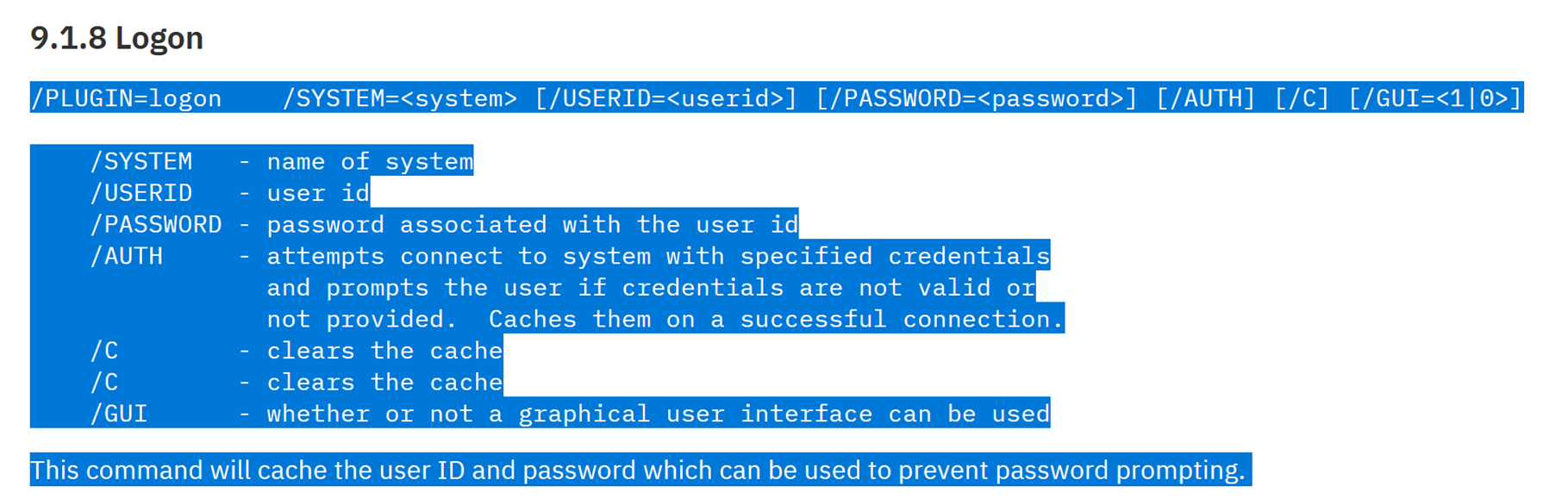
https://www.ibm.com/support/pages/ibm-i-access-acs-getting-started
Thks!
a1eabc92-3dfc-4ea1-9f98-e9444f7bb76f.png
Hello,
If I understand correctly, you would like us to maintain the current behavior of the plugin (connecting through the 5250 emulator to a specified system), but you would like us to add the login process to avoid being prompted for login each time you use the plugin?
Best Regards,
Michaël Beaudin
Hi Michael, that's correct. We want to automate the login process. We are able to fully automate the login process running the following command:
C:\Users\Public\IBM\ClientSolutions\Start_Programs\Windows_x86-64\acslaunch_win-64.exe /PLUGIN=logon /AUTH /SYSTEM=SYSTEM1 /USERID=USERXX /PASSWORD=XXXXXXXX /GUI=0 & C:\Users\Public\IBM\ClientSolutions\Start_Programs\Windows_x86-64\acslaunch_win-64.exe C:\Users\Administrador\Documents\IBM\iAccessClient\Emulator\KYWICDS.hod
This only works from a command prompt. If doesn't works if we include inside a remote session in RDM.
If required, we can schedule a session with the customer to perform additional test.
Regards
Hello,
Thank you for this information. We will create a ticket for this improvement and keep you updated on the progress.
Best Regards,
Michaël Beaudin
Hi Michael, wanted to understand when we can have an update about this requirement.
Regards
Hello,
We do not have any updates for now but I have put this at a higher priority in our TODO.
The person assigned to this ticket should be back from vacation next week and should be able to work on this once he finishes working on a few tickets which are already in the works.
Best Regards,
Michaël Beaudin
Hi Michael, do you have an update to this request?
Thanks in advance
Hello,
There is no update for now as we have been focusing on our bigger new features for the upcoming major release. However, this is still high on our TODO list.
I can't make any promises but we are hoping to squeeze this in the 2024.3 release of RDM which is planned for late September.
Best Regards,
Michaël Beaudin
Hello,
We have been taking a look at this but we do not have a working setup for now so we first started with investigating the command lines.
One thing we have noticed is that we do not have the same way of launching the sessions as you do. Our current implementation works with the PLUGIN=5250 mode while your way of opening the application seems to be by using the PLUGIN=logon method and then targeting a .hod file which seems to be some kind of terminal profile?
What we are wondering is if the logon method can be called first as a way of logging in before calling the 5250 plugin command line? Or does the logon plugin method only work with .hod files as a target?
The reason we are asking this is because we would ideally like to be able to simply add the username and password fields to our existing entry's "5250 session" mode. If they do not work together we would have to create a new "Mode" in the combobox for the logon plugin.
Best Regards,
Michaël Beaudin
Hi Michael, the customer returns from vacations after the 9th of September. I will coordinate a remote session with you so you can see the parameters and results that we got so far. There is also a ticket open with IBM to understand if we can simplify the command that we are using to automate the login process:
C:\Users\Public\IBM\ClientSolutions\Start_Programs\Windows_x86-64\acslaunch_win-64.exe /PLUGIN=logon /AUTH /SYSTEM=SYSTEM1 /USERID=USERXX /PASSWORD=XXXXXXXX /GUI=0 & C:\Users\Public\IBM\ClientSolutions\Start_Programs\Windows_x86-64\acslaunch_win-64.exe C:\Users\Administrador\Documents\IBM\iAccessClient\Emulator\KYWICDS.hod
Regards
Hi Michael, the customer has time in the following days to schedule a meeting where he can show you the tests that he has performed so far. Let me know your availability of time in the coming days to book this meeting.
Thks!
Hello,
Since we have already released the 2024.3 version of RDM recently we do not have the same time and technological constraints we had a few weeks back when discussing this.
We have decided to simply create a new mode in the IBM entry which will use the exact command line provided by the customer and allow him to use his .hod file.
Therefor, it will not be necessary to do a call with the customer.
We have added this to our planning for the 2025.1 version scheduled to be released around February.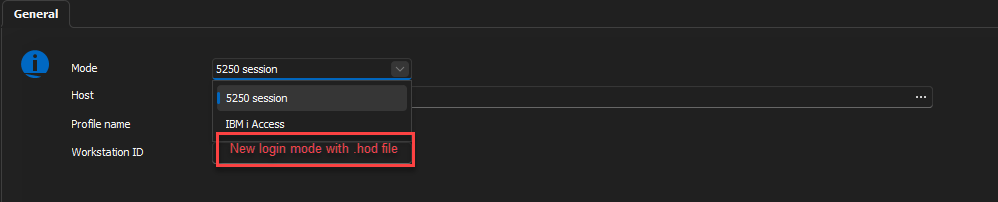
Best Regards,
Michaël Beaudin
10a5fd4c-628d-4a4d-a7b0-83d92a725c53.png
Hi,
We added this feature internally. It should be available starting with version 2025.1 around the start of February
We were not able to test this on our end, if it's not working properly please provide us with your feedback.
Regards,
Jean-Francois Duchesne
Hi Jean-Francois, we made some test with the customer and found that the new logon method is not working. 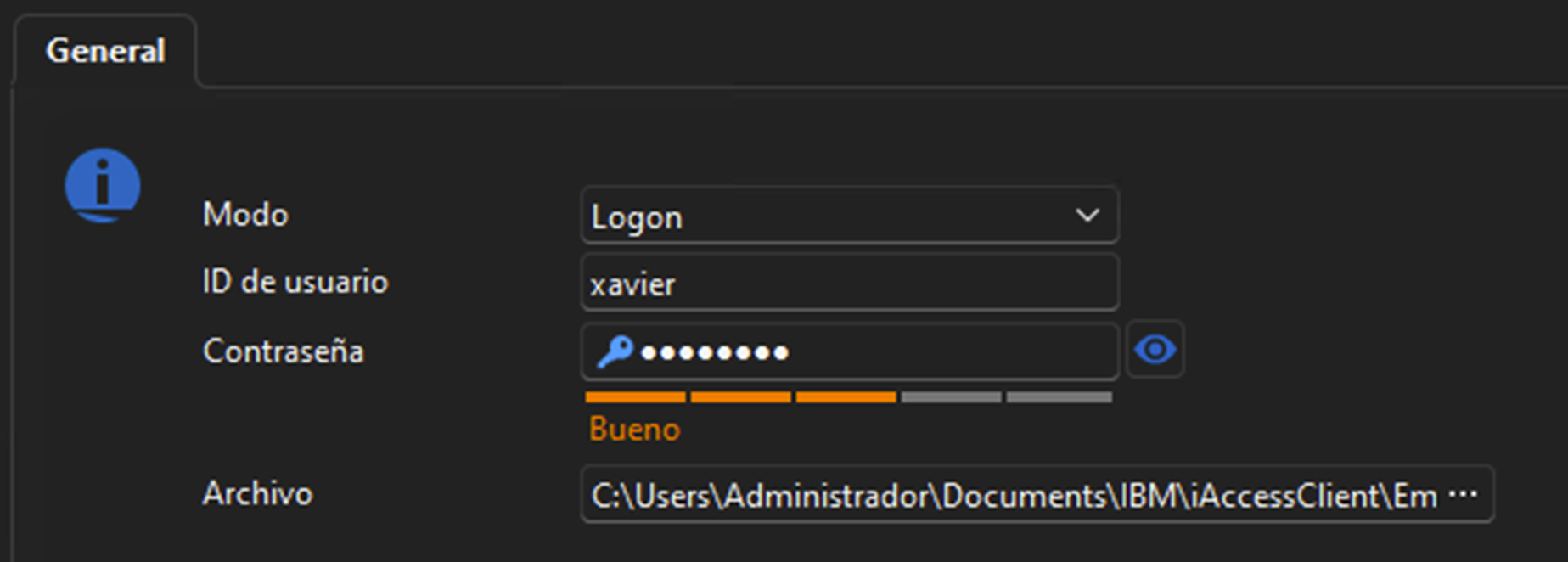
the following error messages in the screen after trying to open the remote session: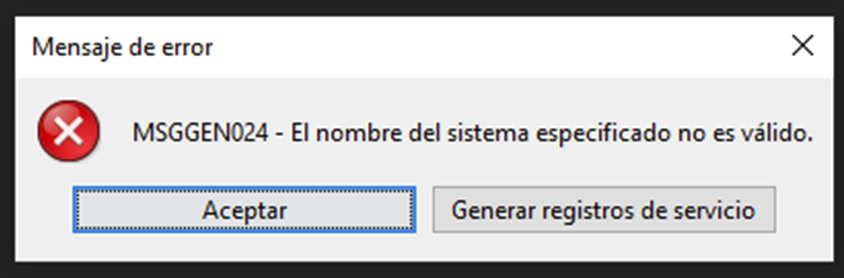
"The name of the specified system is not valid".
I can send to you the .hod file and also a trace file from the i Access client. Please provide a secure upload link. Seems like the hostname parameter of the remote host is not properly passed to the command line. The .hod file also specifies the remote host in the following field:
- name=
I suggest to coordinate a remote session with the customer so you can see the steps that we followed and the errors displayed. This can expedite the resolution of this issue.
Thank you for your support
2f442546-c53e-46e7-b0dd-5ed464050440.png
04d70148-9b82-46d0-bb35-cd99ecc21cb5.png
Hi,
We reviewed your client's use case and our implementation and made a tentative fix internally, it should be available starting with 2025.1.38 which is planed for this week
Regards,
Jean-Francois Duchesne
Hi Jean-Francois, we ran the test again using RDM 2025.1.41.0 64-bit (JIT) but the problem continues.
Can we schedule a remote session with the customer so you can verify what may be causing the issue? Let me know your availability of time during next week.
I think that the following parameter needs to be explicitly specified in the RDM GUI and injected as part of the command line:
/SYSTEM=KYWICDS
where KYWICDS is the hostname of the remote host.
Regards
49aab4fb-028d-40d2-9711-d8651a7ef8a9.png
Hi,
We added the host field internally, it should be available starting with version 2025.2.17
If all the information you have provided are accurate there is no need for a remote session since we do not have a testing environment for this feature.
Once again if it's not working properly we ask for your feedback as this is a blind fix.
Regards
Jean-Francois Duchesne
Hi Jean-Francois. We made additional test. Now the login process seems to work but the console is not opened automatically. The following message is displayed:
Wanted to remind that the following 2 part command logins and automatically opens the 5250 session:
C:\Users\Public\IBM\ClientSolutions\Start_Programs\Windows_x86-64\acslaunch_win-64.exe /PLUGIN=logon /AUTH /SYSTEM=KYWICDS /USERID=XAVIER /PASSWORD=XXXXXXXX /GUI=0 | C:\Users\Public\IBM\ClientSolutions\Start_Programs\Windows_x86-64\acslaunch_win-64.exe C:\Users\Administrador\Documents\IBM\iAccessClient\Emulator\KYWICDS.hod
Seems that the latest fix in RDM makes the first part of the commando to work but not the second part that should open the 5250 session.
Regards
b433a7b3-6501-44c9-8b95-24baf7521fd2.png
Hello,
Jean-Francois is on vacation this week. I will have him get back to you on his return.
Best Regards,
Michaël Beaudin
Hi,
We’ve replaced the previously used & operator with a | in our implementation. This change will take effect starting with version 2025.2.24.
Since we are unable to replicate your environment, we would appreciate it if you could confirm whether this update resolves the issue on your end.
Regards,
Jean-Francois Duchesne