
harrisongiven
Import / Export -- Windows Terminal Format
Hello,
Awesome. I will await the release and test it out.
Thanks,
Import / Export -- Windows Terminal Format
Hello,
Just was wondering where in the backlog this request is?
Thanks,
Question on Double Click Action on the Navigation Panel
Hello,
Cool, I will be on the look out for the new version to try this out.
Thanks,
Question on Double Click Action on the Navigation Panel
Hello,
I found some of these features, and specifically turned on 3. But the use case I use this for is I am an OT engineer that checks on multiple thin client that run our industrial HMIs. So, If I do something to these system I just need to take a peek on these sessions to make sure they are alright and move onto the next client. So, I double click the connection, look, double click to close, and move onto the next connection to repeat.
So, I would say it be nice to be able to do that.
Thanks,
Import / Export -- Windows Terminal Format
Just to also explain my use case I use it to color code certain boxes so I know what I am doing in which box by color of the terminal.
Question on Double Click Action on the Navigation Panel
Hello,
I am new to using RDM, and I have some questions on double click actions in the navigation panel. I originally been using RoyalTS for many years, so I am used to be able to double click a session in their navigation panel to launch the session, and then double clicking in their navigation panel on a open session to close it. I can see RDM working with the first part where double click opens the session, but I have not found a setting or anything that will close the session when I double click it again. Does this exist or does RDM not have a setting/feature to allow for this to work?
Thanks.
Import / Export -- Windows Terminal Format
I also bump this feature request. Our department is moving from RoyalTS to RDM and RoyalTS supports importing these color templates by a couple of clicks.
https://docs.royalapps.com/r2023/royalts/user-interface/color-palettes.html#terminal-color-palettes
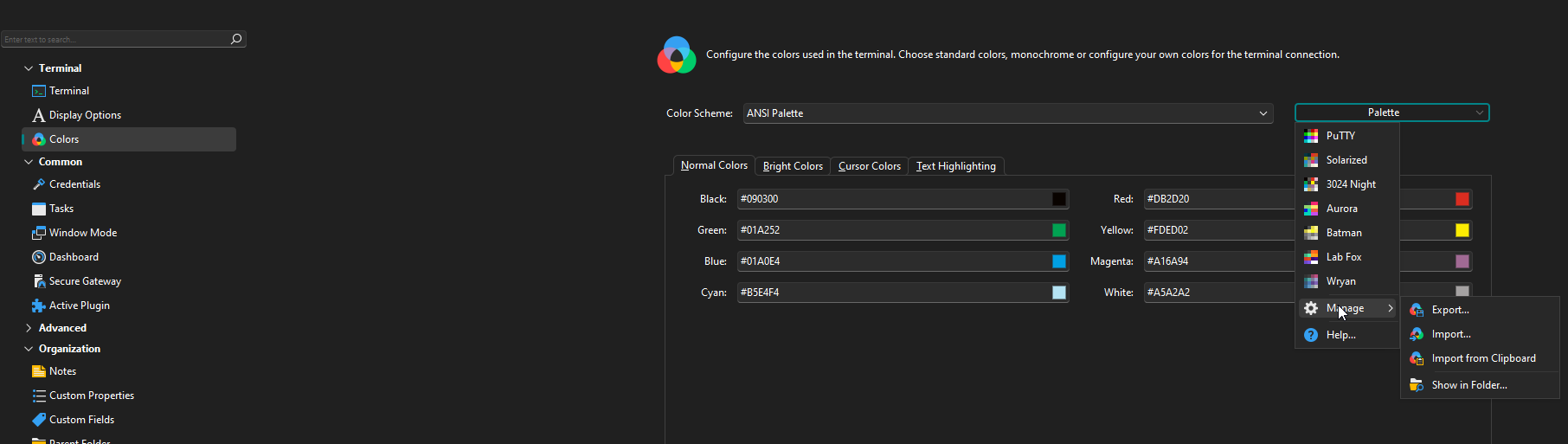
It would be nice if RDM did support these formats.