Import / Export -- Windows Terminal Format
0 vote

I am aware of the import / export feature with terminal colors, however, there are very few places that have that format (kitty SSH I believe) by default.
In comparison, Windows Terminal seems to be fairly prevalent and just a JSON file. I was wondering if it would be possible to allow for at least importing with this format?
I have included examples of the devolutions export, Windows Terminal scheme and a mapping of the 2.
Thank you for any consideration
## Terminal Scheme ##
{
"name": "AdventureTime",
"black": "#050404",
"red": "#bd0013",
"green": "#4ab118",
"yellow": "#e7741e",
"blue": "#0f4ac6",
"purple": "#665993",
"cyan": "#70a598",
"white": "#f8dcc0",
"brightBlack": "#4e7cbf",
"brightRed": "#fc5f5a",
"brightGreen": "#9eff6e",
"brightYellow": "#efc11a",
"brightBlue": "#1997c6",
"brightPurple": "#9b5953",
"brightCyan": "#c8faf4",
"brightWhite": "#f6f5fb",
"background": "#1f1d45",
"foreground": "#f8dcc0",
"cursorColor": "#efbf38",
"selectionBackground": "#706b4e"
}
## Mapping ##
"Colour0": DefaultForeground
"Colour1": DefaultForegroundBold
"Colour2": DefaultBackground
"Colour3": DefaultBackgroundBold
"Colour4":CursorText
"Colour5":CursorColor
"Colour6": ANSIBlack
"Colour7": ANSIBlackBold
"Colour8": ANSIRed
"Colour9": ANSIRedBold
"Colour10": ANSIGreen
"Colour11": ANSIGreenBold
"Colour12": ANSIYellow
"Colour13": ANSIYellowBold
"Colour14": ANSIBlue
"Colour15": ANSIBlueBold
"Colour16": ANSIMagenta
"Colour17": ANSIMagentaBold
"Colour18": ANSICyan
"Colour19": ANSICyanBold
"Colour20": ANSIWhite
"Colour21": ANSIWhiteBold
## Devolutions Export Scheme ##
Colour21\197,200,198\
Colour20\112,120,128\
Colour19\138,190,183\
Colour18\94,141,135\
Colour17\178,148,187\
Colour16\133,103,143\
Colour15\129,162,190\
Colour14\95,129,157\
Colour13\240,198,116\
Colour12\222,147,95\
Colour11\181,189,104\
Colour10\140,148,64\
Colour9\204,102,102\
Colour8\165,66,66\
Colour7\55,59,65\
Colour6\40,42,46\
Colour5\197,200,198\
Colour4\29,31,33\
Colour3\29,31,33\
Colour2\29,31,33\
Colour1\197,200,198\
Colour0\197,200,198\
All Comments (13)
Hello,
Our current import and export feature is meant to work with our own systems. The goal was to be able to share your color configuration with other members of your team using RDM.
Is your goal to be able to accomplish something similar with the Windows Terminal entry, rather than our own terminal? Or do you want to take the colors you use in your Windows Terminal and use them in our terminal (SSH Shell, for example)?
Regards,
Hubert Mireault
I do understand the goal behind the feature and very much appreciate it. :-)
To your question, Windows Terminal is a widely used terminal with just a JSON formatting. I want to be able to use the types of sites listed below to customize my terminal. If I have a scheme that I have tweaked, I can still share that with other team members by the current process. However currently, if I find a theme I like and want to try, I have to figure out how to convert the JSON theme into the importable format that RDM understands.
My thought is that, rather than RDM using it's own standard (I believe it is kitty SSH, but still not very common). You might look at a more widely used format for importing/exporting color configuration. This way, users are still free to import/export colors as they have and additionally, they can search other locations and easily import them.
I hope that helps to clarify the request more.
https://windowsterminalthemes.dev
https://terminal.sexy
https://github.com/catppuccin/windows-terminal
https://draculatheme.com/windows-terminal
https://www.ubuntupit.com/best-windows-terminal-themes-and-color-schemes/
I guess that's a no then.
Hello,
Sorry about the delay, our office was closed during the holidays.
Thank you for the clarification. From looking at the links you've posted, I stumbled upon this github project that mentions a plethora of different formats for color schemes: https://github.com/stayradiated/termcolors
Since in your case, the Windows Terminal format is what you're looking for, we could start with this one and see if more formats are requested by our users. It's possible that it won't be a 1:1 match for every color though, as our terminal's colors are based on PuTTY originally, but we could check and see if there's something close enough that would work. I've opened an internal ticket for this request.
Regards,
Hubert Mireault
Not a problem! Thank you for the reply back!! That looks like a great project find!
Putty's scheme I believe is simply an RGB format. In the very brief testing I did on the below site, I believe it should be close enough.
Thank you for looking into this! I realize it's a very insignificant thing, but people do love their color themes. :-)
https://convertacolor.com
Just as a clarification, what I meant when I said it might not be a 1:1 match isn't for the hex/RGB conversion, but because we have some values for colors that don't seem to exist in the example export from Windows Terminal.
From a quick look, we support "Bold foreground", "Bold background" and "Selection foreground" which aren't supported in the Windows Terminal scheme. The rest seems to match, assuming what we consider "bold" colors are what Windows Terminal considers "bright" colors. As you say, it won't be a dramatic difference, so for the most part I believe it'll work well.
A lot of our features and improvements come from our users' feedback. Small annoyances might feel insignificant in a vacuum, but they can compound, and that's when frustration with a product happens, especially when it comes to onboarding multiple users that were using a different software before.
Regards,
Hubert Mireault
I also bump this feature request. Our department is moving from RoyalTS to RDM and RoyalTS supports importing these color templates by a couple of clicks.
https://docs.royalapps.com/r2023/royalts/user-interface/color-palettes.html#terminal-color-palettes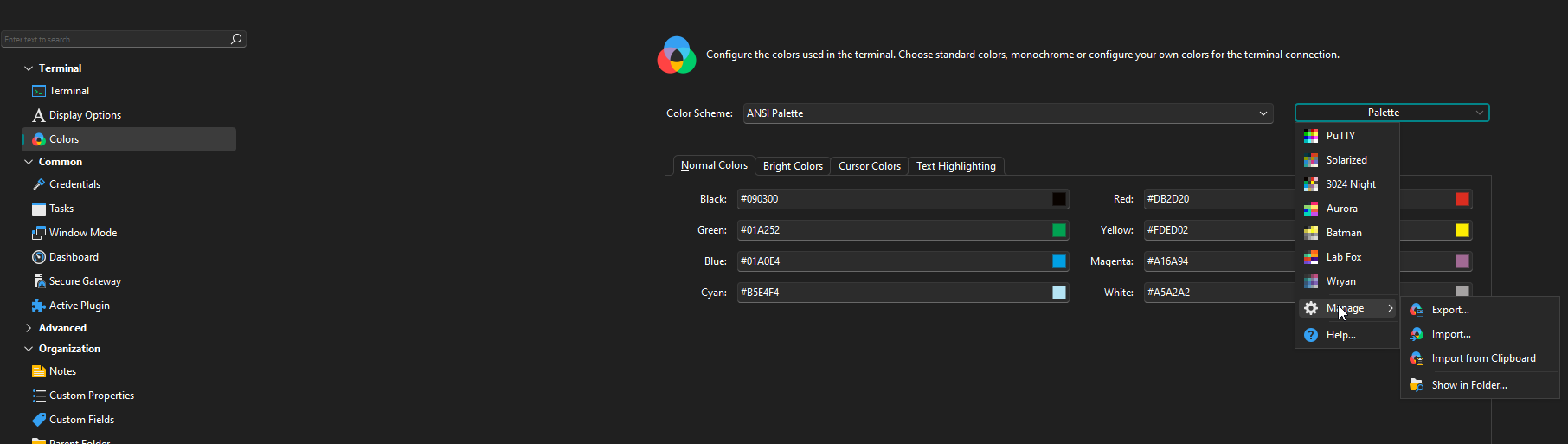
It would be nice if RDM did support these formats.
c9b88088-93b0-4e0c-bb87-7a741e6761fb.png
Hello,
I will add this information to our ticket.
Regards,
Hubert Mireault
Just to also explain my use case I use it to color code certain boxes so I know what I am doing in which box by color of the terminal.
Hello,
Just was wondering where in the backlog this request is?
Thanks,
Hello,
At the moment we don't have an update to provide. We will post back here when we've made progress on this.
Regards,
Hubert Mireault
Hello,
We've added the possibility to import color schemes from Royal TS exported schemes, as well Windows Terminal (from their settings.json file). This should be available for the 2025.1 version.
Regards,
Jafran Majeau
Hello,
Awesome. I will await the release and test it out.
Thanks,