
simon77
DVLS website healthpage
Hi Simon,
Starting from version 2025.3, we added two endpoints:
/health – Indicates whether the server and scheduler are running.
/ready – Indicates whether the server is healthy and not in maintenance mode.
Does this provide the type of health check you’re looking for?
Thank you
@Marc-Andre Bouchard
Hello,
Yes, I believe so, as long as it catch the example I just outlined and give proper http error codes for monitoring.
Thank you,
Regards,
Simon
@simon77
Hello,, we have just upgraded our test environment to 2025.3 but I can't reach these pages, I get a 404
Regards,
Simon
Enhanced reporting
Hello Simon,
This can be added to the PowerShell module. To better understand the scope of your request, could you let us know which reports are most essential to your use case? That will help us prioritize the implementation more effectively.
Best regards,
Maxime
@Maxime Bernier
Hello,
I would say basics; password rotation, recent PAM activities like check out/in, view password. We would also like a report that covered PAM accounts imported to vaults, as well as PAM vaults being created.
Regards,
Simon
Enhanced reporting
Hello,
So we just recently started looking into reporting, trying to get data into Power BI. However, it turned to be a challenge. The PS command Export-DSPamAccountAccessReport did only dump the permissions on each PAM account, so we turned to the GUI with Reports - Scheduled reports. The content is what we are looking for, however, the only way of getting the data out is by e-mailing a file to mailbox.
We would like to request either more of the GUI report content being available using PowerShell and/or if it's in the stars to add support for file share or Azure blob, for storing the Scheduled reports .
Regards,
Simon
MS Authentication users and user group sync issues related scheduler windows service
Hello,
Thank you for your patience, our development team confirmed that they fixed the issue in the 2025.3 version of Devolutions Server and Remote Desktop Manager (RDM) that should be released next week.
They also confirmed that for the full fix, RDM and DVLS will need to be both upgraded.
Best regards,
@William Alphonso
Hello,
Thx. Does this mean that we will have a separate proxy setting inside of DVLS Admin, replacing settings in WinHTTP / WinINET / web.config etc?
Regards,
Simon
DVLS website healthpage
Hi Simon,
Just to clarify, what exactly do you mean by "critical components"?
Thank you
@Marc-Andre Bouchard
Hello,
Well, in our case we had name resolution issues on the app-server that resulted in it not being able to access the database, it's in my first post. Maybe there's other internal components that could be "down" and not affecting the login page, or maybe there isn't. (I'm not referring to the Devolution Scheduler)
Regards,
Simon
MS Authentication users and user group sync issues related scheduler windows service
Hello,
It looks like we’ve narrowed it down, the issue isn’t DVLS or Entra itself, but how the built-in service accounts talk through your proxy.
You’re correct: Test-NetConnection and curl don’t use WinHTTP automatically. They only confirm that without an explicit --proxy, SYSTEM has no direct outbound path.
The fact that curl --proxy works means DVLS can reach Entra/Graph if the right proxy settings are applied.
Next steps:
Check what WinHTTP proxy is actually set
netsh winhttp show proxyIf it shows Direct access (no proxy server), then WinHTTP isn’t actually configured yet — you may need to run:
netsh winhttp import proxy source=ie(This only works if IE/Edge has a static proxy set, not PAC/WPAD.)
If your environment uses PAC/WPAD
WinHTTP doesn’t support PAC/WPAD scripts. You’ll need to translate that into an explicit proxy config for WinHTTP:
netsh winhttp set proxy proxy-server="http=myproxy:8080;https=myproxy:8080" bypass-list="*.local;127.0.0.1;localhost"If your proxy requires authentication
Built-in accounts (SYSTEM/LocalService) can’t prompt for creds. You’ll either need:
An unauthenticated proxy rule for those outbound hosts (login.microsoftonline.com, graph.microsoft.com, CRL/OCSP endpoints), or
Run Scheduler under a service account that can authenticate to the proxy (like your current local .\RDMRunner).
Test again under SYSTEM
After adjusting WinHTTP, re-run:
psexec -i -s cmd.exe
curl https://login.microsoftonline.com/common/discovery/keysThis should succeed without --proxy.
TL;DR:
If your proxy is PAC/WPAD or requires authentication, the built-in accounts can’t handle it.
Either configure a static WinHTTP proxy with exceptions, or keep using the dedicated .\RDMRunner service account (which is fine long-term if proxy rules can’t be adjusted).
Best regards,
@William Alphonso
Hello,
Thing is, the WinHTTP proxy settings looks fine. Anyways, we don't seem to get anywhere, I'm just going to leave the service running with a local user account for the time being. The proxy requires no authentication.
We also have some scheduler related issues with the DGW heartbeat. It works fine when triggered manually, but can't connect using the scheduled health check. This was sorted out in out test envionment as we moved to 2025.1.13, however, in our prod environment, the issues still persist after the upgrade. The only difference between these to is that LOCAL SERVICE is running the Devolutions Scheduler in the test environment (we don't sync with Entra in test, so we don't have the previous issue here). The hearbeat doesn't actually go through the proxy, it's covered by the bypass settings.
Could this be related somehow?
MS Authentication users and user group sync issues related scheduler windows service
Hello,
It looks like the issue isn’t with your DVLS or the app registration itself, but with how the built-in service accounts (Local Service / Local System) handle network access when DVLS Scheduler tries to reach Microsoft Entra ID.
These accounts use the WinHTTP proxy/trust store (machine scope), which is different from the proxy/trust your user account uses (WinINET). That’s why running Scheduler as a local user works, but built-in accounts time out.
What to do:
1. Test connectivity under SYSTEM context
psexec -i -s cmd.exe
powershell -NoProfile -Command "Test-NetConnection login.microsoftonline.com -Port 443; Test-NetConnection graph.microsoft.com -Port 443"
curl https://login.microsoftonline.com/common/discovery/keysIf this times out here, it confirms the network/proxy problem.
2. Fix WinHTTP proxy for services
Import or set the proxy that the service accounts will use:
netsh winhttp show proxy
netsh winhttp import proxy source=ie
:: or explicitly:
netsh winhttp set proxy proxy-server="http=myproxy:8080;https=myproxy:8080" bypass-list="localhost;127.0.0.1;*.local"
3. Allowlist Entra/Graph endpoints and avoid TLS inspection
Make sure outbound 443 is open to:
login.microsoftonline.com
graph.microsoft.com
Also allow CRL/OCSP endpoints (e.g. mscrl.microsoft.com). If your firewall or proxy is doing TLS inspection, either disable it for these hosts or ensure the interception root CA is trusted in the Local Computer store.
4. Switch Scheduler back to Local Service
Once WinHTTP/proxy/TLS are fixed, DVLS Scheduler will work correctly under Local Service (the supported configuration).
In the meantime, running Scheduler as the dedicated local account you created is fine as a temporary workaround. Long-term, once networking is corrected, the built-in Local Service account will work without needing a custom user.
Best regards,
@William Alphonso
Hello,
WinHTTP have already been set, and looks ok using netsh show. Test-NetConnection and curl fails using the method outlined above. Test-NetConnection doesn't read WinHTTP afaik, neither does curl. I can run the curl command using --proxy, which is successful, but kind of "cheating".
I can visit the pages using Edge, so the proxy is letting me through, using WinINET.
Regads,
Simon
Support custom attributes in PAM import
Hi Simon,
I will submit the request again to the portfolio committee. Accounts are now full fledged RDM Entities and support hundreds of fields.
Our objective would be to keep this request as simple as possible, we use the “rocks / pebbles / sand” system at that level, so if we can keep it "pebble" size, it would help greatly in getting it done.
We could offer to map a named field like you want, but to our CUSTOM_FIELD_X attributes, would it be sufficient?
e.g. CUSTOM_FIELD_1 : otherPager
My concern is WHERE you want to consume that information: in the PAM discovery dashboard, or simply in RDM. The latter would be easier.
Please let me know
@Maurice Côté
Hello,
This would be consumed by a PS script running locally on the DVLS host, accessing the ScanResults
Regards,
Simon
MS Authentication users and user group sync issues related scheduler windows service
Hello William,
We are on version 2024.3.13, we will upgrade to 2025.1.13 on Monday
The authentication to the database is SQL authentication, as is should be since we don't use AD integrated anymore after moving to Azure.
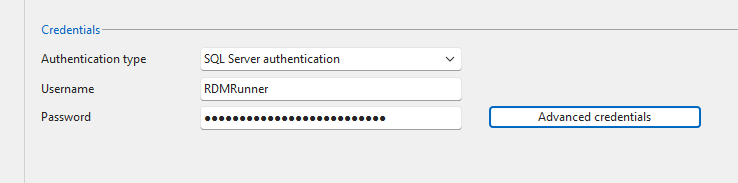
I was unaware of these settings below, are this credentials used for authenticating with the Database only? If that is the case, they should stay I guess, this SQL account is available on the SQL server
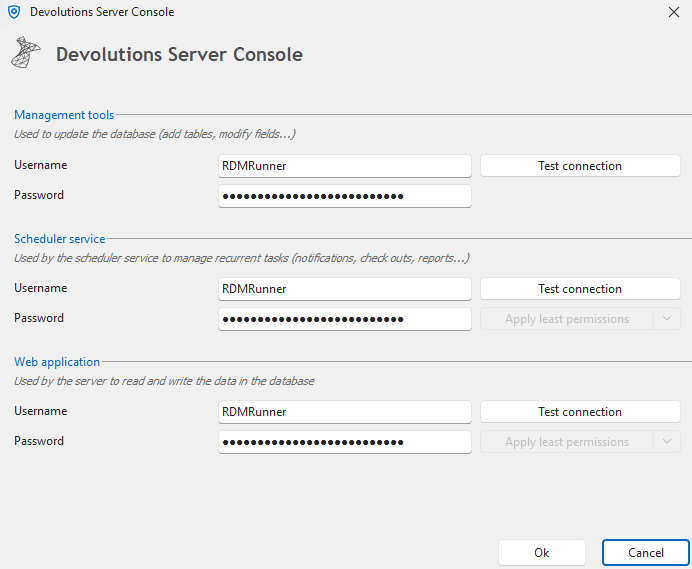
The account I'm referring to is the Local service account on the application server, which is used below. This is the one we would like to change to something else so we can remove the .\RDMRunner. This is where I changed the account earlier.

Also, looking in IIS, I see that the dvls app pool is using the identity NetworkService and not the account specified i web application in advanced credentials. Which one takes precedence?

I assume the secret is still valid, the synchronization works fine as long as Devolutions Scheduler (dvls) is using .\RDMRunner in Windows Services above. The Use specific client ID for users and user groups cache is NOT ticked.
MS Authentication users and user group sync issues related scheduler windows service
Hello,
Thank you for reaching out!
My name is William and I'm here to assist you in any way I can.
These issues are usually caused by the Local Service account being a very restricted account with minimal network privileges. You can try to run the service with Local System instead, which should have sufficient rights to use Microsoft authentication in Devolutions Server.
Best regards,
@William Alphonso
Hey,
Changed to LOCAL SYSTEM and also ran a reset of the Server cache -> MS authentication, but it didn't help, same error.
Regards,
Simon
DVLS website healthpage
Hi Simon,
Starting from version 2025.3, we added two endpoints:
/health – Indicates whether the server and scheduler are running.
/ready – Indicates whether the server is healthy and not in maintenance mode.
Does this provide the type of health check you’re looking for?
Thank you
@Marc-Andre Bouchard
Hello,
Yes, I believe so, as long as it catch the example I just outlined and give proper http error codes for monitoring.
Thank you,
Regards,
Simon
DVLS PAM Reset AD Password - Exception has been thrown by the target of an invocation
Hi Joe
The article has been updated!
https://docs.devolutions.net/pam/kb/how-to-articles/least-privileges-ad-password/
As the link has been modified, I updated the links to this article in this thread.
Best regards,
@Erica Poirier
Hello,
Where did this article go?
Regards,
Simon
MS Authentication users and user group sync issues related scheduler windows service
As we migrated our DVLS from on-prem to Azure, we also made a transition from SQL Server (using integrated authentication) to Azure SQL (using SQL authentication). During this migration we kept running the Devolutions Scheduler with a service account, just like in the old environment, as we sat up the MS authentication config in Administration > Server settings > Authentication > Microsoft Authentication. The only difference is that the service account is a local account on the new VM, we ran the old service with a domain account.
We don't want to use a local service account since it just adds to the complexity, but when we try to run the scheduler using LOCAL SERVICE, but the Microsoft Authentication users and user group sync fails with:
Failed to get Azure AD / Entra ID token for Graph API
ClientSecretCredential authentication failed: Request to the endpoint timed out.
Please advice
Best Regards,
Simon
DVLS website healthpage
Hello,
We get a 200 HTTP code when the page looks like this. Is it possible for you to create a health page that checks critical components and we can monitor that page from our load balancer?

Support custom attributes in PAM import
Hello,
Yes, but we've been unable to deliver an important PAM feature for our coming release, and it's added to what seemed an already full plan for the release after.
I will see what can be done to address this.
Best regards,
@Maurice Côté
Hello Maurice, just wanted to check if this have moved in any direction? We are using a pretty complicated workaround now to get hold on account attributes that we are missing from the import.
More integration with PAM
Hi Simon,
Thank you for the feedback.
I'm sure we can do something to improve the error handling.
I have opened a ticket and will get back to you here once I have an update.
Regards,
David
@David Savard
Hello David,
Any updates on this?
Monitoring DVLS service Externally
Hello Simon,
I'll answer your question.
You want to use Zabbix to monitor server availability via the “Web Scenario” monitoring feature.
From my own experience, I know that this is not so easy, especially if JavaScript is used on the server.
The fact that you can reach the server is a good sign. Otherwise, you would not get an HTTP 200 response.
If you then want to log in, you will most likely have to work with JavaScript within Zabbix if you are using multiple authentication methods.
However, since Zabbix 7.0, there is another way to monitor websites with Zabbix. - Monitor websites with browser items
https://www.zabbix.com/documentation/7.0/en/manual/guides/monitor_browser
I therefore recommend switching to this Zabbix monitoring. There are many tutorials on the internet that explain how to set this up.
Otherwise, ask in the Zabbix forum.
I hope this helps. Good luck!
Alex
@AlexMoucha
Hi,
We are looking for a way to monitor the basic health of DVLS, for example when the database is unavailable. Preferably without maintaining a synthetic user platform, that gives tons of metrics we don't really are interested in.
I see two simple ways, one would be if there's another URL that could throw an error when the app pool can't reach the database, and we could monitor that URL
Or if it's supported, within IIS, to have the page attached earlier, throw a custom non-200 response. Not sure if that is possible.
Regards,
Simon
Monitoring DVLS service Externally
Hello,
Do you mean the Scheduler service or if the DVLS web application is running?
If it's the DVLS web application, then the Zabbix application can only verify if your DVLS URL sends a 200 HTTP code.
Best regards,
@Erica Poirier
Hello,
Sorry, but I'm borrowing this thread. We still get a 200 HTTP code when the page looks like this. Is there any other URL we can use or can this be solved by you using another header?
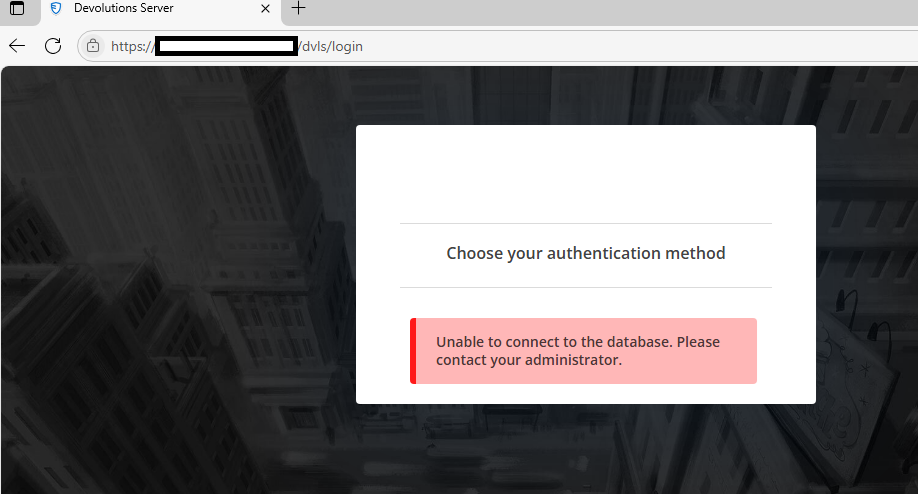
Regards,
Simon
Enable hyperlinking in description
In the description field of entries, it's possible to have either text OR an URL. We would like to have both, so it's possible to embed hyperlinks in the text field.

Solve backward combability issues with Load RDM CmdLet
When using the feature Load RDM CmdLet in PowerShell (local) entries, the latest Devolutions.PowerShell module is fetched from PSGallery. However, if an older version of DVLS is installed, it's quite possible to get compatibility issues. If module backward compatibility can’t be assured, wouldn’t it be better to have the Load RDM CmdLet feature to be configured to fetch an older module with -RequiredVersion 2024.x.x
Adding provider name and domain information in Privileged Access logs
I'm the user, I'd just want to make an addition to the previous post. The logs we believe would be suitable for determine if a environment is onboarded to PAM or not (or PAM utilization) would be to crunch either the PAM password reset logs, or the Check synchronization logs with Power BI. However, it's not possible to reference these logs today to which provider (or PAM vault) they belong to.
In version 2024.3.9, folder_name was included in the Check synchronization logs, but looks like it's been removed since then. Folder_name is the name of the PAM vault, and could be handy in our use case.
DevolutionsGateway PowerShell module requests
Devolutions Gateway will automatically pick the matching certificate with the furthest expiration date on every TLS accept. This means that as soon as you've added the new certificate to the cert store, it will get picked up for new connections without having to reload the configuration by restarting Devolutions Gateway.
Hello again,
I can't replicate this behavior though. Once I install en new certificate (same CN) and remove the old, the web service still present the old certificate. Not sure how often TLS accept is triggered, but eventually the service switches to not showing any certificate at all, displaying a ERR_SSL_PROTOCOL_ERROR. Once I restart the GW service, it picks up the new certificate and the service is restored.
Regarding my other post about we experiencing downtime when renewing certificates was likely more related to exactly this, and not us running Set-DGatewayConfig without ProvisionerPublicKeyFile as I first thought.
DevolutionsGateway PowerShell module requests
Hi,
You can find the source code for Set-DGatewayConfig here: https://github.com/Devolutions/devolutions-gateway/blob/master/powershell/DevolutionsGateway/Public/DGateway.ps1#L363
Here are the parameters it accepts regarding the certificate configuration:
[string] $TlsCertificateFile,
[string] $TlsPrivateKeyFile,
[string] $TlsPrivateKeyPassword,
[ValidateSet("External", "System")]
[string] $TlsCertificateSource,
[string] $TlsCertificateSubjectName,
[string] $TlsCertificateStoreName,
[ValidateSet("CurrentUser", "LocalMachine", "CurrentService")]
[string] $TlsCertificateStoreLocation,
Those are mapped to the gateway.json file which is parsed by Devolutions Gateway:
For the Windows cert store, we took inspiration from Kestrel in ASP.NET, and didn't put an explicit cert thumbprint. Is there a reason why you would prefer to select the certificate by its thumbprint? Aren't the current selection criteria sufficient to find the good certificate? There's also the possibility of using the service certificate store instead of local machine to avoid mixing your certificate with others, and ensuring proper certificate selection.
Best regards,
What's your take on my 2nd request? I just found out that we didn't use the (mandatory?) ProvisionerPublicKeyFile parameter during a renewal procedure with Set-DGatewayConfig, resulting in downtime (#00085017). Can you add some kind output to this command?
DevolutionsGateway PowerShell module requests
Hi Simon,
Ok, so I just inquired and you're probably going to prefer the current way it works. Simply put, once you've set the Windows certificate store criteria (subject name, cert store, etc) Devolutions Gateway will automatically pick the matching certificate with the furthest expiration date on every TLS accept. This means that as soon as you've added the new certificate to the cert store, it will get picked up for new connections without having to reload the configuration by restarting Devolutions Gateway. zero downtime, even if the old certificate remains in the cert store, it will get discarded in favor of the new one with an expiration date further in the future.
This is better in many ways: no need to manually reconfigure Devolutions Gateway on every certificate renewal, and there's nothing to be done to force it to pick up the new certificate, it will be transparent. Would this solve your problem or is there something else where it may not fit your needs?
Best regards,
By the way, is this regardless of how the certificate part is configured during the initial installation?
DevolutionsGateway PowerShell module requests
Hi Simon,
Ok, so I just inquired and you're probably going to prefer the current way it works. Simply put, once you've set the Windows certificate store criteria (subject name, cert store, etc) Devolutions Gateway will automatically pick the matching certificate with the furthest expiration date on every TLS accept. This means that as soon as you've added the new certificate to the cert store, it will get picked up for new connections without having to reload the configuration by restarting Devolutions Gateway. zero downtime, even if the old certificate remains in the cert store, it will get discarded in favor of the new one with an expiration date further in the future.
This is better in many ways: no need to manually reconfigure Devolutions Gateway on every certificate renewal, and there's nothing to be done to force it to pick up the new certificate, it will be transparent. Would this solve your problem or is there something else where it may not fit your needs?
Best regards,
Hello,
Ok, if that work it would be optimal, we would just monitor the published certificate pretty much to see that the renewal is working. We will try it out, thank you.
Regards,
Simon