MS Authentication users and user group sync issues related scheduler windows service
MS Authentication users and user group sync issues related scheduler windows service

As we migrated our DVLS from on-prem to Azure, we also made a transition from SQL Server (using integrated authentication) to Azure SQL (using SQL authentication). During this migration we kept running the Devolutions Scheduler with a service account, just like in the old environment, as we sat up the MS authentication config in Administration > Server settings > Authentication > Microsoft Authentication. The only difference is that the service account is a local account on the new VM, we ran the old service with a domain account.
We don't want to use a local service account since it just adds to the complexity, but when we try to run the scheduler using LOCAL SERVICE, but the Microsoft Authentication users and user group sync fails with:
Failed to get Azure AD / Entra ID token for Graph API
ClientSecretCredential authentication failed: Request to the endpoint timed out.
Please advice
Best Regards,
Simon
All Comments (10)
Hello,
Thank you for reaching out!
My name is William and I'm here to assist you in any way I can.
These issues are usually caused by the Local Service account being a very restricted account with minimal network privileges. You can try to run the service with Local System instead, which should have sufficient rights to use Microsoft authentication in Devolutions Server.
Best regards,
Hello,
Thank you for reaching out!
My name is William and I'm here to assist you in any way I can.
These issues are usually caused by the Local Service account being a very restricted account with minimal network privileges. You can try to run the service with Local System instead, which should have sufficient rights to use Microsoft authentication in Devolutions Server.
Best regards,
@William Alphonso
Hey,
Changed to LOCAL SYSTEM and also ran a reset of the Server cache -> MS authentication, but it didn't help, same error.
Regards,
Simon
Hello,
Would it be possible to confirm your Devolutions Server version?
First, we would like to confirm some information from the Devolutions Server Console:
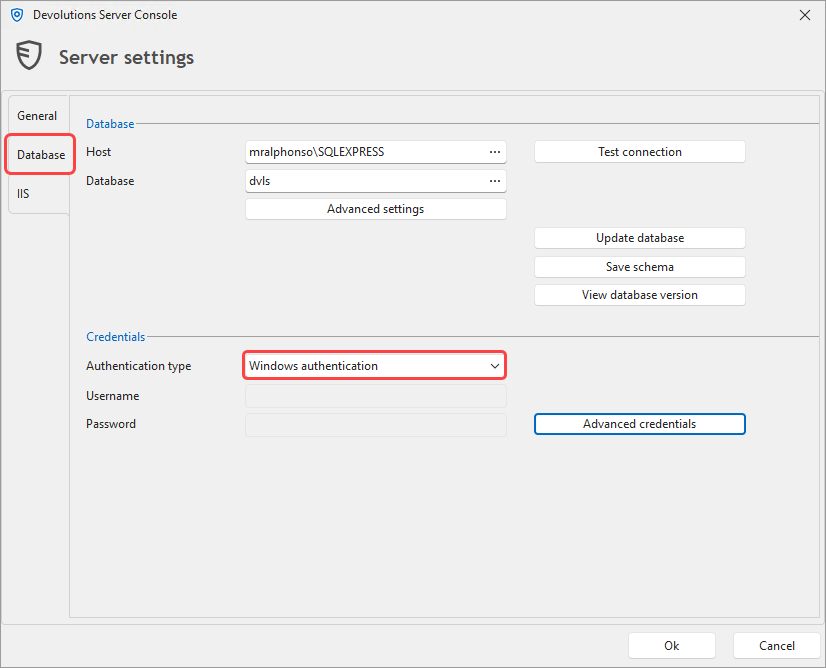
- Confirm that you changed the authentication to the DB from Windows to SQL users in the Devolutions Server Console under Edit > Database?
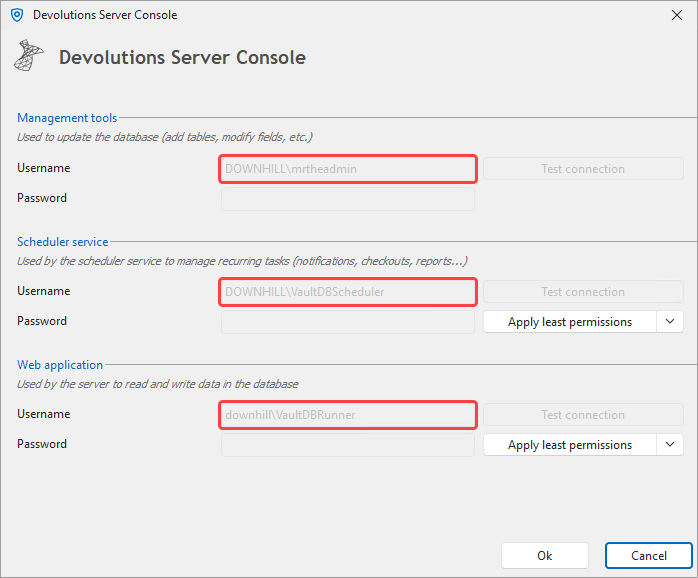
- Could you confirm if the Management tools, Scheduler service and Web application are using the same account under the Advanced credentials?
We would also like to confirm the settings under Administration > Server Settings > Authentication > Microsoft authentication.
- Could you verify that your secret is still valid?
- Do you have the "Use specific client ID for users and user groups cache" enabled?
Feel free to reach out if you have any questions or need further clarification.
Best regards,
21846f45-a224-4ded-a729-3903bf32bf43.png
30f447b9-6cd2-49ec-b808-cd268aa81318.png
Hello William,
We are on version 2024.3.13, we will upgrade to 2025.1.13 on Monday
The authentication to the database is SQL authentication, as is should be since we don't use AD integrated anymore after moving to Azure.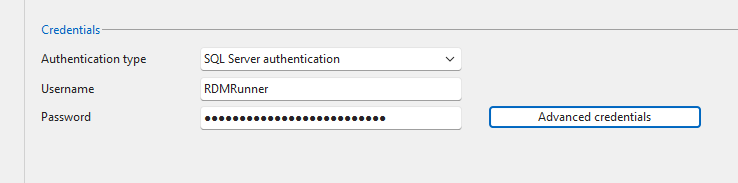
I was unaware of these settings below, are this credentials used for authenticating with the Database only? If that is the case, they should stay I guess, this SQL account is available on the SQL server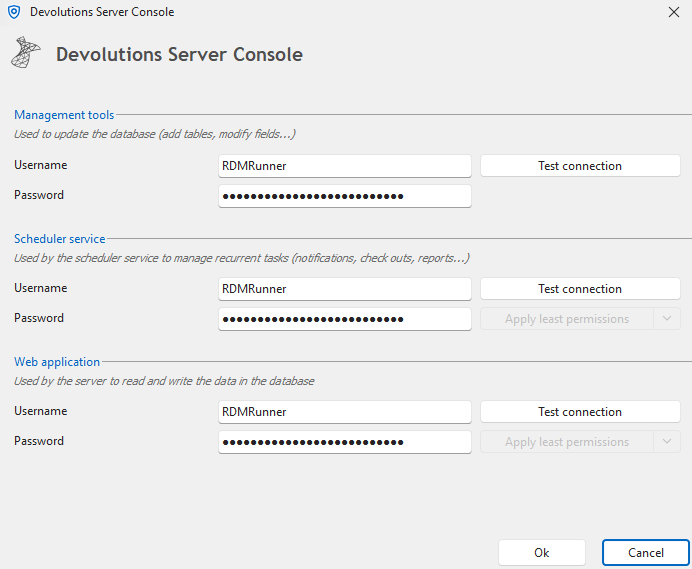
The account I'm referring to is the Local service account on the application server, which is used below. This is the one we would like to change to something else so we can remove the .\RDMRunner. This is where I changed the account earlier.
Also, looking in IIS, I see that the dvls app pool is using the identity NetworkService and not the account specified i web application in advanced credentials. Which one takes precedence?
I assume the secret is still valid, the synchronization works fine as long as Devolutions Scheduler (dvls) is using .\RDMRunner in Windows Services above. The Use specific client ID for users and user groups cache is NOT ticked.
344aeee0-6c4b-4cee-8860-2b4d77211be6.png
7cfaa9cd-991a-40e4-b012-037cfc056c73.png
e7d6d08a-952a-4372-93a2-5f006529977c.png
a98e2f04-8c82-4b91-aa00-3b1fae9932cc.png
Hello,
It looks like the issue isn’t with your DVLS or the app registration itself, but with how the built-in service accounts (Local Service / Local System) handle network access when DVLS Scheduler tries to reach Microsoft Entra ID.
These accounts use the WinHTTP proxy/trust store (machine scope), which is different from the proxy/trust your user account uses (WinINET). That’s why running Scheduler as a local user works, but built-in accounts time out.
What to do:
1. Test connectivity under SYSTEM context
psexec -i -s cmd.exe
powershell -NoProfile -Command "Test-NetConnection login.microsoftonline.com -Port 443; Test-NetConnection graph.microsoft.com -Port 443"
curl https://login.microsoftonline.com/common/discovery/keys
If this times out here, it confirms the network/proxy problem.
2. Fix WinHTTP proxy for services
Import or set the proxy that the service accounts will use:
netsh winhttp show proxy
netsh winhttp import proxy source=ie
:: or explicitly:
netsh winhttp set proxy proxy-server="http=myproxy:8080;https=myproxy:8080" bypass-list="localhost;127.0.0.1;*.local"
3. Allowlist Entra/Graph endpoints and avoid TLS inspection
Make sure outbound 443 is open to:
- login.microsoftonline.com
- graph.microsoft.com
Also allow CRL/OCSP endpoints (e.g. mscrl.microsoft.com). If your firewall or proxy is doing TLS inspection, either disable it for these hosts or ensure the interception root CA is trusted in the Local Computer store.
4. Switch Scheduler back to Local Service
Once WinHTTP/proxy/TLS are fixed, DVLS Scheduler will work correctly under Local Service (the supported configuration).
In the meantime, running Scheduler as the dedicated local account you created is fine as a temporary workaround. Long-term, once networking is corrected, the built-in Local Service account will work without needing a custom user.
Best regards,
Hello,
It looks like the issue isn’t with your DVLS or the app registration itself, but with how the built-in service accounts (Local Service / Local System) handle network access when DVLS Scheduler tries to reach Microsoft Entra ID.
These accounts use the WinHTTP proxy/trust store (machine scope), which is different from the proxy/trust your user account uses (WinINET). That’s why running Scheduler as a local user works, but built-in accounts time out.
What to do:
1. Test connectivity under SYSTEM context
psexec -i -s cmd.exe
powershell -NoProfile -Command "Test-NetConnection login.microsoftonline.com -Port 443; Test-NetConnection graph.microsoft.com -Port 443"
curl https://login.microsoftonline.com/common/discovery/keysIf this times out here, it confirms the network/proxy problem.
2. Fix WinHTTP proxy for services
Import or set the proxy that the service accounts will use:
netsh winhttp show proxy
netsh winhttp import proxy source=ie
:: or explicitly:
netsh winhttp set proxy proxy-server="http=myproxy:8080;https=myproxy:8080" bypass-list="localhost;127.0.0.1;*.local"
3. Allowlist Entra/Graph endpoints and avoid TLS inspection
Make sure outbound 443 is open to:
- login.microsoftonline.com
- graph.microsoft.com
Also allow CRL/OCSP endpoints (e.g. mscrl.microsoft.com). If your firewall or proxy is doing TLS inspection, either disable it for these hosts or ensure the interception root CA is trusted in the Local Computer store.
4. Switch Scheduler back to Local Service
Once WinHTTP/proxy/TLS are fixed, DVLS Scheduler will work correctly under Local Service (the supported configuration).
In the meantime, running Scheduler as the dedicated local account you created is fine as a temporary workaround. Long-term, once networking is corrected, the built-in Local Service account will work without needing a custom user.
Best regards,
@William Alphonso
Hello,
WinHTTP have already been set, and looks ok using netsh show. Test-NetConnection and curl fails using the method outlined above. Test-NetConnection doesn't read WinHTTP afaik, neither does curl. I can run the curl command using --proxy, which is successful, but kind of "cheating".
I can visit the pages using Edge, so the proxy is letting me through, using WinINET.
Regads,
Simon
Hello,
It looks like we’ve narrowed it down, the issue isn’t DVLS or Entra itself, but how the built-in service accounts talk through your proxy.
- You’re correct:
Test-NetConnectionandcurldon’t use WinHTTP automatically. They only confirm that without an explicit--proxy, SYSTEM has no direct outbound path. - The fact that
curl --proxyworks means DVLS can reach Entra/Graph if the right proxy settings are applied.
Next steps:
- Check what WinHTTP proxy is actually set
netsh winhttp show proxy
- If it shows
Direct access (no proxy server), then WinHTTP isn’t actually configured yet — you may need to run:
netsh winhttp import proxy source=ie
- (This only works if IE/Edge has a static proxy set, not PAC/WPAD.)
- If your environment uses PAC/WPAD
- WinHTTP doesn’t support PAC/WPAD scripts. You’ll need to translate that into an explicit proxy config for WinHTTP:
netsh winhttp set proxy proxy-server="http=myproxy:8080;https=myproxy:8080" bypass-list="*.local;127.0.0.1;localhost"
- If your proxy requires authentication
- Built-in accounts (
SYSTEM/LocalService) can’t prompt for creds. You’ll either need:- An unauthenticated proxy rule for those outbound hosts (
login.microsoftonline.com,graph.microsoft.com, CRL/OCSP endpoints), or - Run Scheduler under a service account that can authenticate to the proxy (like your current local
.\RDMRunner).
- An unauthenticated proxy rule for those outbound hosts (
- Built-in accounts (
- Test again under SYSTEM
- After adjusting WinHTTP, re-run:
psexec -i -s cmd.exe
curl https://login.microsoftonline.com/common/discovery/keys
- This should succeed without
--proxy.
TL;DR:
- If your proxy is PAC/WPAD or requires authentication, the built-in accounts can’t handle it.
- Either configure a static WinHTTP proxy with exceptions, or keep using the dedicated .\RDMRunner service account (which is fine long-term if proxy rules can’t be adjusted).
Best regards,
Hello,
It looks like we’ve narrowed it down, the issue isn’t DVLS or Entra itself, but how the built-in service accounts talk through your proxy.
- You’re correct: Test-NetConnection and curl don’t use WinHTTP automatically. They only confirm that without an explicit --proxy, SYSTEM has no direct outbound path.
- The fact that curl --proxy works means DVLS can reach Entra/Graph if the right proxy settings are applied.
Next steps:
- Check what WinHTTP proxy is actually set
- netsh winhttp show proxyIf it shows Direct access (no proxy server), then WinHTTP isn’t actually configured yet — you may need to run:
- netsh winhttp import proxy source=ie(This only works if IE/Edge has a static proxy set, not PAC/WPAD.)
- If your environment uses PAC/WPAD
- WinHTTP doesn’t support PAC/WPAD scripts. You’ll need to translate that into an explicit proxy config for WinHTTP:
- netsh winhttp set proxy proxy-server="http=myproxy:8080;https=myproxy:8080" bypass-list="*.local;127.0.0.1;localhost"If your proxy requires authentication
- Built-in accounts (SYSTEM/LocalService) can’t prompt for creds. You’ll either need:
- An unauthenticated proxy rule for those outbound hosts (login.microsoftonline.com, graph.microsoft.com, CRL/OCSP endpoints), or
- Run Scheduler under a service account that can authenticate to the proxy (like your current local .\RDMRunner).
- Built-in accounts (SYSTEM/LocalService) can’t prompt for creds. You’ll either need:
- Test again under SYSTEM
- After adjusting WinHTTP, re-run:
psexec -i -s cmd.exe
- curl https://login.microsoftonline.com/common/discovery/keysThis should succeed without --proxy.
TL;DR:
- If your proxy is PAC/WPAD or requires authentication, the built-in accounts can’t handle it.
- Either configure a static WinHTTP proxy with exceptions, or keep using the dedicated .\RDMRunner service account (which is fine long-term if proxy rules can’t be adjusted).
Best regards,
@William Alphonso
Hello,
Thing is, the WinHTTP proxy settings looks fine. Anyways, we don't seem to get anywhere, I'm just going to leave the service running with a local user account for the time being. The proxy requires no authentication.
We also have some scheduler related issues with the DGW heartbeat. It works fine when triggered manually, but can't connect using the scheduled health check. This was sorted out in out test envionment as we moved to 2025.1.13, however, in our prod environment, the issues still persist after the upgrade. The only difference between these to is that LOCAL SERVICE is running the Devolutions Scheduler in the test environment (we don't sync with Entra in test, so we don't have the previous issue here). The hearbeat doesn't actually go through the proxy, it's covered by the bypass settings.
Could this be related somehow?
Hello,
Thank you for your patience, our development team confirmed that they fixed the issue in the 2025.3 version of Devolutions Server and Remote Desktop Manager (RDM) that should be released next week.
They also confirmed that for the full fix, RDM and DVLS will need to be both upgraded.
Best regards,
@William Alphonso
Hello,
Thx. Does this mean that we will have a separate proxy setting inside of DVLS Admin, replacing settings in WinHTTP / WinINET / web.config etc?
Regards,
Simon
Hello,
I need to apologize for my last reply, I mistakenly mentioned that your issue would be fixed in version 2025.3 of RDM and DVLS, but that was incorrect as I had responded to the wrong thread.
Your case is still under investigation, and there isn’t a version update that addresses it yet. To correctly investigate the Devolutions Gateway heartbeat issue, please send us the following logs:
- Gateway logs (from the Gateway host):
C:\ProgramData\Devolutions\Gateway
- Devolutions Server Data Source logs (from the web UI):
- Reports → Data Source Logs
When you’ve retrieved the logs, please email them to service@devolutions.net and use the subject line: “FO-51097 – William Alphonso.”
Thank you for your patience and understanding.
Best regards,