
bman4658
Copy password delay
I will, but on Monday.
Copy password delay
You are right, that when I was doing the trace, the multi-thread option was disabled. I turned it on, but the result is the same longer delay.
The option Refresh before copying username/password/etc. from entry has to be turned on as fix of another issue we were dealing with in the past - see https://forum.devolutions.net/topics/41929/sync-problem-in-passwordlist-object#191604 Our team had a sync issue..
Copy password delay
Thanks for the update. We also did some update on the side of the DB server. So I believe it will be fast again.
The last thing that I am curious about is the difference, when I click on Copy password vs. using keyboard shortcut (Ctrl+C in my case). Mouse click gives prompt response, but the keyboard shortcut has delays. I remember that delay was the same but some time ago it changed. I am sorry, that I can give you a more specific timestamp. But I did another trace in the current version and picked up just the similar parts:
Clicking Copy password:
Reading connections from database : 0 ms - Run count : 0 - Count : 2
3 ms
ReadConnections : 3 ms
DecryptAndDeserializeConnections...
DecryptData - Multithreaded : 9 ms - Count : 2
DeserializeData - Multithreaded : 0 ms - Count : 2
DecryptAndDeserializeConnections : 9 ms
Database.GetConnections : 30 ms
GetConnections : 30 ms
LoadConnectionsFromDataSource : 30 ms
LoadConnections [Microsoft SQL Server : COMPANY - User Settings Vault] - ReadOnly : 33 ms
...
· LoadGlobalAndUserVaults : 24 ms
LoadFolders...
FavoriteManager.LoadFolders : 14 ms
LoadFolders : 14 ms
LoadConnections UI - [Microsoft SQL Server : COMPANY] - [COMPANY] - ReadOnly - 64-bit : 946 ms
RefreshConnections : 946 ms
Keyboard shortcut:
Reading connections from database : 0 ms - Run count : 0 - Count : 1
31 ms
ReadConnections : 31 ms
DecryptAndDeserializeConnections...
DecryptData - Multithreaded : 1604 ms - Count : 1
DeserializeData - Multithreaded : 0 ms - Count : 1
DecryptAndDeserializeConnections : 1605 ms
Database.GetConnections : 1637 ms
GetConnections : 1637 ms
LoadConnectionsFromDataSource : 1637 ms
LoadConnections [Microsoft SQL Server : COMPANY - User Settings Vault] - ReadOnly : 1637 ms
...
· LoadGlobalAndUserVaults : 2 ms
LoadFolders...
FavoriteManager.LoadFolders : 10 ms
LoadFolders : 10 ms
LoadConnections UI - [Microsoft SQL Server : COMPANY] - [COMPANY] - ReadOnly - 64-bit : 1660 ms
RefreshConnections : 1660 ms
Regards
Copy password delay
Hello,
thanks for the tip. It looks that it helped, the numbers look much better:
0 - RefreshConnections...
0 - LoadConnections UI - [Microsoft SQL Server : COMAPNY] - [COMAPNY] - ReadOnly - 64-bit...
0 - Reload: False - HasSecurityChanged: False - HasChanged: False
0 - LoadConnections [Microsoft SQL Server : COMAPNY - User Settings Vault] - ReadOnly...
0 - LoadConnectionsFromDataSource...
0 - GetConnections...
0 - Database.GetConnections...
0 - ReadConnections...
0 - --> [SQL]...
0 - Reading connections from database : 0 ms - Run count : 0 - Count : 1
0 - 43 ms
0 - ReadConnections : 43 ms
0 - DecryptAndDeserializeConnections...
0 - DecryptData : 0 ms - Count : 1
0 - DeserializeData : 0 ms - Count : 1
0 - DecryptAndDeserializeConnections : 0 ms
0 - Database.GetConnections : 43 ms
0 - GetConnections : 43 ms
0 - LoadConnectionsFromDataSource : 43 ms
0 - LoadConnections [Microsoft SQL Server : COMAPNY - User Settings Vault] - ReadOnly : 44 ms
0 - · LoadGlobalAndUserVaults...
0 - GlobalConnectionManager.Refresh...
0 - LoadConnections [Microsoft SQL Server : COMAPNY - Global Vault] - ReadOnly : 1 ms
0 - Empty global vault
0 - GlobalConnectionManager.Refresh : 1 ms
0 - PrivateConnectionManager.Refresh : 1 ms
0 - · LoadGlobalAndUserVaults : 2 ms
110 - OfflineManager.Save - Global...
110 - Expiration : 1 ms
110 - OfflineManager.Save - Global : 2 ms
0 - LoadFolders...
0 - FavoriteManager.LoadFolders : 2 ms
0 - LoadFolders : 2 ms
66 - OfflineManager.Save - UserSettings...
66 - Expiration : 6 ms
66 - OfflineManager.Save - UserSettings : 7 ms
110 - OfflineManager.Save - DOMAIN\EMPLOYEE...
110 - Expiration : 2 ms
110 - OfflineManager.Save - DOMAIN\EMPLOYEE : 2 ms
12 - Sync to Offline - COMAPNY - User Settings Vault - UserSettings : 7 ms - Count : 1
0 - LoadConnections UI - [Microsoft SQL Server : COMAPNY] - [COMAPNY] - ReadOnly - 64-bit : 55 ms
0 - RefreshConnections : 56 ms
Copy password delay
Hello, perfect. How can I send it? I see "Send to support" button there, but I am not sure, to which contact will the Support reply after that.
0 - RefreshConnections...
0 - LoadConnections UI - [Microsoft SQL Server : COMPANY] - [COMPANY] - ReadOnly - 64-bit...
0 - Reload: False - HasSecurityChanged: False - HasChanged: False
0 - LoadConnections [Microsoft SQL Server : COMPANY - User Settings Vault] - ReadOnly...
0 - LoadConnectionsFromDataSource...
0 - GetConnections...
0 - Database.GetConnections...
0 - ReadConnections...
0 - --> [SQL]...
0 - Reading connections from database : 0 ms - Run count : 0 - Count : 1
0 - 0 ms
0 - ReadConnections : 0 ms
0 - DecryptAndDeserializeConnections...
0 - DecryptData - Multithreaded : 4295 ms - Count : 1
0 - DeserializeData - Multithreaded : 0 ms - Count : 1
0 - DecryptAndDeserializeConnections : 4295 ms
0 - Database.GetConnections : 4296 ms
0 - GetConnections : 4296 ms
0 - LoadConnectionsFromDataSource : 4296 ms
0 - LoadConnections [Microsoft SQL Server : COMPANY - User Settings Vault] - ReadOnly : 4296 ms
0 - · LoadGlobalAndUserVaults...
0 - GlobalConnectionManager.Refresh...
0 - LoadConnections [Microsoft SQL Server : COMPANY - Global Vault] - ReadOnly : 1 ms
...
159 - OfflineManager.Save - DOMAIN\EMPLOYEE : 1 ms
0 - LoadConnections UI - [Microsoft SQL Server : COMPANY] - [COMPANY] - ReadOnly - 64-bit : 4330 ms
0 - RefreshConnections : 4331 ms
It looks like the culprit is the DB server based on these "numbers".
Kind regards
Copy password delay
Dear Devolution,
please help me with our issue. Whenever I click on copy password (via top ribbon or using keyboard shortcut) it took a few seconds once the pop-up window (right down corner) opens. Sometimes it is less, sometimes little more, but very often it is about 3 seconds, which makes the work with RDM very uncomfortable. I can compare it to my personal pasword manager where once I click, the password is copied. The DB of our company's RDM is much bigger, I understand that, but still I would expect less than second response. Is there somethinkg to tweak to make it quicker?
Kind Regards
MFA application FortiToken
Here is a response from the Forti staff:
Hey,
technically, the FortiToken mobile seeds can be exported during provisioning, under VERY specific circumstances.
Please check here: https://docs.fortinet.com/document/fortiauthenticator/6.6.1/rest-api-solution-guide/829822/local-use...
There is a section 'Third party integration: FTM provisioning' that goes into a bit of detail.
However:
- this requires use of a FortiAuthenticator, and the FortiToken mobile licence must be attached to that same authenticator
- the seeds ARE returned in an encrypted format, but I don't know if the Remote Desktop Manager can import them
I don't know of any other method to retrieve the seeds; that would indeed require an NFR as DPadula mentioned.
User DPadula sent:
Hi,
To request for a new feature you need to contact your AM on Fortinet, unfortunately this type of request cannot be done via forum.
I didn't have time to push it further. Let me/us know, if you succeed.
Regards
Size of the Secure note content window/pane
Hello,
that's great news, thanks!
Size of the Secure note content window/pane
Dear Support,
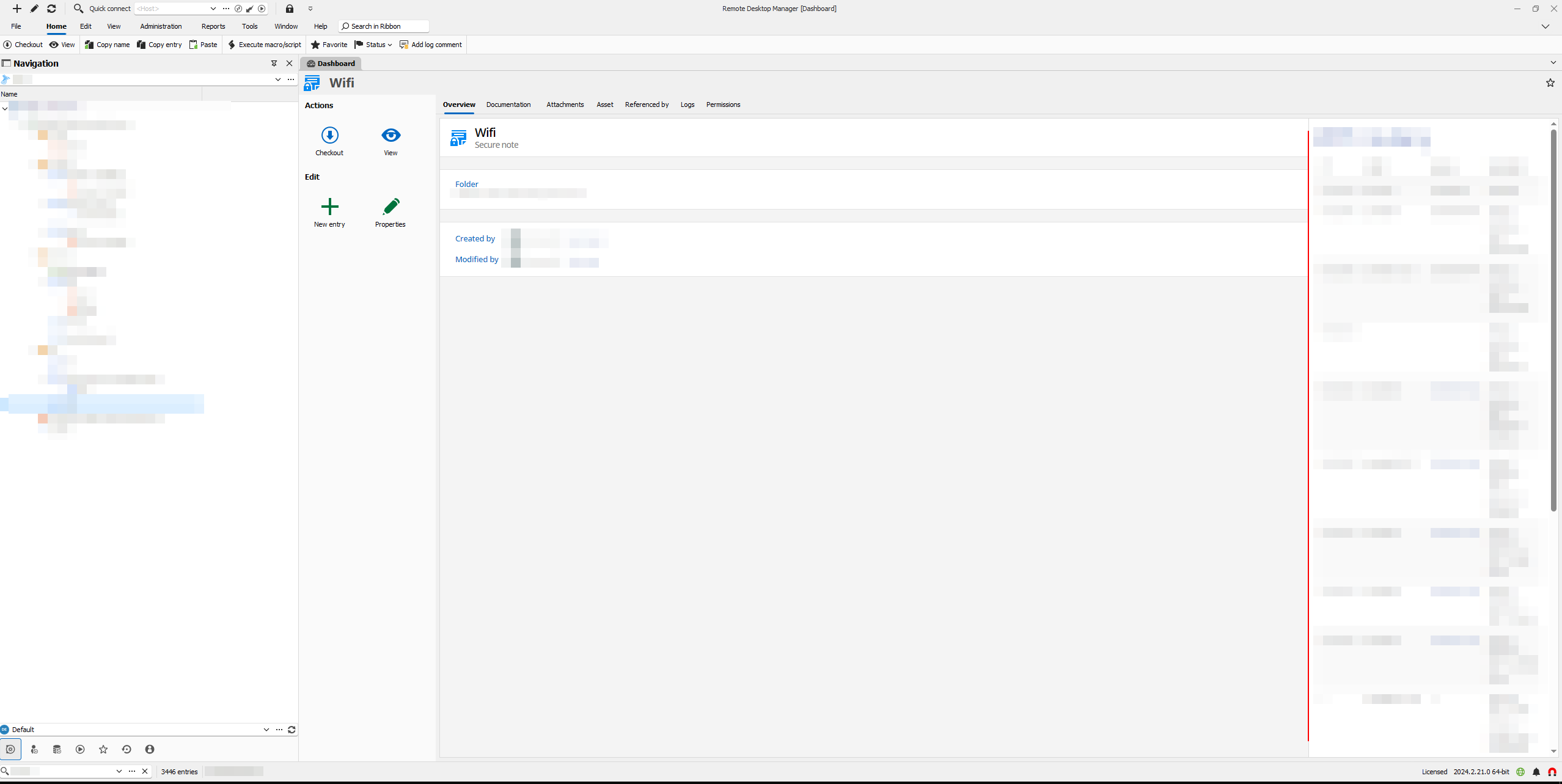
can you help me, how to solve the problem with the size of the content window/pane of the Secure note object? See the attached image - the content is in the right part to the red line. I put there the red line over the divider line to emphazis that. Time to time it happens (most often probably after update), that RDM resest the sizes of the windows and moving the divider is very clumsy (you have to pin the mouse super precisely to be able to resize it and especially when you are in hurry, it looks like an impossible task :-) ). Having wider divider or something like auto-resize would be helpful. But I am first asking here, in case it has an easy solution.
Best regards
MFA application FortiToken
Thank you for the check. I created the same question to the Fortinet. So this thread can be closed for now.
MFA application FortiToken
I've tried without success, but maybe I did that the wrong way. I did:
I got an email from Forti with QR code and activation code (16 digits, all uppercase, combination of alphanumeric)
I created OTP object in RDM
I initialized the object with the activation code
I also added the QR to the FortiToken Mobile app
the time OTP number from phone differs to the one in the RDM and only number from phone app works to login
Regards
MFA application FortiToken
Dear Devolution team,
please add support for FortiToken application as an MFA application option. In Android world there is https://play.google.com/store/apps/details?id=com.fortinet.android.ftm&hl=en for that. As the firewalls from Fortinet are widely used and Fortinet is really urging its customers to use 2FA - for instance users of their Cloud portal (firmwares, support, ...) will be forced to use 2FA in the end of June 24.
Regards
bman
Sync problem in Passwordlist object
We are using Microsoft SQL Server data source.
User A didn't have the Refresh options set, User B had. If both users has the options set, the problem scenario isn't working anymore, good. I am not sure about setting auto-refresh on the whole data source. I am afraid about performance issues - for sure it also depends on how short/long the period will be... If the problematic scenario happens again, I'll give it a try.
Thanks again for the advice.
Sync problem in Passwordlist object
Dear Devolution,
we have just found a sync problem in Password list object. Situation:
There is an empty passwordlist object
User A writes a new item Item A
User B is NOT REFRESHED and see empty passwordlist
User B writes new item Item B
Passwordlist is updated, BUT only Item B is written in and the Item A is lost - latest edit wins, based on its cache
User A has lost the Item A - only way how to get the lost item back is to clone the passwordlist, restore the old one
Both users use the latest version 2024.1.28.0. To remember to click on refresh everytime you want to edit something makes RDM hard to use for us in multi-user environment. So far we have just lost a few passwords, but fortunately we were able to recover them. But we are pretty stressed about what we have lost and don't know yet.
Best regards
Behavior of Copy Username / Copy Password in Password List object
Thank you guys, already tested, works fine. Thank you for such a quick response! Thread can be closed as "Solved". Kind regards
Behavior of Copy Username / Copy Password in Password List object
Great news and thanks for that!
Behavior of Copy Username / Copy Password in Password List object
Hello,
context menu (right mouse click on the specific row) with the options like copy username / copy password / ... would be also fine - I would get to the desired action by just two clicks without need to horizontaly scroll. That sounds pretty fine and probably much more easy for you to implement.
Regards
Behavior of Copy Username / Copy Password in Password List object
Dear Devolution Team,
let me propose change of behavior of buttons Copy Username / Copy Password (top Home ribbon) when working with Password List (alias PL bellow).
Current behavior:
open PL object
select login (click on specifick row)
click on button Copy Username / Copy Password in Home (top) ribbon
new window with that PL opens
user has to choose the login (row of PL) again
My proposed behavior:
open PL object
select login (click on specific row)
click on button Copy Username / Copy Password in Home (top) ribbon
the username / password of the specific selected row is coppied and no new window opens
When the RDM is used on big screen, it is not big deal, but when used on the small screen, the column with buttons for copying username / password is "hidden", and you had to scroll to the right and back all the time, pretty frustrating, believe me... My proposed behavior could be a big time saver (we user PL a lot) it is much intuitive from UX view.
Regards