Copy password delay

Dear Devolution,
please help me with our issue. Whenever I click on copy password (via top ribbon or using keyboard shortcut) it took a few seconds once the pop-up window (right down corner) opens. Sometimes it is less, sometimes little more, but very often it is about 3 seconds, which makes the work with RDM very uncomfortable. I can compare it to my personal pasword manager where once I click, the password is copied. The DB of our company's RDM is much bigger, I understand that, but still I would expect less than second response. Is there somethinkg to tweak to make it quicker?
Kind Regards
All Comments (10)
Hi bman4658,
Thanks for the report, a few seconds of delay on Copy Password isn't expected, even on a large database. Could you let us know your workspace type (DVLS, SQL, or Cloud), your current RDM version, and roughly how many entries your data source has?
The most useful thing you could send us is a Performance Profiler trace of the delay itself:
- Go to Help > Performance Profiler
- Set Profiler level to 1
- Enable Auto mode
- Set Threshold (ms) to 200
- Use Copy Password once, so the 3 second delay gets captured
- Send us the profiler output
(If you don't see Auto mode, please update RDM first, it's a fairly recent addition.)
That trace will show us exactly where the time is being spent (data source round-trip, permission checks, or something else) so we can figure out if it's something you can tweak on your end or something we need to look at.
Best regards,
Eduard Sepulveda Lopez
Hello, perfect. How can I send it? I see "Send to support" button there, but I am not sure, to which contact will the Support reply after that. 0 - RefreshConnections...0 - LoadConnections UI - [Microsoft SQL Server : COMPANY] - [COMPANY] - ReadOnly - 64-bit...0 - Reload: False - HasSecurityChanged: False - HasChanged: False0 - LoadConnections [Microsoft SQL Server : COMPANY - User Settings Vault] - ReadOnly...0 - LoadConnectionsFromDataSource...0 - GetConnections...0 - Database.GetConnections...0 - ReadConnections...0 - --> [SQL]...0 - Reading connections from database : 0 ms - Run count : 0 - Count : 10 - 0 ms0 - ReadConnections : 0 ms0 - DecryptAndDeserializeConnections...0 - DecryptData - Multithreaded : 4295 ms - Count : 10 - DeserializeData - Multithreaded : 0 ms - Count : 10 - DecryptAndDeserializeConnections : 4295 ms0 - Database.GetConnections : 4296 ms0 - GetConnections : 4296 ms0 - LoadConnectionsFromDataSource : 4296 ms0 - LoadConnections [Microsoft SQL Server : COMPANY - User Settings Vault] - ReadOnly : 4296 ms0 - · LoadGlobalAndUserVaults...0 - GlobalConnectionManager.Refresh...0 - LoadConnections [Microsoft SQL Server : COMPANY - Global Vault] - ReadOnly : 1 ms...159 - OfflineManager.Save - DOMAIN\EMPLOYEE : 1 ms0 - LoadConnections UI - [Microsoft SQL Server : COMPANY] - [COMPANY] - ReadOnly - 64-bit : 4330 ms0 - RefreshConnections : 4331 ms
It looks like the culprit is the DB server based on these "numbers".
Kind regards
Hi.
Stéfane here from the dev team, I've been keeping an eye on this thread.
Your profiler trace is very interesting. At this point the only thing that comes to mind is a thread-pool scheduling stall, odd but that's what the trace suggests.
The good news is we can test this relatively easily. In RDM File > Settings > Advanced > Settings > Diagnostic (section) > check Disable multi-threaded loading.
Does it solve the issue? Please post the new profiler trace.
To be clear, that setting is a diagnostic to confirm the cause, not the final fix. If it checks out, we'll address it properly in the app.
Best regards,
Stéfane Lavergne
Hello,
thanks for the tip. It looks that it helped, the numbers look much better:0 - RefreshConnections...0 - LoadConnections UI - [Microsoft SQL Server : COMAPNY] - [COMAPNY] - ReadOnly - 64-bit...0 - Reload: False - HasSecurityChanged: False - HasChanged: False0 - LoadConnections [Microsoft SQL Server : COMAPNY - User Settings Vault] - ReadOnly...0 - LoadConnectionsFromDataSource...0 - GetConnections...0 - Database.GetConnections...0 - ReadConnections...0 - --> [SQL]...0 - Reading connections from database : 0 ms - Run count : 0 - Count : 10 - 43 ms0 - ReadConnections : 43 ms0 - DecryptAndDeserializeConnections...0 - DecryptData : 0 ms - Count : 10 - DeserializeData : 0 ms - Count : 10 - DecryptAndDeserializeConnections : 0 ms0 - Database.GetConnections : 43 ms0 - GetConnections : 43 ms0 - LoadConnectionsFromDataSource : 43 ms0 - LoadConnections [Microsoft SQL Server : COMAPNY - User Settings Vault] - ReadOnly : 44 ms0 - · LoadGlobalAndUserVaults...0 - GlobalConnectionManager.Refresh...0 - LoadConnections [Microsoft SQL Server : COMAPNY - Global Vault] - ReadOnly : 1 ms0 - Empty global vault0 - GlobalConnectionManager.Refresh : 1 ms0 - PrivateConnectionManager.Refresh : 1 ms0 - · LoadGlobalAndUserVaults : 2 ms110 - OfflineManager.Save - Global...110 - Expiration : 1 ms110 - OfflineManager.Save - Global : 2 ms0 - LoadFolders...0 - FavoriteManager.LoadFolders : 2 ms0 - LoadFolders : 2 ms66 - OfflineManager.Save - UserSettings...66 - Expiration : 6 ms66 - OfflineManager.Save - UserSettings : 7 ms110 - OfflineManager.Save - DOMAIN\EMPLOYEE...110 - Expiration : 2 ms110 - OfflineManager.Save - DOMAIN\EMPLOYEE : 2 ms12 - Sync to Offline - COMAPNY - User Settings Vault - UserSettings : 7 ms - Count : 10 - LoadConnections UI - [Microsoft SQL Server : COMAPNY] - [COMAPNY] - ReadOnly - 64-bit : 55 ms0 - RefreshConnections : 56 ms
Hello,
Thank you for taking the time to run the test, it confirmed the cause right away.
The issue has been fixed. Vault loading no longer waits unnecessarily, so load times should be back to normal without any special configuration.
The fix is scheduled for v2026.2.19.0 and v2026.3.3.0 (beta). Until you update you can leave "Disable multi-threaded loading" enabled; once you are on one of those versions, you can turn it back off.
Best regards,
Stéfane Lavergne
Thanks for the update. We also did some update on the side of the DB server. So I believe it will be fast again.
The last thing that I am curious about is the difference, when I click on Copy password vs. using keyboard shortcut (Ctrl+C in my case). Mouse click gives prompt response, but the keyboard shortcut has delays. I remember that delay was the same but some time ago it changed. I am sorry, that I can give you a more specific timestamp. But I did another trace in the current version and picked up just the similar parts:
Clicking Copy password: Reading connections from database : 0 ms - Run count : 0 - Count : 2 3 ms ReadConnections : 3 ms DecryptAndDeserializeConnections... DecryptData - Multithreaded : 9 ms - Count : 2 DeserializeData - Multithreaded : 0 ms - Count : 2 DecryptAndDeserializeConnections : 9 ms Database.GetConnections : 30 ms GetConnections : 30 ms LoadConnectionsFromDataSource : 30 ms LoadConnections [Microsoft SQL Server : COMPANY - User Settings Vault] - ReadOnly : 33 ms ... · LoadGlobalAndUserVaults : 24 ms LoadFolders... FavoriteManager.LoadFolders : 14 ms LoadFolders : 14 ms LoadConnections UI - [Microsoft SQL Server : COMPANY] - [COMPANY] - ReadOnly - 64-bit : 946 msRefreshConnections : 946 ms
Keyboard shortcut: Reading connections from database : 0 ms - Run count : 0 - Count : 1 31 ms ReadConnections : 31 ms DecryptAndDeserializeConnections... DecryptData - Multithreaded : 1604 ms - Count : 1 DeserializeData - Multithreaded : 0 ms - Count : 1 DecryptAndDeserializeConnections : 1605 ms Database.GetConnections : 1637 ms GetConnections : 1637 ms LoadConnectionsFromDataSource : 1637 ms LoadConnections [Microsoft SQL Server : COMPANY - User Settings Vault] - ReadOnly : 1637 ms ... · LoadGlobalAndUserVaults : 2 ms LoadFolders... FavoriteManager.LoadFolders : 10 ms LoadFolders : 10 ms LoadConnections UI - [Microsoft SQL Server : COMPANY] - [COMPANY] - ReadOnly - 64-bit : 1660 msRefreshConnections : 1660 ms
Regards
Hello,
Do you still have Disable multi-threaded loading checked?
The reason I as is we still see DecryptData - Multithreaded : and not DecryptData : in both profilers.
The odd thing here is the DecryptData - Multithreaded in the keyboard shortcut trace represents 96% of the total refresh time while in the click copy password it represents less than 1%. Note sure how to explain that one honestly.
Clicking Copy password:
...
                            DecryptData - Multithreaded : 9 ms - Count : 2
        LoadConnections [Microsoft SQL Server : COMPANY - User Settings Vault] - ReadOnly : 33 ms
		...
RefreshConnections : 946 ms
Keyboard shortcut:
...
                            DecryptData - Multithreaded : 1604 ms - Count : 1
...
        LoadConnections [Microsoft SQL Server : COMPANY - User Settings Vault] - ReadOnly : 1637 ms
		...
RefreshConnections : 1660 ms
Also depending on how often your passwords change you could uncheck Refresh before copying username/password/etc. from entry in Administration > System settings > Appllication (section) > Cache/Offline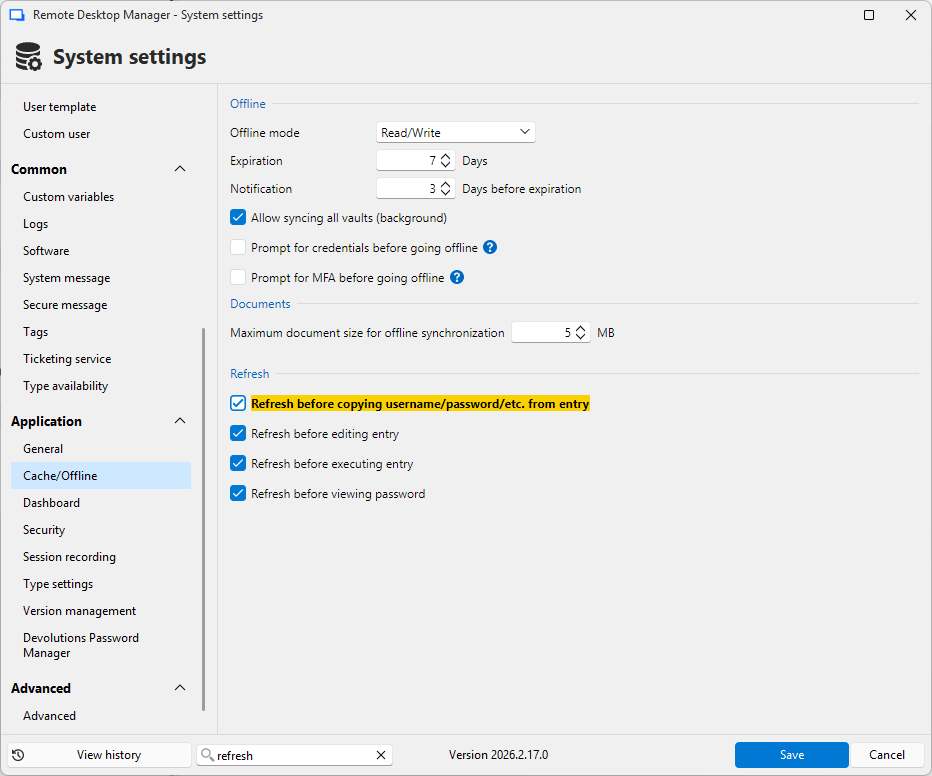
Stéfane Lavergne
b61a3435-b82b-4bda-b1da-4c449d1e5c15.png
You are right, that when I was doing the trace, the multi-thread option was disabled. I turned it on, but the result is the same longer delay.
The option Refresh before copying username/password/etc. from entry has to be turned on as fix of another issue we were dealing with in the past - see https://forum.devolutions.net/topics/41929/sync-problem-in-passwordlist-object#191604 Our team had a sync issue..
The option Refresh before copying username/password/etc. from entry has to be turned on as fix of another issue we were dealing with in the past
Understood, no problem.
On the hotkey delay: the trace does explain it. The 1604 ms is the issue we have just fixed, and it will be resolved in 2026.2.19.0 & 2026.3 beta.
What I cannot explain yet is that the click action also spends roughly 900 ms in the same refresh, even though it feels immediate and that part is not covered by the fix.
If it is not too much trouble, could you send the complete profiler trace for both actions, untrimmed, while it is still reproducible? That would let me account for the remaining time properly. Otherwise we can re-test once you are on 2026.2.19.0 and go from there.
Best regard
Stéfane Lavergne
I will, but on Monday.