arl
Issue with opening RDP, opens the same session no matter the IP
Hi Maxim,
Sorry for first responding now, long week with 16 hour work days.
I found the issues, simply DNS not working as it should (again)
its always DNS....
I found out because using mRemoteNG didn't change anything, it also had the same issue. SO its a DNS / Mappning issue on my end.
Thanks for all the help, i will get my DNS fixed.
Issue with opening RDP, opens the same session no matter the IP
Hello Arl,
Thank you for contacting us on that matter!
Could you verify under the Administration logs if there's any information? If not, could you try to reproduce the issue with the Profiler opened in the background?
To activate the Profiler, you can go to the Help tab > Profiler > remove the "Auto Clear" > Minimize the window > Reproduce the issue and then reopen the Profiler from the window in the taskbar, not from the help tab.
Here's a helpful topic regarding the Profiler.
https://docs.devolutions.net/rdm/commands/help/support/profiler/
Also, would it be possible to provide us with a recording of the issue? I will send you the link to provide us with that recording through Direct Message.
Thank you for letting us know. If you have any other questions, feel free to let us know.
Best regards,
Hi Maxim,
I have uploaded a video file to the link you send plus a txt file with the output from the profiler to mentioned.
I hope this helps, if you need anything else let me know!
Issue with opening RDP, opens the same session no matter the IP
Hi,
I am this weird issue with RDM, i have around 50 servers in a folder and no matter what i do it keeps opening the same one.
I can change the ip on the other items but RDM keeps connection to the same IP even tho the entiet has a diffence IP.
Here is a exempel of my issue
sh01 --> 10.10.10.10
sh02 --> 10.10.10.11
If i open sh01 i will connect to the ip that sh02 has no matter what i do.
This is happning to about 100 items in RDM, No matter what i do really it keeps happening to all of my sh / gis / shoff items.
I am running version 2024.1.29.0
I can provide any logs let me know how and i will do my best!
Debian 12 dllnotfoundexecption [SOLVED]
Hi again ! we are trying a potential fix in RDM 2024.1.0.8,
Please let me know if it solves your issue !
Cheers,
Hey, i am so sorry for not responding, been sick and drowning in work really.
yes it fixed my issue!
Again sorry for the long awaited reply, health didn't like me for a good while
Debian 12 dllnotfoundexecption [SOLVED]
Hi David,
I got it work, i re did my install and used Gnome instead of KDE and it seemed to fix the problem for me. I don't what KDE version is running on my install. Its a standard Debian 12 install.
I have tested it with a fresh install,
Debian 12, KDE as DE.
The error can be remade on my system. Its an error with KDE, the same error is on both X11 and Wayland
Debian 12 dllnotfoundexecption [SOLVED]
Hi David,
Sorry for the late respond, EU time zone.
Version is 2024.1.0.6
System Data:
========== DIAGNOSTIC ==========
Debian GNU/Linux 12
Kernel version [6.1.0.18]
Desktop environment [KDE]
Display server [wayland]
Architecture [X64]
Support local password saving [Ok]
Is administrator [Ok]
Is system administrator [Ok]
Is database administrator [Ok]
Is elevated privilege [No]
Workspace size [1568 / 567]
Is Internet connected [Ok]
Allow multiple instances [No]
Allow drag-and-drop [Ok]
Auto refresh [No]
Debug level [0]
Running since [Running since: 1 min 10 sec]
========== DATA SOURCE ==========
Data source ID: d5fbe7fc-72a0-4c4f-bc1f-689aa47ed4f4
Repositories (count): 0
Data source type: SQLite
Data source settings size: 188 Bytes
User specific settings size: 0 Bytes
Connection protocol:
Caching/Offline: Disabled (File, OpenMCDFv2)
Allow connection states: True
Repository (ID): (d5fbe7fc-72a0-4c4f-bc1f-689aa47ed4f4)
Repository size: 0 Bytes
Entries/Items: 0/0
Sessions: 0
Data entries: 0
Credentials: 0
Sub entries: 0
Documents: 0
Contacts: 0
-->Sub total: 0
Session tools: 0
Folders: 0
--> Total: 0
Virtual folders: 0
Custom images: 0
Custom images (legacy): 0
RTF notes: 0
Connection client version: 0x0000000000000000
------------------------------------------------------------------------
Data Source
========== DIAGNOSTIC ==========
Debian GNU/Linux 12
Kernel version [6.1.0.18]
Desktop environment [KDE]
Display server [wayland]
Architecture [X64]
Support local password saving [Ok]
Is administrator [Ok]
Is system administrator [Ok]
Is database administrator [Ok]
Is elevated privilege [No]
Workspace size [1568 / 567]
Is Internet connected [Ok]
Allow multiple instances [No]
Allow drag-and-drop [Ok]
Auto refresh [No]
Debug level [0]
Running since [Running since: 2 min 43 sec]
========== DATA SOURCE ==========
Data source ID: d5fbe7fc-72a0-4c4f-bc1f-689aa47ed4f4
Repositories (count): 0
Data source type: SQLite
Data source settings size: 188 Bytes
User specific settings size: 0 Bytes
Connection protocol:
Caching/Offline: Disabled (File, OpenMCDFv2)
Allow connection states: True
Repository (ID): (d5fbe7fc-72a0-4c4f-bc1f-689aa47ed4f4)
Repository size: 0 Bytes
Entries/Items: 0/0
Sessions: 0
Data entries: 0
Credentials: 0
Sub entries: 0
Documents: 0
Contacts: 0
-->Sub total: 0
Session tools: 0
Folders: 0
--> Total: 0
Virtual folders: 0
Custom images: 0
Custom images (legacy): 0
RTF notes: 0
Connection client version: 0x0000000000000000
----------------------------------------------------------------------------------------------
If you need anything else let me know!
Debian 12 dllnotfoundexecption [SOLVED]
Hi,
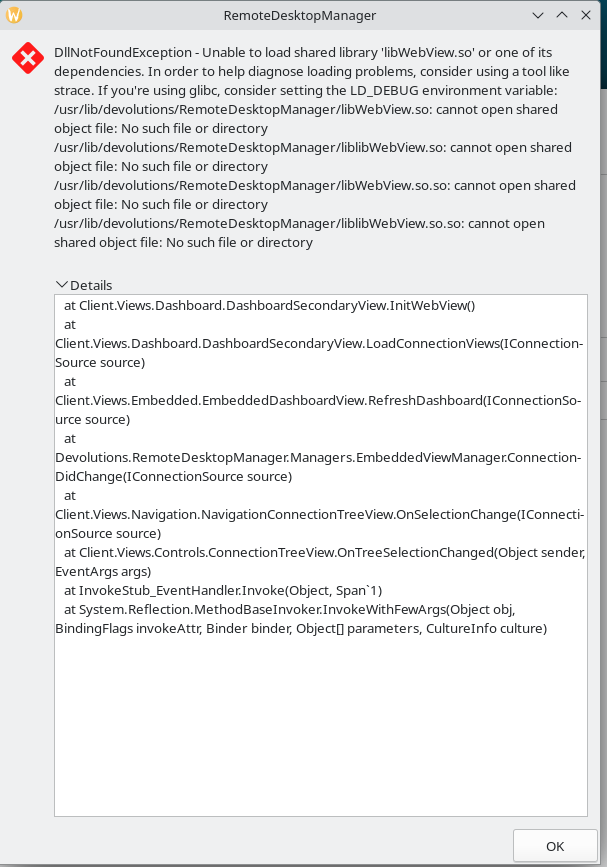
I just installed debian 12 and is getting the following error.
Any idea how to fix it?
I have downloaded the deb pack from the website