Debian 12 dllnotfoundexecption [SOLVED]

Hi,
I just installed debian 12 and is getting the following error.
Any idea how to fix it?
I have downloaded the deb pack from the website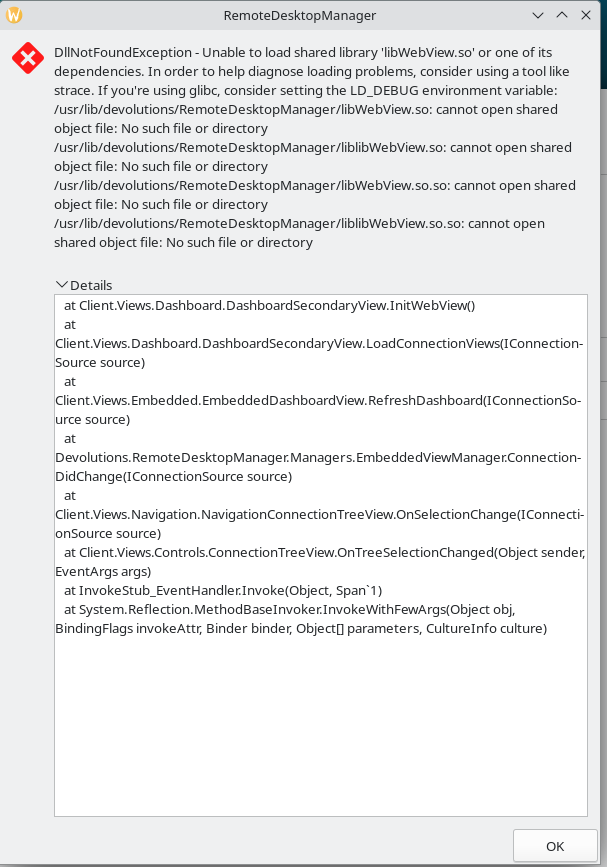
Screenshot_20240321_085947.png
All Comments (6)
Hi !
thank you for reaching out, could you also send me the diagnostic info from RDM (HELP -> Diagnostic) and also tell me which version of RDM you are currently running ?
cheers,
David Ringuet
Hi David,
Sorry for the late respond, EU time zone.
Version is 2024.1.0.6
System Data:
========== DIAGNOSTIC ==========
Debian GNU/Linux 12
Kernel version [6.1.0.18]
Desktop environment [KDE]
Display server [wayland]
Architecture [X64]
Support local password saving [Ok]
Is administrator [Ok]
Is system administrator [Ok]
Is database administrator [Ok]
Is elevated privilege [No]
Workspace size [1568 / 567]
Is Internet connected [Ok]
Allow multiple instances [No]
Allow drag-and-drop [Ok]
Auto refresh [No]
Debug level [0]
Running since [Running since: 1 min 10 sec]
========== DATA SOURCE ==========
Data source ID: d5fbe7fc-72a0-4c4f-bc1f-689aa47ed4f4
Repositories (count): 0
Data source type: SQLite
Data source settings size: 188 Bytes
User specific settings size: 0 Bytes
Connection protocol:
Caching/Offline: Disabled (File, OpenMCDFv2)
Allow connection states: True
Repository (ID): (d5fbe7fc-72a0-4c4f-bc1f-689aa47ed4f4)
Repository size: 0 Bytes
Entries/Items: 0/0
Sessions: 0
Data entries: 0
Credentials: 0
Sub entries: 0
Documents: 0
Contacts: 0
-->Sub total: 0
Session tools: 0
Folders: 0
--> Total: 0
Virtual folders: 0
Custom images: 0
Custom images (legacy): 0
RTF notes: 0
Connection client version: 0x0000000000000000
------------------------------------------------------------------------
Data Source
========== DIAGNOSTIC ==========
Debian GNU/Linux 12
Kernel version [6.1.0.18]
Desktop environment [KDE]
Display server [wayland]
Architecture [X64]
Support local password saving [Ok]
Is administrator [Ok]
Is system administrator [Ok]
Is database administrator [Ok]
Is elevated privilege [No]
Workspace size [1568 / 567]
Is Internet connected [Ok]
Allow multiple instances [No]
Allow drag-and-drop [Ok]
Auto refresh [No]
Debug level [0]
Running since [Running since: 2 min 43 sec]
========== DATA SOURCE ==========
Data source ID: d5fbe7fc-72a0-4c4f-bc1f-689aa47ed4f4
Repositories (count): 0
Data source type: SQLite
Data source settings size: 188 Bytes
User specific settings size: 0 Bytes
Connection protocol:
Caching/Offline: Disabled (File, OpenMCDFv2)
Allow connection states: True
Repository (ID): (d5fbe7fc-72a0-4c4f-bc1f-689aa47ed4f4)
Repository size: 0 Bytes
Entries/Items: 0/0
Sessions: 0
Data entries: 0
Credentials: 0
Sub entries: 0
Documents: 0
Contacts: 0
-->Sub total: 0
Session tools: 0
Folders: 0
--> Total: 0
Virtual folders: 0
Custom images: 0
Custom images (legacy): 0
RTF notes: 0
Connection client version: 0x0000000000000000
----------------------------------------------------------------------------------------------
If you need anything else let me know!
Hi David,
I got it work, i re did my install and used Gnome instead of KDE and it seemed to fix the problem for me. I don't what KDE version is running on my install. Its a standard Debian 12 install.
I have tested it with a fresh install,
Debian 12, KDE as DE.
The error can be remade on my system. Its an error with KDE, the same error is on both X11 and Wayland
Hi again !
thank you very much for your input, i am currently investigating the issue and i will report back when you can expect the fix.
thank you for your time,
David Ringuet
Hi again ! we are trying a potential fix in RDM 2024.1.0.8,
Please let me know if it solves your issue !
Cheers,
David Ringuet
Hi again ! we are trying a potential fix in RDM 2024.1.0.8,
Please let me know if it solves your issue !
Cheers,
Hey, i am so sorry for not responding, been sick and drowning in work really.
yes it fixed my issue!
Again sorry for the long awaited reply, health didn't like me for a good while