
nicjames2378
Running Local Powershell Macro as Privileged Account
It looks as though your provided screenshot is using a (blue, session) Powershell Script (Local) rather than the macro? Is there a way to have that prompt for the host(s) instead? If so, I can probably work with it instead of using the (green, macro/script/tool) tool. Biggest difference I can tell is that the former runs standalone, while the latter runs against the currently selected host entry.
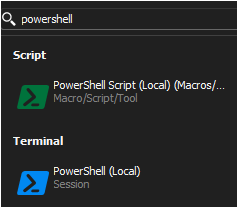
Running Local Powershell Macro as Privileged Account
Sorry for the late reply, things got hectic this week!
It appears that the script still runs with my currently logged in Windows account, regardless of what I set that to. I verified this by putting a "whoami" as the first line of the script, which returns the account running RDM regardless of setting "My privileges account", "Username and password", or "Prompt for credentials" under the 'Management Tools > Tools' properties. It's as through they are not passing along to the Powershell script macro.
For further explanation:
I login to Windows as 'StandardUser1'
My SSH connections uses inherited credentials of 'SshUser1'
Powershell scripts on the local machine must be run as 'ElevatedUser1'
Running Local Powershell Macro as Privileged Account
Hello! Is there a way to have a "PowerShell Script (Local)" (from "Macro/Script/Tool") run with the credentials from My Privileged Account? I have to log into my PC as a standard user, with anything administrative requiring elevation via UAC. When trying to run this script against a few dozen devices, it gets extremely tedious to fill out creds back-to-back. Here is my current use case:
I have a script to check DNS for a static entry, and update it if required to make the name match what shows in RDM. This Powershell script is added as a Macro, so that I can right-click on a folder and bulk run it against an group of devices. Within this script, I utilize the $HOST$ and $NAME$ variables to get the hostname and ip for the device the macro is run against. All of this works perfectly fine if I edit the properties to say "run as administrator" and enter credentials into the UAC prompt. However, as mentioned above this is very tedious for bulk operations. When run without this checkbox, I get execution errors due to the cmdlets used requiring elevation.
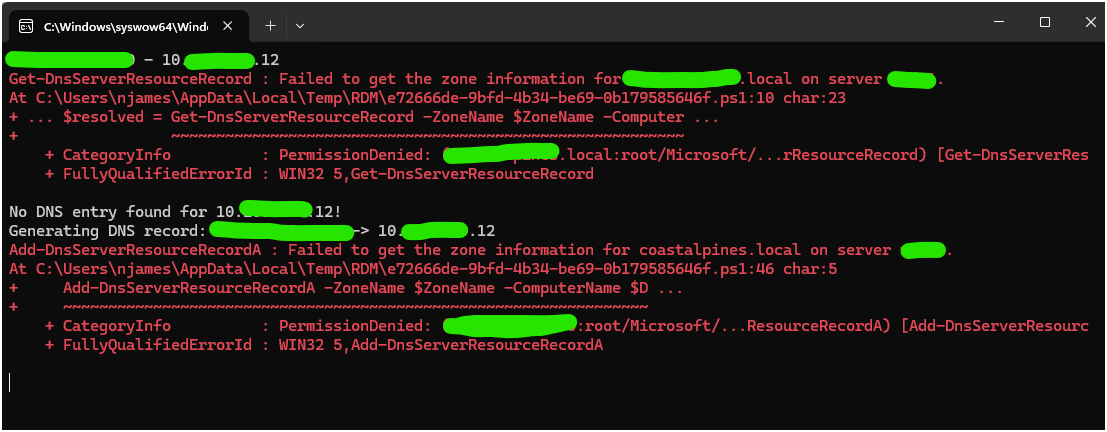
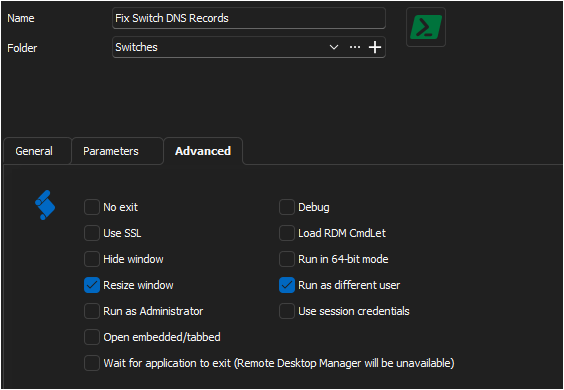
Under the properties, I see the option to "Run as a different user", but there doesn't seem to be anywhere to specify which alternate credentials to use.
While I could make a stand-alone Powershell script which reads from a CSV or something, it is not an ideal solution to need to manage two separate files when everything else is managed via RDM. Is there any solution to running my Powershell macro with My Privileged Account credentials?
Side note: I have attached the script I use in case it benefits anyone else. It's a rough draft, but should be adjustable for other environments.
VMware Synchronizer - More Granular Settings
Hello! We've been trying out the free version of RDM at my company for a little while and have thoroughly enjoyed it. However, we have found a few points of aggravation when attempting to use the VMware Synchronizer which prompted me to make an account to discuss.
Our current use case is to have all of our Linux VMs import with an SSH template, and all of the Windows VMs import with an RDP template. However, due to the way our VMs are organized in the vSphere Client/vCenter, this is proving quite annoying. Below is a very simplified example of our organizational structure, with all objects assumed to be in the same Datacenter.
App Servers
Linux-01
Linux-02
Windows-01
Print Servers
Windows-02
Windows-03
Windows-04
Linux-03
DMZ
Linux-04
Linux-05
While the above example is fairly simple, in our situation we have many, many more VMs and have resorted to creating subfolders in each top-level folders for Linux and Windows, with separate synchronizers for each. This results in dozens of synchronizers, each handling only a small portion of our servers. We unfortunately aren't able to just make a top-level folder for each fo Windows and Linux and sort below that as it is above due to our parent organization being somewhat strict about their top-level structure.
To get to the point, I would like to make the following feature requests regarding the VMware Synchronizers:
Allow multiple filters within the "Filter by group" option.
This could be as simple as allowing multiple filters, delimited by a semicolon (;), pipe (|), or other special character, OR
a similar, more complex boolean structure as mentioned here, OR
allow wildcard filtering (i.e., "Datacenter\*Linux"), OR
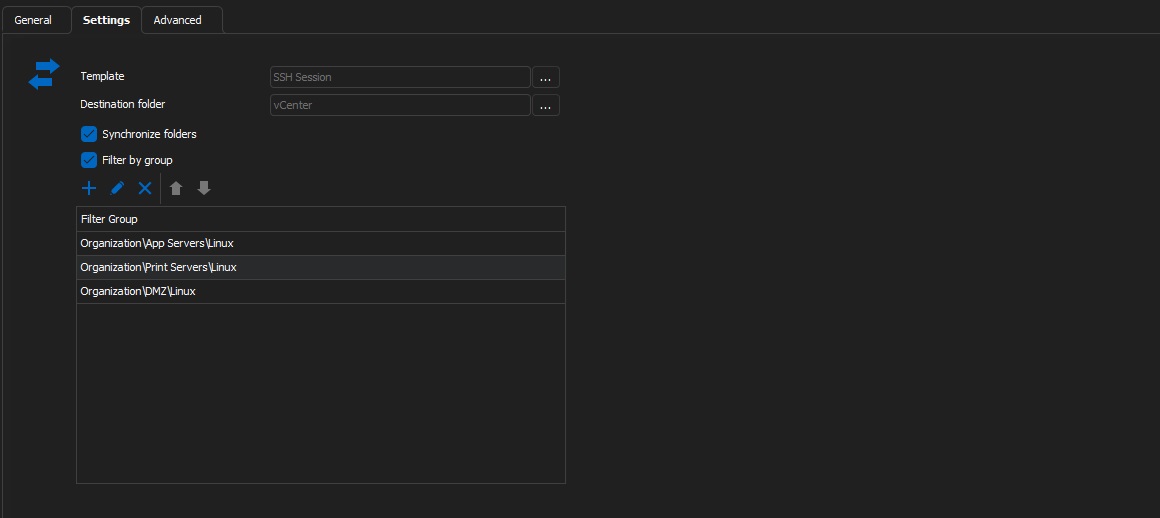
possibly a user-editable list of valid filters? These could possibly be saved into the database without any schema changes if they are concatenated with a seperator. An example user editable list sample is attached. GUI editing borrowed from the Post Login commands area.
It would be very useful to be able to see the info pulled from the PowerCLI queries in the dashboard. If nothing else, could we get integration to open the web interface directly to the device, similar to how the Lansweeper Synchronizer works?
I've seen it posted here a few times, but haven't seen any recent updates. Are there active plans to implement filtering by VM Tags? This would open a wide range of capabilities, such as only getting VMs which are tagged "Linux" or "Windows" or VMs with both an "Ephemeral" (automatically generated/destroyed) and "Terraform Generated" tag.
While on the topic of the Lansweeper synchronizer, the Filter from it would looks great on the VMware Synchronizer!
(Final one, I promise!) This would likely be a more demanding integration, but the ability to specify detailed information about VMs for synchronizing would be astounding. For example, to write a query of [OS~*Windows Server* & (Tags="Critical" || Tags="Domain Controller")] would allow limitless possibilities when it comes to how users want to organize their data.
What I believe most people would get the most use out of are Operating System, Tags, Powered State, VMHost, and Datastore. I'm sure others will contribute below with ideas of how additional information would be useful as well.
Some of these would definitely take some time to implement, but I believe even a small update such as 1A or 1D prior to a big overhaul would help myself and numerous others simplify their configurations. After all, the less time it takes setting up the toys, the more time spent playing with them!