VMware Synchronizer - More Granular Settings
0 vote

Hello! We've been trying out the free version of RDM at my company for a little while and have thoroughly enjoyed it. However, we have found a few points of aggravation when attempting to use the VMware Synchronizer which prompted me to make an account to discuss.
Our current use case is to have all of our Linux VMs import with an SSH template, and all of the Windows VMs import with an RDP template. However, due to the way our VMs are organized in the vSphere Client/vCenter, this is proving quite annoying. Below is a very simplified example of our organizational structure, with all objects assumed to be in the same Datacenter.
- App Servers
- Linux-01
- Linux-02
- Windows-01
- Print Servers
- Windows-02
- Windows-03
- Windows-04
- Linux-03
- DMZ
- Linux-04
- Linux-05
While the above example is fairly simple, in our situation we have many, many more VMs and have resorted to creating subfolders in each top-level folders for Linux and Windows, with separate synchronizers for each. This results in dozens of synchronizers, each handling only a small portion of our servers. We unfortunately aren't able to just make a top-level folder for each fo Windows and Linux and sort below that as it is above due to our parent organization being somewhat strict about their top-level structure.
To get to the point, I would like to make the following feature requests regarding the VMware Synchronizers:
- Allow multiple filters within the "Filter by group" option.
- This could be as simple as allowing multiple filters, delimited by a semicolon (;), pipe (|), or other special character, OR
- a similar, more complex boolean structure as mentioned here, OR
- allow wildcard filtering (i.e., "Datacenter\*Linux"), OR
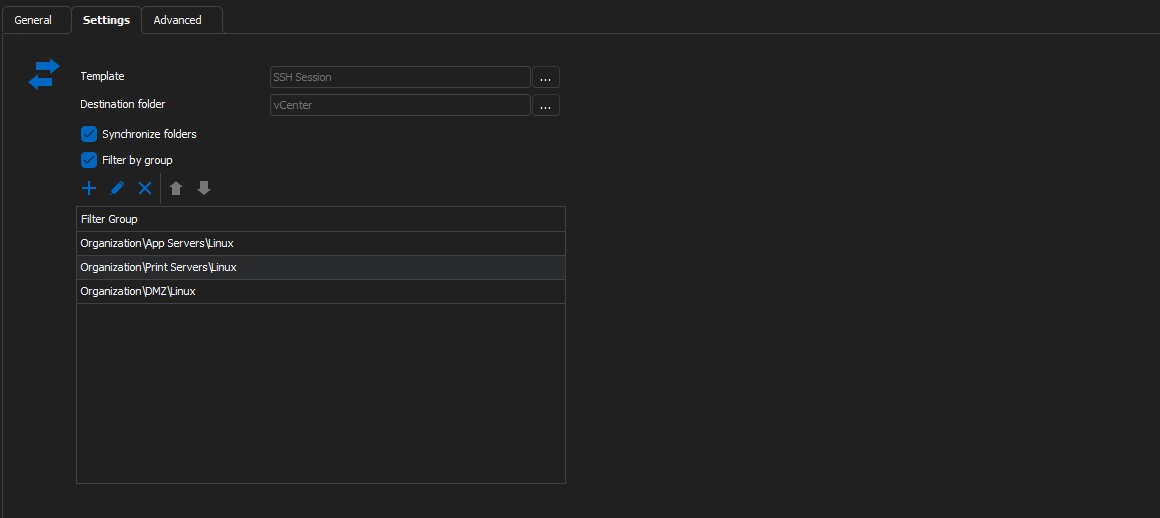
- possibly a user-editable list of valid filters? These could possibly be saved into the database without any schema changes if they are concatenated with a seperator. An example user editable list sample is attached. GUI editing borrowed from the Post Login commands area.
- It would be very useful to be able to see the info pulled from the PowerCLI queries in the dashboard. If nothing else, could we get integration to open the web interface directly to the device, similar to how the Lansweeper Synchronizer works?
- I've seen it posted here a few times, but haven't seen any recent updates. Are there active plans to implement filtering by VM Tags? This would open a wide range of capabilities, such as only getting VMs which are tagged "Linux" or "Windows" or VMs with both an "Ephemeral" (automatically generated/destroyed) and "Terraform Generated" tag.
- While on the topic of the Lansweeper synchronizer, the Filter from it would looks great on the VMware Synchronizer!
- (Final one, I promise!) This would likely be a more demanding integration, but the ability to specify detailed information about VMs for synchronizing would be astounding. For example, to write a query of [OS~*Windows Server* & (Tags="Critical" || Tags="Domain Controller")] would allow limitless possibilities when it comes to how users want to organize their data.
- What I believe most people would get the most use out of are Operating System, Tags, Powered State, VMHost, and Datastore. I'm sure others will contribute below with ideas of how additional information would be useful as well.
Some of these would definitely take some time to implement, but I believe even a small update such as 1A or 1D prior to a big overhaul would help myself and numerous others simplify their configurations. After all, the less time it takes setting up the toys, the more time spent playing with them!
user editable list sample.jpg
All Comments (1)
Hello nicjames2378,
Thank you for your suggestion.
A case has been opened with our development department and we will follow up with you when this feature is implemented.
Best regards.
Patrick Ouimet