
Xavier.Soares
Android app VNC connection View only needs improvement
Dear Developer,
Every time an android update comes out I immediately check to see if the option works, but unfortunately I still can't or I don't understand what it says, please check the attached file with the buttons that appear.
Thanks.
Best regards,
Xavier Soares
Android app VNC connection View only needs improvement
Great! Thank you very much. Improvements are always welcome!
Best regards,
Xavier Soares
Android app VNC connection View only needs improvement
Dear Developer,
With this change it will be very good, much easier and much more functional.
Many thanks.
Best regards,
Xavier Soares
Android app VNC connection View only needs improvement
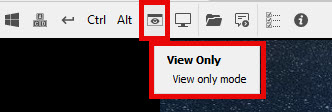
Dear Developer,
VNC connections that have View Only (Input Ignored) mode active, in the Android application we were unable to activate and deactivate mode like in Windows, we need to go to the connection and edit the option, it was wonderful to work like Windows, when connected to VNC click on the button to activate and deactivate view only mode.
Many thanks.
Best regards,
Xavier Soares
Damaged XML after changing data/information on Android coming from desktop
Dear Nicolas,
This is a excellent news! I will wait for new version and after I will test.
Many thanks,
Best regards.
Xavier Soares
Damaged XML after changing data/information on Android coming from desktop
Dear Nicolas,
I'm using exactly the same versions, I made a video to check, use only one data source and that it's the first, that way it always does the same thing to me, strangely I even managed to make an edit, but as a rule it doesn't even let me make any.
I'm sending three files, the XML before being edited on Android and after being edited (with an error) and I'm sending a video to see how I did it on Android.
I await your verification.
Thanks.
Best regards,
Xavier Soares
Damaged XML after changing data/information on Android coming from desktop
Dear Nicolas,
The objective is to be solely for me to use between my devices, for my own use only. And I don't feel comfortable with my data on other servers. The XML file solution for me is the most logical, simply because of this BUG I can't use it, which completely limits me.
Thanks.
Best regards,
Xavier Soares
Damaged XML after changing data/information on Android coming from desktop
Good afternoon,
I have the XML file on the computer and everything works perfectly well, if I put the file on Android, I can also see everything in the file and see all the saved data, as well as computers and make connections, the problem is when I edit, for example, a name of computer or some information, I can never access the XML file again and the error "Data at the root level is invalid." always appears.
I thought it was from my master key, but I removed the master key and the problem continues, that is, everything works fine on the Desktop, both creating and editing, on Android I can only read, when I want to edit it always damages the file. I did several tests and it's the same, it only works well if the XML file is created and edited ONLY on Android.
Thanks.
Best regards,
Xavier Soares