Android app VNC connection View only needs improvement
Android app VNC connection View only needs improvement
0 vote

 Dear Developer,
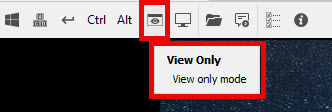
VNC connections that have View Only (Input Ignored) mode active, in the Android application we were unable to activate and deactivate mode like in Windows, we need to go to the connection and edit the option, it was wonderful to work like Windows, when connected to VNC click on the button to activate and deactivate view only mode.
Many thanks.
Best regards,
Xavier Soares
2024-02-10_12-54-03.jpg
All Comments (7)
Hello,
I moved your request on the RDM Android Feature Request forum.
I will inform our development team of this topic.
Best regards,
Jeff Dagenais
Hello,
We will investigate to see if it is possible for us to make it work like the Windows version.
Best regards,
Maxime Brousseau
Dear Developer,
With this change it will be very good, much easier and much more functional.
Many thanks.
Best regards,
Xavier Soares
Hello Xavier,
The feature has been implemented and will be released in our next version (beginning of March). We have added a button to toggle the "view only" that can be added to the session toolbar. Here are the steps to add a button to the toolbar:
- Open the VNC session
- Click on the 3-dots menu in the toolbar
- Go into "Toolbar's layout customization" menu
- In that menu you can simply drag items that you want to add to the toolbar
Best regards,
Maxime Brousseau
Great! Thank you very much. Improvements are always welcome!
Best regards,
Xavier Soares
Dear Developer,
Every time an android update comes out I immediately check to see if the option works, but unfortunately I still can't or I don't understand what it says, please check the attached file with the buttons that appear.
Thanks.
Best regards,
Xavier Soares
2024-04-12_09-56-17.jpg
Hello Xavier,
This feature required additional testing which is why it has not been released yet. We will make sure to inform you once available.
Best regards,
Nicholas Lachapelle
Nicholas Lachapelle