
lpowellus
VIM does not work as expected using ssh terminal under version 2025.2.13.1
I am also having this problem, I am running 2025.2.14.0 64-bit (JIT) and using devolutions personal hub as my data source. All old connections, however do NOT have this issue. "Old" being relative - created maybe 5 or 6 releases back. The problem is only on newly created ssh session entries.
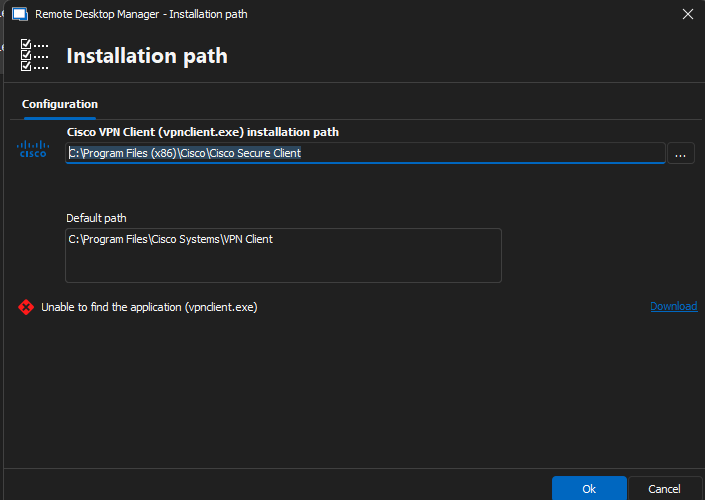
CISCO VPN updated..
I think the problem still exists. The binary required by RDM is vpnclient.exe, but I can't seem to find that on my system.
C:\Program Files (x86)\Cisco\Cisco Secure Client\vpncli.exe does exist but it isn't being seen by DRM.
X11 Server in RDM
Hi Hubert,
Thank you for the response. If you'd like support in testing the feature, please reach out.
X11 Server in RDM
Is there one built in? We're trying to shift an entire office to this product using the enterprise subscription, but this is a hurdle we can't seem to overcome. X11 forwarding doesn't function natively it would appear.
ssh key forwarding (smart card login) crashes RDM
I have three Windows event log entries and one generic log entry within RemoteDesktopManager:
Windows Event log:
Log Name: Application
Source: Application Error
Date: 12/8/2023 9:37:39 AM
Event ID: 1000
Task Category: Application Crashing Events
Level: Error
Keywords:
User:
Computer:
Description:
Faulting application name: RemoteDesktopManager.exe, version: 2023.2.18.0, time stamp: 0x88ed67e2
Faulting module name: unknown, version: 0.0.0.0, time stamp: 0x00000000
Exception code: 0xc0000005
Fault offset: 0x0000000000000000
Faulting process id: 0x0x427C
Faulting application start time: 0x0x1DA29E44D90B8A0
Faulting application path: C:\Users\admin\OneDrive\devolutions\RemoteDesktopManager.exe
Faulting module path: unknown
Report Id: 3dff3c33-d633-4962-a0ec-7e29869e52c0
Faulting package full name:
Faulting package-relative application ID:
Event Xml:
<Event xmlns="http://schemas.microsoft.com/win/2004/08/events/event">
<System>
<Provider Name="Application Error" Guid="{a0e9b465-b939-57d7-b27d-95d8e925ff57}" />
<EventID>1000</EventID>
<Version>0</Version>
<Level>2</Level>
<Task>100</Task>
<Opcode>0</Opcode>
<Keywords>0x8000000000000000</Keywords>
<TimeCreated SystemTime="2023-12-08T15:37:39.7915343Z" />
<EventRecordID>3391</EventRecordID>
<Correlation />
<Execution ProcessID="4396" ThreadID="1220" />
<Channel>Application</Channel>
<Computer>-</Computer>
<Security UserID="" />
</System>
<EventData>
<Data Name="AppName">RemoteDesktopManager.exe</Data>
<Data Name="AppVersion">2023.2.18.0</Data>
<Data Name="AppTimeStamp">88ed67e2</Data>
<Data Name="ModuleName">unknown</Data>
<Data Name="ModuleVersion">0.0.0.0</Data>
<Data Name="ModuleTimeStamp">00000000</Data>
<Data Name="ExceptionCode">c0000005</Data>
<Data Name="FaultingOffset">0000000000000000</Data>
<Data Name="ProcessId">0x427c</Data>
<Data Name="ProcessCreationTime">0x1da29e44d90b8a0</Data>
<Data Name="AppPath">C:\Users\admin\OneDrive\devolutions\RemoteDesktopManager.exe</Data>
<Data Name="ModulePath">unknown</Data>
<Data Name="IntegratorReportId">3dff3c33-d633-4962-a0ec-7e29869e52c0</Data>
<Data Name="PackageFullName">
</Data>
<Data Name="PackageRelativeAppId">
</Data>
</EventData>
</Event>
Log Name: Application
Source: Windows Error Reporting
Date: 12/8/2023 9:37:45 AM
Event ID: 1001
Task Category: None
Level: Information
Keywords:
User: -\
Computer: -
Description:
Fault bucket 1728942364468260724, type 5
Event Name: BEX64
Response: Not available
Cab Id: 0
Problem signature:
P1: RemoteDesktopManager.exe
P2: 2023.2.18.0
P3: 88ed67e2
P4: StackHash_ac46
P5: 0.0.0.0
P6: 00000000
P7: PCH_EE_FROM_ntdll+0x000000000009FEC4
P8: c0000005
P9: 0000000000000008
P10:
Attached files:
\\?\C:\ProgramData\Microsoft\Windows\WER\Temp\WER.6af1dbad-fec0-491c-90c4-34108be010d7.tmp.dmp
\\?\C:\ProgramData\Microsoft\Windows\WER\Temp\WER.eaa1baab-575a-40f0-b5c6-05adb9e236fd.tmp.WERInternalMetadata.xml
\\?\C:\ProgramData\Microsoft\Windows\WER\Temp\WER.c5ddc2f2-4ecb-4a31-b0c0-0c6db56500b6.tmp.csv
\\?\C:\ProgramData\Microsoft\Windows\WER\Temp\WER.f1fc353e-0198-42c0-94a2-8d0938a81ef8.tmp.txt
\\?\C:\ProgramData\Microsoft\Windows\WER\Temp\WER.22f15a53-bd4a-4e67-8f65-ff7436e6a2b2.tmp.xml
These files may be available here:
\\?\C:\ProgramData\Microsoft\Windows\WER\ReportArchive\AppCrash_RemoteDesktopMan_ddf5a692636a65c9e09e35e7fc2ff5dab2ee1b7_1d944a02_68dff438-2c24-4031-8da4-9650f066f6b3
Analysis symbol:
Rechecking for solution: 0
Report Id: 3dff3c33-d633-4962-a0ec-7e29869e52c0
Report Status: 268435456
Hashed bucket: edfd3fae6a7e6a2097fe6feb8f412f74
Cab Guid: 0
Event Xml:
<Event xmlns="http://schemas.microsoft.com/win/2004/08/events/event">
<System>
<Provider Name="Windows Error Reporting" Guid="{0ead09bd-2157-539a-8d6d-c87f95b64d70}" />
<EventID>1001</EventID>
<Version>0</Version>
<Level>4</Level>
<Task>0</Task>
<Opcode>0</Opcode>
<Keywords>0x8000000000000000</Keywords>
<TimeCreated SystemTime="2023-12-08T15:37:45.5053227Z" />
<EventRecordID>3392</EventRecordID>
<Correlation />
<Execution ProcessID="4396" ThreadID="1220" />
<Channel>Application</Channel>
<Computer>DESKTOP-GDVJU9V</Computer>
<Security UserID="" />
</System>
<EventData>
<Data Name="Bucket">1728942364468260724</Data>
<Data Name="BucketType">5</Data>
<Data Name="EventName">BEX64</Data>
<Data Name="Response">Not available</Data>
<Data Name="CabId">0</Data>
<Data Name="P1">RemoteDesktopManager.exe</Data>
<Data Name="P2">2023.2.18.0</Data>
<Data Name="P3">88ed67e2</Data>
<Data Name="P4">StackHash_ac46</Data>
<Data Name="P5">0.0.0.0</Data>
<Data Name="P6">00000000</Data>
<Data Name="P7">PCH_EE_FROM_ntdll+0x000000000009FEC4</Data>
<Data Name="P8">c0000005</Data>
<Data Name="P9">0000000000000008</Data>
<Data Name="P10">
</Data>
<Data Name="AttachedFiles">
\\?\C:\ProgramData\Microsoft\Windows\WER\Temp\WER.6af1dbad-fec0-491c-90c4-34108be010d7.tmp.dmp
\\?\C:\ProgramData\Microsoft\Windows\WER\Temp\WER.eaa1baab-575a-40f0-b5c6-05adb9e236fd.tmp.WERInternalMetadata.xml
\\?\C:\ProgramData\Microsoft\Windows\WER\Temp\WER.c5ddc2f2-4ecb-4a31-b0c0-0c6db56500b6.tmp.csv
\\?\C:\ProgramData\Microsoft\Windows\WER\Temp\WER.f1fc353e-0198-42c0-94a2-8d0938a81ef8.tmp.txt
\\?\C:\ProgramData\Microsoft\Windows\WER\Temp\WER.22f15a53-bd4a-4e67-8f65-ff7436e6a2b2.tmp.xml</Data>
<Data Name="StorePath">\\?\C:\ProgramData\Microsoft\Windows\WER\ReportArchive\AppCrash_RemoteDesktopMan_ddf5a692636a65c9e09e35e7fc2ff5dab2ee1b7_1d944a02_68dff438-2c24-4031-8da4-9650f066f6b3</Data>
<Data Name="AnalysisSymbol">
</Data>
<Data Name="Rechecking">0</Data>
<Data Name="ReportId">3dff3c33-d633-4962-a0ec-7e29869e52c0</Data>
<Data Name="ReportStatus">268435456</Data>
<Data Name="HashedBucket">edfd3fae6a7e6a2097fe6feb8f412f74</Data>
<Data Name="CabGuid">0</Data>
</EventData>
</Event>
Log Name: Application
Source: .NET Runtime
Date: 12/8/2023 9:37:39 AM
Event ID: 1026
Task Category: None
Level: Error
Keywords: Classic
User: N/A
Computer: -
Description:
Application: RemoteDesktopManager.exe
Framework Version: v4.0.30319
Description: The process was terminated due to an unhandled exception.
Exception Info: exception code c0000005, exception address 0000000000000000
Stack:
Event Xml:
<Event xmlns="http://schemas.microsoft.com/win/2004/08/events/event">
<System>
<Provider Name=".NET Runtime" />
<EventID Qualifiers="0">1026</EventID>
<Version>0</Version>
<Level>2</Level>
<Task>0</Task>
<Opcode>0</Opcode>
<Keywords>0x80000000000000</Keywords>
<TimeCreated SystemTime="2023-12-08T15:37:39.4259898Z" />
<EventRecordID>3390</EventRecordID>
<Correlation />
<Execution ProcessID="17020" ThreadID="0" />
<Channel>Application</Channel>
<Computer>-</Computer>
<Security />
</System>
<EventData>
<Data>Application: RemoteDesktopManager.exe
Framework Version: v4.0.30319
Description: The process was terminated due to an unhandled exception.
Exception Info: exception code c0000005, exception address 0000000000000000
Stack:
</Data>
</EventData>
</Event>
RDM:
An error occurred while sending a data source event: An error occurred while sending the request.
ssh key forwarding (smart card login) crashes RDM
Hello,
I can confirm the same problem still exists with version 2023.3.32.0, both the fully installed version and the portable. When agent forwarding is enabled with CAPI smart card flag, the application crashes when jumping to a second host, or when querying if agent forwarding is enabled with a "ssh-add -L" command.
Any update here? Willing to test betas!!
Love the product otherwise,
Lee