
OzgurH
CR/LF(?) Issue with Telnet to Keenetic Modem/Router
Hello,
Thank you for your patience. Would it be possible for you to open the entry property and check these options in the terminal tabs?
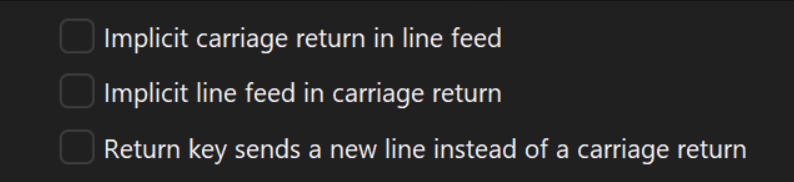
Please let me know how it goes.
Best regards,
@carl marien
Please see the second screenshot in my second post on the thread. When I was trying before posting here, none of them were checked, but as I mentioned in my first post, (earlier in my tests) I've probably tried all the possibilities of those 3 checkboxes, and couldn't find a "working as desired" combination.
Thanks,
Ozgur
CR/LF(?) Issue with Telnet to Keenetic Modem/Router
This is for Custom log, with Verbosity=2, and Log mode=Event (I've removed the blank lines in between):
[9/9/2025 6:30:50 PM] Devolutions.ProtocolsSharp: 2025.8.14.1 OS: Windows
[9/9/2025 6:30:50 PM] Terminal font: Courier New [Courier New, fixed=True]
[9/9/2025 6:30:50 PM] Starting Telnet, verbose level: 2
[9/9/2025 6:30:50 PM] Connecting to: 192.168.1.1:23 (IPV_ANY)
[9/9/2025 6:30:50 PM] Credentials provided: empty user(no prompt), empty password(no prompt)
[9/9/2025 6:30:50 PM] Skipping auto fill for username and password
[9/9/2025 6:30:50 PM] Starting Telnet negociation
[9/9/2025 6:30:50 PM] Client will Negotiate Window Size
[9/9/2025 6:30:50 PM] Client will Terminal Speed
[9/9/2025 6:30:50 PM] Client will Terminal Type
[9/9/2025 6:30:50 PM] Client do Echo
[9/9/2025 6:30:50 PM] Client will Suppress Go Ahead
[9/9/2025 6:30:50 PM] Client do Suppress Go Ahead
[9/9/2025 6:30:50 PM] Client will Binary Transmission
[9/9/2025 6:30:50 PM] Client do Binary Transmission
[9/9/2025 6:30:50 PM] Server do Echo
[9/9/2025 6:30:50 PM] Client will Echo
[9/9/2025 6:30:50 PM] Server do Negotiate Window Size
[9/9/2025 6:30:50 PM] Client sends Window Size: width = 132 height = 83
[9/9/2025 6:30:50 PM] Server will Echo
[9/9/2025 6:30:50 PM] Server will Suppress Go Ahead
[9/9/2025 6:30:51 PM] Connected after Telnet negociation
[9/9/2025 6:30:51 PM] Connection process complete
Let me know if you need to change any of the logging parameters, and try again.
While I'm at it, let me also share the screen text of Wireshark (I've skipped the SYN, empty ACK kind of packets for brevity) (but added info about telnet payload after "#" signs):
4   01:04:02.933164  192.168.1.1    192.168.1.123  TELNET  66  Do Echo, Do Negotiate About Window Size, Will Echo, Will Suppress Go Ahead
5   01:04:02.933769  192.168.1.123  192.168.1.1    TELNET  90   Will Negotiate About Window Size, Will Terminal Speed, Will Terminal Type, Do Echo, Will Suppress Go Ahead, …
7   01:04:02.973175  192.168.1.1    192.168.1.123  TELNET  60   3 bytes data   # Hex: 1b 5b 4b
9   01:04:04.772648  192.168.1.1    192.168.1.123  TELNET  128  74 bytes data  # "KeeneticOS version .... .\r\n"
10  01:04:04.772967  192.168.1.1    192.168.1.123  TELNET  64   10 bytes data  # 4c 6f 67 69 6e 3a 20 1b 5b 4b                     Login: .[K
12  01:04:07.817377  192.168.1.123  192.168.1.1    TELNET  55   1 byte data    # "a"
14  01:04:07.818779  192.168.1.1    192.168.1.123  TELNET  60   1 byte data    # "a"
15  01:04:07.819072  192.168.1.1    192.168.1.123  TELNET  60   3 bytes data   # Hex: 1b 5b 4b
17  01:04:08.133314  192.168.1.123  192.168.1.1    TELNET  55   1 byte data    # "d"
18  01:04:08.134692  192.168.1.1    192.168.1.123  TELNET  60   1 byte data    # "d"
19  01:04:08.134929  192.168.1.1    192.168.1.123  TELNET  60   3 bytes data   # Hex: 1b 5b 4b
21  01:04:08.455961  192.168.1.123  192.168.1.1    TELNET  55   1 byte data    # "m"
22  01:04:08.457195  192.168.1.1    192.168.1.123  TELNET  60   1 byte data    # "m"
23  01:04:08.457526  192.168.1.1    192.168.1.123  TELNET  60   3 bytes data   # Hex: 1b 5b 4b
25  01:04:08.701293  192.168.1.123  192.168.1.1    TELNET  55   1 byte data    # "i"
26  01:04:08.702554  192.168.1.1    192.168.1.123  TELNET  60   1 byte data    # "i"
27  01:04:08.702841  192.168.1.1    192.168.1.123  TELNET  60   3 bytes data   # Hex: 1b 5b 4b
29  01:04:08.918548  192.168.1.123  192.168.1.1    TELNET  55   1 byte data    # "n"
30  01:04:08.920281  192.168.1.1    192.168.1.123  TELNET  60   1 byte data    # "n"
31  01:04:08.920551  192.168.1.1    192.168.1.123  TELNET  60   3 bytes data   # Hex: 1b 5b 4b
33  01:04:10.920998  192.168.1.123  192.168.1.1    TELNET  55   1 byte data    # "\r" 0d
The handshake part is different as well, but in Windows' Telnet client that last packet (after admin's "n") (#33) is sent as "\r\n" 0d 0a.
Edit: In theory the tests should all behave same, but FYI: the packet capture and log capture were of different runs, in case there's a mismatch b/w them according to your expectations.
CR/LF(?) Issue with Telnet to Keenetic Modem/Router
Hey Samuel,
Thanks for the quick response.
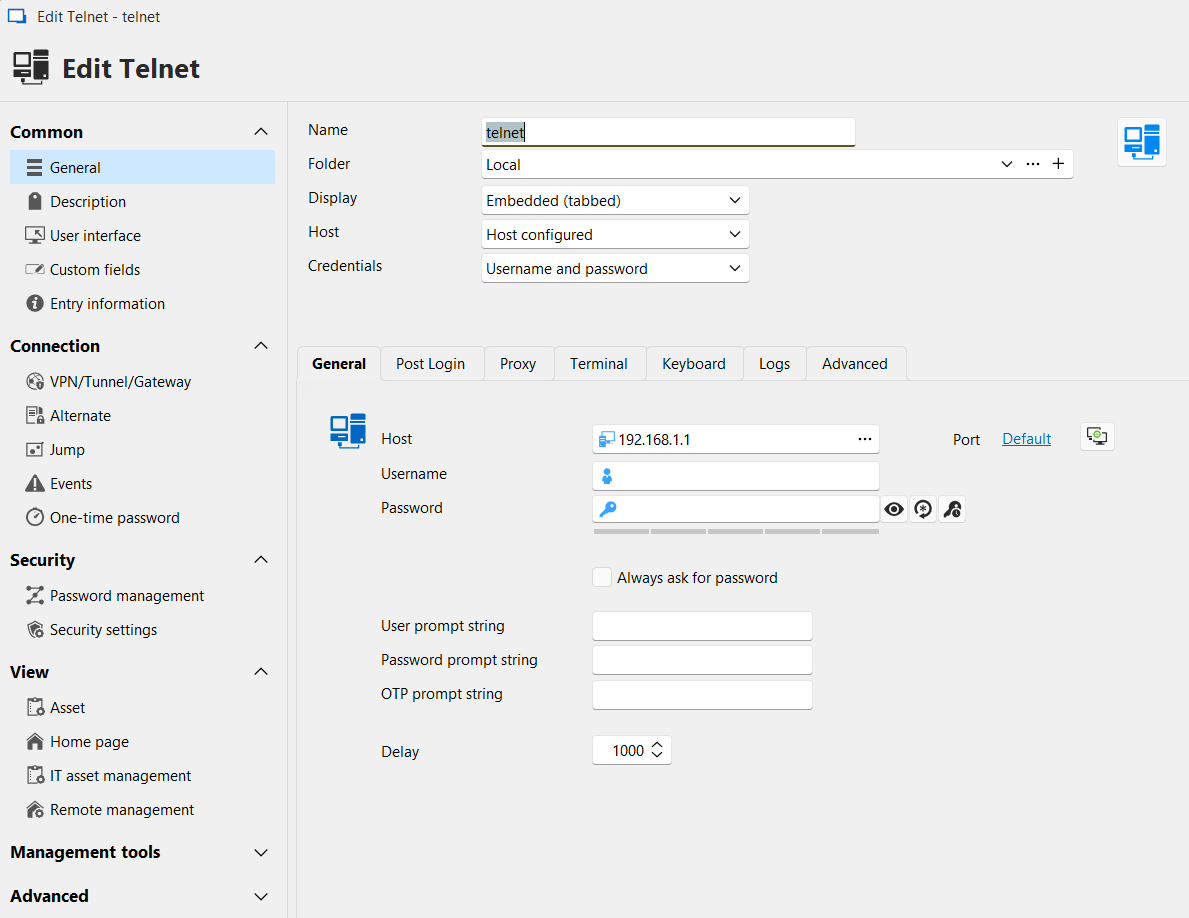
This entry was added to "Local XML in AppData". I do have a "Devolutions Hub Personal" data source set up as well. Would it matter where it is?
Here's a screenshot. Since it's using an intranet IP, I won't bother with blurring:
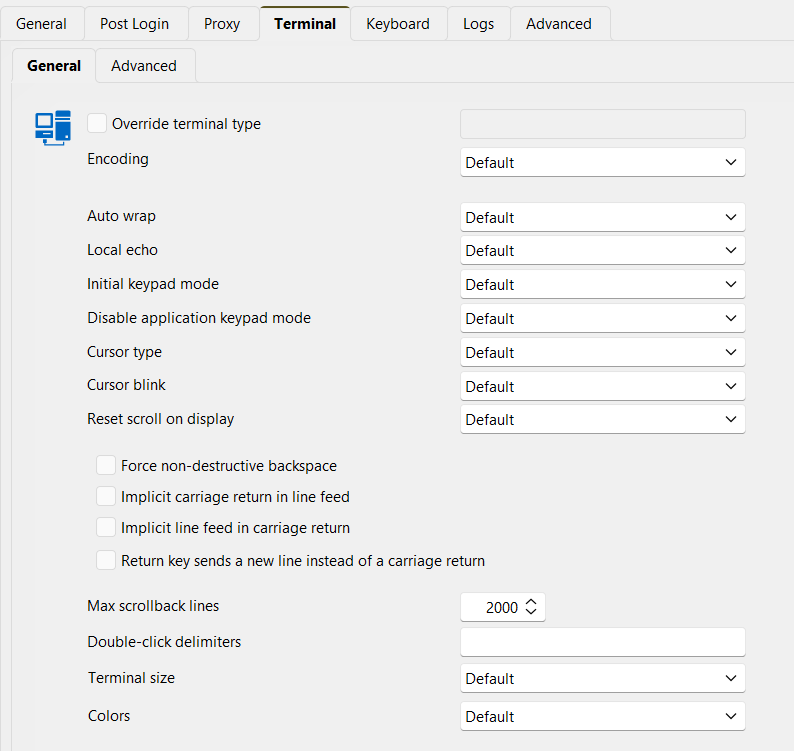
(As I said in the first post, checking "Return key sends a new line...." box does not change the way it behaves).
Trying to have RDM auto-enter username-password was the first problem I ran into actually! But even in this interactive mode, server doesn't send the Password: prompt according to packet capture. So I don't think the value of the pwd prompt matters (yet)(?).
(BTW, the modem/router does send the prompts in a capitilized fashion (as opposed to all-lowercase, like I've seen in other SSH sessions)).
Thanks!
CR/LF(?) Issue with Telnet to Keenetic Modem/Router
Hey there,
This looks like an issue that would have been reported and quickly fixed by you guys... As that's not the case, it's most likely something I'm skipping, but let me try to explain:
Keenetic modems/routers provide a command line interface management option as well through the regular Telnet port+protocol.
When I add the "Telnet client" feature on my Win11 machine, and use it to connect, the login sequence works fine.
However, with RDM Telnet (I've tried both regular, and Rebex) (version 2025.2.27.0 64-bit (JIT)), I cannot get the Password prompt, after typing in the username and pressing just
Enter. I have to press another key to see thePassword:prompt.I've tried most likely all the combinations about carriage return/line-feed in
Terminalsection of the entry's properties.
The reason I was focused on the CR/LF combinations was that, when I tried on Win11 client, I see a \r\n combo sent (in Wireshark) after the last letter of the user name. RDM only sends a \r.
The order and count of "Do", "Will" packets each way, and the order of "Output Marking" (?) bytes (0x1B 0x5B 0x4B) also is a bit different. But let me hold on sharing them, as this may have an easier fix/option change in RDM.
Thanks,
Ozgur
VNC "Security type" preference (to pick VNC over VeNCrypt)
I don't have a TigerVNC install handy to play with, but would it not be possible to disable the authentication types you don't want on the server side?
Thanks for quick and also a detailed response! Last night, after noticing your reply, (but not being able to read it due to issues w/ my phone) I also realized I could have done this, and yes, after adding the following line in the ~/.vnc/config file:
securitytypes=vncauthI was able to enforce the outcome I wanted from the server side, and the latest version also worked fine! Thanks for the suggestion!
So, my "feature request" of being able to specify the securitytype(s) on the RDM side can now be assigned a much lower priority!
Since you guys are doing such a good job (of eliminating the need for different clients for remote access! ;) ), I don't have an independent VNCViewer client installed to test, but can you please also confirm that, you're not doing anything special for cipher suites, and my original issue with the VeNCrypt security type is most likely due to a server side issue? (Since, both FreeVnc, and UltraVnc are both failing the same way, there already is a strong clue for this reasoning, but I wanted to double check)
(BTW, for sake of completeness: during my research, I ran into another post in this forum that was suggesting disabling TLS 1.3 for SCHANNEL in Win11 (for another TLS related issue), but that didn't help).
(Also, <IronVNC client in RDM - TigerVNC server> combination is even worse that it can't even get to those later handshake phases, but I'm not worried about that right now)
Thanks,
Ozgur
Built-in SCP
And for the directory issue, could you post a screenshot or otherwise specify exactly where you found this?
Hi again,
I was using the Process Monitor tool from SysInternals. It tracks several kinds of activity on the system at the OS level.
Using the "Stack" tab in its "Event Properties" window, I was hoping to provide you with an exact call stack of the point in the program that triggers this lookup into dhervieux profile folder, but managed code stopped me from doing that!?! :( (If you have a symbol server, of are somehow making PDB files available, let me know the process, and I can try to get a proper call stack - I'm more familiar with native debugging of the C++ world, ignore this last sentence if it doesn't make sense for .NET binaries! :) ).

Native code call stack for the first reference was like this [1].
Thanks,
Özgür
[1]
0	FLTMGR.SYS	FltPerformSynchronousIo + 0x2651	0xfffff800752dc7a1	C:\WINDOWS\System32\drivers\FLTMGR.SYS
1	FLTMGR.SYS	FltPerformSynchronousIo + 0x1ce1	0xfffff800752dbe31	C:\WINDOWS\System32\drivers\FLTMGR.SYS
2	FLTMGR.SYS	FltPerformSynchronousIo + 0xc38	0xfffff800752dad88	C:\WINDOWS\System32\drivers\FLTMGR.SYS
3	FLTMGR.SYS	FltPerformSynchronousIo + 0x7ed	0xfffff800752da93d	C:\WINDOWS\System32\drivers\FLTMGR.SYS
4	ntoskrnl.exe	IofCallDriver + 0xbe	0xfffff800e38bffde	C:\WINDOWS\system32\ntoskrnl.exe
5	ntoskrnl.exe	NtDeviceIoControlFile + 0x1b18	0xfffff800e3e82e38	C:\WINDOWS\system32\ntoskrnl.exe
6	ntoskrnl.exe	NtQueryDirectoryFile + 0xe0	0xfffff800e3e84b70	C:\WINDOWS\system32\ntoskrnl.exe
7	ntoskrnl.exe	setjmpex + 0x91f5	0xfffff800e3c8ef55	C:\WINDOWS\system32\ntoskrnl.exe
8	ntdll.dll	NtQueryDirectoryFile + 0x14	0x7ffc2779c664	C:\WINDOWS\SYSTEM32\ntdll.dll
9	windows.storage.dll	GetFindDataForPath + 0x811	0x7ffc224bfce1	C:\WINDOWS\SYSTEM32\windows.storage.dll
10	windows.storage.dll	GetFindDataForPath + 0x219	0x7ffc224bf6e9	C:\WINDOWS\SYSTEM32\windows.storage.dll
11	windows.storage.dll	GetFindDataForPath + 0x1512	0x7ffc224c09e2	C:\WINDOWS\SYSTEM32\windows.storage.dll
12	windows.storage.dll	GetFindDataForPath + 0x17ed	0x7ffc224c0cbd	C:\WINDOWS\SYSTEM32\windows.storage.dll
13	windows.storage.dll	Ordinal765 + 0xa445	0x7ffc22512665	C:\WINDOWS\SYSTEM32\windows.storage.dll
14	windows.storage.dll	SHGetIDListFromObject + 0x2fa	0x7ffc2256a0ba	C:\WINDOWS\SYSTEM32\windows.storage.dll
15	windows.storage.dll	Ordinal765 + 0xd08e	0x7ffc225152ae	C:\WINDOWS\SYSTEM32\windows.storage.dll
16	windows.storage.dll	SHGetIDListFromObject + 0x2fa	0x7ffc2256a0ba	C:\WINDOWS\SYSTEM32\windows.storage.dll
17	windows.storage.dll	SHParseDisplayName + 0x205	0x7ffc22517155	C:\WINDOWS\SYSTEM32\windows.storage.dll
18	windows.storage.dll	ILCreateFromPathEx + 0x9f	0x7ffc225e90af	C:\WINDOWS\SYSTEM32\windows.storage.dll
19	windows.storage.dll	ILCreateFromPathW + 0x2f	0x7ffc22a3999f	C:\WINDOWS\SYSTEM32\windows.storage.dll
20 <unknown> 0x7ffb54128e9b 0x7ffb54128e9bBuilt-in SCP
For the first issue, could you test this again on our latest version?
Hi again @Jafran Majeau ,
Sorry for not getting back to you earlier (and also for resurrecting this old thread after so many months)!
After making another post in the forum, I remembered this "to do item" that has been sitting in the back of my head for 2 years and tried again. I have noticed the same issue again. The SFTP window opens up with the local folders, but it doesn't load the remote folders. Checking the packet capture, I noticed that RDM is trying to set up the connection at port 65,535! (Sending SYN packets, but not getting SYN+ACK back).
Checking my connection properties, I noticed, I left the SSH port at "Default" (=0). Enforcing it to be 22 in the connection properties got rid of the problem I was having... I think the "default" port number handling could/should(?) be the same for both embedded SCP, and SFTP sessions, no?
(I'll make another post for the user directory issue).
Thanks,
Özgür
VNC "Security type" preference (to pick VNC over VeNCrypt)
Hi there,
From my point of view (upgrading from 2024.1.29 to 2025.1.33) the issue I ran into looked like a regression, but diving into the log files, and packet captures, it turns out this upgrade causes the default "Security type" picked by RDM's VNC client (ultra, and free) to be VeNCrypt instead of VNC with the earlier one (and that makes the SW more secure, but it breaks things in my environment!? :) :( ).
Config Details: Win 11 (24H2 26100.3775) client connecting to TigerVNC server (1.8.0 - 33.0.3.el7_9) running on Oracle Linux 7.
Packet capture and VNCServer logs show that earlier version was picking VNC security type, and the authentication (which is much less secure, I know) was working fine [1], whereas the most recent version is picking VeNCrypt and running into a
TLS Handshake failed: Could not negotiate a supported cipher suiteerror later on the server side [2].
I realize this is what I should be fixing, but I thought I should first report this here so it gets recorded in your "knowledge-base" for curious folks like me! :) (Since the latest VNC Server release on my OS cannot pick a cipher suite among the offered 104 suites, that research may be more tedious)
So is there a way to instruct RDM to pick a certain encryption type (or provide some sort of order) for VNC? I couldn't see one in settings.
Thanks,
Özgür
[1]
 Connections: accepted: 172.30.3.41::60275
 SConnection: Client needs protocol version 3.8
 SConnection: Client requests security type VncAuth(2)
 VNCSConnST:  Server default pixel format depth 24 (32bpp) little-endian rgb888
[2]
 SConnection: Client requests security type VeNCrypt(19)
 SVeNCrypt:   Client requests security type TLSVnc (258)
 TLS:         TLS Handshake failed: Could not negotiate a supported cipher
              suite.
 TLS:         TLS session wasn't terminated gracefully
 SConnection: AuthFailureException: TLS Handshake failed
Connections: closed: 172.30.3.41::59868 (TLS Handshake failed)Built-in SCP
@Jafran,
Thanks for adding this feature to Windows port of RDM as well. I'm afraid there may be some issues though. The SCP one seems to work fine, however Open Embedded (SFTP) only shows local fıles, and doesn't even make a connection to remote server (as observed by TcpView - (SFTP-enabled SSH sessions do establish 2 port-22 TCP connections for an SSH session for example, and does log lines to log file, and show folders)
Also, is the embedded SFTP session not expected to show remote files pane?? Then, unless "Show files in tree view" option is checked, there doesn't seem to be way to download individual files, only upload to folders I guess? Was that intentional?
Version 2023.2.18.0 64-bit on Win7
(BTW, while trying to see if a log file was created or not, I noticed RDM checks for David H's home directory!? Was that intentional for some custom debugging alternative probably? :) )
Thanks,
Özgür