
aakash
Password Entry Issue with Parentheses - Bug?
Thanks! Is there perhaps an ETA on when Chrome will be supported for password entry?
View And Use Copy Password Option
This request can be closed - I discovered the answer for this. I had to go to File | Data Sources | Edit | Advanced and remove the checkmark for "Disable reveal password".
Password Entry Issue with Parentheses - Bug?
I recently upgraded from v2021.1.30.0 to v2023.1.27.0 using a SQLite database. One of my passwords using "Execute Typing Macro" keeps failing. Upon testing further, it appears that if the password contains parentheses, it strips out the parentheses.
Example:
If the password is:
test (somechars)
RDM enters this using the "Execute typing macro" with the parentheses removed:
test somechars
To recreate this create a new website entry using:
Web browser: Google Chrome
Display: Embedded (tabbed)
Username:
testusernamePassword:
test (somechars)Change "Events | After Open" to use the "Typing macro":
$PASSWORD$
When you open this connection, it will not type in the parentheses when using "Execute Typing Macro".
I have recreated this on more than one computer, so I believe this may perhaps be a bug? If so, when will this be resolved?
Connection Icon In Tab Showing Generic Icon After Upgrade
I recently changed a zip/portable install from version v2021.1.30.0 to v2023.1.27.0 with a SQLite database. After the upgrade, the Remote Desktop connections I make appear using a generic icon instead of the RDM RDP icon. I have tried to restart the application but it has not helped. Is there any way to restore this icon?
Note that the icons appear fine in the Vault and Favorites sections, and also appears correct when going into the Properties for the connection and viewing the icon. But after making a connection, the icon that appears in the tabbed interface that shows all of the open connections shows a generic icon.
I am also seeing the same generic icon for a website I load too.
This computer does not have Internet access. All of the files/folders from the downloaded Zip file were copied in/used. I copied the database from the old folder to the new folder with this new version.
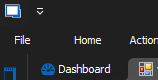
This is the generic icon in v2023.1.27.0 that I see for both browser and RDP connections:

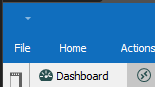
Icon before upgrade from v2021.1.30.0 for RDP:

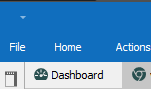
Icon before upgrade from v2021.1.30.0 for browser:

Please let me know if I can provide any other information.
Thanks!
View And Use Copy Password Option
I am using the SQLite option with RDM v2023.1.27.0. How can I get the "Copy Password" option?
While looking into this, I noticed that I see the option in v2023.1.23.0 on a different computer with a different SQLite option, but I can't seem to find a way to enable this.