Connection Icon In Tab Showing Generic Icon After Upgrade

I recently changed a zip/portable install from version v2021.1.30.0 to v2023.1.27.0 with a SQLite database. After the upgrade, the Remote Desktop connections I make appear using a generic icon instead of the RDM RDP icon. I have tried to restart the application but it has not helped. Is there any way to restore this icon?
Note that the icons appear fine in the Vault and Favorites sections, and also appears correct when going into the Properties for the connection and viewing the icon. But after making a connection, the icon that appears in the tabbed interface that shows all of the open connections shows a generic icon.
I am also seeing the same generic icon for a website I load too.
This computer does not have Internet access. All of the files/folders from the downloaded Zip file were copied in/used. I copied the database from the old folder to the new folder with this new version.
This is the generic icon in v2023.1.27.0 that I see for both browser and RDP connections:
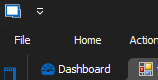
Icon before upgrade from v2021.1.30.0 for RDP:

Icon before upgrade from v2021.1.30.0 for browser:

Please let me know if I can provide any other information.
Thanks!
9e00f164-fbc8-4730-b08e-7ba62644e5f0.png
bd06925c-0284-46cc-a79a-682706969794.png
3c7a7bf0-1b87-4fb8-b0d8-ed340d847f14.png
5ba71f7f-e368-44e2-b7b2-9a2d35449a95.png
9e6ca06c-9ad6-49cd-98e9-f0d6e737b81c.png
d2adbc4e-6fc5-4cdc-9b5b-53ff72014837.png
All Comments (1)
Hello,
Thank you for reaching out to us regarding this,
This is indeed odd, I'm wondering if the issue is related to this portable instance itself, If you create a new portable instance do you encounter the same issue?
To do so, you will need to do the following:
1- Download the .zip file below:
https://remotedesktopmanager.com/home/thankyou/rdmbin
2- Create a new folder on your Desktop
3- Extract the content of the .zip file into the folder created at #2
4- Go in this folder once the .zip file has been extracted and run remotedesktopmanager.exe
Let me know,
Best regards,
Samuel Dery