
Gerhard Ryznar
select relavent folder when I select sessions
Hello Neilson,
Thank you for the detailed example.
We set up the same folder structure in our lab and tested it with the navigation pane set to auto-hide.
In our test, the matching entry was selected when we switched tabs, so we could not reproduce the issue yet.
To find the difference between our setups, could you please send us the following:
The value of "Auto-select item on tab focus" in File > Settings > User interface > Tree view
The types of sessions you open, for example RDP, SSH or web sessions
How you switch between sessions, for example by clicking the tab, with a keyboard shortcut or from the tab list
Whether the sessions open as embedded tabs or in undocked windows
If you are not on the latest version, please update to 2026.3.13.0 and test again
Several fixes for the auto-hide navigation pane were included in the recent releases.
You can find more details about the tree view options here:
https://docs.devolutions.net/rdm/ribbon-menu-bar/file/settings/user-interface/tree-view
Best regards,
PowerShell: expose the password policy engine (generate + validate)
Hello,
Request on behalf of a customer.Get-DSPasswordPolicy reads a DVLS password template, but nothing in the module can actually use it - no cmdlet generates a password from a policy, and none validates a password against one.
So, we would like to request that the existing cmdlet be extended, or that a new cmdlet be added, for:
New-DSRandomPassword -PolicyName 'Standard'Test-DSPassword -Password <string> -PolicyName 'Standard'(returning the unmet criteria)a
-PolicyNameparameter onNew-DSCredentialEntry
The workaround for now would be the following code block:
$pol = Get-DSPasswordPolicy -Name 'Standard'
if (-not $pol) { throw "Policy not found" }

$pwd = [Devolutions.RemoteDesktopManager.Business.PasswordGeneratorHelper]::Generate($pol)

# Verify in advance whether the generated password meets the policy requirements
"Requirements: " + [Devolutions.Server.Managers.PasswordValidationManager]::GetWarningDetails($pwd, $pol)

$new = New-DSCredentialEntry -Name 'srv01-admin' -Username 'admin' -Password $pwd

$e = Get-DSEntry -EntryID $new.ID -AsRDMConnection
$e.ConnectionInfo |
  Set-DSEntryProperty -Path 'Credentials' -PropertyName 'Password'                        -PropertyValue $pwd |
  Set-DSEntryProperty -Path 'Security'    -PropertyName 'PasswordComplexityId'            -PropertyValue $pol.ID |
  Set-DSEntryProperty -Path 'Security'    -PropertyName 'PasswordComplexityUsageOverride' -PropertyValue 'Enabled' |
  Update-DSEntryBase
Thanks!
Best regards,
Failed to add license from environment variable
Hallo Michael,
alles klar, danke für die Information!
Dann fahren wir über den Case fort und posten die Lösung hier, sobald wir das Verhalten geklärt haben. 😉
Mit besten Grüßen
Failed to add license from environment variable
Hallo Michael,
funktioniert die Lizenz, wenn du sie von der UI aus hinzufügst? Verfügt der Server über eine Internetverbindung?
Könntest du uns die Lizenz eventuell per DM zur Verfügung stellen?
Vielen Dank!
Mit besten Grüßen
DVLS WebUI unavailable after upgrade to 2026.1.6.0
Hello Alex,
There was a small change for the URI between 2025.3 and 2026.1.
In fact, getting an empty page is the intended behaviour. Being redirected to the login page indicates an issue with the health URI.
For 2025.3 the URI for the health check would be https://fqdn/api/health starting with 2026 it changed to https://fqdn/health.
If the DVLS instance runs properly, you should see a Status 200 response in your browser:
(This reflects exactly the statement from the mentioned KB topic)
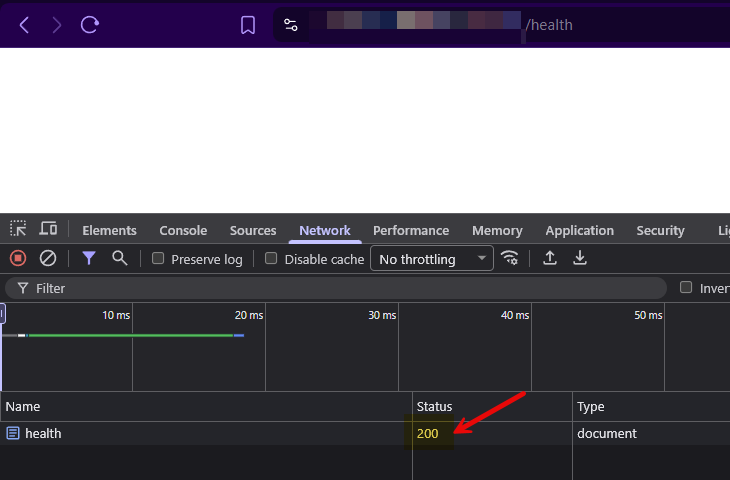
Please let us know if you have any further questions.
Best regards,
DVLS WebUI unavailable after upgrade to 2026.1.6.0
Hello all,
After further investigation, it turned out that the culprit in this case was a load balancer. As soon as we bypassed it, the connection worked properly, and there were no issues with the upgrade process.
Best regards,
SSO setup with EntraID fails
Hello,
The behaviour occurred because of an incorrect platform configuration on Entra-ID side. (Steps #11 - 14)
After reviewing and applying the correct value, the authentication works as expected.
Best regards,
SSO setup with EntraID fails
Hello René,
As you also opened a case, we will continue the troubleshooting there and post the resolution afterwards here.
I would also like to take this opportunity to highlight our support services appendum.
Best regards,