
jpuder
Windows Terminal...not working since update to 2024.1.29.0 64-bit
Hello,
I just realized that it is completely normal that the Command Line entry cannot launch our integration of the Windows Terminal. It is due to the fact that our integration of the Windows Terminal is only designed to work while using other terminal entries which offer "Application" choice (Console host or Windows Terminal). Theses entries launch our integration correctly using specific parameters (if not used correctly, the terminal would not launch/work properly).
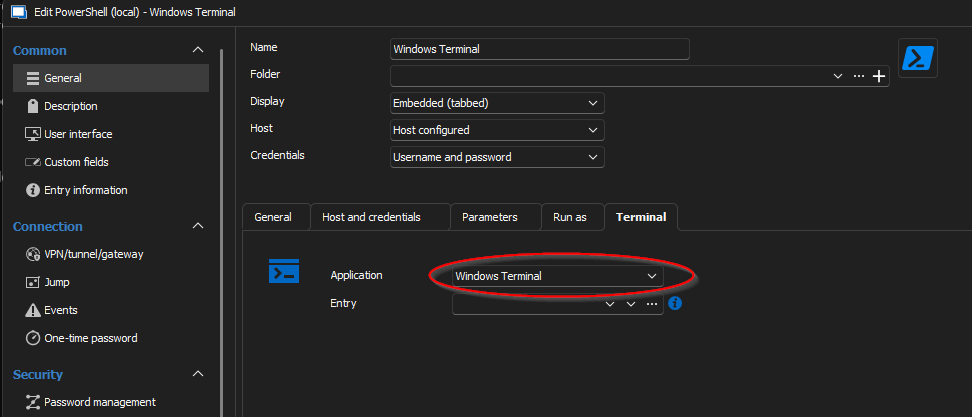
You can validate that an entry (in that example a PowerShell (Local)) has the "Application" choice. Simply chose the "Windows Terminal" option.
In that case our integration of the Windows Terminal will be launched and embedded successfully into RDM.
So to make everything clearer about this forum case :
The first problem you guys were experiencing was due to a faulty file in the Windows Terminal application.
This will be fixed in the 2024.2.18.0 minor release (for any future clients experiencing the problem)
For Jeremy and Jens, this is already fixed as you guys manually changed the version of your Windows Terminal application.
The new "problem" stated by Jens was due to a misuse of the Windows Terminal application --> simply use a PowerShell (Local) entry and select "Windows Terminal" application use.
Thank you for your feedbacks, and if you have any problems let us know !
Best regards,
Nathan Beauregard
Hello Nathan,
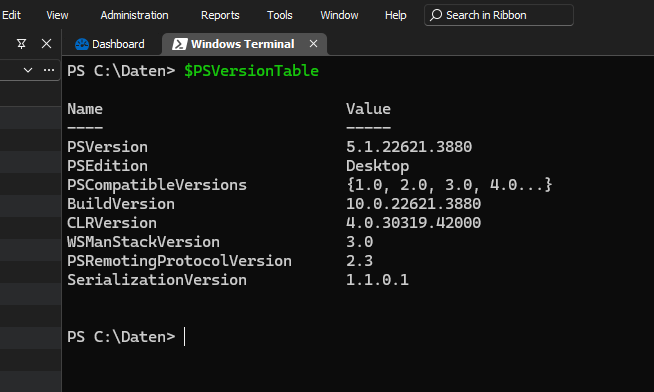
Thank you for your explanation. Unfortunately, this is not the solution, because the "Windows Terminal" session type used to work in the past. If I use the "PowerShell (local)" session type, then I also have a PowerShell. These session types have no problem, I was able to continue using them without any problems. If I now create a new session of the type "PowerShell (local)" and then use "Windows Terminal" as the application, then I still have a PowerShell and not the "Windows Terminal". See screenshots.
Regards,
Jens
Windows Terminal...not working since update to 2024.1.29.0 64-bit
Hello Nathan,
i have changed the "Run" parameter to start the Windows native App. The terminal now starts, but unfortunately only as a separate window. It should actually start integrated in the RDM as a tab (this is also the setting).
Best regards,
Jens
Windows Terminal...not working since update to 2024.1.29.0 64-bit
Hello, i have now tried it on my Windows 11 Desktop. But i have no luck. The problem is still there. I have replaced the folder with the content from the ZIP-Archive. When i start the "WindowsTerminal.exe" in that folder, the windows store warning pos up, when i go to continue, the terminal is opened.
When i start a session from RDM, the Terminal Tab opens, but with no prompt. No keyboard input possible.
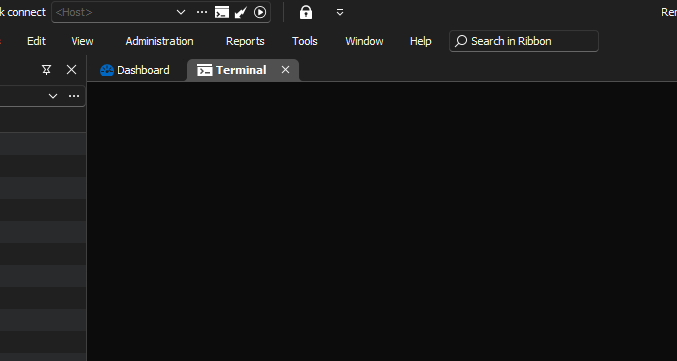
Here the settings from that session:
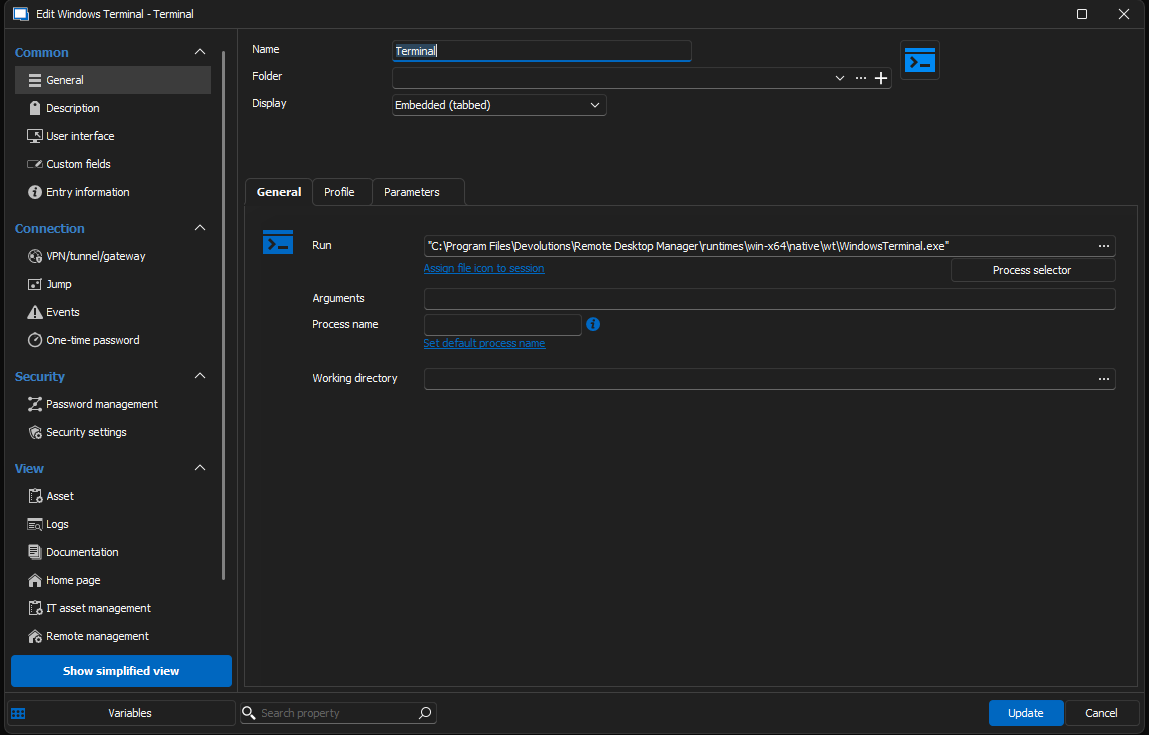
Are there any additional settings that i must configure?
Regards
Jens
Windows Terminal...not working since update to 2024.1.29.0 64-bit
Hello,
a little update from me. I have updated RDM to 2024.2.12.0 64-bit.
But the problem is still there. Terminal does not open.
Jens
Windows Terminal...not working since update to 2024.1.29.0 64-bit
Hi,
i can start "windows terminal" outside from RDM without problems. Run: wt -> opens Terminal, also Start -> Search "Terminal" will also start normally.
Best regards
Jens
Windows Terminal...not working since update to 2024.1.29.0 64-bit
My last Windows Update was on 01/04/2024, so it should not be the problem. I have some updates to be done. I will check it again after that.
Windows Terminal...not working since update to 2024.1.29.0 64-bit
Hello,
since today my windows terminal session don't work anymore. Yesterday it was fine and at working end i have closed the RDM with two opened tabs (1x rdp, 1x Windows Terminal).
Today i have opened RDM and i was asked to open the two sessions. After confirmation the rdp session is up and running, but the terminal tab disappears.
It looks like the same behaviour as with "bossanova808".
I have deleted the Terminal Session entry and created a new one without success. Also i have updated RDM to 2024.1.31.0 64-bit (from 2024.1.30.0 64-bit).
When i add a new "Windows Terminal" session entry (embedded (tabbed)) with no additional parameters, i get the error "unable to execute the applicaton".
When i configure the "Run" with "C:\Program Files\WindowsApps\Microsoft.WindowsTerminal_1.20.11381.0_x64__8wekyb3d8bbwe\WindowsTerminal.exe", the session starts (in tab) but disappears.
I am on Windows 11 Pro 22H2
Best regards
Jens
SSH Shell - automatisches Login nach Abfrage vom Server
Hallo,
ist es möglich eine SSH Shell Session so zu konfigurieren, dass man sich ohne weiteren Prompt (Username / Passwort sind hinterlegt bzw. inheritet) einloggen kann, wenn der Server vorher noch einen Frage beantwortet haben will?
Der Login-Vorgang sieht so aus:
login as: Username
Danach kommt eine Frage vom Server:
Keyboard-interactive authentication prompts from server:
| Do you accept and acknowledge the statement above ? (yes/no) : yes
| Password:
Ich muss also immer erst "yes" eintippen und dann kommt der Passwort-Prompt. Das funktioniert dann eben nur ohne ausgefülltes Passwort in der Session, bzw. wenn "Always ask password" ausgewählt ist.
Kann man das eintippen von "yes" also automatisiert von RDM machen lassen?
Danke
Jens