
rdonohue
PAM password rotation ignoring password policy
Thank you! Yep directly selecting it there solved it.
PAM password rotation ignoring password policy
For comparison, I'm able to run this powershell script from the dvls server and it works just fine.
# Prompt for credentials (or use current session if desired)
$Cred = Get-Credential # Enter an account with rights to modify local users on the remote system
# Generate a 16-character complex password
Add-Type -AssemblyName System.Web
$NewPasswordPlain = [System.Web.Security.Membership]::GeneratePassword(16,4)
$NewPasswordSecure = ConvertTo-SecureString $NewPasswordPlain -AsPlainText -Force
# Invoke command on remote server via WinRM
Invoke-Command -ComputerName <target> -Credential $Cred -Authentication Default -Port 5985 -ScriptBlock {
param($UserName, $SecurePass)
# Change local account password
$User = [ADSI]"WinNT://./$UserName,user"
$User.SetPassword($SecurePass)
} -ArgumentList '<account>', $NewPasswordPlain
# Output the new password (optional, secure handling recommended)
Write-Host "New password for '<account>': $NewPasswordPlain"
PAM password rotation ignoring password policy
Hi @rdonohue — Thanks for reporting this. We’ll try to reproduce the issue on our side. In the meantime, could you please confirm what password policy is configured on your user account? You can check this by editing your account settings and reviewing the password policy there.

Best regards,
@Samuel Desrosiers-Theroux
It shows the correct password policy being applied. Looks like "Default template (<name of policy>)". And that password policy have a 16 char limit with the correct minimum character types. I also tried excluding some characters that might be problematic, but that change makes no difference.
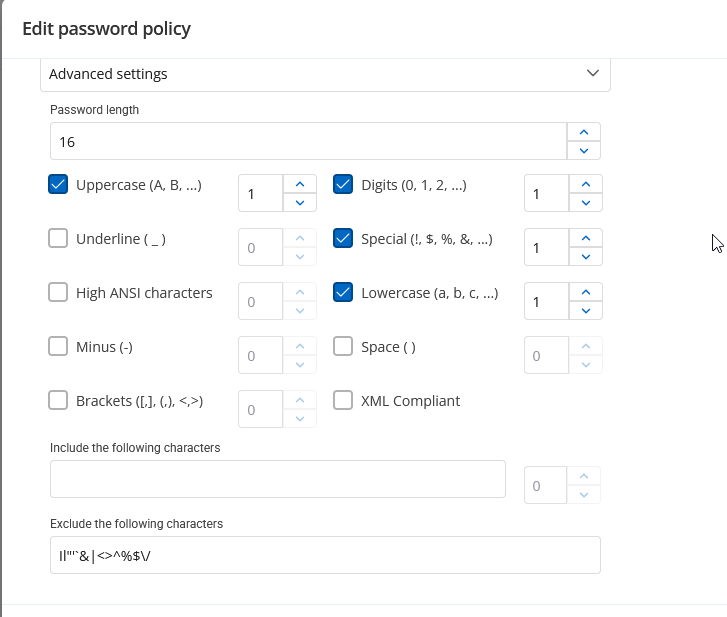
PAM password rotation ignoring password policy
This is a new setup. I'm waiting to hear back from support. I'm on the latest version.
All I'm trying to do is rotate the password on a single local windows account. I have tried with the default provider for this as well as the custom template from github and get the same result with both. When it tries to rotate the password it throws an error that appears to come from the target server stating that the password does not meet the length or complexity requirements on the server, which are just 12 character minimum and basic windows complexity requirements. I also see the error in event viewer on the target server where the password change failed.
In dvls server I've only got a single password policy and I've set it as the default, forced the default, set it on the provider and the vault. I also tested manually resetting the password outside of dvls with a powershell script using winrm, using similar password generation settings to the policy I was using in dvls and I was able to successfully change it. So winrm is working fine, and the permissions and all that are working.
As best I can tell dvls is ignoring the password policy I've set and is trying to rotate the password on this account to something either shorter than my 12 char minimum, or it's not honoring the char type minimums I've set. Or it's a bug. Has anyone else run into this? Have any recommendations on things to test or try?

LastPass authentication not working
DLL fixed it for me
LastPass authentication not working
Good job on identifying the issue quickly! We'll be keeping an eye out for that release.
LastPass authentication not working
Bump. We're experiencing this now too. I've opened a ticket, but wanted to post here too to see if ya'll have found anything yet.
problem closing 'external' connection/session on jump host
We're running into the same issue, trying to get our OT team using the tool. They have to use jump hosts a lot more than our IT team has been, so we haven't really had to deal with this up until now. I'm just wondering why hitting the "reconnect" button couldn't simply resend the command to start the application again.
Sorry, I know this is an old thread, but just wondering if there's been any more movement on addressing this issue.