
andrewbarr
Cant modify anything from the dekstop app.
Ok the update has worked and I am able to access the properties pages now :D
Now to look in to some of the other forum pages about not updating to 2024!!
Cant modify anything from the dekstop app.
I am having the same issues,
When I logged off of the data source (devolutions Hub peronsal) I noticed the following message
The Hub version (2024.1) and Remote Desktop Manager version (2023.3) are mismatched. We recommend updating Remote Desktop Manager. Otherwise, your datasource will remain in read-only mode. But when I log back in that message disappears, so not too sure if that is related. Checked for updates and I get the following, I will update and see if it all works again

Locked out of RDM
Straight in, no more error messages and all entries are there.
Thanks again to the Devolution team, great work.
Andy
Locked out of RDM
@all
v2023.3.22 is now available
https://devolutions.net/remote-desktop-manager/home/download/
Best regards,
Whoop! Installing as I type this!! Will update in a few minutes
Locked out of RDM
Great to hear a fix is in the pipeline, and now I have gone from spamming the close on the error to spamming the "Check for updates" button! :D
I would just like to say that this is how you work with your customers, even the free edition freeloaders like myself. I have had so many bad experiences of support forums where the actual company doesn't engage with the forum themselves directly and every time things go bad with the product the forums just end up a toxic mess. Well Done Devolution, this is how its done properly!!
Andy
Locked out of RDM
opps! Spoke to soon! I get errors when I moved from the Navigation window to Favourites.
Locked out of RDM
If I select no to the upgrade then swap over to the new data source on the top of the Navigation side bar, I dont get any errors when it loads up. If that helps in any way.
Locked out of RDM
Just restarted and I am still getting the 422 error :(
When I got in last time I set the system to allow me to choose the vault that I want to connect to (as I wasn't too sure if it was connecting to the old vault or not)
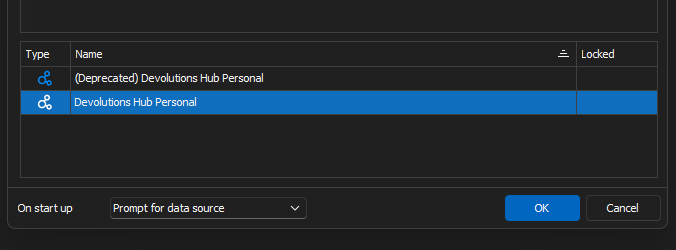
and I get the 422 error when I select the new data source, if I select the depreciated data source then I get the "Your Hub Personal is already migrated. This is a readonly mode for this datasource. Do you want to create the updated version" popup.
Locked out of RDM
Andrew - Please go to https://hub.devolutions.com and validate that the migration is completed. Do you see your entries there?
I can go to the above website and all looks good all the connections and entries are there, is there anything I need to do to validate or is it if I can log on and see stuff is validation enough?
Locked out of RDM
Closed app and went back in, error started popping up. I noticed the following window pop up just before the error kicks in
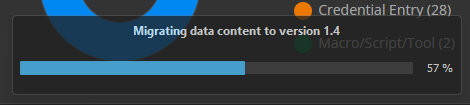
Each time I cancel the error message the version number creeps up to 1.11 before the error clears and I can access my vault.
@rob02 - yup I have no roll back options
Locked out of RDM
I have just managed to get past the Errror status popup. I dont know if something has changed server side or if me just spamming the close button has done something.
Just going to do some more testing.
Locked out of RDM
I am getting the same HTTP status code error (422). I have just updated to latest free version of RDM. I had to upgrade my Hub Personal and now cant get in to my vault.
Details seem the same as above.
at Devolutions.Hub.Clients.HubClient.<PutEntryAsync>d__71.MoveNext()
--- End of stack trace from previous location where exception was thrown ---
at System.Runtime.ExceptionServices.ExceptionDispatchInfo.Throw()
at System.Runtime.CompilerServices.TaskAwaiter.HandleNonSuccessAndDebuggerNotification(Task task)
at Devolutions.Hub.Clients.HubClient.<>c__DisplayClass70_0.<<PutEntry>b__0>d.MoveNext()
--- End of stack trace from previous location where exception was thrown ---
at System.Runtime.ExceptionServices.ExceptionDispatchInfo.Throw()
at System.Runtime.CompilerServices.TaskAwaiter.HandleNonSuccessAndDebuggerNotification(Task task)
at Devolutions.Hub.Clients.HubClient.PutEntry(Guid vaultId, Guid entryId, Entry entryToPut)
at Devolutions.RemoteDesktopManager.Managers.DevolutionsHubDataSourceManager.SaveConnectionAsEntry(Guid dataSourceID, Guid repositoryID, Connection toSave, Connection[] currentConnections)
at Devolutions.RemoteDesktopManager.Managers.DevolutionsHubDataSourceManager.SaveConnection(Guid dataSourceID, Guid repositoryID, Connection toSave)
at Devolutions.RemoteDesktopManager.Business.DataSources.HubConnectionDataSource.SaveConnection(Connection connection)
SCP doesn't seem to connect (external program does)
quick update...
So if I use the address bar at the top and enter /home or / I can browse the files and folders. But it only seems to be showing in the bottom window, I was expecting to see the folders in the top and files in the bottom. Is that not the norm?

SCP doesn't seem to connect (external program does)
I have been trying to get SCP sessions working via RDM, but the connection seems to hang with a "Loading......." under the / folder. Yet when I try to connect using the same credentials with winSCP it connects straight away. Is there any troubleshooting that I can do to work out why the connection is failing.
SSH connections work fine and I have even tried using linked session with the SSH connections.
Let me know if you need any screenshots/logfiles.

Andy
White screen on initial startup
Ok , reinstall fixed issue.
White screen on initial startup
Hi all,
I am hoping someone can help me. I have just rebuilt my laptop and have reinstalled RDM 2023.2.14.0, but when it starts up I get a white splash screen and it just hangs, I am unable to click on anything and have to shut the app down via the task manager.
I will try a reinstall, but if any one has any ideas that would be great.
OS: Win11 Enterprise

Upgrade RDM free and Yubikey no longer accepted (Invalid Yubikey code)
I have just manually upgraded RDM Free with 2022.3.29.0 (as check upgrade doesnt launch the setup after downloading) and Yubikey authentication was working before I upgraded, but after the upgrade I am no longer able to get in to the Database as I get a Invalid Yubikey code message. Is there a way of either rolling back or opening the software without the default database?

Changing a session type
Hi all,
Still a bit new to RDM, but I was wondering if it was possible to duplicate a session and then change the type. For example, I have a SSH session to a webserver, but I would also like to create a FTPS to the same server. So rather than create two sessions manually, I would like to create one, duplicate it and then change the session type so the host and the credentials stay the same.
Or is it possible to create a host entry and then have different types of sessions linked to that host.
Thanks
Andy