
MorrisonIT
After adding to Protected Users Group, can't RDP inside of RDM (I can using the Microsoft RDP client).
Nope I was on the same network. Tomorrow I'll just RDPing via RDM on another machine that is domain joined to see if I can replicate the issue.
After adding to Protected Users Group, can't RDP inside of RDM (I can using the Microsoft RDP client).
The Server Admin account is not a Domain Administrator. It is an account that is in a Security Group which adds it to the local administrator group on servers.
Using MSTC was working ,but when I tested it today it was giving the same error that RDM was giving.
The one thing I haven't tested is from a different computer. My laptop is Azure AD Joined and not Domain Joined. I've tried using both <DOMAIN>user and user@<domain>.com. These servers are domain joined to our local AD.
After adding to Protected Users Group, can't RDP inside of RDM (I can using the Microsoft RDP client).
Received the same error. Error code 0xc07.
After adding to Protected Users Group, can't RDP inside of RDM (I can using the Microsoft RDP client).
There is no option for External. Under Display it just has Screen sizing mode/Remote desktop size, and Zoom.
After adding to Protected Users Group, can't RDP inside of RDM (I can using the Microsoft RDP client).
RDM version: 2023.2.32.0 64-bit
Data Source: Local
This only started happening after adding the users to the Protected Users Group. If I use the Microsoft RDP client (not the one from the App Store) I can remote in with the account fine (even get the MFA trigger from Crowdstrike).
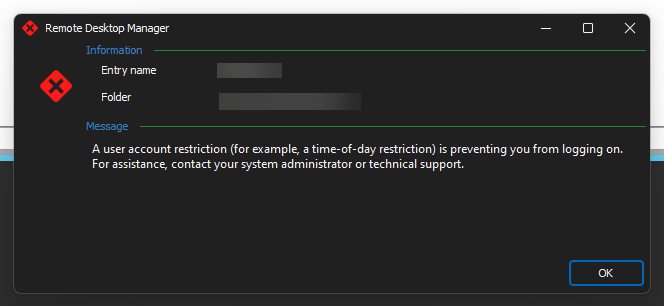
After adding to Protected Users Group, can't RDP inside of RDM (I can using the Microsoft RDP client).
I moved a Server Admin account into the Protected Users group. I instantly get hit with an error when trying to RDP using the FQDN (I tried just the server name and the FQDN).
I then open mstc and try to RDP and it works.
I saw a forum post a few months ago where someone had a similar issue and just changed it to connect via the FQDN. It's not working on my end.
On Application Lock, Devolutions Web Login extension should lock as well.
Just checking back in regard to my question. Thanks.
On Application Lock, Devolutions Web Login extension should lock as well.
I've already done a chat session about this and the person told me to open a Feature Request, because this is by design.
On Application Lock, Devolutions Web Login extension should lock as well.
I have my RDM set to lock itself if I minimize it, lock the computer, etc. The one thing I noticed is that DWL still works even if the application is locked.
Is it possible to have a setting so the DWL connection is disconnected until the application is unlocked?